# Yuxi-Know
**Repository Path**: 461827813/Yuxi-Know
## Basic Information
- **Project Name**: Yuxi-Know
- **Description**: No description available
- **Primary Language**: Unknown
- **License**: MIT
- **Default Branch**: main
- **Homepage**: None
- **GVP Project**: No
## Statistics
- **Stars**: 0
- **Forks**: 0
- **Created**: 2025-04-13
- **Last Updated**: 2025-04-13
## Categories & Tags
**Categories**: Uncategorized
**Tags**: None
## README
语析 - 基于大模型的知识库与知识图谱问答系统


## 📝 项目概述
语析是一个强大的问答平台,结合了大模型 RAG 知识库与知识图谱技术,基于 Llamaindex + VueJS + FastAPI + Neo4j 构建。
**核心特点:**
- 🤖 多模型支持:适配 OpenAI、各大国内主流大模型平台,以及本地 vllm、ollama 部署
- 📚 灵活知识库:支持 PDF、TXT、MD 等多种格式文档
- 🕸️ 知识图谱集成:基于 Neo4j 的知识图谱问答能力
- 🚀 简单配置:只需配置对应服务平台的 `API_KEY` 即可使用
- 🤖 智能体拓展:可以编写自己的智能体代码(Dev过程,非正式版)

## 📋 更新日志
- **2025.03.30** - 系统中集成智能体(WIP, [PR#96](https://github.com/xerrors/Yuxi-Know/pull/96))
- **2025.02.24** - 新增网页检索以及内容展示,需配置 `TAVILY_API_KEY`,感谢 [littlewwwhite](https://github.com/littlewwwhite)
- **2025.02.23** - SiliconFlow 的 Rerank 和 Embedding model 支持,现默认使用 SiliconFlow
- **2025.02.20** - DeepSeek-R1 支持,需配置 `DEEPSEEK_API_KEY` 或 `SILICONFLOW_API_KEY`
- **2024.10.12** - 后端修改为 [FastAPI](https://github.com/fastapi),添加 [Milvus-Standalone](https://github.com/milvus-io) 独立部署

| PC 网页 | 小屏设备 |
| :-------------------------------------------------------------------------------------- | :-------------------------------------------------------------------------------------- |
|  |  |
### 环境配置
在启动前,您需要提供 API 服务商的 API_KEY,并放置在 `src/.env` 文件中(此文件项目中没有,需要自行参考 [src/.env.template](src/.env.template) 创建)。更多可配置项,可参考 后面**对话模型**部分。
默认使用硅基流动的服务,因此**必须**配置:
```
SILICONFLOW_API_KEY=sk-270ea********8bfa97.e3XOMd****Q1Sk
OPENAI_API_KEY= # 如果需要配置 openai 则添加此行,并替换 API_KEY
DEEPSEEK_API_KEY= # 如果配置 DeepSeek 添加此行,并替换 API_KEY
ZHIPUAI_API_KEY= # 如果配置 智谱清言 添加此行,并替换 API_KEY
```
需要确保账户有一点点额度供调用,或使用这个链接注册[SiliconFlow 注册(含邀请码)](https://cloud.siliconflow.cn/i/Eo5yTHGJ)获得 14 元的赠送额度。
> 本项目的基础对话服务可在不含显卡的设备上运行,大模型使用在线服务商的接口。
### 启动服务
**开发环境启动**(源代码修改会自动更新):
```bash
docker compose -f docker/docker-compose.dev.yml --env-file src/.env up --build
```
> 添加 `-d` 参数可在后台运行
成功启动后,会看到以下容器:
```
[+] Running 7/7
✔ Network docker_app-network Created
✔ Container graph-dev Started
✔ Container milvus-etcd-dev Started
✔ Container milvus-minio-dev Started
✔ Container milvus-standalone-dev Started
✔ Container api-dev Started
✔ Container web-dev Started
```
访问 [http://localhost:5173/](http://localhost:5173/) 即可使用系统。
### 系统预览

问答支持 Deepseek-R1 等推理模型、知识图谱检索、知识库检索、网页检索

网页检索结果:

知识图谱检索结果:

知识库检索结果

知识库管理:


知识图谱

可视化配置:

丰富的模型支持:

### 服务管理
**关闭服务**:
```bash
docker compose -f docker/docker-compose.dev.yml --env-file src/.env down
```
**查看日志**:
```bash
docker logs <容器名称> # 例如:docker logs api-dev
```
## 💻 模型支持
### 1. 对话模型
本项目支持通过 API 调用的模型,本地模型需使用 vllm、ollama 转成 API 服务后使用。
| 模型供应商 | 默认模型 | 配置项目 |
| :--------------------- | :---------------------------------- | :--------------------------------------------- |
| `siliconflow` (默认) | `Qwen/Qwen2.5-7B-Instruct` (免费) | `SILICONFLOW_API_KEY` |
| `openai` | `gpt-4o` | `OPENAI_API_KEY` |
| `deepseek` | `deepseek-chat` | `DEEPSEEK_API_KEY` |
| `arc`(豆包方舟) | `doubao-1-5-pro-32k-250115` | `ARK_API_KEY` |
| `zhipu`(智谱清言) | `glm-4-flash` | `ZHIPUAI_API_KEY` |
| `dashscope`(阿里) | `qwen-max-latest` | `DASHSCOPE_API_KEY` |
#### 添加新模型供应商
如需添加供应商模型,了解 OpenAI 调用方法后,只需在 [src/static/models.yaml](src/static/models.yaml) 中添加对应配置:
```yaml
ark:
name: 豆包(Ark)
url: https://console.volcengine.com/ark/region:ark+cn-beijing/model # 模型列表
default: doubao-1-5-pro-32k-250115 # 默认模型
base_url: https://ark.cn-beijing.volces.com/api/v3
env: # 需要配置的环境变量,仅限API key
- ARK_API_KEY
models:
- doubao-1-5-pro-32k-250115
- doubao-1-5-lite-32k-250115
- deepseek-r1-250120
```
#### 本地模型部署
支持添加以 OpenAI 兼容模式运行的本地模型,可在 Web 设置中直接添加(适用于 vllm 和 Ollama 等)。
> [!注意]
> 使用 docker 运行此项目时,ollama 或 vllm 需监听 `0.0.0.0`

### 2. 向量模型与重排序模型
建议使用硅基流动部署的 bge-m3(免费且无需修改)。其他模型配置参考 [src/static/models.yaml](src/static/models.yaml)。
对于**向量模型**和**重排序模型**,选择 `local` 前缀的模型会自动下载。如遇下载问题,请参考 [HF-Mirror](https://hf-mirror.com/) 配置。
要使用已下载的本地模型,可在 models.yaml 或者网页设置中映射。

**添加向量模型**
```yaml
# src/static/models.yaml
# 添加本地向量模型(所有 FlagEmbedding 支持的模型)
local/BAAI/bge-m3:
name: BAAI/bge-m3
dimension: 1024
# local_path: /models/BAAI/bge-m3,也可以在这里配置
# 添加 OpenAI 兼容的向量模型
siliconflow/BAAI/bge-m3:
name: BAAI/bge-m3
dimension: 1024
url: https://api.siliconflow.cn/v1/embeddings
api_key: SILICONFLOW_API_KEY
# 添加 Ollama 模型
ollama/nomic-embed-text:
name: nomic-embed-text
dimension: 768
```
## 📚 知识库支持
本项目支持多种格式的知识库文件:
- PDF
- Txt
- Markdown
- Docx
文件上传后,系统会:
1. 将文件转换为纯文本
2. 使用向量模型将文本转换为向量
3. 存储到向量数据库中
> 此过程可能需要一定时间,请耐心等待。
## 🕸️ 知识图谱支持
本项目使用 Neo4j 作为知识图谱存储。您需要将图谱整理成 jsonl 格式,每行格式为:
```
{"h": "北京", "t": "中国", "r": "首都"}
```
然后在网页的图谱管理中添加此文件。
> [!说明]
> 现阶段项目使用的 OneKE 自动创建知识图谱效果不佳,已暂时移除,建议在项目外创建知识图谱
系统启动后会自动启动 neo4j 服务:
- 访问地址:[http://localhost:7474/](http://localhost:7474/)
- 默认账户:`neo4j`
- 默认密码:`0123456789`
可在 `docker/docker-compose.yml` 和 `docker/docker-compose.dev.yml` 中修改配置(注意同时修改 `api.environment` 和 `graph.environment`)。
目前项目暂不支持同时查询多个知识图谱。如已有基于 neo4j 的知识图谱,可删除 `docker-compose.yml` 中的 `graph` 配置项,并修改 `api.environment` 中的 `NEO4J_URI` 为您的 neo4j 服务地址。同时,需要确保节点的标签中包含 Entity 标签,才能正常触发索引。
## 贡献者名单
感谢以下贡献者的支持!
 ## ❓ 常见问题
### 镜像下载问题
如无法直接下载相关镜像,可参考 [DaoCloud/public-image-mirror](https://github.com/DaoCloud/public-image-mirror?tab=readme-ov-file#%E5%BF%AB%E9%80%9F%E5%BC%80%E5%A7%8B),尝试替换前缀:
```bash
# 以 neo4j 为例,其余类似
docker pull m.daocloud.io/docker.io/library/neo4j:latest
# 然后重命名镜像
docker tag m.daocloud.io/docker.io/library/neo4j:latest neo4j:latest
```
## Star History
[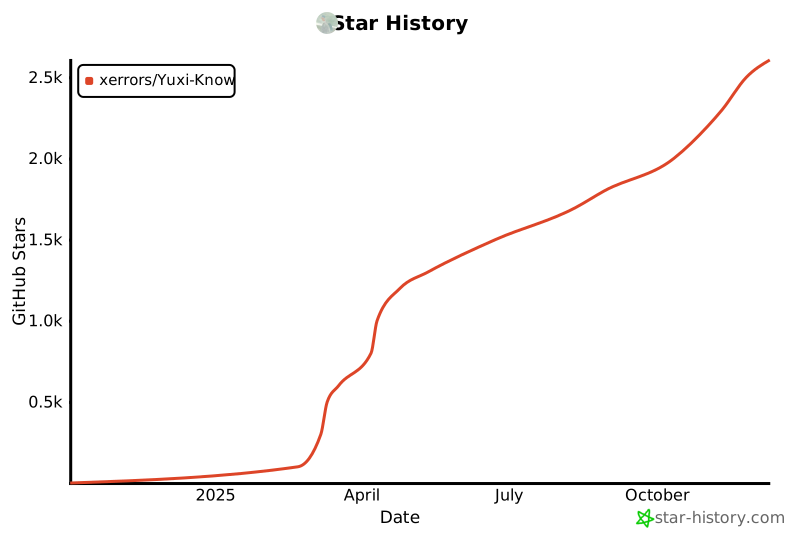](https://star-history.com/#xerrors/Yuxi-Know)
## ❓ 常见问题
### 镜像下载问题
如无法直接下载相关镜像,可参考 [DaoCloud/public-image-mirror](https://github.com/DaoCloud/public-image-mirror?tab=readme-ov-file#%E5%BF%AB%E9%80%9F%E5%BC%80%E5%A7%8B),尝试替换前缀:
```bash
# 以 neo4j 为例,其余类似
docker pull m.daocloud.io/docker.io/library/neo4j:latest
# 然后重命名镜像
docker tag m.daocloud.io/docker.io/library/neo4j:latest neo4j:latest
```
## Star History
[](https://star-history.com/#xerrors/Yuxi-Know)