# fbroadcast **Repository Path**: AIGAMESTUDIO.AILHC/fbroadcast ## Basic Information - **Project Name**: fbroadcast - **Description**: No description available - **Primary Language**: Unknown - **License**: Apache-2.0 - **Default Branch**: master - **Homepage**: None - **GVP Project**: No ## Statistics - **Stars**: 1 - **Forks**: 0 - **Created**: 2020-08-27 - **Last Updated**: 2024-06-01 ## Categories & Tags **Categories**: Uncategorized **Tags**: None ## README

fbroadcast

The complexity is simplified and easy to manage.

FBroadcast helps developer build an efficient broadcast system in the application and supports sticky broadcast.

Author:CoorChice(coorchice.cb@alibaba-inc.com)

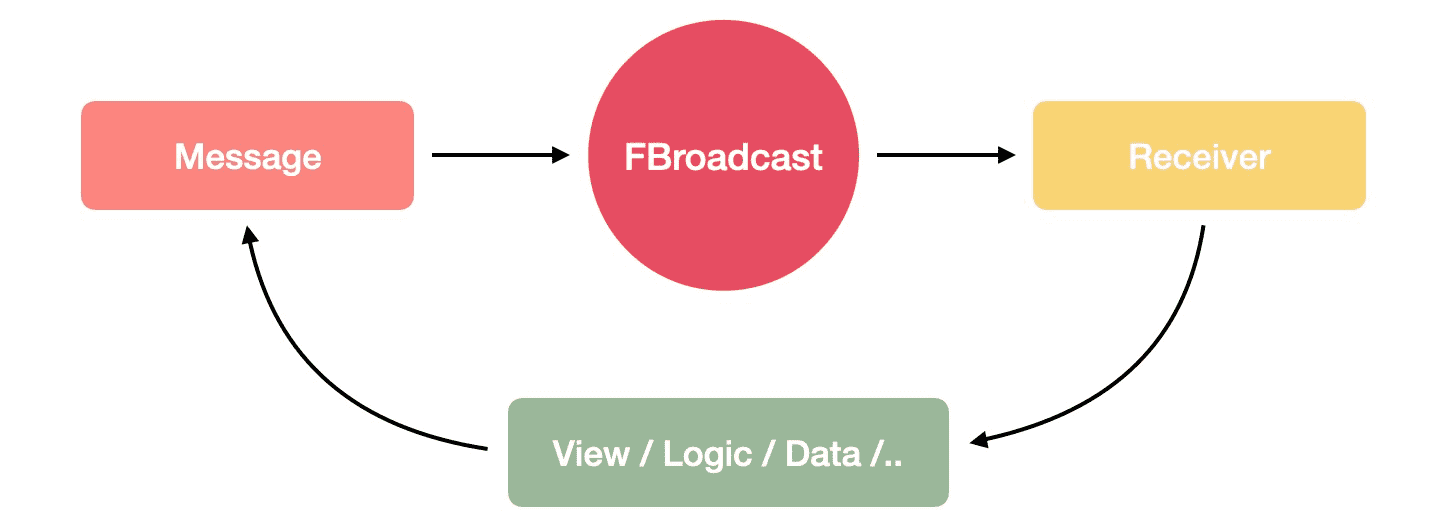
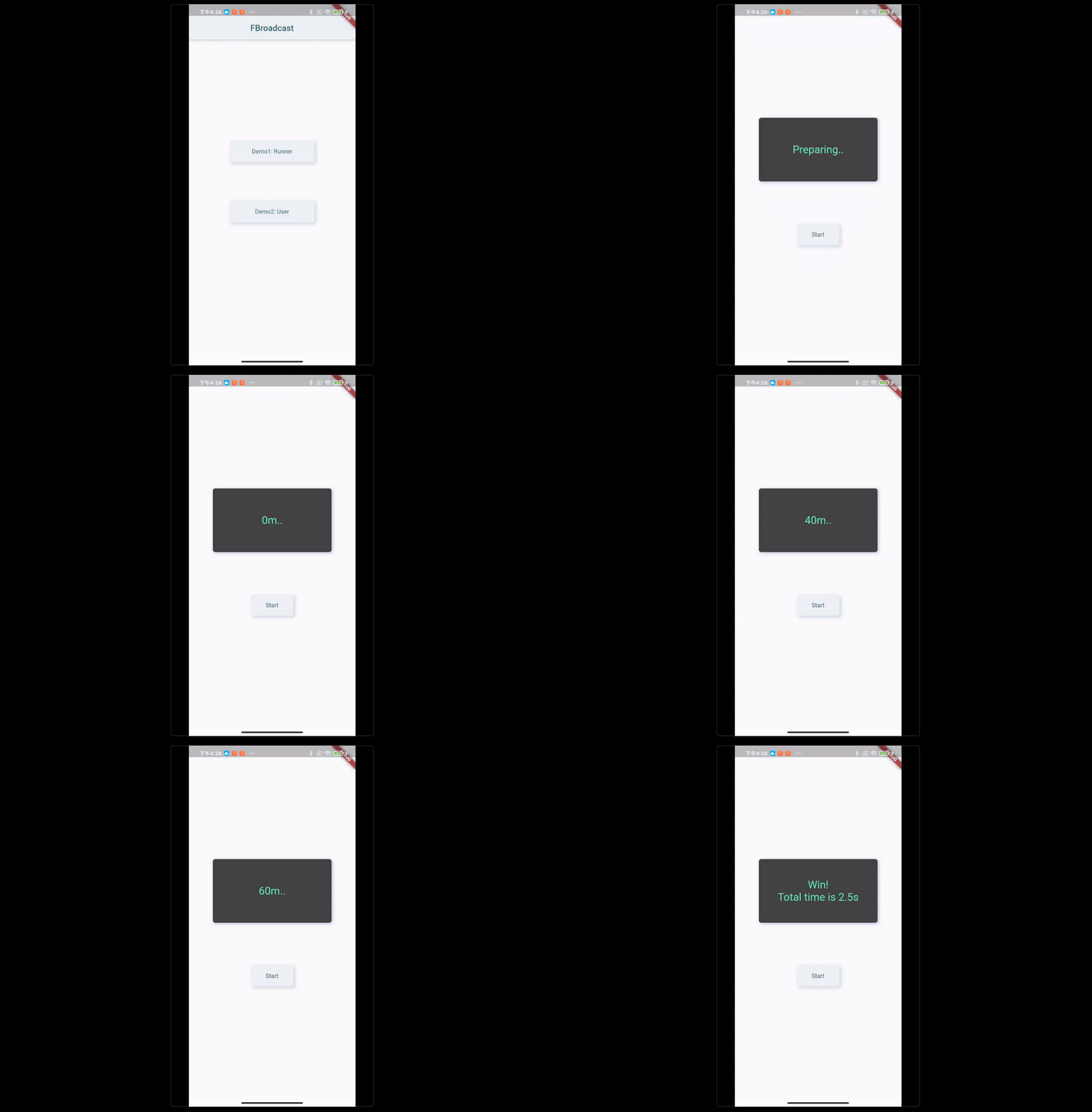
![](https://gw.alicdn.com/tfs/TB1IjopQUT1gK0jSZFrXXcNCXXa-1560-840.png) **English | [简体中文](https://github.com/Fliggy-Mobile/fbroadcast/blob/master/README_CN.md)** > Like it? Please cast your **Star** 🥰 ! # ✨ Features Let’s take a look at **FBroadcast** that provides developer with incredible capabilities: - Support **send** and **receive** specified types of messages - Message support to carry **any type** data packets - Provided **Context Bind**, one line of code can remove all receivers in the context - Incredible **Sticky Broadcast** - **Two-way communication** support - Easy to build simple and clear local and global state management # 🛠 Guide **FBroadcast** is an efficient and flexible **Broadcasting System** that can help developer **easy and orderly** build **associated interaction** and **state changes** with great complexity、beautiful application. ![](https://gw.alicdn.com/tfs/TB1xVcSe9R26e4jSZFEXXbwuXXa-1456-528.png) **FBroadcast** will bring those obvious changes to building complex and beautiful application? - **Complete decoupling between Widget/Module** Through the **FBroadcast** efficient broadcast system, developer can easily complete the decoupling of **Widget/Module**. When building an application, it is often necessary to change the state or data between **Widget/Modules A, B, C, ..** according to interactive operations. Developer have to make each **Widget/Module depend on each other for this purpose**, or create a **Unified State Manager** for them, which can solve the problem, but it makes the build cumbersome and also makes the change difficult. **FBroadcast** has established a **simple, effective, and clear** broadcasting system, so that changes at any time/location in any **Widget/Module** can be actively broadcast, and it needs to be broadcast based on these. The **Widget/Module** that changes **response or updates the view** only needs to register the corresponding **information receiver**, and it can receive the message and respond when the change occurs. This makes the associated modules no longer need to depend on each other, or design and establish a unified state manager for them. **Very simple, lightweight, and easy to change**. When a **Widget/Module** no longer needs to be updated according to the changes of another **Widget/Module**, just remove the **receiver** in it, instead of making major changes **Dependency** or **State Manager**. - **Simple, flexible, clear and easy to manage** **FBroadcast** provides developer with the ability to send broadcasts and register/remove receivers at any time, without restriction and flexibility. The broadcast and the receiver confirm each other's identities through a clear type (string), and the specified type of broadcast can only be received by the specified type of receiver. **FBroadcast** provides environment registration support. Developer can remove all types of receivers in the environment at one time through the [unregister()] function when the environment is deconstructed, without having to remember and care about which receivers need to be removed. . For example, the developer can remove all receivers registered in the **Widget** in the `dispose()` of **Widget**. With the capabilities of modern IDEA, developer can create a unified broadcast type index table (or multiple) for the broadcast system. Through the reference index of IDEA, developer can easily , It can be seen at a glance that this type of broadcast has been sent in those places, and the receivers are registered in those places, which is very easy to manage and maintain. The use of character strings as type identifiers allows developer to describe the meaning of different types of broadcasts clearly enough. - **Sticky Broadcast Support** **FBroadcast** provides support for sending **sticky broadcast**. In the case that no receiver has been registered, the developer can send a **sticky broadcast** in advance when the event occurs. **Sticky Broadcast** will be temporarily stuck in the broadcast system, and when a receiver is registered, it will broadcast immediately. This helps developer to adopt clearer and more effective thinking when doing logic design. For example, when the switch button in a control module is turned on, and the module controlled by the switch has not been built yet, you can send a **sticky broadcast** first, and after the module is built and the receiver is registered, It will immediately receive the **sticky broadcast** and enter the open state (this is essentially different from the idea of ​​mutual dependence, defining unified state management or parameter transfer, and then checking the switch state). ## 📡 Base Broadcast Register through **FBroadcast**, sending broadcast is very easy. ```dart /// register FBroadcast.instance().register(Key_Message, (value, callback) { /// do something }); /// send message FBroadcast.instance().broadcast(Key_Message); ``` **FBroadcast** allows developer to include data when sending messages. ```dart /// register FBroadcast.instance().register(Key_Message, (value, callback) { /// get data var data = value; }); /// send message and data FBroadcast.instance().broadcast( /// message type Key_Message, /// data value: data, ); ``` Developer can choose to persist specific types of messages, so that they can easily implement broadcast-style global state management. ```dart FBroadcast.instance().broadcast( /// message type Key_Message, /// data value: data, /// Persist the message types persistence: true, ); ``` After the developer persists a message type, he can use `FBroadcast.value(String key)` to get the latest data of the message type in the broadcast system at any location. The update of the data in the broadcast system only needs to be done through `broadcast()`. > ⚠️Note that once a message type is persisted, it can only be removed from the broadcast system through `FBroadcast.instance().clear(String key)`. ## 🧲 Sticky Broadcast **FBroadcast** allows developer to send **Sticky Broadcasts**. ```dart FBroadcast.instance().stickyBroadcast( /// message type Key_Message, /// data value: data, ); ``` When there is no corresponding type of receiver in the broadcast system, **sticky broadcast** will temporarily stay in the system until a receiver of this type is registered, and the broadcast will be sent out immediately (when there is a corresponding type in the broadcast system The receiver has the same performance as ordinary broadcast). ## ⛓ Two-way communication **FBroadcast** supports receiving messages returned by **receiver** at the broadcast sending point. ```dart /// send message FBroadcast.instance().broadcast( /// message type Key_Message, /// data value: data, /// The message returned by the receiver callback: (value){ // do something } ); /// register FBroadcast.instance().register(Key_Message, (value, callback) { /// get data var data = value; /// do something var result = logic(); /// return message callback(result); }); ``` Through **FBroadcast**, two-way communication can be realized very easily. ## 🌏 Bind Context **FBroadcast** supports passing in an **environment object (can be of any type)** when registering the receiver, which will register the receiver in the environment. When the environment is deconstructed, developer can easily move it all at once. Except for all receivers registered in the environment. ```dart /// register FBroadcast.instance().register( /// Message type Key_Message1, /// Receiver (value, callback) { /// do something }, /// more receiver more: { /// Message type: Receiver Key_Message2: (value, callback) { /// do something }, Key_Message3: (value, callback) { /// do something }, Key_Message4: (value, callback) { /// do something }, }, /// context context: this, ); /// Remove all receivers from the environment FBroadcast.instance().unregister(this); ``` ## 👀 Example ### 💫 Messaging **Scene**: Click **Start**, the Runner starts Run, and the display needs to update the status of the athlete in real time. ![](https://gw.alicdn.com/tfs/TB1ZgoHg_M11u4jSZPxXXahcXXa-1280-869.gif) #### 🏃 1. Create Runner: ```dart /// Runner class Runner { Runner() { /// register FBroadcast.instance().register(Key_RunnerState, (value, callback) { if (value is String && value.contains("Run")) { /// receive start run message FBroadcast.instance().broadcast(Key_RunnerState, value: "0m.."); run(20); } }); } run(double distance) { /// send running message Timer(Duration(milliseconds: 500), () { FBroadcast.instance().broadcast(Key_RunnerState, value: "${distance.toInt()}m.."); var newDistance = distance + 20; if (newDistance > 100) { FBroadcast.instance().broadcast(Key_RunnerState, value: "Win!\nTotal time is 2.5s"); } else { run(newDistance); } }); } } ``` #### 🍭 2. Create UI: ```dart Column( mainAxisAlignment: MainAxisAlignment.center, children: [ Stateful( /// init initState: (setState, data) { FBroadcast.instance().register( Key_RunnerState, (value, callback) { /// refresh ui setState(() {}); }, /// bind context context: data, ); }, builder: (context, setState, data) { return FSuper( ... /// get running message text: FBroadcast.value(Key_RunnerState) ?? "Preparing..", ); }, ), const SizedBox(height: 100), FButton( text: "Start" ... onPressed: () { /// send start run message FBroadcast.instance().broadcast(Key_RunnerState, value: "Running..."); }, ), ], ) ``` In the above example, the communication between the Runner and the UI is realized simply and clearly through **FBroadcast**. > 1. Click the Start button and send the start message to the Runner through **FBroadcast**; > 2. After the Runner receives the message, it starts to run and continuously sends out Running info through **FBroadcast**; > 3. Since the UI is registered with the receiver, when it receives Running info, it gets the message data through `FBroadcast.value()` and automatically updates the view. Throughout the process, the Runner and the UI are **completely decoupled**, and the UI only needs to **register the receiver** in `init` (call `setState((){})` in the receiver), The view can be automatically updated in real time according to the changes in the message data, without the developer needing to care about the entire process. ### ⛓ Two-way communication > **Scene**: Click the button to request positioning, receive the result after positioning is successful, and refresh the positioning point ![](https://gw.alicdn.com/tfs/TB18D6vQ.Y1gK0jSZFMXXaWcVXa-1280-951.gif) #### 📝 1. Global Positioning Service Provider ```dart class LocationServer { LocationServer() { init(); } init() { /// register Key_Location receiver FBroadcast.instance().register(Key_Location, (value, callback) async { var loc = await location(); /// return message callback(loc); }); } /// Analog positioning Future> location() async { await Future.delayed(Duration(milliseconds: 2000)); return [Random().nextDouble() * 280, Random().nextDouble() * 150]; } } ``` #### 📝 2. Click to send location request and receive return message ```dart FButton( ... text: "Location", onPressed: () { FLoading.show(context, color: Colors.black26, loading: buildLoading()); /// request location FBroadcast.instance().broadcast(Key_Location, callback: (location) { /// The message returned by the receiver setState(() { FLoading.hide(); this.location = location; }); }); }, ) ``` **FBroadcast** can further simplify scenarios that require two-way communication. Developers can see that in this example, through **FBroadcast**, the two-way communication scenario of location request can be easily realized, and the **location service provider** and **UI** can be completely realized. Decoupling. The **UI interaction point** only needs to send a broadcast of the positioning request, and any **location service provider** registered for the broadcast can receive the request for processing, and then return the result to the **UI interaction point**. In other words, as the project evolves, developers can provide new **location service providers** at any time without having to care about any **UI** changes. ### 📱 Local state management > **Scene**: Click to change the UI color ![](https://gw.alicdn.com/tfs/TB1jDjHQUY1gK0jSZFCXXcwqXXa-1280-869.gif) #### 📝 1. Click to emit event ```dart FButton( text: "Change Color", ... onPressed: () { /// send change color message FBroadcast.instance().broadcast(Key_Color, value: reduceColor()); }, ) ``` #### 📝 2. UI register receiver ```dart Stateful( /// init initState: (setState, data) { /// register FBroadcast.instance().register( Key_Color, (value, callback) { /// refresh ui setState(() { }); }, /// bind context context: data, ); }, builder: (context, setState, data) { return FSuper( ... /// get color value backgroundColor: FBroadcast.value(Key_Color) ?? mainBackgroundColor, ); }, ) ``` Through **FBroadcast**, partial status updates between UI interactions can be easily completed. The above example shows the color change. The data object has only one parameter. In the actual development process, the developer can enrich the communication data object as needed. Developer only need to **register the receiver** in the Widget that needs to update the UI, call `setState((){})` once to send a message at the interaction point. Instead of actively writing the trigger logic and `setState((){})` at all interaction points. ### 💻 Global state management > **Scene**: Click on the avatar to jump to the login page. When the account password is not null, the login button can be clicked. Click the login button to send a login request. After the login is successful, return to the previous page and refresh the user information. ![](https://gw.alicdn.com/tfs/TB1kOvGQKH2gK0jSZJnXXaT1FXa-1280-869.gif) #### 📝 1. User Information Widget registration receiver ```dart class Avatar extends StatefulWidget { @override _AvatarState createState() => _AvatarState(); } class _AvatarState extends State { User user; int msgCount = 0; @override void initState() { super.initState(); FBroadcast.instance().register( Key_MsgCount, /// register Key_MsgCount reviver (value, callback) => setState(() { msgCount = value; }), more: { /// register Key_User reviver Key_User: (value, callback) => setState(() { /// get value user = value; }), }, /// bind context context: this, ); } @override Widget build(BuildContext context) { return FSuper( ... backgroundImage: (user == null || _textIsEmpty(user.avatar)) ? null : AssetImage(user.avatar), redPoint: user != null && msgCount > 0, redPointText: msgCount.toString(), text: user != null ? null : "Click Login", onClick: user != null ? null : () => Navigator.push(context, MaterialPageRoute( builder: (context) => LoginPage())), ); } @override void dispose() { super.dispose(); /// remove all receivers from the environment FBroadcast.instance().unregister(this); } } ``` Register the `Key_User` receiver in the login page. When the login message is received, the data in it will be retrieved and the UI will be refreshed. #### 📝 2. Build a data model ```dart class User{ String name; String avatar; int messageCount = 0; String info; } ``` #### 📝 3. Build logical processing objects ```dart class LoginHandler { String _userName; String _password; /// set user name, check to see if login is allowed set userName(String v) { _userName = v; if (_textNoEmpty(_userName) && _textNoEmpty(_password)) { FBroadcast.instance().broadcast(Key_Login, value: true); } else { FBroadcast.instance().broadcast(Key_Login, value: false); } } /// set user password, check to see if login is allowed set password(String v) { _password = v; if (_textNoEmpty(_userName) && _textNoEmpty(_password)) { FBroadcast.instance().broadcast(Key_Login, value: true); } else { FBroadcast.instance().broadcast(Key_Login, value: false); } } /// login void login() { Timer(Duration(milliseconds: 1500), () { /// login success,send login success message —— Key_User FBroadcast.instance().broadcast( Key_User, value: User() ..avatar = "assets/logo.png" ..name = _userName ..info = "Seriously provide exquisite widget to help you build exquisite application.", /// Persistence Key_User persistence: true, ); }); } } ``` The logical processing is transferred to **LoginHandler** for isolation, and all processing results are broadcasted through **FBroadcast**, so that the corresponding receivers registered in the broadcasting system can respond. #### 📝 4. Login page ```dart class LoginPage extends StatefulWidget { @override _LoginPageState createState() => _LoginPageState(); } class _LoginPageState extends State { /// Logic handler LoginHandler handler = LoginHandler(); /// input controller FSearchController _controller1 = FSearchController(); FSearchController _controller2 = FSearchController(); @override void initState() { super.initState(); _controller1.setListener(() { /// update userName handler.userName = _controller1.text; }); _controller2.setListener(() { /// update password handler.password = _controller2.text; }); } @override Widget build(BuildContext context) { return { ... /// userName input FSearch( controller: _controller1, ... ), ... /// userName input FSearch( controller: _controller2, ... ), ... Stateful( initState: (setState, data) { /// register login receiver FBroadcast.instance().register( Key_Login, /// refresh ui (value, callback) => setState(() {}), more: { /// register user receiver Key_User: (value, callback) { FLoading.hide(); Navigator.pop(context); }, }, /// bind context context: data, ); }, builder: (context, setState, data) { return FButton( ... text: "LOGIN", /// Key_Login value=true is allowed to click login onPressed: !(FBroadcast.value(Key_Login) ?? false) ? null : () { _controller1.clearFocus(); _controller2.clearFocus(); FLoading.show(context); /// Execute login logic handler.login(); }, ); },), ... }; } } ``` When registering the receiver, you only need to call `setState((){})` in the receive callback, and all subsequent data changes are refreshed, and the developer can no longer pay attention. The UI assignment can be conveniently done by obtaining the corresponding data through **FBroadcast.value()**. > ⚠️Note that for the state/data models that need to be used globally, and their corresponding broadcast types, when sending, **need to set persistence** to **true** at least once. In the above example, just after the login is successful, the broadcast of the `Key_User` type is persisted. ```dart /// login success,send login success message —— Key_User FBroadcast.instance().broadcast( Key_User, value: User() ..avatar = "assets/logo.png" ..name = _userName ..info = "Seriously provide exquisite widget to help you build exquisite application.", /// Persistence Key_User persistence: true, ); ``` The above example shows that through **FBroadcast**, **message transfer** can be easily and quickly realized, **local and global state management and refresh**, and **each module, logic and UI** are well integrated decoupling. **FBroadcast** provides a simple, easy-to-understand, and very flexible broadcasting system. With few constraints, developer can quickly get started, easily implement complex logic simplification, and help developer build **easy to maintain, complex, Beautiful** application. **FBroadcast** In the process of using, with a unified **broadcast type registration form** (multiple sheets can also be divided into modules), developer can easily use **IDEA**'s citation retrieval capabilities to view at any time All broadcast conditions are very useful for maintenance in the continuous iteration process. ![](https://gw.alicdn.com/tfs/TB1eg6tdQcx_u4jSZFlXXXnUFXa-1280-442.gif) ## 📖 Api ### 📌 Register receiver ```dart /// Register recipients of the specified type. /// If the [context] environment is passed in, the recipient will be registered in the environment. The environment can be any type of object, for example: page, class... /// The receiver can get the data carried in this message through [value]. /// When [unregister] is called, the receiver will be cleared. /// [key]-message type /// [receiver] - receiver /// [context] - context. Not null, [receiver] will be registered in the environment. /// [more] - Make it easy to register multiple recipients at once FBroadcast register(String key, ResultCallback receiver, {Object context, Map more}) ``` ### 📌 Send Broadcast #### 📡 Base Broadcast ```dart /// Broadcast a message of type [key]. /// Recipients already registered in the system will receive this message. /// The receiver can get the data carried in this message through [value]. /// [key] - Message type /// [value] - The data carried in the message. Can be any type or null. /// [callback] - Able to receive the message returned by the receiver /// [persistence] - Whether or not to persist message types. Persistent messages can be retrieved at any time by [FBroadcast. Value] for the current message packet. By default, unpersisted message types are removed without a receiver, while persisted message types are not. Developer can use the [clear] function to remove persistent message types. void broadcast(String key, {dynamic value, ValueCallback callback, bool persistence}) ``` #### 🧲 Send Sticky Broadcast ```dart /// Broadcast a sticky message of type [key]. /// If there are unregistered receivers of this type in the broadcast system, this message will be stuck in the system. Once a recipient of this type is registered, this message will be sent to the recipient immediately. /// If this type of receiver is already registered in the system, this message will be sent to the receiver immediately. /// The receiver can get the data carried in this message through [value]. /// /// [key] - Message type /// [value] - The data carried in the message. Can be any type or null. /// [callback] - Able to receive the message returned by the receiver /// [persistence] - Whether or not to persist message types. Persistent messages can be retrieved at any time by [FBroadcast. Value] for the current message packet. By default, unpersisted message types are removed without a receiver, while persisted message types are not. Developer can use the [clear] function to remove persistent message types. void stickyBroadcast(String key, {dynamic value, ValueCallback callback, bool persistence}) ``` ### 📌 Get the data packet of the specified message ```dart /// This function allows the receiver to get the data in the message static T value(String key) ``` ### 📌 Remove specified receiver ```dart /// Remove the specified receiver [receiver]. /// If [key] and [context] are specified, it will help to remove the specified recipient faster. /// [receiver] - receiver /// [key]-message type /// [context] - context. FBroadcast remove(ResultCallback receiver, {String key, Object context}) ``` ### 📌 Remove the specified type of message ```dart /// Remove all receivers of the specified [key] type in the broadcast system and sticky broadcasts of that type. /// [key] - type void clear(String key) ``` ### 📌 Remove all receiver in the context ```dart /// Remove all receivers registered in the [context] environment from the broadcast system. /// For example, when the page is closed, the developer can use [unregister] to remove all recipients registered in the environment at once. /// Of course, the prerequisite is that when the receiver registers through [register], pass in [context] to register the receiver to the environment. /// [context] - context. void unregister(Object context) ``` ### 📌 Release Broadcast ```dart /// Remove all receivers in the broadcasting system, and sticky broadcasting. void dispose() ``` # 😃 How to use? Add dependencies in the project `pubspec.yaml` file: ## 🌐 pub dependency ``` dependencies: fbroadcast: ^ ``` > ⚠️ Attention,please go to [**pub**] (https://pub.dev/packages/fbroadcast) to get the latest version number of **FBroadcast** ## 🖥 Git dependency ``` dependencies: fbroadcast: git: url: 'git@github.com:Fliggy-Mobile/fbroadcast.git' ref: '' ``` > ⚠️ Attention,please refer to [**FBroadcast**] (https://github.com/Fliggy-Mobile/fbroadcast) official project for branch number or tag. # 💡 License ``` Copyright 2020-present Fliggy Android Team . Licensed under the Apache License, Version 2.0 (the "License"); you may not use this file except in compliance with the License. You may obtain a copy of the License at following link. http://www.apache.org/licenses/LICENSE-2.0 Unless required by applicable law or agreed to in writing, software distributed under the License is distributed on an "AS IS" BASIS, WITHOUT WARRANTIES OR CONDITIONS OF ANY KIND, either express or implied. See the License for the specific language governing permissions and limitations under the License. ``` ### Like it? Please cast your [**Star**](https://github.com/Fliggy-Mobile/fbroadcast) 🥰 ! --- # How to run Demo project? 1. **clone** project to local 2. Enter the project `example` directory and run the following command ``` flutter create . ``` 3. Run the demo in `example`