# ssm-template
**Repository Path**: AlanLee97/ssm-template
## Basic Information
- **Project Name**: ssm-template
- **Description**: SSM整合模板,我个人感觉整合SSM还是比较麻烦的,所以自己做个了整合好了的模板,下次创建SSM项目时可以直接使用该模板。
- **Primary Language**: Java
- **License**: Apache-2.0
- **Default Branch**: master
- **Homepage**: None
- **GVP Project**: No
## Statistics
- **Stars**: 3
- **Forks**: 0
- **Created**: 2020-04-13
- **Last Updated**: 2020-12-22
## Categories & Tags
**Categories**: Uncategorized
**Tags**: None
## README
# 整合SSM
> SSM整合模板,我个人感觉整合SSM还是比较麻烦的,所以自己做个了整合好了的模板,下次创建SSM项目时可以直接使用该模板。
## 整合Spring
### 添加Spring的依赖
在pom.xml文件中添加如下依赖
```xml
junit
junit
4.12
test
org.springframework
spring-context
5.1.5.RELEASE
```
### 添加Spring配置文件applicationContext.xml
在resources文件夹下添加applicationContext.xml
```xml
```
暂时不配置bean
### 修改web.xml,配置上下文参数,加载Spring配置文件
在web.xml文件下添加如下配置
```xml
contextConfigLocation
classpath:applicationContext.xml
index.jsp
```
## 整合Spring MVC
### 添加SpringMVC的依赖
在pom.xml文件中添加如下依赖
```xml
org.springframework
spring-webmvc
5.1.5.RELEASE
```
### 配置转发Servlet
在web.xml文件下添加如下配置
```xml
org.springframework.web.context.ContextLoaderListener
dispatcher
org.springframework.web.servlet.DispatcherServlet
dispatcher
/
```
在WEB-INF文件夹下创建dispatcher-servlet.xml,配置如下
```xml
```
> 如果需要在需要返回json数据,则需要配置消息转换器,采用如下配置
>
> ```xml
>
> xmlns:xsi="http://www.w3.org/2001/XMLSchema-instance" xmlns:mvc="http://www.springframework.org/schema/mvc"
> xmlns:context="http://www.springframework.org/schema/context"
> xsi:schemaLocation="http://www.springframework.org/schema/beans http://www.springframework.org/schema/beans/spring-beans.xsd http://www.springframework.org/schema/mvc http://www.springframework.org/schema/mvc/spring-mvc.xsd http://www.springframework.org/schema/context http://www.springframework.org/schema/context/spring-context.xsd">
>
>
>
>
>
>
>
>
>
>
>
>
>
>
>
>
>
>
> application/json; charset=UTF-8
>
>
>
>
>
>
>
>
>
>
>
>
>
>
>
>
> ```
> 同时还需要在pom.xml中加上jackson的依赖
>
> ```xml
>
>
> com.fasterxml.jackson.core
> jackson-core
> 2.9.9
>
>
> com.fasterxml.jackson.core
> jackson-annotations
> 2.9.9
>
>
> com.fasterxml.jackson.core
> jackson-databind
> 2.9.9
>
>
> ```
>
>
在WEB-INF文件夹下创建jsp的文件夹(用来存放jsp文件)
## 整合MyBatis
### 添加相关依赖
在pom.xml文件中添加如下依赖
```xml
org.mybatis
mybatis
3.4.6
org.mybatis
mybatis-spring
1.3.2
mysql
mysql-connector-java
5.1.47
com.alibaba
druid
1.1.21
org.springframework
spring-tx
5.1.5.RELEASE
org.springframework
spring-jdbc
5.1.5.RELEASE
log4j
log4j
1.2.17
```
### 添加MyBatis配置文件mybatis-config.xml
在resources文件夹下创建mybatis-config.xml,配置如下
```xml
```
### 添加log4f配置文件log4j.properties
在resources文件夹下创建log4j.properties,内容如下
```properties
log4j.rootLogger=INFO,DEBUG,CONSOLE,file
log4j.logger.com.jingze=debug
log4j.logger.com.ibatis=info
log4j.logger.com.ibatis.common.jdbc.SimpleDataSource=info
log4j.logger.com.ibatis.common.jdbc.ScriptRunner=info
log4j.logger.com.ibatis.sqlmap.engine.impl.SqlMapClientDelegate=info
log4j.logger.java.sql.Connection=info
log4j.logger.java.sql.Statement=info
log4j.logger.java.sql.PreparedStatement=info
log4j.logger.java.sql.ResultSet=info
log4j.appender.CONSOLE=org.apache.log4j.ConsoleAppender
log4j.appender.Threshold=error
log4j.appender.CONSOLE.Target=System.out
log4j.appender.CONSOLE.layout=org.apache.log4j.PatternLayout
log4j.appender.CONSOLE.layout.ConversionPattern= %-d{yyyy-MM-dd HH:mm:ss} [%5p]-[%.10t]-[%.20C] - %m%n
```
### 添加jdbc配置文件jdbc.properties
在resources文件夹下创建jdbc.properties,内容如下
```properties
jdbc.user=root
jdbc.password=123456
jdbc.driver=com.mysql.jdbc.Driver
jdbc.url=jdbc:mysql://localhost:3306/ssm_template?useUnicode=true&characterEncoding=utf-8
```
### 将MyBatis集成到Spring中
在applicationContext.xml中的beans节点下添加如下配置
```xml
```
### 添加XxxMapper.java文件
在src源码目录中添加UserMapper.java
```java
package top.alanlee.pam.mapper;
import org.apache.ibatis.annotations.Mapper;
import org.springframework.stereotype.Repository;
import top.alanlee.pam.entity.User;
import java.util.List;
@Mapper
@Repository
public interface UserMapper {
List getAllUsers();
}
```
### 添加XxxMapper.xml文件
在resource目录中创建mapper文件夹,在mapper文件夹中添加UserMapper.xml,内容如下
```xml
```
## 完整的配置文件
### pom.xml
```xml
4.0.0
pam.alanlee.top
ssm-personal-account-management
1.0-SNAPSHOT
war
ssm-personal-account-management
UTF-8
1.8
1.8
junit
junit
4.12
test
org.springframework
spring-context
5.1.5.RELEASE
org.springframework
spring-tx
5.1.5.RELEASE
org.springframework
spring-jdbc
5.1.5.RELEASE
org.springframework
spring-webmvc
5.1.5.RELEASE
org.mybatis
mybatis
3.4.6
org.mybatis
mybatis-spring
1.3.2
log4j
log4j
1.2.17
mysql
mysql-connector-java
5.1.47
com.alibaba
druid
1.1.21
com.alibaba
fastjson
1.2.62
com.fasterxml.jackson.core
jackson-core
2.9.9
com.fasterxml.jackson.core
jackson-annotations
2.9.9
com.fasterxml.jackson.core
jackson-databind
2.9.9
ssm-personal-account-management
maven-clean-plugin
3.1.0
maven-resources-plugin
3.0.2
maven-compiler-plugin
3.8.0
maven-surefire-plugin
2.22.1
maven-war-plugin
3.2.2
maven-install-plugin
2.5.2
maven-deploy-plugin
2.8.2
src/main/java
**/*.xml
src/main/resources
```
### web.xml
```xml
contextConfigLocation
classpath:applicationContext.xml
org.springframework.web.context.ContextLoaderListener
dispatcher
org.springframework.web.servlet.DispatcherServlet
dispatcher
/
index.jsp
```
### applicationContext.xml
```xml
```
### mybatis-config.xml
```xml
```
### jdbc.properties
```properties
jdbc.user=root
jdbc.password=123456
jdbc.driver=com.mysql.jdbc.Driver
jdbc.url=jdbc:mysql://localhost:3306/ssm_template?useUnicode=true&characterEncoding=utf-8
```
### log4j.properties
```pro
log4j.rootLogger=INFO,DEBUG,CONSOLE,file
log4j.logger.com.jingze=debug
log4j.logger.com.ibatis=info
log4j.logger.com.ibatis.common.jdbc.SimpleDataSource=info
log4j.logger.com.ibatis.common.jdbc.ScriptRunner=info
log4j.logger.com.ibatis.sqlmap.engine.impl.SqlMapClientDelegate=info
log4j.logger.java.sql.Connection=info
log4j.logger.java.sql.Statement=info
log4j.logger.java.sql.PreparedStatement=info
log4j.logger.java.sql.ResultSet=info
log4j.appender.CONSOLE=org.apache.log4j.ConsoleAppender
log4j.appender.Threshold=error
log4j.appender.CONSOLE.Target=System.out
log4j.appender.CONSOLE.layout=org.apache.log4j.PatternLayout
log4j.appender.CONSOLE.layout.ConversionPattern= %-d{yyyy-MM-dd HH:mm:ss} [%5p]-[%.10t]-[%.20C] - %m%n
```
## 运行
### 导入sql
将resource/sql目录下的sql脚本ssm_template.sql导入自己的数据库
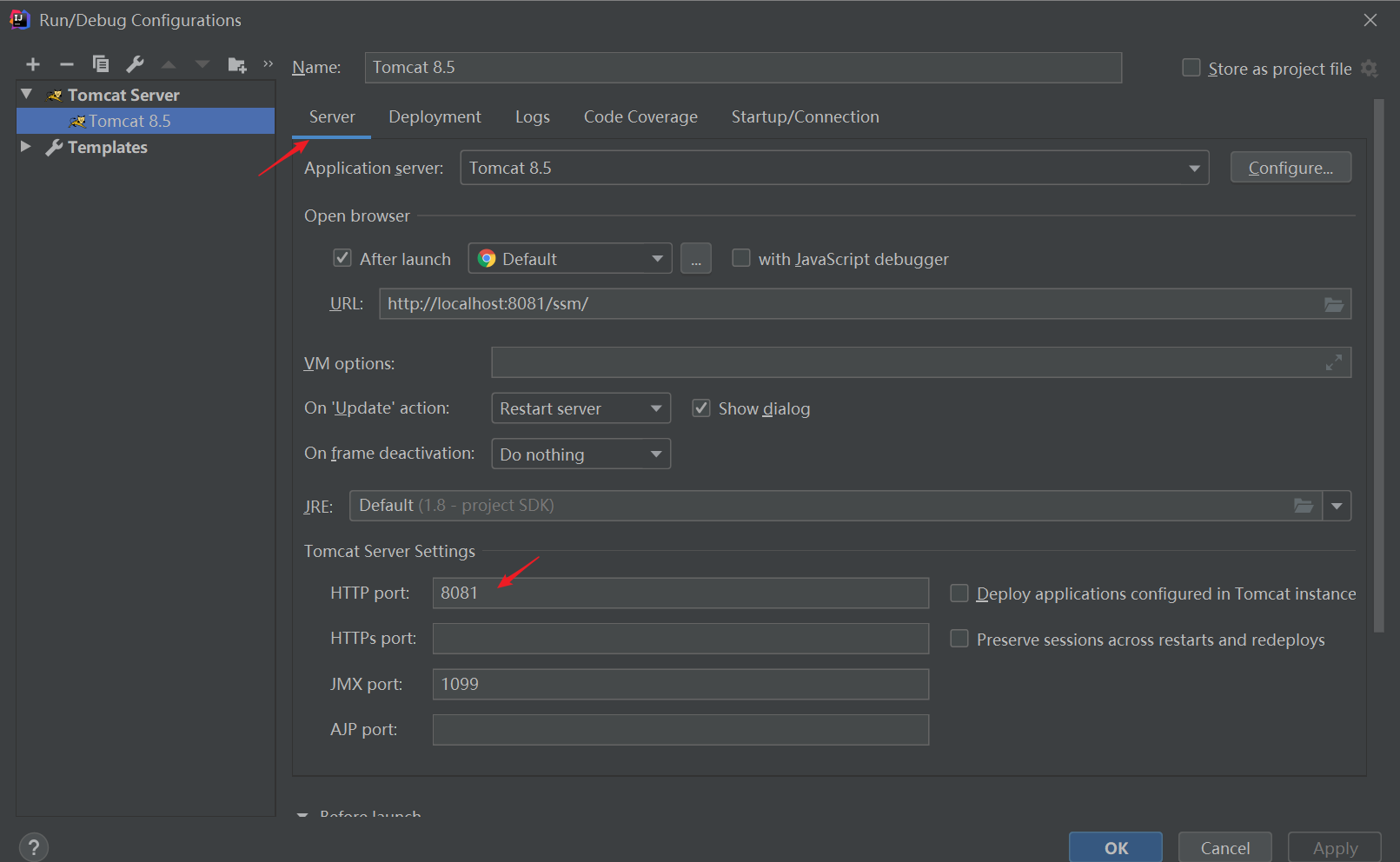
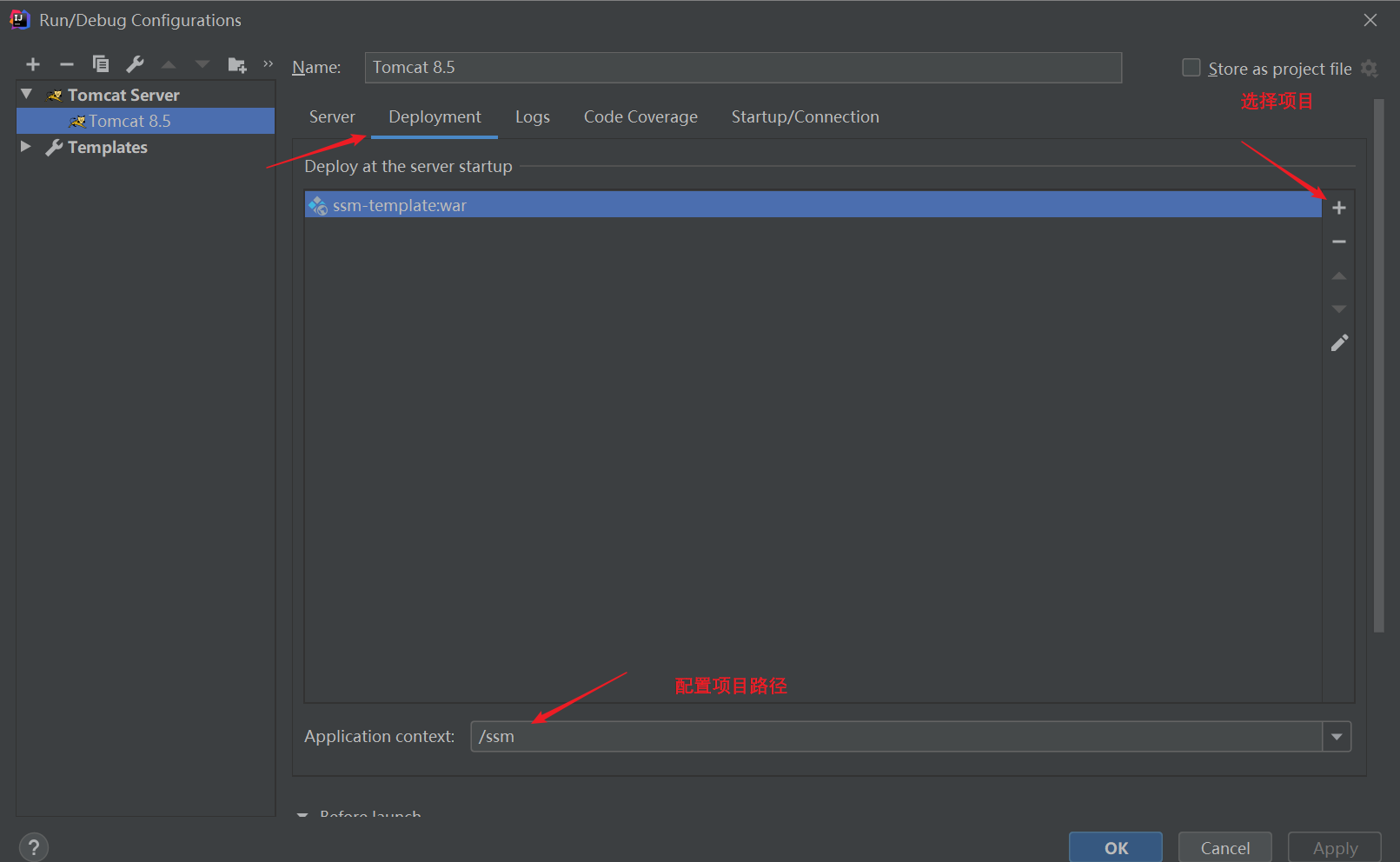
### IDEA配置启动参数
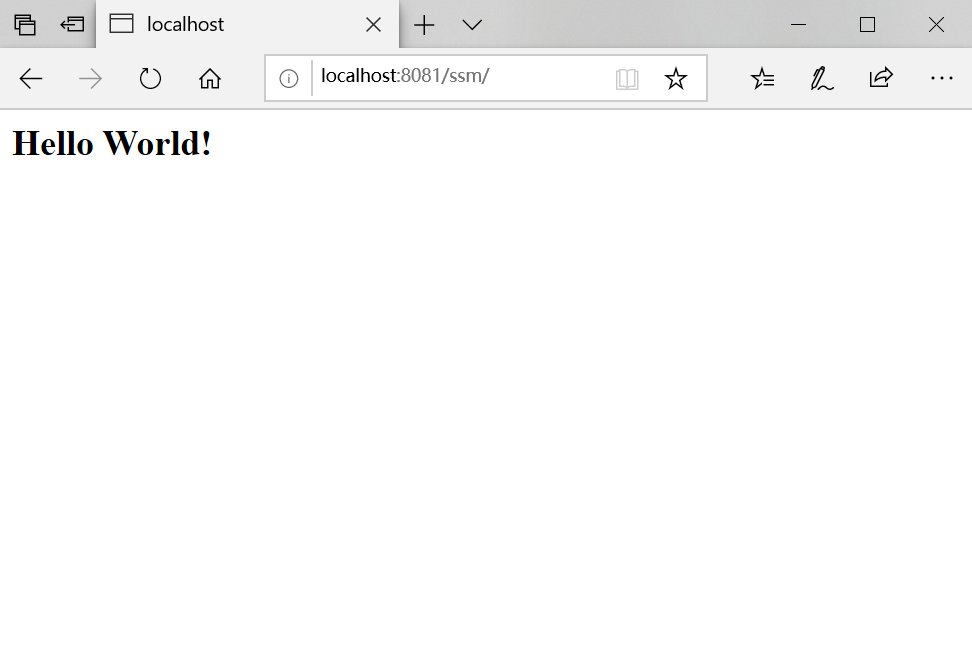
### 浏览器输入http://localhost:8081/ssm/
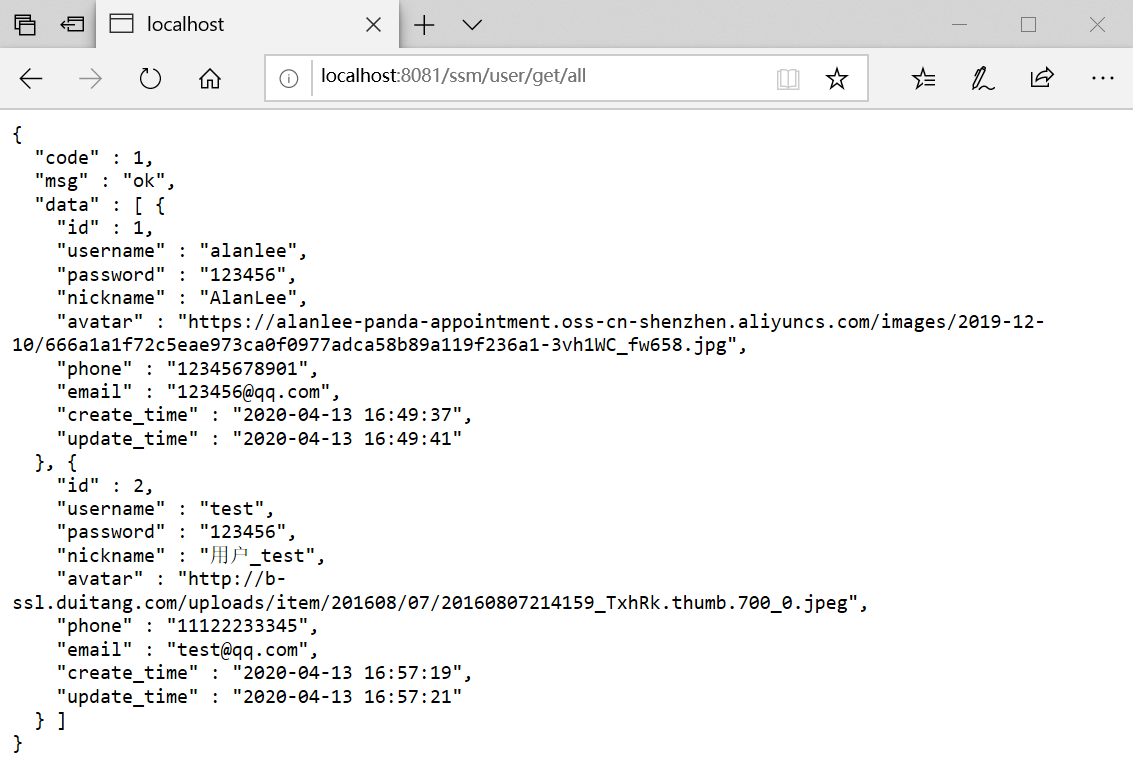
### 浏览器输入http://localhost:8081/ssm/user/get/all,输出json数据
## 仓库链接
GitHub: https://github.com/AlanLee97/ssm-template
码云:https://gitee.com/AlanLee97/ssm-template