# NovelVids
**Repository Path**: An-ning/novel-vids
## Basic Information
- **Project Name**: NovelVids
- **Description**: 基于第三方视频生成 API,将小说自动转换为风格一致的视频内容。
- **Primary Language**: Python
- **License**: Not specified
- **Default Branch**: main
- **Homepage**: None
- **GVP Project**: No
## Statistics
- **Stars**: 0
- **Forks**: 0
- **Created**: 2026-01-23
- **Last Updated**: 2026-10-23
## Categories & Tags
**Categories**: Uncategorized
**Tags**: None
## README
[中文](README.md) · **English** · [English dialogue and voices](docs/english-production.md)

NovelVids
An AI-powered production platform for turning novels into short dramas







Live demo •
Sample video •
Features •
Creation assistant •
Screenshots •
Quick start •
Model configuration •
Storage •
Prompt customization •
Project structure •
Technology stack •
Tests •
License
## Introduction
**NovelVids**, also known as **猫影短剧**, turns novels, scripts and existing videos into short drama projects:
**Chapter splitting / video analysis → asset extraction → reference images → storyboards → multimodal video generation → episode composition.**
Use Agent mode to start from a manuscript, or manual mode to build a project step by step. Both workflows share character variants, storyboard strategies, character and narrator voices, batch generation, last-frame continuity and a common video-model integration layer.
The creation assistant uses **Pydantic AI** to call real application tools. Describe a character to create, a shot to adjust or an object to find. The assistant works within the selected scope and returns recorded changes that you can inspect and undo.
## Live demo
- **Application:** [demo.xiazq.com](https://demo.xiazq.com)
- **Username:** `demo`
- **Password:** `NovelVids-Demo-2026`
- **Access:** viewer access to projects, settings, storyboards, images and existing videos. Backend role checks reject writes.
- **Data:** zero team balance and personal allowance, no model keys and no OSS. The demo resets to its baseline snapshot daily at `00:00` Asia/Shanghai, including the demo password.
- **API documentation:** [Demo API docs](https://demo.xiazq.com/docs).
The demo uses a separate database and local media copies, isolated from production. Do not upload private or production data. API documentation can be disabled in production deployments.
## Sample video
A short drama clip generated from a novel using NovelVids:
[](https://youtu.be/fdiw__J19uk)

Click the cover to watch the full clip. The workflow includes manuscript upload, chapter splitting, asset extraction, reference images, storyboards and shot-by-shot video generation.
## Features
### Manuscripts and projects
- Paste text or import DOC, DOCX, TXT, PDF and Markdown files.
- Analyze the story, identify chapter boundaries and plan reusable assets.
- Set the project's aspect ratio, resolution, visual style and storyboard strategy.
- Switch between light, dark and system appearance, with locally saved preferences.
### Chinese and English
- One administrator-controlled **System language** setting governs the interface and future generation tasks across the installation.
- New installations default to English; existing saved language settings are retained.
- Existing manuscripts, assets, prompts, conversation history and media are not automatically translated.
- Submitted tasks and assistant turns retain their language snapshot, including on retry.
- English chapter headings, dialogue, narration and uploaded voice references are supported. See the [English production guide](docs/english-production.md) for setup, limitations and a two-chapter acceptance sample.
### Remake studio
- Start from one MP4/MOV video, a folder of episode videos, or an eligible existing project.
- Each source video can be up to 500 MB and 20 minutes. Folder mode recognizes episode numbers such as `EP12`, `E12`, `第12集`, `第12话` and `12集`, then sorts the episodes.
- Extract global characters, locations and props before detecting shot boundaries and generating detailed shot prompts.
- Reuse the existing asset editor, storyboard view and infinite canvas.
- Background analysis continues when the browser closes. Reopen the project to recover saved progress.
- Stream episode and stage progress through SSE; retry failed episodes independently.
- Configure video understanding as an LLM's **Remake** capability, with controlled concurrency and a ten-minute per-request timeout.
### Assets and variants
- Extract characters, locations and props, consolidating aliases for the same entity.
- Generate all three asset types in a batch, or use uploaded images and image-to-image references.
- Retain generation history and select the current image version.
- Create character outfits, age or state changes, location states and prop variants, each with its own references and optional voice override.
- Merge assets and bind them to chapters. Storyboard and canvas views share the same relationships.
### Storyboards and prompts
- Choose **Cinematic narrative** or **Narrated story** at project creation or while editing story settings.
- Use a project narrator voice, with narration and inner monologue scheduled outside character dialogue.
- Produce self-contained shot prompts covering time, environment, positions, action timing, camera movement and sound.
- Reference assets with `@{Asset Name}` and audio with `@音频N`. Technical reference tokens remain stable across interface languages.
- Edit prompts visually and preview referenced images or play audio from their tags.
### Storyboard view and infinite canvas
- Edit shot descriptions, assets, prompts, generation parameters and results together.
- Pan, zoom, select, arrange, copy, paste, undo, redo, collapse and group nodes on a Vue Flow canvas.
- Drag in reference media using the same multimodal protocol as the storyboard view.
- Persist selected models, aspect ratios, resolutions and canvas viewport settings.
### Voices and audio references
- Choose system voices or upload MP3/WAV voice references.
- Preview duration and trim longer recordings into a new copy without changing the original.
- Assign voices to base characters, individual variants and the project narrator.
- Send an explicit speaker-to-audio mapping with supported video generation requests.
- Resolve local or remote audio according to the configured model's capabilities and storage setup.
Voice bindings persist across chapters when the same project assets are reused. They do not guarantee identical sound, a particular accent or perfect lip synchronization. Built-in voice names are not language capability declarations; verify the selected model with authorized English recordings.
### Video generation and episode composition
- Use a configuration-driven factory for reference-based or first/last-frame video generation.
- Set each shot's model, duration, aspect ratio, resolution, audio and continuity options.
- Generate selected shots in bulk. Sequential mode feeds each shot's last frame into the next shot automatically.
- Extract a last frame with FFmpeg when the provider does not return one.
- Reconcile queued and running provider tasks in the background even after the browser closes.
- Compose available shot videos in episode order and download the result.
- Browse images, audio, videos and generation versions in the media library.
### Models and costs
- Configure and enable multiple text, image and video models.
- Keep capabilities, limits, protocols, defaults and pricing in backend configuration.
- Record tokens, image counts, video duration, input references, pricing snapshots, discounts, costs and request duration.
- Filter costs by project and inspect paginated usage records.
- Group assistant costs by conversation while retaining original call records and avoiding duplicate billing.
- In team mode, check balances before submission and charge completed usage. Currency units are preserved when switching language.
## Creation assistant
### Capabilities
- **Find, create, edit and remove:** manage characters, locations, props, variants and shots within selected-object, chapter or project scope.
- **Shared prompt standards:** reuse the application's image and storyboard rules. Precise edits preserve unrelated actions, audio and references.
- **Memory:** retain recent conversation and save explicit ongoing user requirements for the relevant project, chapters or objects.
- **Bounded context:** query objects as needed, read long text in pages and compact older working context while retaining original records.
- **Inspectable changes:** show diffs and undo actions. Idempotent requests avoid duplicate writes; version conflicts prevent overwriting newer edits.
The assistant manages creative settings and storyboards. Image and video generation remain available through the workspace's generation controls.
### Enable and use
1. Add an LLM under **Settings → Model settings**. Select **Creation assistant** and enable **Multi-turn tool calling**.
2. Enable the assistant under **Settings → General settings → Creation assistant**. With authentication enabled, global assistant configuration is managed by the super administrator.
3. Open the assistant from the settings workspace, storyboard or canvas. **Edit with assistant** can reference a specific object directly.
4. Select the scope and describe your request, such as “Make only this shot's lighting warmer; preserve the action and sound.”
5. Review the recorded changes, expand diffs or undo. Conversations can be created, switched, deleted and restored.
On desktop, the assistant sits beside the workspace. Messages, query results, changes, memory, usage and references can be collapsed. See the [UI attribution notice](web/src/features/creation-agent/beautiful-ui.NOTICE.md).
### Default budgets
These are application presets for long-context conversations, not universal provider limits. Adjust them under **Advanced settings** to match the configured model.
| Setting | Default |
| --- | --- |
| Working context budget | 840,000 estimated input tokens |
| Context character limit | 2,000,000 characters |
| Compaction trigger / target | 70% / 45% |
| Output per call / total per turn | 64,000 / 2,000,000 tokens |
| Model calls / tool calls per turn | 20 / 50 |
| Objects per turn / run timeout | 32 / 600 seconds |
| Recent history turns / text page length | 12 / 4,000 characters |
| Summary output / timeout | 4,000 tokens / 30 seconds |
Lower model-level limits still apply. Per-turn usage includes multiple calls; compaction does not refund consumed tokens. Original conversation records remain available. Cache usage and charges depend on provider reports and configured prices.
### Page routes
Routes use hash navigation: append `/#` followed by a path to the application URL.
| Page | Path |
| --- | --- |
| Short drama creation | `/create/short-drama` |
| Remake studio | `/create/remake` |
| Agent workspace | `/create/short-drama/agent/:projectId` |
| Manual workspace | `/create/short-drama/manual/:projectId` |
| Storyboard / canvas | `/create/short-drama/storyboard/:projectId` |
| Settings | `/settings` |
| Cost dashboard | `/billing` |
## Screenshots
The screenshots below show the Chinese interface; the same workflows are available in English through System language.


| Home | Projects |
 |  |
| Novel details | Assets |
 |  |
| Storyboard | Infinite canvas |
 |  |
| Video generation | Model settings |
 |  |
| Cost dashboard |
 |
## Quick start
### Requirements
- Docker 20.10+ with Docker Compose, or Python 3.12+ and Node.js 22+ for local development.
- [uv](https://docs.astral.sh/uv/) for Python dependencies.
- FFmpeg and ffprobe for media inspection, trimming, shot splitting, episode composition and last-frame extraction.
### Docker
```sh
git clone https://github.com/Anning01/novelvids.git
cd novelvids
docker compose up -d --build
```
Open [localhost:8080](http://localhost:8080). API documentation is available at [localhost:8080/docs](http://localhost:8080/docs) when enabled.
The default deployment persists SQLite data in `./data` and media in `./media`. Configure your model endpoints and keys under **Settings → Model settings** before generating content.
```sh
# Stop containers; bind-mounted data and media remain.
docker compose down
# Rebuild and restart after updating the source.
docker compose up -d --build
```
### Local development
Start the backend from the repository root:
```sh
uv sync --dev
make dev PORT=9000
```
In another terminal:
```sh
cd web
npm ci
npm run dev
```
Open [localhost:3000](http://localhost:3000). The frontend proxies `/api` and `/media` to port 9000. Retain `uv.lock` and `web/package-lock.json` for reproducible installation.
## Optional authentication and teams
Authentication is disabled by default. Set `AUTH_ENABLED=true` to require login and enable team features:
- Super administrator, team administrator, creator and viewer roles.
- Team data isolation and member management.
- Platform-managed and team-specific model configurations with protected keys.
- Team balance checks before tasks and usage charging after completion.
- Username/password login, with initial super-administrator setup through `SUPER_ADMIN_USERNAME` and `SUPER_ADMIN_PASSWORD`.
For deployment variables and reverse-proxy examples, see the [team deployment guide](docs/team-auth-deployment.md) (Chinese). Do not commit real credentials.
## Model configuration
Model configurations are stored in the database and managed under **Settings → Model settings**. Configure task capabilities, pricing, discounts and activation there.
### Language and video-understanding models
The text-model integration uses the OpenAI-compatible protocol. Configure the display name, base URL, API key, model ID and supported capabilities.
| Setting | Purpose |
| --- | --- |
| Capabilities | Select extraction, storyboard planning, project analysis, remake or creation assistant as appropriate. |
| JSON output | Enables structured JSON response mode for compatible models. |
| Multi-turn tool calling | Required for the creation assistant; JSON output alone is insufficient. |
| Context characters / output tokens | Set limits supported by the provider or proxy. |
| Thinking mode | Use the model default or explicitly enable/disable supported reasoning behavior. |
| Concurrency | Controls parallel requests, including remake shot analysis. |
Select **Remake** only for models that support video input. The model name alone does not establish its capabilities.
### Image models
| Configured type | Protocols |
| --- | --- |
| Doubao Seedream 5.0 Lite / Pro | `volcengine_ark`, `openrouter_compatible` |
| GPT Image 2 | `openai_compatible`, `openrouter_compatible` |
### Video models
The selected `video_model_type` determines the adapter. Backend capabilities validate media, duration, aspect ratio, resolution and protocol.
| Configured family | Integration | Protocol |
| --- | --- | --- |
| Doubao Seedance 2.0 / Fast / Mini | Reference media, keyframes and synchronized audio | `volcengine_ark` |
| Doubao Seedance 2.5 | Extended reference limits and system audio assets | `volcengine_ark` |
| MiniMax H3 | Image/video/audio references and keyframes | `minimax` |
| Wan3 | Text/image/keyframe/reference modes and temporary media uploads | `dashscope` |
Available settings and limits come from the configured capabilities. Provider availability and generated quality must be verified for your deployment. Multiple configurations can be enabled for the same task type.
## English production
1. An administrator selects **Settings → General settings → System language → English**, then saves.
2. Import an English manuscript with clear headings, such as `Chapter 1: Arrival` and `Chapter 2: The Signal`.
3. Review analysis and extracted assets. Reuse each recurring character across chapters, adding appearance variants where needed.
4. Upload authorized English MP3/WAV references and assign them to characters and, if used, the narrator.
5. Generate storyboards and select a video model supporting reference audio, with audio generation enabled.
6. Review the actual spoken language, accent, voice consistency and lip movement before composing an episode.
The [English production guide](docs/english-production.md) explains the full workflow and answers [Issue #19](https://github.com/Anning01/novelvids/issues/19). This release does not add a certified built-in English voice pack or a new TTS provider.
## Database and media storage
Configure storage through environment variables. Use [`.env.example`](.env.example) as a template for your private `.env` file.
### SQLite and PostgreSQL
Development defaults to SQLite:
```dotenv
DATABASE_URL=sqlite://./data/novelvids.db
```
For PostgreSQL:
```dotenv
DATABASE_URL=postgres://novelvids:your-password@127.0.0.1:5432/novelvids
```
Startup creates missing tables with `safe=True` and runs compatibility initialization. It does not delete existing tables. Back up the database before migrating an existing deployment; changing the URL does not transfer its data.
### Local media and Alibaba Cloud OSS
Local storage:
```dotenv
MEDIA_PATH=./media
OSS_PROVIDER=local
```
Alibaba Cloud OSS:
```dotenv
OSS_PROVIDER=aliyun
OSS_BUCKET=your-bucket
OSS_ENDPOINT=oss-cn-guangzhou.aliyuncs.com
OSS_INTERNAL_ENDPOINT=oss-cn-guangzhou-internal.aliyuncs.com
OSS_PUBLIC_BASE=https://media.example.com
OSS_ACCESS_KEY_ID=
OSS_ACCESS_KEY_SECRET=
```
- Browsers use signed policies to upload large files directly.
- Server-side processing uses `OSS_INTERNAL_ENDPOINT` for downloads and uploads.
- Models and browser previews receive public or signed URLs; the database retains stable object keys where possible.
- `OSS_PUBLIC_BASE` can point to a CDN or CNAME. If omitted, URLs use the bucket and public endpoint.
Original images are retained alongside thumbnails and previews. To backfill derivatives after upgrading:
```sh
uv run python -m scripts.backfill_media_derivatives
```
The idempotent command creates WebP image derivatives and first-frame posters for historical generated videos. Local derivatives sit beside originals; OSS derivatives use the configured internal endpoint.
### Background video reconciliation
```dotenv
VIDEO_RECONCILE_INTERVAL_SECONDS=30
VIDEO_RECONCILE_BATCH_SIZE=50
```
The backend continues querying queued and running provider tasks after the browser closes, including completion handling, usage recording, last-frame extraction and continuity updates.
## Customizing prompts and rules (developers)
**If the default results are not suitable, you can edit the prompts and generation rules yourself.** For inaccurate extraction, fragmented shots, overly long dialogue or inconsistent style, start with the corresponding template and compare results on a fixed sample. You do not need to rewrite provider calls to tune creative instructions.
Chinese templates live in [`prompts/templates/zh/`](prompts/templates/zh/); English templates live in [`prompts/templates/en/`](prompts/templates/en/). Matching filenames contain independent language versions. A task loads the complete version for its language snapshot, rather than replacing Chinese sentences or appending English instructions to a Chinese system prompt.
All filenames below are relative to the selected language directory:
| Behavior or rule to tune | Location |
| --- | --- |
| Story analysis, genres, outline and key characters | `analysis_system.md` |
| Project cover | `cover.md` |
| Asset selection, recurrence, deduplication and evidence priority | `extraction_system.md` |
| Individual/animal, group, location and prop visual-design rules | `character_rules.md`, `group_rules.md`, `scene_rules.md`, `item_rules.md` |
| Final character reference, four-view location sheet and prop layouts | `reference_character.md`, `reference_scene.md`, `reference_item.md`; other asset types use `reference_other.md` |
| Shot quality, action timelines, dialogue and continuity | `storyboard_system.md`; initial and continuation batches use `storyboard_initial.md` and `storyboard_continue.md` |
| Storyboard data boundaries and context framing | `storyboard_assets.md`, `storyboard_narrative.md`, `storyboard_constraints.md` |
| Cinematic and narration strategies | `strategy_cinematic.md`, `strategy_narration.md`; restrictions are the `prohibitions_*` entries in `messages.json`. The cinematic supplement is empty by default because it uses the main storyboard rules |
| Assistant editing, CRUD, history summaries and final-turn behavior | `agent_edit.md`, `agent_crud.md`, `agent_summary.md`, `agent_turn_limit.md` |
| Remake asset analysis, subtitle cross-checking and shot reconstruction | `remake_assets.md`, `remake_shots.md` |
| Image and video rules for each visual style | `styles.json`: edit `image` / `video` under the stable style key; `label` names the style inside that language's prompt, while page copy uses frontend i18n |
| Output language, JSON instructions, speaker/audio mapping, frame continuity and shared framing | Named entries in `messages.json` |
| Model-facing field and tool descriptions | `schema.json`, with mappings in [`prompts/schema.py`](prompts/schema.py) |
| Character trait fields and rendered section labels | `contracts.json`, `labels.json`; changes also require parser/validation compatibility work |
### Editing rules and activation
1. **For creative tuning, edit template prose first.** Preserve evidence priority, data boundaries and the meaning of required constraints. Maintain both language versions when changing a shared rule.
2. **Keep placeholders and protocol identifiers intact.** Do not casually rename or remove `{details}`, `{ratio}`, `{output_guard}`, `{language_instruction}`, JSON keys, tool names or style keys. In templates rendered with `.format()`, literal braces must be doubled, as in `@{{Full Entity Name}}` inside the storyboard system template. Assistant bodies are loaded directly: do not mechanically double their existing `@{Full Entity Name}` references.
3. **Prompt guidance and application limits are different.** Natural-language rules live in the template directories. Response structures and validation live in [`schemas/`](schemas/); character-field validation lives in [`prompts/extraction.py`](prompts/extraction.py) and [`prompts/creation_standards.py`](prompts/creation_standards.py). Media limits, durations and billing capabilities remain governed by backend configuration and service validation. Editing prose does not bypass those limits.
4. **Preserve historical compatibility.** New English character descriptions use English trait labels, while legacy Chinese labels remain readable. Changes to field names/order in `contracts.json`, section labels in `labels.json` or recognized template opening markers require corresponding parser, validator and test updates. `*_legacy_prefix.md` and `remake_*_prefix.md` retain compatibility with legacy exports/remake layouts; normally tune the main templates listed above.
5. **User content is not automatically translated.** Existing manuscript text, names, edited prompts and custom styles are passed through unchanged. Compatibility reference tokens such as `@{Asset Name}`, `@{镜头时长:…}` and `[音频N]` are protocol syntax, not mixed-language instruction prose. Do not rename them independently.
6. **Restart the backend after editing, then submit test tasks.** [`prompts/catalog.py`](prompts/catalog.py) caches resource files. Rebuild and restart Docker deployments. Task language is snapshotted, but template bodies are not version-snapshotted: queued tasks that have not rendered their prompts may read the updated templates. Saved asset/shot prompts are not rewritten automatically. An existing complete reference-image prompt remains authoritative; regenerate or edit it to adopt a new template.
### Verify a change
Check rendering, language isolation, legacy fields and call contracts before evaluating a real model:
```sh
uv run pytest test/test_services/test_prompt_locales.py test/test_services/test_prompt_language.py test/test_services/test_storyboard_prompts.py test/test_services/test_creation_prompt_standards.py test/test_services/test_style_prompts.py test/test_services/test_remake_prompt_render.py -q
```
Change one rule family at a time. Compare the same model, settings, two-chapter sample and voice references, recording identity consistency, shot continuity, dialogue and lip synchronization. Automated tests validate templates and requests, not the subjective quality of generated audio/video.
## Project structure
```text
novelvids/
├── api/ # HTTP routes under /api
├── controllers/ # Business orchestration
├── models/ # Tortoise ORM models
├── schemas/ # Pydantic validation and response schemas
├── services/
│ ├── ai_task_executor.py # Background AI tasks
│ ├── extraction/ # Asset extraction
│ ├── storyboard/ # Storyboard generation
│ ├── reference/ # Reference image generation
│ ├── remake/ # Uploads, analysis, progress and persistence
│ ├── creation_agent/ # Tools, scope, memory, context and changes
│ ├── billing/ # Usage, pricing and summaries
│ ├── image_generation/ # Image protocols and capabilities
│ ├── video/ # Video adapters, composition and continuity
│ ├── oss/ # Local and OSS storage
│ └── audio_references.py # Audio upload and trimming
├── prompts/ # Central prompt templates and pure renderers
├── seeds/ # Initial audio and digital human data
├── scripts/ # Maintenance tools
├── test/ # Backend tests
├── web/
│ ├── src/
│ │ ├── pages/ # Application pages
│ │ ├── features/workbench/ # Infinite canvas
│ │ ├── features/creation-agent/ # Assistant UI
│ │ ├── components/ # Shared components
│ │ ├── i18n/ # Language state and translation catalog
│ │ ├── shared/ # Shared state and utilities
│ │ ├── api.ts # API client
│ │ └── router.ts # Routes
│ └── public/ # Static assets
├── Dockerfile
├── docker-compose.yml
├── .env.example
├── pyproject.toml
├── README.md # Chinese documentation
└── README.en.md # English documentation
```
## Technology stack
| Backend | Purpose |
| --- | --- |
| FastAPI / Uvicorn | Asynchronous API and ASGI server |
| Tortoise ORM / asyncpg / aiosqlite | Database models and drivers |
| Pydantic | Validation and serialization |
| Pydantic AI / AG-UI | Assistant tool loop, typed output and streaming events |
| OpenAI SDK / HTTPX | Model calls and media transport |
| PySceneDetect / FFmpeg | Shot detection, media processing and composition |
| uv / pytest | Dependency management and testing |
| Frontend | Purpose |
| --- | --- |
| Vue 3 / TypeScript / Vite | Application framework, types and build tooling |
| Pinia / Vue Router | State and navigation |
| Element Plus / vue-element-plus-x / AG-UI Client | Assistant and settings components |
| Vue Flow | Infinite canvas |
| vue-i18n | Chinese and English interface text |
| Vitest | Unit and component tests |
## Tests
From the repository root:
```sh
# Backend suite, including coverage reporting
uv run pytest
# Targeted backend tests
uv run pytest test/test_services/test_storyboard_handler.py -q
```
Frontend checks:
```sh
cd web
npm run test
npm run typecheck
npm run build
```
Authentication-specific tests target deployments with authentication enabled. Real-model tests require local provider configuration and can incur charges. Keep `test/.test.env` private. Automated request-contract tests do not establish actual voice fidelity, accent or lip synchronization.
## License
This project is licensed under [Creative Commons Attribution–NonCommercial 4.0 International (CC BY-NC 4.0)](LICENSE).
- Learning, research and personal noncommercial use are permitted.
- Noncommercial redistribution and derivative works require attribution to the author and project.
- Commercial use of the project or derivative works requires the author's prior written authorization. This includes selling the software, offering it as a paid service, paid customization and advertising-supported commercial use.
For commercial licensing, contact [anningforchina@gmail.com](mailto:anningforchina@gmail.com). Consult the [license text](LICENSE) for the full terms.
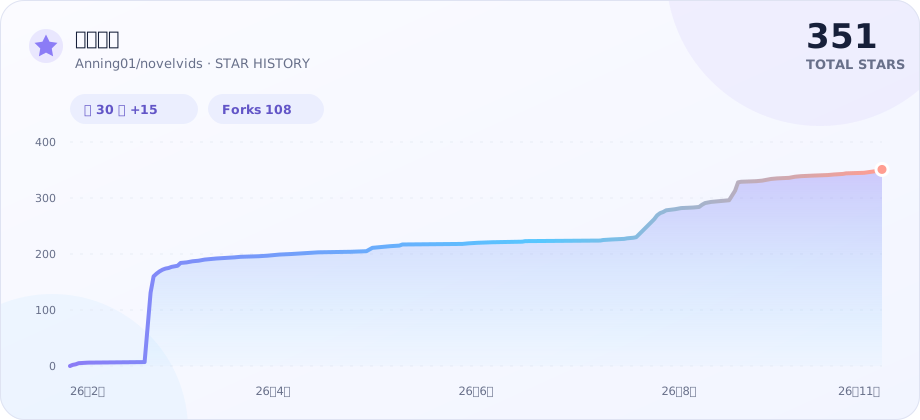
## Star history
---
Built with passion by Anning