# aruco_ros
**Repository Path**: Bryan_Jiang/aruco_ros
## Basic Information
- **Project Name**: aruco_ros
- **Description**: No description available
- **Primary Language**: Unknown
- **License**: Not specified
- **Default Branch**: noetic-devel
- **Homepage**: None
- **GVP Project**: No
## Statistics
- **Stars**: 0
- **Forks**: 0
- **Created**: 2022-02-17
- **Last Updated**: 2022-02-17
## Categories & Tags
**Categories**: Uncategorized
**Tags**: None
## README
aruco_ros
=========
Software package and ROS wrappers of the [Aruco][1] Augmented Reality marker detector library.
### Features
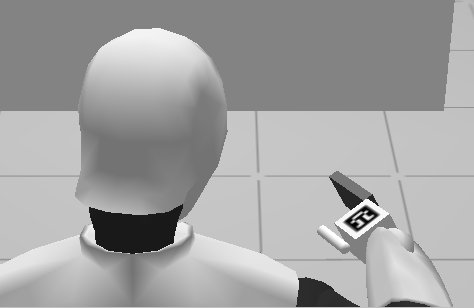 * High-framerate tracking of AR markers
* Generate AR markers with given size and optimized for minimal perceptive ambiguity (when there are more markers to track)
* Enhanced precision tracking by using boards of markers
* ROS wrappers
### Applications
* Object pose estimation
* Visual servoing: track object and hand at the same time
* High-framerate tracking of AR markers
* Generate AR markers with given size and optimized for minimal perceptive ambiguity (when there are more markers to track)
* Enhanced precision tracking by using boards of markers
* ROS wrappers
### Applications
* Object pose estimation
* Visual servoing: track object and hand at the same time
 ### ROS API
#### Messages
* aruco_ros/Marker.msg
Header header
uint32 id
geometry_msgs/PoseWithCovariance pose
float64 confidence
* aruco_ros/MarkerArray.msg
Header header
aruco_ros/Marker[] markers
### Kinetic changes
* Updated the [Aruco][1] library to version 3.0.4
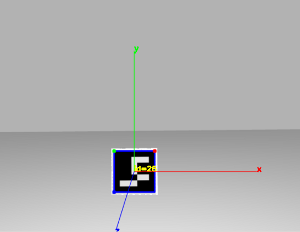
* Changed the coordinate system to match the library's, the convention is shown
in the image below, following rviz conventions, X is red, Y is green and Z is
blue.
### ROS API
#### Messages
* aruco_ros/Marker.msg
Header header
uint32 id
geometry_msgs/PoseWithCovariance pose
float64 confidence
* aruco_ros/MarkerArray.msg
Header header
aruco_ros/Marker[] markers
### Kinetic changes
* Updated the [Aruco][1] library to version 3.0.4
* Changed the coordinate system to match the library's, the convention is shown
in the image below, following rviz conventions, X is red, Y is green and Z is
blue.
 ### Test it with REEM
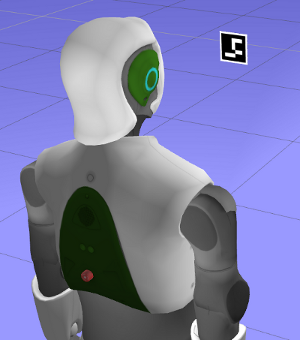
* Open a REEM in simulation with a marker floating in front of the robot. This will start the stereo cameras of the robot too. Since this is only a vision test, there is nothing else in this world apart from the robot and a marker floating in front of it. An extra light source had to be added to compensate for the default darkness.
```
roslaunch reem_gazebo reem_gazebo.launch world:=floating_marker
```
* Launch the `image_proc` node to get undistorted images from the cameras of the robot.
```
ROS_NAMESPACE=/stereo/right rosrun image_proc image_proc image_raw:=image
```
* Start the `single` node which will start tracking the specified marker and will publish its pose in the camera frame
```
roslaunch aruco_ros single.launch markerId:=26 markerSize:=0.08 eye:="right"
```
the frame in which the pose is refered to can be chosen with the 'ref_frame' argument. The next example forces the marker pose to
be published with respect to the robot base_link frame:
```
roslaunch aruco_ros single.launch markerId:=26 markerSize:=0.08 eye:="right" ref_frame:=/base_link
```
* Visualize the result
```
rosrun image_view image_view image:=/aruco_single/result
```
### Test it with REEM
* Open a REEM in simulation with a marker floating in front of the robot. This will start the stereo cameras of the robot too. Since this is only a vision test, there is nothing else in this world apart from the robot and a marker floating in front of it. An extra light source had to be added to compensate for the default darkness.
```
roslaunch reem_gazebo reem_gazebo.launch world:=floating_marker
```
* Launch the `image_proc` node to get undistorted images from the cameras of the robot.
```
ROS_NAMESPACE=/stereo/right rosrun image_proc image_proc image_raw:=image
```
* Start the `single` node which will start tracking the specified marker and will publish its pose in the camera frame
```
roslaunch aruco_ros single.launch markerId:=26 markerSize:=0.08 eye:="right"
```
the frame in which the pose is refered to can be chosen with the 'ref_frame' argument. The next example forces the marker pose to
be published with respect to the robot base_link frame:
```
roslaunch aruco_ros single.launch markerId:=26 markerSize:=0.08 eye:="right" ref_frame:=/base_link
```
* Visualize the result
```
rosrun image_view image_view image:=/aruco_single/result
```
 [1]: http://www.sciencedirect.com/science/article/pii/S0031320314000235 "Automatic generation and detection of highly reliable fiducial markers under occlusion by S. Garrido-Jurado and R. Muñoz-Salinas and F.J. Madrid-Cuevas and M.J. Marín-Jiménez 2014"