# event_representation_study
**Repository Path**: Bryan_Jiang/event_representation_study
## Basic Information
- **Project Name**: event_representation_study
- **Description**: No description available
- **Primary Language**: Unknown
- **License**: Not specified
- **Default Branch**: master
- **Homepage**: None
- **GVP Project**: No
## Statistics
- **Stars**: 0
- **Forks**: 0
- **Created**: 2024-04-01
- **Last Updated**: 2024-04-01
## Categories & Tags
**Categories**: Uncategorized
**Tags**: None
## README
# From Chaos Comes Order: Ordering Event Representations for Object Recognition and Detection
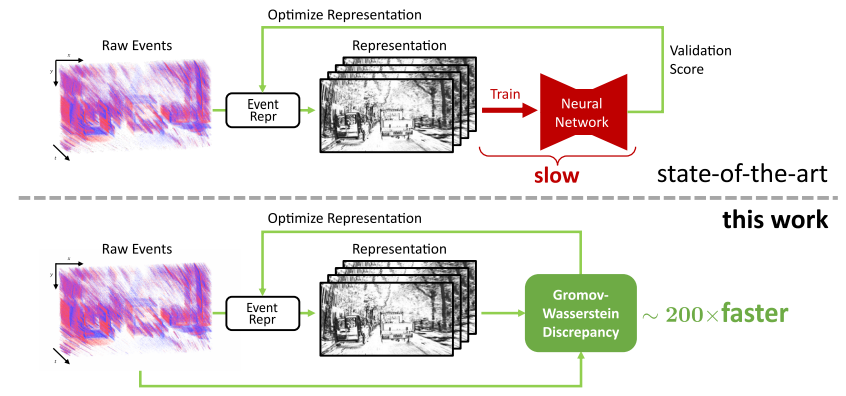
Official PyTorch implementation of the ICCV 2023 paper: [From Chaos Comes Order: Ordering Event Representations for Object Recognition and Detection](https://arxiv.org/abs/2304.13455).
## 🖼️ Check Out Our Poster! 🖼️ [here](https://download.ifi.uzh.ch/rpg/event_representation_study/ICCV23_Zubic.pdf)
## Citation
If you find this work useful, please consider citing:
```bibtex
@InProceedings{Zubic_2023_ICCV,
author = {Zubi\'c, Nikola and Gehrig, Daniel and Gehrig, Mathias and Scaramuzza, Davide},
title = {From Chaos Comes Order: Ordering Event Representations for Object Recognition and Detection},
booktitle = {Proceedings of the IEEE/CVF International Conference on Computer Vision (ICCV)},
month = {October},
year = {2023},
pages = {12846-12856}
}
```
## Conda Installation
We highly recommend using [Mambaforge](https://github.com/conda-forge/miniforge#mambaforge) to reduce the installation time.
```Bash
conda create -y -n event_representation python=3.8
conda activate event_representation
conda install -y pytorch==1.13.1 torchvision==0.14.1 torchaudio==0.13.1 pytorch-cuda=11.7 -c pytorch -c nvidia
pip install matplotlib tonic tqdm numba POT scikit-learn wandb pyyaml opencv-python bbox-visualizer pycocotools h5py hdf5plugin timm tensorboard addict
conda install -y pyg -c pyg
conda install -y pytorch-scatter -c pyg
cd ev-licious
pip install .
cd ..
cd gryffin
pip install .
```
## Required Data
* To evaluate or train the model, you will need to download the required preprocessed datasets:
* 1 Mpx dataset needs to be downloaded from the following [repository](https://github.com/wds320/AAAI_Event_based_detection) and then processed using [precompute_reps.py](https://github.com/uzh-rpg/event_representation_study/blob/master/ev-YOLOv6/yolov6/data/gen4/precompute_reps.py) file.
* Annotations for GEN1 and 1 Mpx datasets can be downloaded from [here](https://download.ifi.uzh.ch/rpg/event_representation_study/annotations.zip).
## Pre-trained Checkpoints
### [Gen1](https://download.ifi.uzh.ch/rpg/event_representation_study/GEN1.zip)
### [1 Mpx](https://download.ifi.uzh.ch/rpg/event_representation_study/GEN4.zip)
Contains folders of all trained models. Each folder has weights folder, and we use `best_ckpt.pt` as the checkpoint.
Currently, contains two optimized representations we found (small variations), by default the second one is used - aim for `gen1_optimized_2` and `gen1_optimized_augment_2` weights when evaluating.
If you want to use the first one, uncomment it at lines 16-66 ([optimized_representation.py](https://github.com/uzh-rpg/event_representation_study/blob/master/representations/optimized_representation.py)) and comment out the second one (lines 86-134).
`gen1_optimized_augment_2` should produce the following results (50.6% mAP):
```
Average Precision (AP) @[ IoU=0.50:0.95 | area= all | maxDets=100 ] = 0.506
Average Precision (AP) @[ IoU=0.50 | area= all | maxDets=100 ] = 0.775
Average Precision (AP) @[ IoU=0.75 | area= all | maxDets=100 ] = 0.539
Average Precision (AP) @[ IoU=0.50:0.95 | area= small | maxDets=100 ] = 0.420
Average Precision (AP) @[ IoU=0.50:0.95 | area=medium | maxDets=100 ] = 0.580
Average Precision (AP) @[ IoU=0.50:0.95 | area= large | maxDets=100 ] = 0.528
Average Recall (AR) @[ IoU=0.50:0.95 | area= all | maxDets= 1 ] = 0.319
Average Recall (AR) @[ IoU=0.50:0.95 | area= all | maxDets= 10 ] = 0.635
Average Recall (AR) @[ IoU=0.50:0.95 | area= all | maxDets=100 ] = 0.666
Average Recall (AR) @[ IoU=0.50:0.95 | area= small | maxDets=100 ] = 0.622
Average Recall (AR) @[ IoU=0.50:0.95 | area=medium | maxDets=100 ] = 0.712
Average Recall (AR) @[ IoU=0.50:0.95 | area= large | maxDets=100 ] = 0.666
```
## Evaluation
- Set `DATASET_PATH` as the path to either the 1 Mpx or Gen1 dataset directory
- Set `OUTPUT_DIR` to the path where you want to save evaluation outputs.
- Set `conf-file`'s (e.g. ev-YOLOv6/configs/gen1_optimized_augment2.py by default; configs are same for both gen1 and gen4) pre-trained parameter to the path of the model (best_ckpt.pt)
- Evaluation scripts also start from `train.py` file, but use `testing` parameter
For simplicity, we are only showing the validation script for Gen1. For 1 Mpx it should be similar.
### Gen1 (no augment)
```Bash
python ev-YOLOv6/tools/train.py --wandb_name test_gen1_optimized_augment --file $DATASET_PATH \
--data-path ev-YOLOv6/data/gen1.yaml --conf-file ev-YOLOv6/configs/gen1_optimized_augment2.py \
--img-size 640 --batch-size 32 --epochs 100 --device 0 --output-dir $OUTPUT_DIR \
--name test_gen1_optimized_augment --representation OptimizedRepresentation --dataset gen1 --testing
```
### Gen1 (augment)
```Bash
python ev-YOLOv6/tools/train.py --wandb_name test_gen1_optimized_augment --file $DATASET_PATH \
--data-path ev-YOLOv6/data/gen1.yaml --conf-file ev-YOLOv6/configs/gen1_optimized_augment2.py \
--img-size 640 --batch-size 32 --epochs 100 --device 0 --output-dir $OUTPUT_DIR \
--name test_gen1_optimized_augment --representation OptimizedRepresentation --dataset gen1 --testing --augment
```
## Training
Pretrained Swin-V2 weights (`swinv2_yolov6l6.pt`) can be downloaded from [here](https://download.ifi.uzh.ch/rpg/event_representation_study/swinv2_yolov6l6.pt).
You can set the [pretrained variable](https://github.com/uzh-rpg/event_representation_study/blob/master/ev-YOLOv6/configs/swinv2_yolov6l6_finetune.py#L4) to your path to `swinv2_yolov6l6.pt` file.
### Gen1
- Set `OUTPUT_DIR` to the directory where you want to store training outputs
Training without augmentation:
```Bash
python ev-YOLOv6/tools/train.py --wandb_name gen1_optimized --file /shares/rpg.ifi.uzh/dgehrig/gen1 \
--data-path ev-YOLOv6/data/gen1.yaml --conf-file ev-YOLOv6/configs/swinv2_yolov6l6_finetune.py \
--img-size 640 --batch-size 32 --epochs 100 --device 0 --output-dir $OUTPUT_DIR \
--name gen1_optimized --representation OptimizedRepresentation --dataset gen1
```
Training with augmentation:
```Bash
python ev-YOLOv6/tools/train.py --wandb_name gen1_optimized_augment --file /shares/rpg.ifi.uzh/dgehrig/gen1 \
--data-path ev-YOLOv6/data/gen1.yaml --conf-file ev-YOLOv6/configs/swinv2_yolov6l6_finetune.py \
--img-size 640 --batch-size 32 --epochs 100 --device 0 --output-dir $OUTPUT_DIR \
--name gen1_optimized_augment --representation OptimizedRepresentation --dataset gen1 --augment
```
### 1 Mpx
- Set `OUTPUT_DIR` to the directory where you want to store training outputs
Training without augmentation:
```Bash
python ev-YOLOv6/tools/train.py --wandb_name gen4_optimized \
--file /shares/rpg.ifi.uzh/nzubic/datasets/gen4/OptimizedRepresentation \
--data-path ev-YOLOv6/data/gen4.yaml --conf-file ev-YOLOv6/configs/swinv2_yolov6l6_finetune.py \
--img-size 640 --batch-size 32 --epochs 100 --device 0 --output-dir $OUTPUT_DIR \
--name gen4_optimized --representation OptimizedRepresentation --dataset gen4
```
Training with augmentation:
```Bash
python ev-YOLOv6/tools/train.py --wandb_name gen4_optimized_augment \
--file /shares/rpg.ifi.uzh/nzubic/datasets/gen4/OptimizedRepresentation \
--data-path ev-YOLOv6/data/gen4.yaml --conf-file ev-YOLOv6/configs/swinv2_yolov6l6_finetune.py \
--img-size 640 --batch-size 32 --epochs 100 --device 0 --output-dir $OUTPUT_DIR \
--name gen4_optimized_augment --representation OptimizedRepresentation --dataset gen4 --augment
```
## Mini N-ImageNet experiments
* All details regarding the execution of Mini N-ImageNet experiments can be seen in [n_imagenet/scripts](https://github.com/uzh-rpg/event_representation_study/tree/master/n_imagenet/scripts) folder.
* Details on how to download the Mini N-ImageNet dataset and prepare data can be seen at their official repo [here](https://github.com/82magnolia/n_imagenet).
## Running GWD computation
* Computation can be run with the following command:
```Bash
ID=0
REP_NAME=VoxelGrid
CUDA_VISIBLE_DEVICES=$ID python representations/representation_search/gen1_compute.py \
--event_representation_name $REP_NAME
```
where `ID` represents ID of the device, and `REP_NAME` represents the representation name.
## Running Gryffin optimization
`python representations/representation_search/optimization.py`
Change file [Path](https://github.com/uzh-rpg/event_representation_study/blob/master/representations/representation_search/optimization.py#L294) to the directory of GEN1 folder where `training.h5`, `validation.h5` and `testing.h5` files are.
Change [`SAVE_PATH`](https://github.com/uzh-rpg/event_representation_study/blob/master/representations/representation_search/optimization.py#L272) of run_optimization function to the path where you want to save the results.
Obtained optimal representation (ERGO-12):

## Code Acknowledgments
This project has used code from the following projects:
- [Swin-Transformer](https://github.com/microsoft/Swin-Transformer) for the Swin Transformer version 2 implementation in PyTorch
- [YOLOv6](https://github.com/meituan/YOLOv6) for the object detection pipeline
- [n_imagenet](https://github.com/82magnolia/n_imagenet) for Mini N-ImageNet experiments
- [AAAI_Event_based_detection](https://github.com/wds320/AAAI_Event_based_detection) for processed/filtered 1 Mpx dataset