# threex.webar
**Repository Path**: CoolkingNight/threex.webar
## Basic Information
- **Project Name**: threex.webar
- **Description**: No description available
- **Primary Language**: Unknown
- **License**: Not specified
- **Default Branch**: master
- **Homepage**: None
- **GVP Project**: No
## Statistics
- **Stars**: 0
- **Forks**: 0
- **Created**: 2018-07-28
- **Last Updated**: 2020-12-19
## Categories & Tags
**Categories**: Uncategorized
**Tags**: None
## README
# Augmented Reality For the Web
threex.webar shows how to get augmented reality using only web technologies.
It is a [threex extension for three.js](http://www.threejsgames.com/extensions/).
It provides easy to use extension to experiment with augmented reality and three.js.
I did a presentation about it. You can find the [slides](http://jeromeetienne.github.io/slides/augmentedrealitywiththreejs/)
here.
As an example, you can checkout ["Hatsunemiku Dancing in Augmented Reality"](https://github.com/jeromeetienne/demo.hatsunemiku-augmentedreality) demo.
It is a funny application of [threex.webar](https://github.com/jeromeetienne/threex.webar)
# A Screenshot
[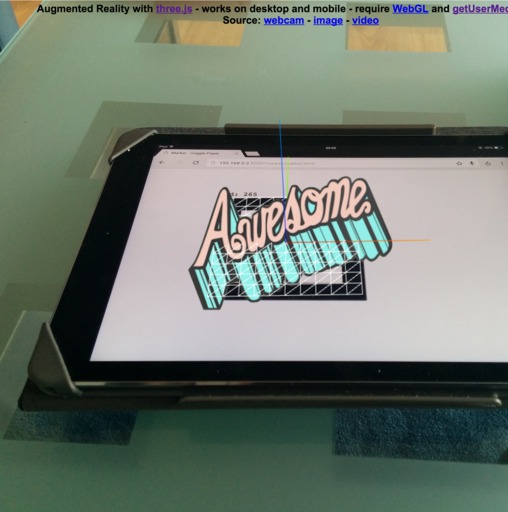](http://jeromeetienne.github.io/threex.webar/examples/basic.html)
# How To Install It
You can install it via script tag
```html
```
Or you can install with [bower](http://bower.io/), as you wish.
```bash
bower install threex.webar
```
# How To Run The Demo ?
- put a browser on https://jeromeetienne.github.io/threex.webar/examples/basic.html
- it will read your webcam using [getUserMedia](https://developer.mozilla.org/en-US/docs/Web/API/Navigator/getUserMedia)
- if it asks for permission, allow it :)
- it will recognize the marker you put in front of the mcamera
- get the marker from [here](http://jeromeetienne.github.io/threex.webar/marker/image-marker-265.html)
- you can print it and point the camera toward the paper
- or you can load the marker web page and put the phone in front of the camera
# Supported Devices
- It should run on any web browser which support
[WebGL](http://caniuse.com/#feat=webgl)
and
[getUserMedia](http://caniuse.com/#feat=stream)
- It runs on desktop and mobiles.
- modern phones, such as nexus 6/9, are powerfull enougth to run it
- unfortunatly ios browser still lack support
for [getUserMedia](http://caniuse.com/#feat=stream), so iphone and ipads can't play :(
# Show Don't Tell
* [examples/basic.html](https://jeromeetienne.github.io/threex.webar/examples/basic.html)
\[[view source](https://github.com/jeromeetienne/threex.webar/blob/master/examples/basic.html)\] :
It shows a basic augmented reality webapp. Good to learn how to use the code. Perfect start point.
-
[youtube video](https://www.youtube.com/watch?v=fz9bmOfYvG0)
* [examples/data-visualization-histogram3d.html](https://jeromeetienne.github.io/threex.webar/examples/data-visualization-histogram3d.html)
\[[view source](https://github.com/jeromeetienne/threex.webar/blob/master/examples/data-visualization-histogram3d.html)\] :
It shows a possible data visualisation with 3d histogram. You can change the value the way you like. You can get them from a REST API, or from an industrial sensor, what ever you want.
-
[vine video](https://vine.co/v/ei1TDWLrYiX)
* [examples/contact-sharing-in-ar.html](https://jeromeetienne.github.io/threex.webar/examples/contact-sharing-in-ar.html)
\[[view source](https://github.com/jeromeetienne/threex.webar/blob/master/examples/contact-sharing-in-ar.html)\] :
It shows how to display informations on a per-marker basis.
There is a database which contains the informations. When the proper marker is recognized, the info specific to this marker is displayed. In this example, we provide a contact sharing webapp. Everybody got his own marker. Suppose alice wears a specific marker. Bob load the apps on his mobile, and will see alice contact information when he point it to alice.
-
[youtube video](https://www.youtube.com/watch?v=wrMX_FH2hsc)
# How To Use It
## threex.jsArucoMarker.js
It recognizes the marker in a video stream.
It is then positioned in 3d.
You just have to apply that to your own three.js meshes.
## threex.webcamgrabbing.js
It handles the video grabbing.
It will take the environment camera if it is available.
It provides a nice see-through effect.