# Todo-MVP
**Repository Path**: DanteAndroid/Todo-MVP
## Basic Information
- **Project Name**: Todo-MVP
- **Description**: No description available
- **Primary Language**: Java
- **License**: Apache-2.0
- **Default Branch**: master
- **Homepage**: None
- **GVP Project**: No
## Statistics
- **Stars**: 0
- **Forks**: 0
- **Created**: 2016-12-30
- **Last Updated**: 2020-12-19
## Categories & Tags
**Categories**: Uncategorized
**Tags**: None
## README
# TODO-MVP
### Summary
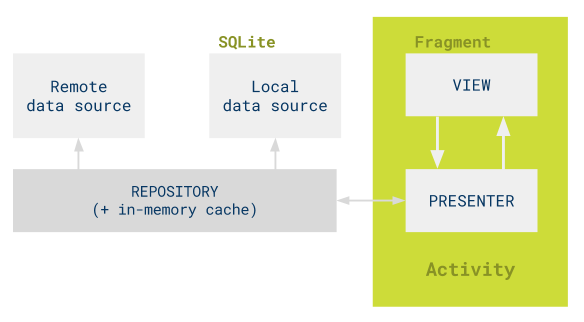
This sample is the base for many of the variants. It showcases a simple
implementation of the Model-View-Presenter pattern with no architectural
frameworks. It uses manual dependency injection to provide a repository with
local and remote data sources. Asynchronous tasks are handled with callbacks.
 Note: in a MVP context, the term "view" is overloaded:
* The class android.view.View will be referred to as "Android View"
* The view that receives commands from a presenter in MVP, will be simply called
"view".
### Fragments
It uses fragments for two reasons:
* The separation between Activity and Fragment fits nicely with this
implementation of MVP: the Activity is the overall controller that creates and
connects views and presenters.
* Tablet layout or screens with multiple views take advantage of the Fragments
framework.
### Key concepts
There are four features in the app:
*
Note: in a MVP context, the term "view" is overloaded:
* The class android.view.View will be referred to as "Android View"
* The view that receives commands from a presenter in MVP, will be simply called
"view".
### Fragments
It uses fragments for two reasons:
* The separation between Activity and Fragment fits nicely with this
implementation of MVP: the Activity is the overall controller that creates and
connects views and presenters.
* Tablet layout or screens with multiple views take advantage of the Fragments
framework.
### Key concepts
There are four features in the app:
* Tasks
* TaskDetail
* AddEditTask
* Statistics
Each feature has:
* A contract defining the view and the presenter
* An Activity which is responsible for the creation of fragments and presenters
* A Fragment which implements the view interface.
* A presenter which implements the presenter interface
In general, the business logic lives in the presenter and relies on the view to
do the Android UI work.
The view contains almost no logic: it converts the presenter's commands to UI
actions and listens to user actions, which are passed to the presenter.
Contracts are interfaces used to define the connection between views and
presenters.
### Dependencies
* Common Android support libraries (com.android.support.\*)
* Android Testing Support Library (Espresso, AndroidJUnitRunner…)
* Mockito
* Guava (null checking)
## Features
### Complexity - understandability
#### Use of architectural frameworks/libraries/tools:
None
#### Conceptual complexity
Low, as it's a pure MVP implementation for Android
### Testability
#### Unit testing
High, presenters are unit tested as well as repositories and data sources.
#### UI testing
High, injection of fake modules allow for testing with fake data
### Code metrics
Compared to a traditional project with no architecture in place, this sample
introduces additional classes and interfaces: presenters, a repository,
contracts, etc. So lines of code and number of classes are higher in MVP.
```
-------------------------------------------------------------------------------
Language files blank comment code
-------------------------------------------------------------------------------
Java 46 1075 1451 3451
XML 34 97 337 601
-------------------------------------------------------------------------------
SUM: 80 1172 1788 4052
-------------------------------------------------------------------------------
```
### Maintainability
#### Ease of amending or adding a feature
High.
#### Learning cost
Low. Features are easy to find and the responsibilities are clear. Developers
don't need to be familiar with any external dependency to work on the project.