# vadnet
**Repository Path**: GOUKOU007/vadnet
## Basic Information
- **Project Name**: vadnet
- **Description**: No description available
- **Primary Language**: Unknown
- **License**: LGPL-3.0
- **Default Branch**: master
- **Homepage**: None
- **GVP Project**: No
## Statistics
- **Stars**: 0
- **Forks**: 0
- **Created**: 2020-12-07
- **Last Updated**: 2021-06-11
## Categories & Tags
**Categories**: Uncategorized
**Tags**: None
## README
# VadNet
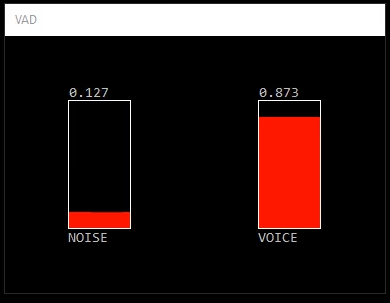
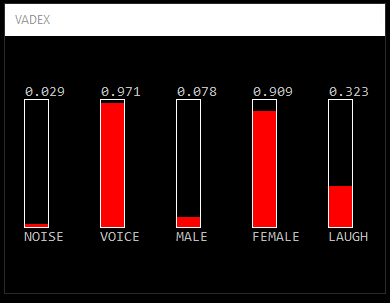
VadNet is a real-time voice activity detector for noisy enviroments. It implements an end-to-end learning approach based on Deep Neural Networks. In the extended version, gender and laughter detection are added. To see a demonstration click on the images below.
 # Platform
Windows
# Dependencies
Visual Studio 2015 Redistributable (https://www.microsoft.com/en-us/download/details.aspx?id=52685)
# Installation
`do_bin.cmd` - Installs embedded Python and downloads SSI interpreter. During the installation the script tries to detect if a GPU is available and possibly installs the GPU version of tensorflow. This requires that a NVIDIA graphic card is detected and CUDA has been installed. Nevertheless, VadNet does fine on a CPU.
# Quick Guide
`do_vad[ex].cmd` - Demo on pre-recorded files (requires 48k mono wav files)
`do_vad[ex]_live.cmd` - Capture from microphone and stream results to a socket
`do_vad[ex]_loopback.cmd` - Instead of a microphone capture from soundcard (loopback mode, see comments below)
`do_vad_extract.cmd` - Separates audio file into noisy and voiced parts (supports any audio format)
`train\do_all.cmd` - Performs a fresh training (downloads media files, creates annotations and trains a new network)
# Documentation
VadNet is implemented using the [Social Signal Interpretation (SSI)](http://openssi.net) framework. The processing pipeline is defined in ``vad[ex].pipeline`` and can be configured by editing ``vad[ex].pipeline-config``. Available options are:
```
audio:live = false # $(bool) use live input (otherwise read from file)
audio:live:mic = true # $(bool) if live input is selected use microphone (otherwise use soundcard)
model:path=models\vad # path to model folder
send:do = false # $(bool) stream detection results to a socket
send:url = upd://localhost:1234 # socket address in format
record:do = false # $(bool) capture screen and audio
record:path = capture # capture path
```
If the option ``send:do`` is turned on, an XML string with the detection results is streamed to a socket (see ``send:url``). You can change the format of the XML string by editing ``vad.xml``. To run SSI in the background, click on the tray icon and select 'Hide windows'. For more information about SSI pipelines please consult the [documentation](https://rawgit.com/hcmlab/ssi/master/docs/index.html#xml) of SSI.
The Python script ``vad_extract.py`` can be used to separate noisy and voiced parts of an audio file. For each input file ``.`` two new files ``.speech.wav`` and ``.noise.wav`` will be generated. The script should handle all common audio formats. You can run the script from the command line by calling ``> bin\python.exe vad_extract.py ``:
```
usage: vad_extract.py [-h] [--model MODEL] [--files FILES [FILES ...]] [--n_batch N_BATCH]
optional arguments:
-h, --help show this help message and exit
--model MODEL path to model
--files FILES [FILES ...] list of files
--n_batch N_BATCH number of batches
```
# Loopback Mode
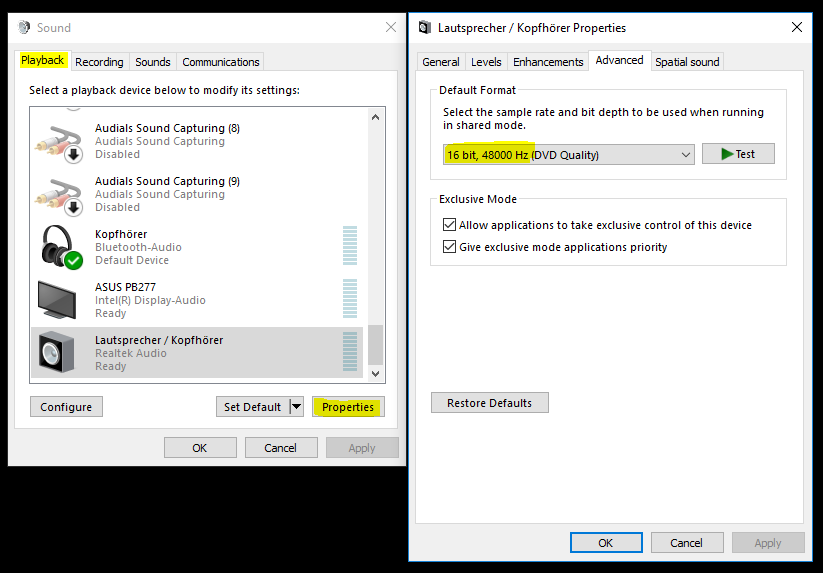
In loopback mode, whatever you playback through your soundcard will be analysed. Before using it please set the right output format for your soundcard. To do so, go to the ``Sound`` settings in the control panel, select your default playback device and click on ``Properties``. Most devices will now allow you to set a default format. Choose ``16 bit, 48000 Hz`` and press ``OK``.
# Platform
Windows
# Dependencies
Visual Studio 2015 Redistributable (https://www.microsoft.com/en-us/download/details.aspx?id=52685)
# Installation
`do_bin.cmd` - Installs embedded Python and downloads SSI interpreter. During the installation the script tries to detect if a GPU is available and possibly installs the GPU version of tensorflow. This requires that a NVIDIA graphic card is detected and CUDA has been installed. Nevertheless, VadNet does fine on a CPU.
# Quick Guide
`do_vad[ex].cmd` - Demo on pre-recorded files (requires 48k mono wav files)
`do_vad[ex]_live.cmd` - Capture from microphone and stream results to a socket
`do_vad[ex]_loopback.cmd` - Instead of a microphone capture from soundcard (loopback mode, see comments below)
`do_vad_extract.cmd` - Separates audio file into noisy and voiced parts (supports any audio format)
`train\do_all.cmd` - Performs a fresh training (downloads media files, creates annotations and trains a new network)
# Documentation
VadNet is implemented using the [Social Signal Interpretation (SSI)](http://openssi.net) framework. The processing pipeline is defined in ``vad[ex].pipeline`` and can be configured by editing ``vad[ex].pipeline-config``. Available options are:
```
audio:live = false # $(bool) use live input (otherwise read from file)
audio:live:mic = true # $(bool) if live input is selected use microphone (otherwise use soundcard)
model:path=models\vad # path to model folder
send:do = false # $(bool) stream detection results to a socket
send:url = upd://localhost:1234 # socket address in format
record:do = false # $(bool) capture screen and audio
record:path = capture # capture path
```
If the option ``send:do`` is turned on, an XML string with the detection results is streamed to a socket (see ``send:url``). You can change the format of the XML string by editing ``vad.xml``. To run SSI in the background, click on the tray icon and select 'Hide windows'. For more information about SSI pipelines please consult the [documentation](https://rawgit.com/hcmlab/ssi/master/docs/index.html#xml) of SSI.
The Python script ``vad_extract.py`` can be used to separate noisy and voiced parts of an audio file. For each input file ``.`` two new files ``.speech.wav`` and ``.noise.wav`` will be generated. The script should handle all common audio formats. You can run the script from the command line by calling ``> bin\python.exe vad_extract.py ``:
```
usage: vad_extract.py [-h] [--model MODEL] [--files FILES [FILES ...]] [--n_batch N_BATCH]
optional arguments:
-h, --help show this help message and exit
--model MODEL path to model
--files FILES [FILES ...] list of files
--n_batch N_BATCH number of batches
```
# Loopback Mode
In loopback mode, whatever you playback through your soundcard will be analysed. Before using it please set the right output format for your soundcard. To do so, go to the ``Sound`` settings in the control panel, select your default playback device and click on ``Properties``. Most devices will now allow you to set a default format. Choose ``16 bit, 48000 Hz`` and press ``OK``.
 # Insights
The model we are using has been trained with [Tensorflow](https://www.tensorflow.org/). It takes as input the raw audio input and feeds it into a 3-layer Convolutional Network. The result of this filter operation is then processed by a 2-layer Recurrent Network containing 64 RLU cells. The final bit is a fully-connected layer, which applies a softmax and maps the input to a tuple ```` in the range ``[0..1]``.
Network architecture:
# Insights
The model we are using has been trained with [Tensorflow](https://www.tensorflow.org/). It takes as input the raw audio input and feeds it into a 3-layer Convolutional Network. The result of this filter operation is then processed by a 2-layer Recurrent Network containing 64 RLU cells. The final bit is a fully-connected layer, which applies a softmax and maps the input to a tuple ```` in the range ``[0..1]``.
Network architecture:
 We have trained the network on roughly 134 h of audio data (5.6 days) and run training for 25 epochs (381024 steps) using a batch size of 128.
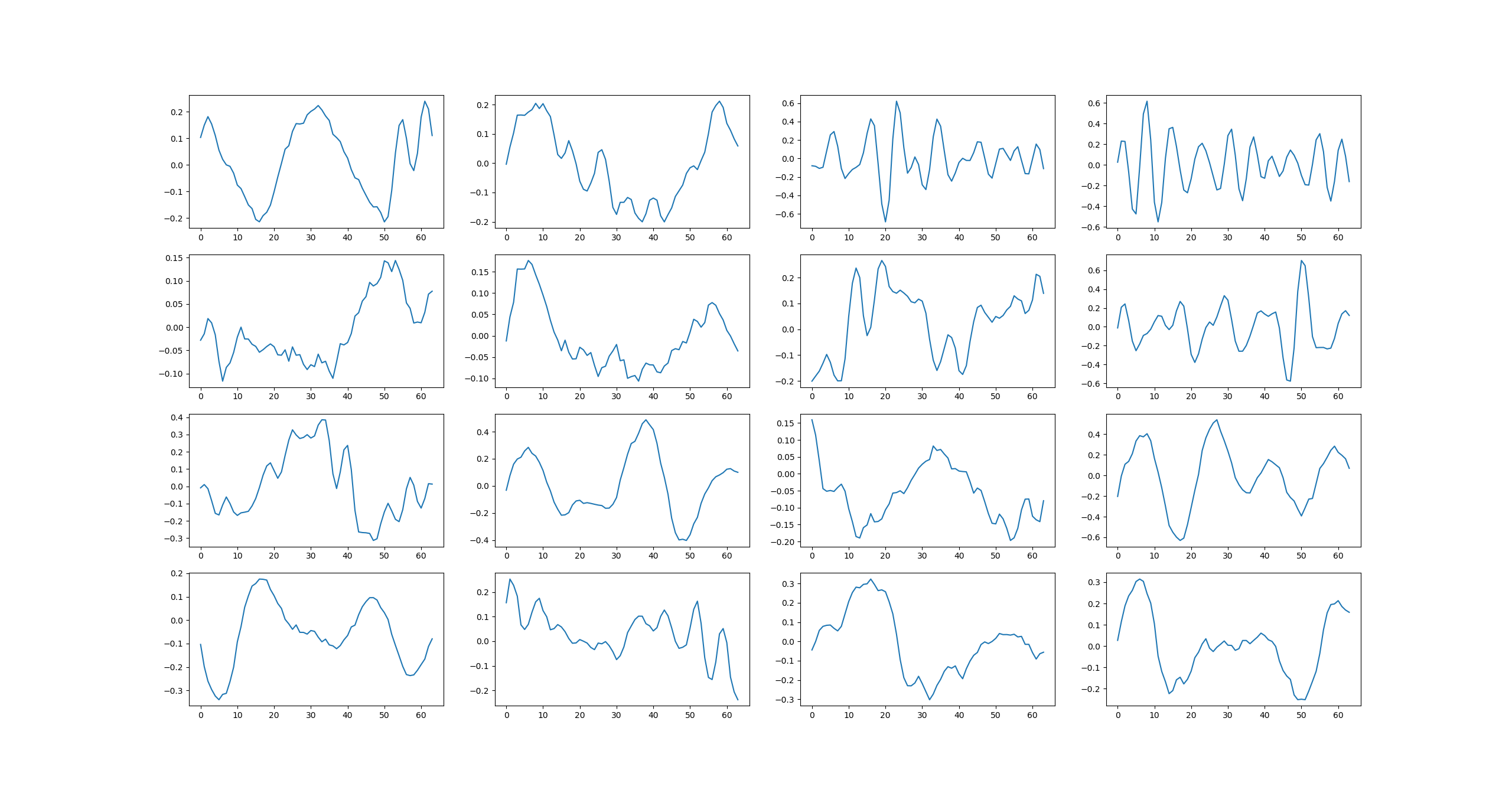
Filter weights learned in the first CNN layer:
We have trained the network on roughly 134 h of audio data (5.6 days) and run training for 25 epochs (381024 steps) using a batch size of 128.
Filter weights learned in the first CNN layer:
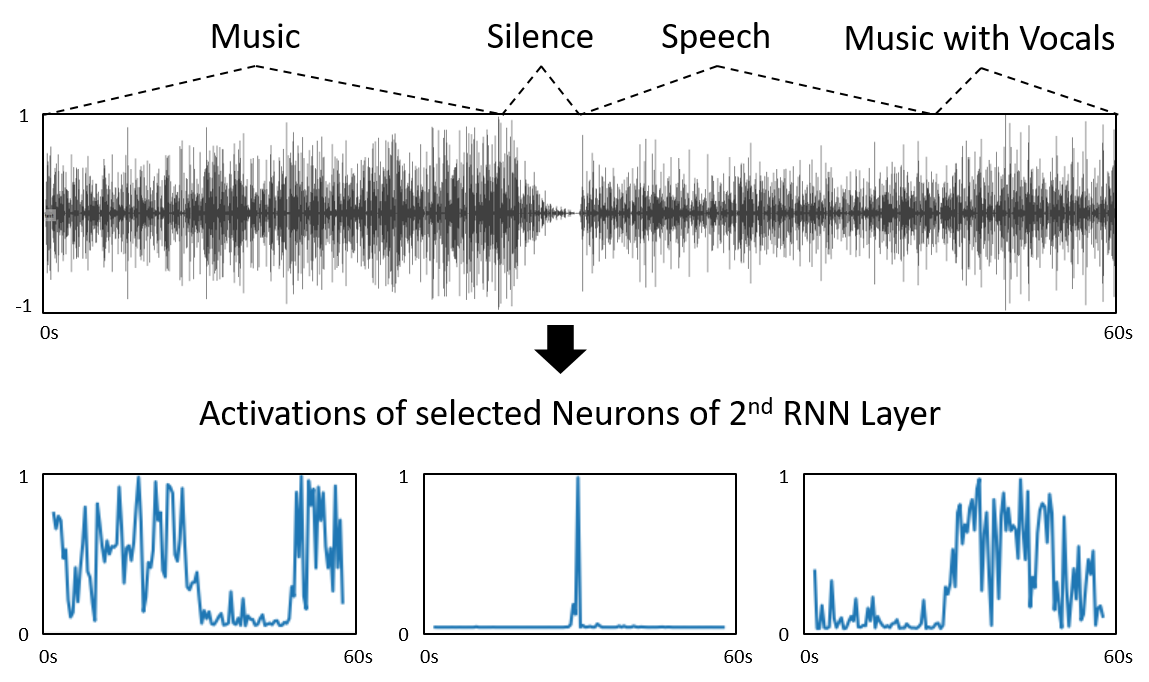
 Some selected activations of the last RNN layer for an audio sample containing music and speech:
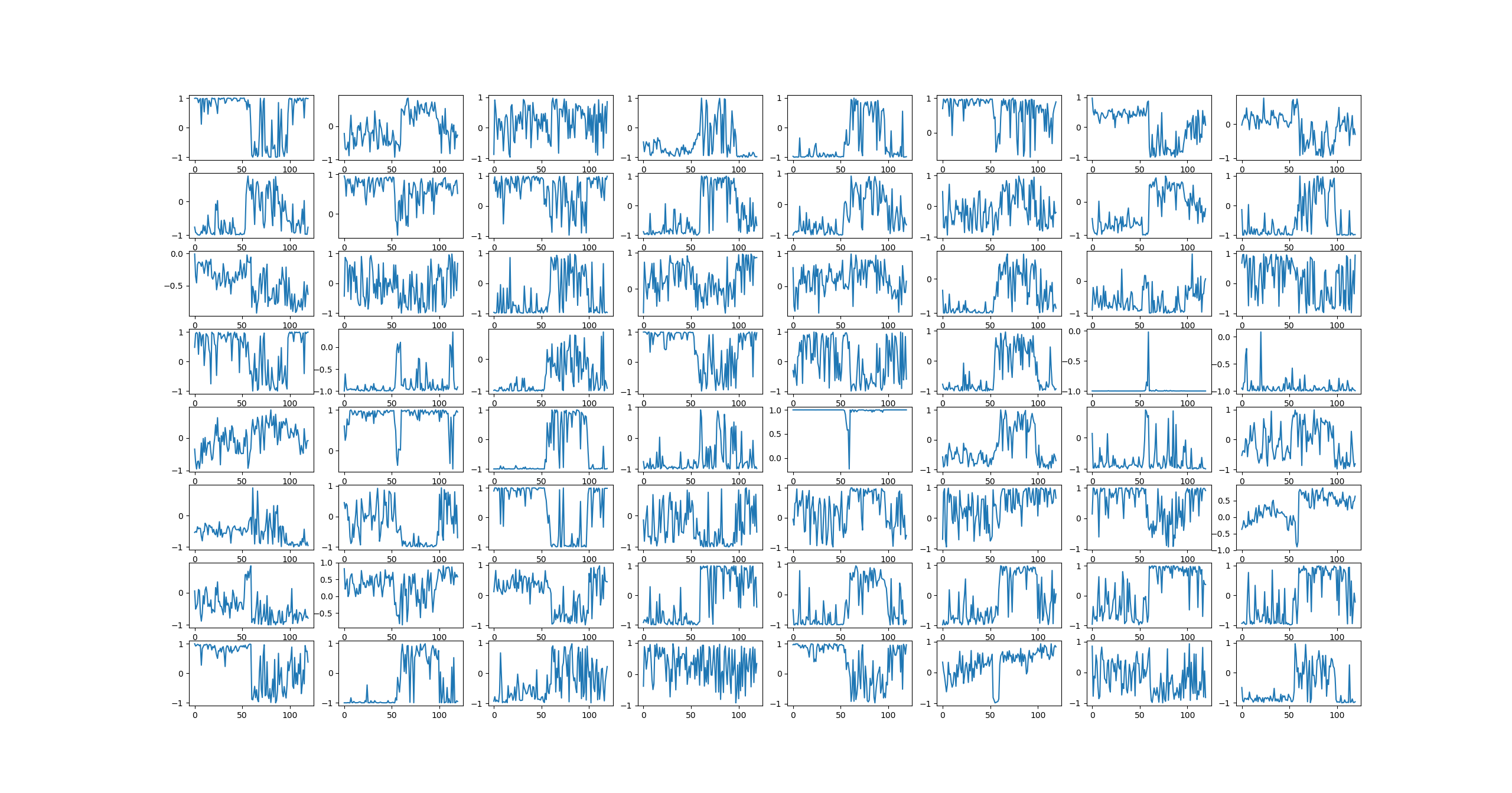
 Activations for all cells in the last RNN layer for the same sample:
 # Credits
* SSI -- Social Signal Interpretation Framework - http://openssi.net
* Tensorflow -- An open source machine learning framework for everyone - https://www.tensorflow.org/
# License
VadNet is released under LGPL (see LICENSE).
# Publication
If you use VadNet in your work please cite the following paper:
```
@InProceedings{Wagner2018,
author = {Johannes Wagner and Dominik Schiller and Andreas Seiderer and Elisabeth Andr\'e},
title = {Deep Learning in Paralinguistic Recognition Tasks: Are Hand-crafted Features Still Relevant?},
booktitle = {Proceedings of Interspeech},
address = {Hyderabad, India},
year = {2018},
pages = {147--151}
}
```
# Author
Johannes Wagner, Lab for Human Centered Multimedia, 2018
# Credits
* SSI -- Social Signal Interpretation Framework - http://openssi.net
* Tensorflow -- An open source machine learning framework for everyone - https://www.tensorflow.org/
# License
VadNet is released under LGPL (see LICENSE).
# Publication
If you use VadNet in your work please cite the following paper:
```
@InProceedings{Wagner2018,
author = {Johannes Wagner and Dominik Schiller and Andreas Seiderer and Elisabeth Andr\'e},
title = {Deep Learning in Paralinguistic Recognition Tasks: Are Hand-crafted Features Still Relevant?},
booktitle = {Proceedings of Interspeech},
address = {Hyderabad, India},
year = {2018},
pages = {147--151}
}
```
# Author
Johannes Wagner, Lab for Human Centered Multimedia, 2018