# clip-as-service **Repository Path**: July1921/clip-as-service ## Basic Information - **Project Name**: clip-as-service - **Description**: https://github.com/jina-ai/clip-as-service - **Primary Language**: Unknown - **License**: Apache-2.0 - **Default Branch**: master - **Homepage**: None - **GVP Project**: No ## Statistics - **Stars**: 0 - **Forks**: 0 - **Created**: 2025-07-14 - **Last Updated**: 2025-07-14 ## Categories & Tags **Categories**: Uncategorized **Tags**: None ## README


CLIP-as-service logo: The data structure for unstructured data


Embedding image and sentence into fixed-length vectors via CLIP

Python 3.7 3.8 3.9 3.10 PyPI

CLIP-as-service is a low-latency high-scalability embedding service for images and texts. It can be easily integrated as a microservice into neural search solutions. ⚑ **Fast**: Serve CLIP models with ONNX runtime and PyTorch JIT with 800QPS[*]. Non-blocking duplex streaming on requests and responses, designed for large data and long-running tasks. 🫐 **Elastic**: Horizontally scale up and down multiple CLIP models on single GPU, with automatic load balancing. πŸ₯ **Easy-to-use**: No learning curve, minimalist design on client and server. Intuitive and consistent API for image and sentence embedding. πŸ‘’ **Modern**: Async client support. Easily switch between gRPC, HTTP, Websocket protocols with TLS and compressions. 🍱 **Integration**: Smoothly integrated with neural search ecosystem including [Jina](https://github.com/jina-ai/jina) and [DocArray](https://github.com/jina-ai/docarray). Build cross-modal and multi-modal solution in no time. [*] with default config (single replica, PyTorch no JIT) on GeForce RTX 3090. ## [Documentation](https://clip-as-service.jina.ai) ## Install CLIP-as-service consists of two Python packages `clip-server` and `clip-client` that can be installed _independently_. Both require Python 3.7+. ### Install server ```bash pip install clip-server ``` To run CLIP model via ONNX (default is via PyTorch): ```bash pip install "clip-server[onnx]" ``` ### Install client ```bash pip install clip-client ``` ### Quick check You can run a simple connectivity check after install.
C/S Command Expect output
Server ```bash python -m clip_server ``` Expected server output
Client ```python from clip_client import Client c = Client('grpc://0.0.0.0:23456') c.profile() ``` Expected clip-client output
You can change `0.0.0.0` to the intranet or public IP address to test the connectivity over private and public network. If you encounter some errors, please find the solution here. ## Get Started ### Basic usage 1. Start the server: `python -m clip_server`. Remember its address and port. 2. Create a client: ```python from clip_client import Client c = Client('grpc://87.191.159.105:51000') ``` 3. To get sentence embedding: ```python r = c.encode(['First do it', 'then do it right', 'then do it better']) print(r.shape) # [3, 512] ``` 4. To get image embedding: ```python r = c.encode(['apple.png', # local image 'https://docarray.jina.ai/_static/favicon.png', # remote image 'data:image/gif;base64,R0lGODlhEAAQAMQAAORHHOVSKudfOulrSOp3WOyDZu6QdvCchPGolfO0o/XBs/fNwfjZ0frl3/zy7////wAAAAAAAAAAAAAAAAAAAAAAAAAAAAAAAAAAAAAAAAAAAAAAAAAAAAAAAAAAAAAAACH5BAkAABAALAAAAAAQABAAAAVVICSOZGlCQAosJ6mu7fiyZeKqNKToQGDsM8hBADgUXoGAiqhSvp5QAnQKGIgUhwFUYLCVDFCrKUE1lBavAViFIDlTImbKC5Gm2hB0SlBCBMQiB0UjIQA7']) # in image URI print(r.shape) # [3, 512] ``` More comprehensive server & client configs can be found in the docs. ### Text-to-image cross-modal search in 10 Lines Let's build a text-to-image search using CLIP-as-service. Namely, user input a sentence and the program returns the matched images. We will use [Totally Looks Like](https://sites.google.com/view/totally-looks-like-dataset) dataset and [DocArray](https://github.com/jina-ai/docarray) package. Note that DocArray is included within `clip-client` as an upstream dependency, so you don't need to install it separately. #### Load images First we load images. You can simply pull it from Jina Cloud: ```python from docarray import DocumentArray da = DocumentArray.pull('ttl-original', show_progress=True, local_cache=True) ```
or download TTL dataset, unzip, load manually Alternatively, you can go to [Totally Looks Like](https://sites.google.com/view/totally-looks-like-dataset) official website, unzip and load images as follows: ```python from docarray import DocumentArray da = DocumentArray.from_files(['left/*.jpg', 'right/*.jpg']) ```
The dataset contains 12,032 images, hence it may take half minute to pull. Once done, you can visualize it and get the first taste of those images. ```python da.plot_image_sprites() ```

Visualize of the image sprite of Totally looks like dataset

#### Encode images Start the server with `python -m clip_server`. Say it is at `87.191.159.105:51000` with `GRPC` protocol (you will get this information after running the server). Create a Python client script: ```python from clip_client import Client c = Client(server='grpc://87.191.159.105:51000') da = c.encode(da, show_progress=True) ``` Depending on your GPU and client-server network, it could take a while to embed 12K images. In my case, it takes ~2 minute.
Download the pre-encoded dataset For people who are impatient or lack of GPU, waiting can be a hell. In this case, you can simply pull our pre-encoded image dataset. ```python from docarray import DocumentArray da = DocumentArray.pull('ttl-embedding', show_progress=True, local_cache=True) ```
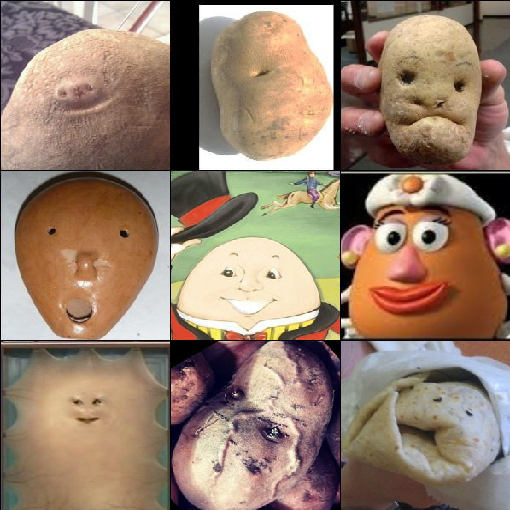
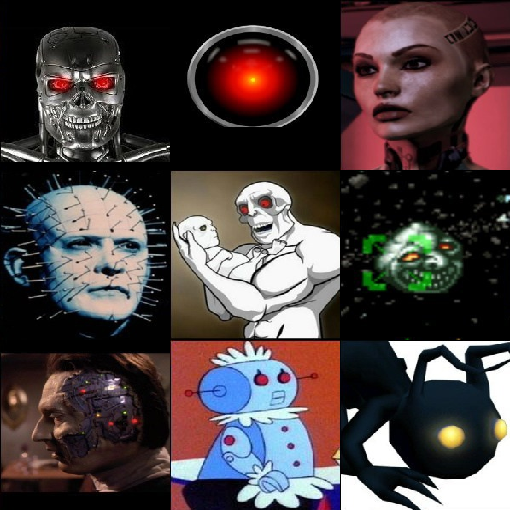
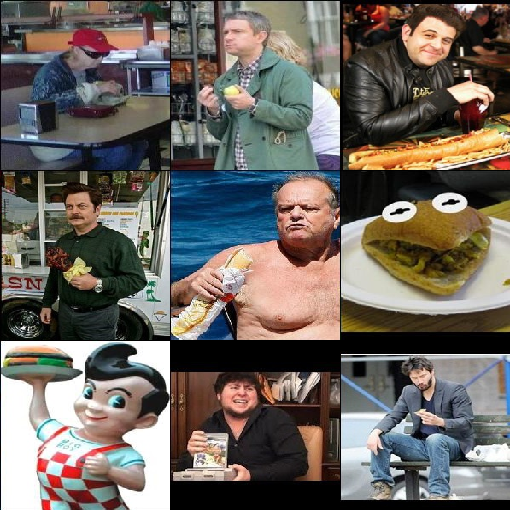
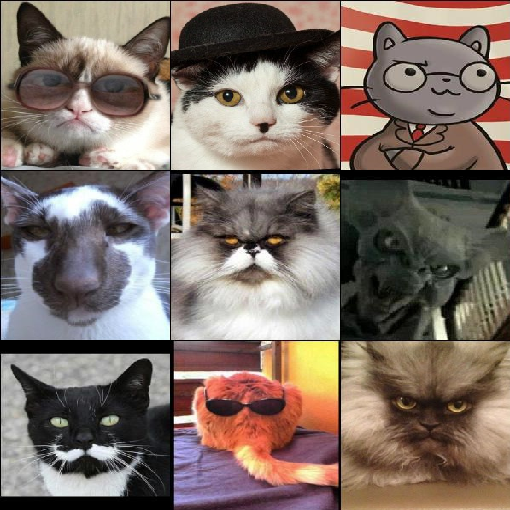
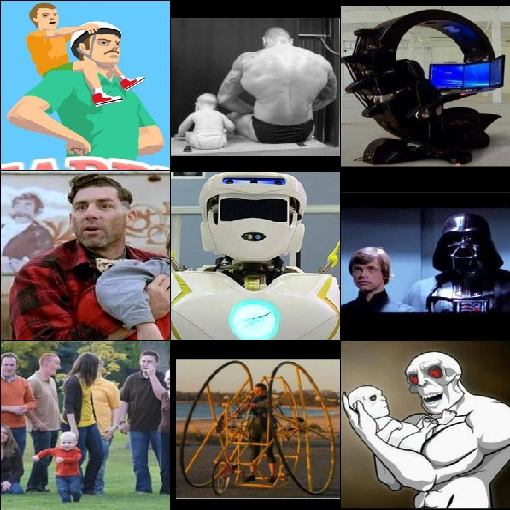
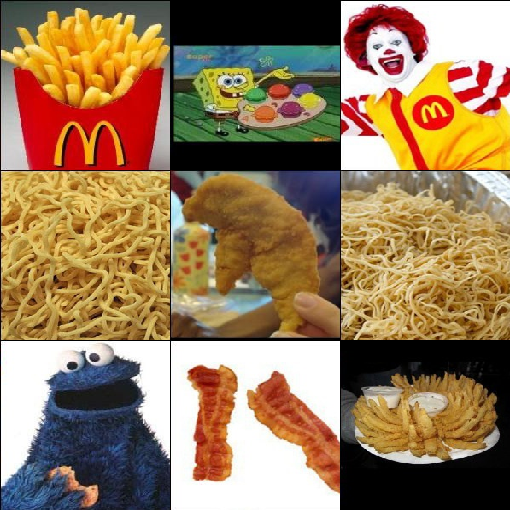
#### Search via sentence Let's build a simple prompt to allow user to type sentence: ```python while True: vec = c.encode([input('sentence> ')]) r = da.find(query=vec, limit=9) r.plot_image_sprites() ``` #### Showcase Now you can input arbitrary English sentences and view the top-9 matched images. Search is fast and instinct. Let's have some fun:
"a happy potato" "a super evil AI" "a guy enjoying his burger"

Visualize of the image sprite of Totally looks like dataset

Visualize of the image sprite of Totally looks like dataset

Visualize of the image sprite of Totally looks like dataset

"professor cat is very serious" "an ego engineer lives with parent" "there will be no tomorrow so lets eat unhealthy"

Visualize of the image sprite of Totally looks like dataset

Visualize of the image sprite of Totally looks like dataset

Visualize of the image sprite of Totally looks like dataset

Let's save the embedding result for our next example: ```python da.save_binary('ttl-image') ``` ### Image-to-text cross-modal search in 10 Lines We can also switch the input and output of the last program to achieve image-to-text search. Precisely, given a query image find the sentence that best describes the image. Let's use all sentences from the book "Pride and Prejudice". ```python from docarray import Document, DocumentArray d = Document(uri='https://www.gutenberg.org/files/1342/1342-0.txt').load_uri_to_text() da = DocumentArray( Document(text=s.strip()) for s in d.text.replace('\r\n', '').split('.') if s.strip() ) ``` Let's look at what we got: ```python da.summary() ``` ```text Documents Summary Length 6403 Homogenous Documents True Common Attributes ('id', 'text') Attributes Summary Attribute Data type #Unique values Has empty value ────────────────────────────────────────────────────────── id ('str',) 6403 False text ('str',) 6030 False ``` #### Encode sentences Now encode these 6403 sentences, it may take 10s or less depending on your GPU and network: ```python from clip_client import Client c = Client('grpc://87.191.159.105:51000') r = c.encode(da, show_progress=True) ```
Download the pre-encoded dataset Again, for people who are impatient or lack of GPU, we have prepared a pre-encoded text dataset. ```python from docarray import DocumentArray da = DocumentArray.pull('ttl-textual', show_progress=True, local_cache=True) ```
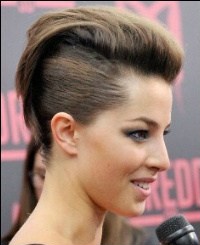
#### Search via image Let's load our previously stored image embedding; randomly sample image Document from it, then find top-1 nearest neighbour of each. ```python from docarray import DocumentArray img_da = DocumentArray.load_binary('ttl-image') for d in img_da.sample(10): print(da.find(d.embedding, limit=1)[0].text) ``` #### Showcase Fun time! Note, unlike the previous example, here the input is an image, the sentence is the output. All sentences come from the book "Pride and Prejudice".

Visualize of the image sprite of Totally looks like dataset

Visualize of the image sprite of Totally looks like dataset

Visualize of the image sprite of Totally looks like dataset

Visualize of the image sprite of Totally looks like dataset

Visualize of the image sprite of Totally looks like dataset

Besides, there was truth in his looks Gardiner smiled what’s his name By tea time, however, the dose had been enough, and Mr You do not look well

Visualize of the image sprite of Totally looks like dataset

Visualize of the image sprite of Totally looks like dataset

Visualize of the image sprite of Totally looks like dataset

Visualize of the image sprite of Totally looks like dataset

Visualize of the image sprite of Totally looks like dataset

β€œA gamester!” she cried If you mention my name at the Bell, you will be attended to Never mind Miss Lizzy’s hair Elizabeth will soon be the wife of Mr I saw them the night before last
Intrigued? That's only scratching the surface of what CLIP-as-service is capable of. [Read our docs to learn more](https://clip-as-service.jina.ai). ## Support - Use [Discussions](https://github.com/jina-ai/clip-as-service/discussions) to talk about your use cases, questions, and support queries. - Join our [Slack community](https://slack.jina.ai) and chat with other community members about ideas. - Join our [Engineering All Hands](https://youtube.com/playlist?list=PL3UBBWOUVhFYRUa_gpYYKBqEAkO4sxmne) meet-up to discuss your use case and learn Jina's new features. - **When?** The second Tuesday of every month - **Where?** Zoom ([see our public events calendar](https://calendar.google.com/calendar/embed?src=c_1t5ogfp2d45v8fit981j08mcm4%40group.calendar.google.com&ctz=Europe%2FBerlin)/[.ical](https://calendar.google.com/calendar/ical/c_1t5ogfp2d45v8fit981j08mcm4%40group.calendar.google.com/public/basic.ics)) and [live stream on YouTube](https://youtube.com/c/jina-ai) - Subscribe to the latest video tutorials on our [YouTube channel](https://youtube.com/c/jina-ai) ## Join Us CLIP-as-service is backed by [Jina AI](https://jina.ai) and licensed under [Apache-2.0](./LICENSE). [We are actively hiring](https://jobs.jina.ai) AI engineers, solution engineers to build the next neural search ecosystem in open-source.