






TreeCoreL2 data flow graph
* 64-bits single-issue, five-stage pipeline riscv core * written by chisel3 * support RISCV integer(I) instruction set * supports machine mode privilege levels * supports AXI4 inst and mem acess * supports dynamics branch prediction * can boot rt-thread * develop under all open-source toolchain asdafafaadsfsafa IMG!!!!!!!!!!!!!!! ### Develop Schedule Now, the develop schedule of TreeCore is recorded by the **Tencent Document**. You can click below link to view it: 1. TreeCoreL1&2(**frozen**): [link](https://docs.qq.com/sheet/DY3lORW5Pa3pLRFpT?newPad=1&newPadType=clone&tab=BB08J2) ### Memory Map To compatible with ysyx3 SoC test, TreeCoreL2 have below memory map range: | Range | Description | | ------------------------- | --------------------------------------------------- | | 0x0000_0000 - 0x01ff_ffff | reserve | | 0x0200_0000 - 0x0200_ffff | clint | | 0x0201_0000 - 0x0fff_ffff | reserve | | 0x1000_0000 - 0x1000_0fff | uart16550 | | 0x1000_1000 - 0x1000_1fff | spi controller | | 0x1000_2000 - 0x2fff_ffff | reserve | | 0x3000_0000 - 0x3fff_ffff | spi flash xip mode | | 0x4000_0000 - 0x7fff_ffff | chiplink | | 0x8000_0000 - 0x8xxx_xxxx | mem | #### Configuration ### Enviroment Setup > NOTE: All of the components and tools are installed under linux operation system. To gurantee the compatibility and stability, I **STRONGLY** recommend using `ubuntu 20.04 LTS`. `ubuntu 18.04` and `ubuntu 16.04` is not supported official. If you're new to TreeCore project, we suggest you start with the install section. Remeber you **ONLY** need to install the below libraries once. Now all of operations(config, compile, test) have been automated by Makefile. You can visit [unit-test.yml](.github/workflows/unit-test.yml) to get more information. > NOTE: In order to download and configure all libraries successful, you **NEED** to be able to visit github.com and gitee.com. First, you need to install verilator, mill, difftest, abstract-machine and other dependency libraries: ```bash $ git clone https://github.com/microdynamics-cpu/tree-core-cpu.git $ cd tree-core-cpu/rtl $ chmod +x scripts/install.sh $ make install ``` Then, download and configuare all components from the github and gitee: ```bash $ chmod +x scripts/setup.sh $ make setup ``` After that, you need to add the `NEMU_HOME` and `NOOP_HOME` environment variables to your shell environment config file: ```bash $ echo export NEMU_HOME=$(pwd)/dependency/NEMU >> ~/.bashrc # according to shell type your system uses $ echo export NOOP_HOME=$(pwd)/dependency >> ~/.bashrc $ source ~/.bashrc ``` Running the ISA test don't need 8G memory, so you can reconfigure the `memory size` to reduce the simulation memory usage. Achieving that, you need to type `make menuconfig` as follow: ```bash $ cd dependency/NEMU $ make menuconfig ``` > NOTE: if you encounter `Your display is too small to run Menuconfig!` error, you need to resize the terminal to match need as the console output: `It must be at least 19 lines by 80 columns`.
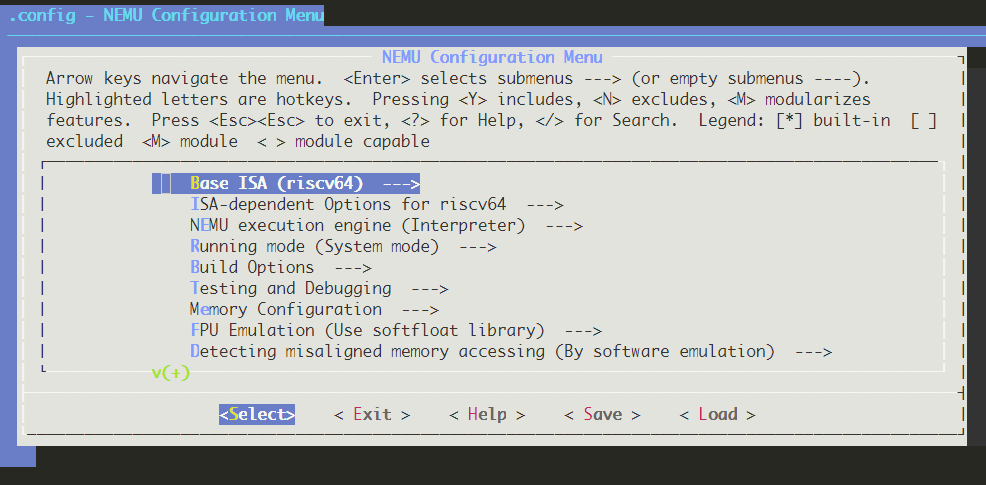
The main configuration menu
Usually, 256MB memory address space is enough for simulation. You need to switch into `[Memory - Configuration]` menu and change `[Memory size]` value into `0x10000000` manually as follow picture shows. It can adjust difftest's simulation memory size from 8G to 256MB. > NOTE: In fact, the `Memory size` has been modified to `0x10000000` in `make setup` phase. Now, you only need to confirm it once more time.
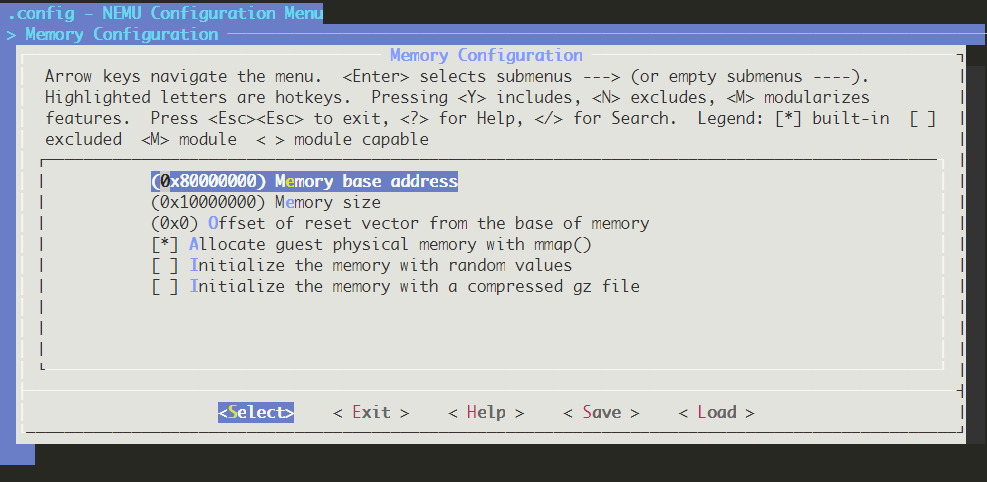
The memory address size menu
Last, remember to type `Save` button in bottom menu to save the `.config` file. Then, type `Exit` to exit the menuconfig. ### Compile runtime libraries If you already run above commands correctly, you can compile runtime libraries as follow: ```bash $ cd ../../ $ make nemuBuild $ make dramsim3Build ``` ### Compile testcases Two type of ISA testcases set are used: `riscv test` and `cpu test`. ```bash $ make riscvTestBuild $ make cpuTestBuild $ make amTestBuild ``` > NOTE: you need enough memory to compile the application binaries. Generally speaking, you need at least 4GB of memory. ### Recursive test After you modify the processor design, you need to run recursive unit test to gurantee the modification is correct. ```bash $ make CHIP_TARGET=tc_l2 unit-test ``` The unit tests display the progress, testcase name, PASS or FAIL and ipc value.
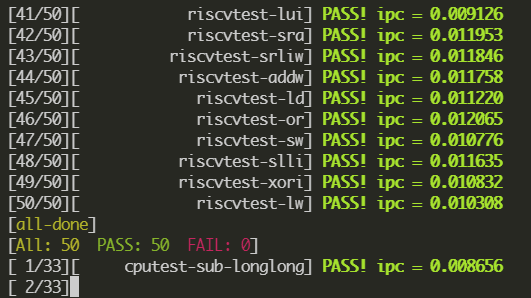
TreeCoreL2's unit test result
Running unit test need to download `mill` from github.com. If you cannot access the github correctly, you need to type below commands to configure `mill` manually: ```bash $ # download '0.9.9-assembly' from https://github.com/com-lihaoyi/mill/releases/download/0.9.9/0.9.9-assembly manually. $ cp 0.9.9-assembly ~/.cache/mill/download $ mv ~/.cache/mill/download/0.9.9-assembly ~/.cache/mill/download/0.9.9 # change name $ chmod +x ~/.cache/mill/download/0.9.9 ``` ### Software test Software test, also called application test, can provide integrated test for interrupt. You need to recompile the amtest with specific `AM_TARGET` when you want to change the software target. ```bash # the 'AM_TARGET' option value(default h): # h => "hello" # H => "display this help message" # i => "interrupt/yield test" # d => "scan devices" # m => "multiprocessor test" # t => "real-time clock test" # k => "readkey test" # v => "display test" # a => "audio test" # p => "x86 virtual memory test" $ make amTestBuild AM_TARGET=i $ make amTest ``` ### Benchmark test First, you need to compile the benchmark programs. ```bash $ make coremarkTestBuild $ make dhrystoneTestBuild $ make microbenchTestBuild ``` ```bash $ make coremakrTest $ make dhrystoneTest $ make microbenchTest ``` ### SoC test SoC test is based on ysyxSoC project. SoC test provides more accurate simulation environment for processor design. ```bash $ make CHIP_TARGET=tc_l2 socBuild # SOC_APP_TYPE: flash, loader # SOC_APP_NAME: hello, memtest, rtthread $ make CHIP_TARGET=tc_l2 SOC_APP_TYPE=flash SOC_APP_NAME=hello socTest ``` ### Add and Customize new project ```bash # First modify the `CHIP_TARGET` in Makefile to your custom name which create folder. $ make template ``` ## TreeCoreL3(_under development_) ## TreeCoreL4(_under development_) * 64-bits five-stage pipeline riscv core ## Plan ## Update ## License TreeCore CPU's codes are release under the [GPL-3.0 License](./LICENSE) and compliance with other open source agreements. You can find all 3rd party libraries licenses in [3RD_PARTY.md](./3RD_PARTY.md). ## Acknowledgement 1. [oscpu-framework](https://github.com/OSCPU/oscpu-framework) 2. [NutShell](https://github.com/OSCPU/NutShell) ## Reference