# spring-security-login-demo
**Repository Path**: RingoTangs/spring-security-login-demo
## Basic Information
- **Project Name**: spring-security-login-demo
- **Description**: spring-security登录案例
- **Primary Language**: Unknown
- **License**: Not specified
- **Default Branch**: master
- **Homepage**: None
- **GVP Project**: No
## Statistics
- **Stars**: 1
- **Forks**: 0
- **Created**: 2021-06-25
- **Last Updated**: 2021-12-27
## Categories & Tags
**Categories**: Uncategorized
**Tags**: None
## README
**Spring Security 实现短信验证码和图片验证码登录**。
**参考文章**:
- [添加图片验证码](https://www.cnblogs.com/zyly/p/12287310.html)
- [短信验证码校验逻辑](https://www.cnblogs.com/zyly/p/12287813.html)
- [Spring Security中UsernameNotFoundException的解决方案](https://www.it610.com/article/1280916147809566720.htm)
- [Spring Security实现自动登录](http://www.javaboy.org/2020/0429/rememberme-advance.html)
- [Spring Security 过滤器链](https://blog.csdn.net/zhong_csdn/article/details/79447185)
# 1. 实现原理
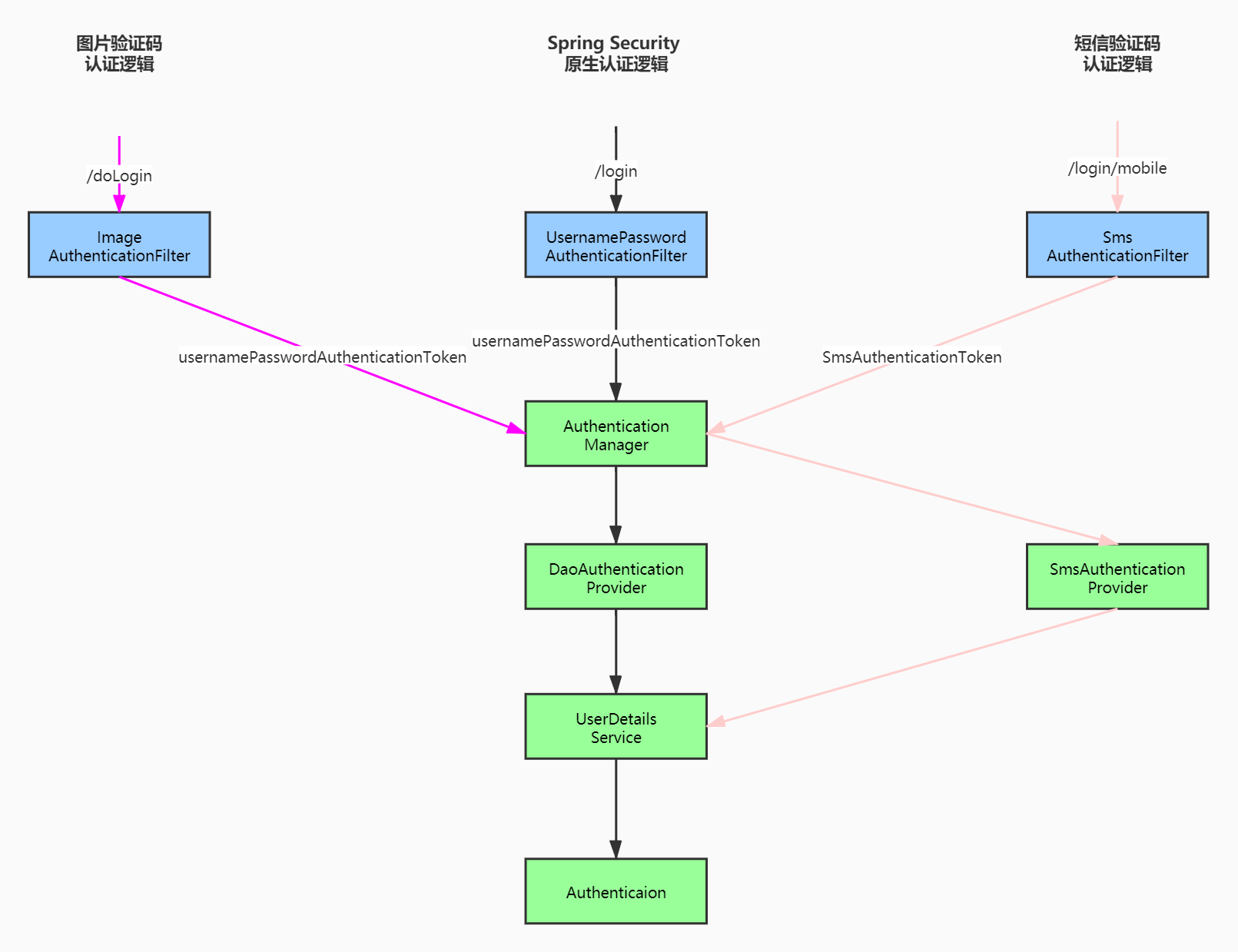
- `ImageAuthenticationFilter、SmsAuthenticationFilter` 在这两个过滤器分别校验了图片验证码和短信验证码。
- 由于`Spring Security` 默认支持的是表单登录,项目中采用的是 `InputStream` 的形式来读取 POST 请求中的 JSON,所以就直接在这里校验了(流只能获取一次,如果在这两个过滤前再加验证码过滤器,使用流获读JSON,就会报错)。
- 图片验证码只需要自定义`ImageAuthenticaionFilter`即可,然后将 filter 加入到 Spring Security 过滤器链中。
- 短信验证码需要自定义`SmsAuthenticationFilter、SmsAuthenticationToken、SmsAuthenticationProvider`,然后将 filter 和 provider 加入到 Spring Security 过滤器链中。
> **自定义的 AuthenticationFilter 继承自 AbstractAuthenticationProcessingFilter**:
>
> - filter 必须要设置 AuthenticationManager 属性;
> - requiresAuthenticationRequestMatcher 中保存 filter 拦截的请求路径;
> - 当校验通过时就会进入到 AuthenticationSuccessHandler 中;
> - 校验失败时就会进入到 AuthenticationFailureHandler。
>
> 更多信息请看 AbstractAuthenticationProcessingFilter 源码注释。
# 2. 验证码实现
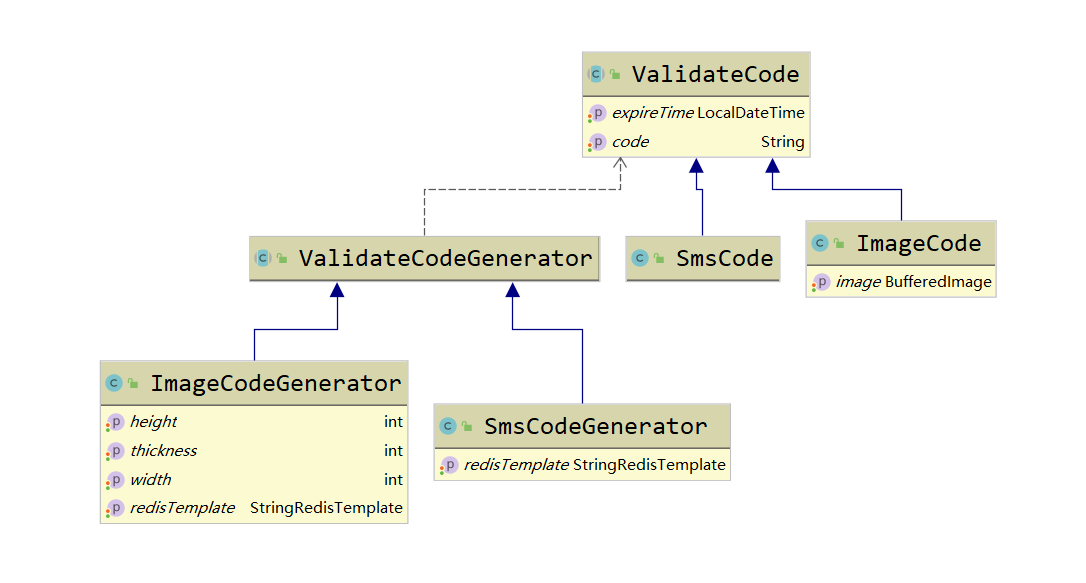 - `ValidateCode`: 抽象方法,保存【验证码】和 【过期时间】。
- `SmsCode`: 短信验证码,直接继承 ValidateCode。
- `ImageCode`: 图片验证码,继承 ValidateCode,并且添加了 BufferedImage 属性,用于生成图片。
- `ValidateCodeGenerator`: 抽象方法,依赖了 ValidateCode,有验证码 生成逻辑和存储逻辑(项目中使用 Redis 存储)。
> 注意:图片验证码存储的 key 不是使用的用户名,而是【验证码类型 + "_" + 本次获取验证码的随机字符串(id)】。短信验证码使用【验证码类型 + "__" + 手机号】作为key来存储。
>
> - 前端在获取图片验证码之前要生成一个随机字符串(唯一性),代表本次获取图片验证码的唯一标识。然后在请求带着这个字符串(项目中用参数 id 来标识)去请求获取图片验证码。
> - 当校验图片验证码时,前端需要将这个 id 一起传过来,用于从 Redis 中获取存储的图片验证码。
```java
/**
* @param id 前端传过来的随机字符串(用于生成key)
* @param type 枚举类型, 表示验证码类型
* @return 存在Redis中的key。如: sms_code_qwead、image_code_asdqwe
*/
public static String keyGenerator(String id, ValidateCodeType type) {
return type.value + "_" + id;
}
```
# 3. 如何使用?
## 3.1. 开发环境
- *JDK 1.8*
- *MySQL 5.7*。
- *Redis 6.0.4*。
- *Idea 2019.3.3 必须安装 lombok*。
- *spring boot 2.4.1*。
## 3.1. 下载配置
```properties
# 1、下载项目
git clone https://github.com/RingoTangs/spring-security-login-demo.git
# 2、修改配置文件。idea 需要安装 lombok
# 只需要修改 datasource 和 reids 的配置
# 3、图片验证码可以手动开启和关闭(默认开启)
validate.code.image.enabled=true
# 4、创建数据库表(查看项目中的user.sql文件)
# 5、启动项目访问 /JsonLogin.html 即可。
```
> 注意:
>
> - 存储在数据库中的密码需要是密文,项目中使用的是 `BCryptPasswordEncoder`。
> - 准备数据库测试数据之前需要先将明文编码。
```java
// 本项目 SecurityConfig 中注入了该组件
@Bean
public PasswordEncoder passwordEncoder() {
return new BCryptPasswordEncoder();
}
// 在测试类中调用 passwordEncoder.encode("123") 方法就可以生成密文了。
```
## 3.2. 接口描述
**接口地址**:
**(1)/smsCode**:获取短信验证码。
| 接口参数 | 描述 |
| -------- | ------------------------------------------- |
| mobile | 手机号。必填。 |
| expireIn | 验证码过期时间(单位: 秒)。选填。默认60s。 |
| length | 验证码的位数(长度)。选填。默认6位。 |
> **注意**:
>
> 项目中短信验证码并没有接入通信运营商,验证码信息会以 JSON 的形式返回,请注意查看 ~
**(2)/imageCode**:获取图片验证码。
例如:`
- `ValidateCode`: 抽象方法,保存【验证码】和 【过期时间】。
- `SmsCode`: 短信验证码,直接继承 ValidateCode。
- `ImageCode`: 图片验证码,继承 ValidateCode,并且添加了 BufferedImage 属性,用于生成图片。
- `ValidateCodeGenerator`: 抽象方法,依赖了 ValidateCode,有验证码 生成逻辑和存储逻辑(项目中使用 Redis 存储)。
> 注意:图片验证码存储的 key 不是使用的用户名,而是【验证码类型 + "_" + 本次获取验证码的随机字符串(id)】。短信验证码使用【验证码类型 + "__" + 手机号】作为key来存储。
>
> - 前端在获取图片验证码之前要生成一个随机字符串(唯一性),代表本次获取图片验证码的唯一标识。然后在请求带着这个字符串(项目中用参数 id 来标识)去请求获取图片验证码。
> - 当校验图片验证码时,前端需要将这个 id 一起传过来,用于从 Redis 中获取存储的图片验证码。
```java
/**
* @param id 前端传过来的随机字符串(用于生成key)
* @param type 枚举类型, 表示验证码类型
* @return 存在Redis中的key。如: sms_code_qwead、image_code_asdqwe
*/
public static String keyGenerator(String id, ValidateCodeType type) {
return type.value + "_" + id;
}
```
# 3. 如何使用?
## 3.1. 开发环境
- *JDK 1.8*
- *MySQL 5.7*。
- *Redis 6.0.4*。
- *Idea 2019.3.3 必须安装 lombok*。
- *spring boot 2.4.1*。
## 3.1. 下载配置
```properties
# 1、下载项目
git clone https://github.com/RingoTangs/spring-security-login-demo.git
# 2、修改配置文件。idea 需要安装 lombok
# 只需要修改 datasource 和 reids 的配置
# 3、图片验证码可以手动开启和关闭(默认开启)
validate.code.image.enabled=true
# 4、创建数据库表(查看项目中的user.sql文件)
# 5、启动项目访问 /JsonLogin.html 即可。
```
> 注意:
>
> - 存储在数据库中的密码需要是密文,项目中使用的是 `BCryptPasswordEncoder`。
> - 准备数据库测试数据之前需要先将明文编码。
```java
// 本项目 SecurityConfig 中注入了该组件
@Bean
public PasswordEncoder passwordEncoder() {
return new BCryptPasswordEncoder();
}
// 在测试类中调用 passwordEncoder.encode("123") 方法就可以生成密文了。
```
## 3.2. 接口描述
**接口地址**:
**(1)/smsCode**:获取短信验证码。
| 接口参数 | 描述 |
| -------- | ------------------------------------------- |
| mobile | 手机号。必填。 |
| expireIn | 验证码过期时间(单位: 秒)。选填。默认60s。 |
| length | 验证码的位数(长度)。选填。默认6位。 |
> **注意**:
>
> 项目中短信验证码并没有接入通信运营商,验证码信息会以 JSON 的形式返回,请注意查看 ~
**(2)/imageCode**:获取图片验证码。
例如:` ` 即可获取验证码。
| 接口参数 | 描述 |
| -------- | ------------------------------------ |
| id | 本次获取图片验证码的唯一标识。必填。 |
| expireIn | 同上。 |
| length | 同上。 |
**(3)/doLogin**:使用 username、password登录的地址。
详细信息请看 `ImageAuthenticationFilter`。
| 接口参数 | 描述 |
| --------- | ------------------------------------------------------------ |
| username | 用户名。必填。如不填写,按空字符串匹配。 |
| password | 密码。必填。如不填写,按空字符串匹配。 |
| id | 本次获取图片验证码的唯一标识。必填。如不填写,按空字符串匹配。 |
| imageCode | 图片验证码。必填。如不填写,按空字符串匹配。 |
**(4)/login/mobile**:使用手机号登录的地址。
详细信息请看 `SmsAuthenticationFilter`。
| 接口参数 | 描述 |
| -------- | -------------------------------------------- |
| mobile | 手机号。必填。如不填写,按空字符串匹配。 |
| smsCode | 短信验证码。必填。如不填写,按空字符串匹配。 |
**(5)/JsonLogin.html**:H5页面,用于测试登录。也可以用 Postman 等工具测试。
**(6)/logout**:注销本次登录。
# 4. 更新记录
## 5月14日更新
**5.14日更新:配置多个UserDetailsService**?
先看原来的UserDetailsService实现类:
```java
@Service
public class UserService implements UserDetailsService {
@Resource
private UserMapper userMapper;
/**
* 该方法在 {@link SmsAuthenticationProvider} 中被调用。
*/
@Override
public UserDetails loadUserByUsername(String username) throws UsernameNotFoundException {
// 1: 先按照 username 查询, 用户名查不到再按照 mobile(手机号) 查
QueryWrapper wrapper = new QueryWrapper<>();
wrapper.eq("mobile", username).or().eq("username", username);
User user = userMapper.selectOne(wrapper);
// 2: username和mobile都查不到直接抛出异常
if (user == null) {
throw new UsernameNotFoundException("用户不存在, 请先注册~");
}
// 4: 查到用户信息
// 设置角色 user.setAuthorities(List<>) ....
return user;
}
}
```
`UserDetailsService` 是在 `AuthenticationProvider` 中被调用的,目的就是去查看用户是否存在。显然我们这里发的SQL是 `select * from t_user where username = ? or mobile = ?`。众所周知,SQL中使用 OR 会影响MySQL的性能,所以第一个解决办法是再写一个UserDetailsService。
> - `UserService` 只用于查询用户名。
> - `UserMobileService` 只用户查询手机号。
>
> 以上两个 UserDetailsService 更改业务逻辑非常简单,这里就不再展示了~
**第一步**:`DaoAuthenticationProvider` 调用 `UserService` 用于查询用户名是否存在。但是源码中并不知道我们定义了新的 UserDetailsService。
```java
// DaoAuthenticationProvider 源码
public class DaoAuthenticationProvider extends AbstractUserDetailsAuthenticationProvider {
// 这里定义的是接口
private UserDetailsService userDetailsService;
// ....
// 以下方法中直接调用 userDetailsService.loadUserByUsername(String username)
}
```
因此,需要重新设置 `DaoAuthenticaionProvider`。配置如下:
```java
// 项目中Spring Security的主配置类
@Configuration
public class SecurityConfig extends WebSecurityConfigurerAdapter {
/**
* 重新设置 DaoAuthenticationProvider
*
* DaoAuthenticationProvider 配置 UsernameNotFoundException 向上抛出。
*/
@Bean
public DaoAuthenticationProvider daoAuthenticationProvider() {
DaoAuthenticationProvider provider = new DaoAuthenticationProvider();
provider.setUserDetailsService(userService);
provider.setHideUserNotFoundExceptions(false);
provider.setPasswordEncoder(passwordEncoder());
return provider;
}
/**
* Spring Security 原生的 AuthenticationProvider 需要在这里配置才会生效!
*/
@Override
protected void configure(AuthenticationManagerBuilder auth) throws Exception {
// 添加自定义的 AuthenticationProvider
auth.authenticationProvider(daoAuthenticationProvider());
}
}
```
**第二步**:我们自定义的 `SmsAuthenticationProvider` 也不知道 `UserMobileService` 的存在,也需要配置。
```java
// 项目中短信验证码的配置类
@Configuration
public class SmsAuthenticationConfig extends SecurityConfigurerAdapter {
// 注入 UserMobileService
@Resource
private UserMobileService userMobileService;
// 配置 AuthenticationProvider 需要有 UserDetailsService。
@Bean
public SmsAuthenticationProvider smsAuthenticationProvider() {
SmsAuthenticationProvider provider = new SmsAuthenticationProvider();
// 注意:这里添加的是 userMobileService
provider.setUserDetailsService(userMobileService);
return provider;
}
// 其他代码可以在项目中看到
// 将 SmsAuthenticationProvider 加入到 Spring Security 中 省略
// .....
}
```
OK大功告成,定义多个 UserDeatilsService 搞定 ~
> 但是,能不能就定义一个 UserDetailsService 就解决问题呢?
>
> 答案是肯定的,那就在 UserSevice 这个实现类中**使用正则表达式**即可~
>
> 项目本次更新用的也是该方法!
```java
@Slf4j
@Service
public class UserService implements UserDetailsService {
@Resource
private UserMapper userMapper;
/**
* 该方法在 {@link SmsAuthenticationProvider} 中被调用。
*/
@Override
public UserDetails loadUserByUsername(String username) throws UsernameNotFoundException {
QueryWrapper wrapper = new QueryWrapper<>();
if (ReUtil.isMatch(MOBILE_REGEX, username)) {
// 参数 username 是手机号
log.info("手机号登录...UserService");
wrapper.eq("mobile", username);
} else {
// 参数 username 是用户账号
log.info("用户名登录...UserService");
wrapper.eq("username", username);
}
// 1: 手机号登录就去查手机号,用户名登录就去查用户名~ 只要能确定用户是否存在即可
// 用户名 + 密码 登录模式 <==> username/mobile + password 模式
// 即: 前端用户名的输出框, 既可以填 username 也可以填 mobile
User user = userMapper.selectOne(wrapper);
// 2: username和mobile都查不到直接抛出异常
if (user == null) {
throw new UsernameNotFoundException("用户不存在, 请先注册~");
}
// 4: 查到用户信息
// 设置角色 user.setAuthorities(List<>) ....
return user;
}
}
```
## 5月16日更新
**5月16日更新:remember-me功能**。
Spring Security的记住我功能包含两方面:
1. 登录校验成功后,token分别存储到数据库和浏览器的cookie中(RememberMeServices)。
2. 再次登录,不用输入密码,需要进行校验(RememberMeAuthenticationFilter)。
**第一步**:如何登录?
```java
// AbstractAuthenticationProcessingFilter 源码
public abstract class AbstractAuthenticationProcessingFilter {
// 默认的RememberMeServices
// 需要我们重新配置
private RememberMeServices rememberMeServices = new NullRememberMeServices();
// 用户名密码校验成功之后会调用这个方法
protected void successfulAuthentication(HttpServletRequest request, HttpServletResponse response, FilterChain chain,
Authentication authResult) throws IOException, ServletException {
SecurityContextHolder.getContext().setAuthentication(authResult);
if (this.logger.isDebugEnabled()) {
this.logger.debug(LogMessage.format("Set SecurityContextHolder to %s", authResult));
}
// 登录时 remrember-me 的逻辑
this.rememberMeServices.loginSuccess(request, response, authResult);
if (this.eventPublisher != null) {
this.eventPublisher.publishEvent(new InteractiveAuthenticationSuccessEvent(authResult, this.getClass()));
}
this.successHandler.onAuthenticationSuccess(request, response, authResult);
}
}
```
由此可见,`SmsAuthenticationFilter、ImageAuthenticationFilter` 都需要设置 RememberMeServices。
详细配置请看 `RememberMeConfig`。
数据库表请看 `persistent_logins.sql`。
> **注意**:
>
> - 使用记住我登录功能,前端必须传remember-me参数。
> - 由于remember-me参数的获取是直接从 request 中获取,所以post请求中的JSON要转换成表单登录的形式。
```java
// AbstractRememberMeServices#rememberMeRequested(HttpServletRequest, String) 源码
String paramValue = request.getParameter(parameter);
if (paramValue != null) {
if (paramValue.equalsIgnoreCase("true") || paramValue.equalsIgnoreCase("on")
|| paramValue.equalsIgnoreCase("yes") || paramValue.equals("1")) {
return true;
}
}
```
```javascript
// 前端可以这样传数据。
postRequest('http://localhost:8081/login/mobile?' +
'spring-security-remember-me=' + this.isRemember2, {
'mobile': this.mobile,
'smsCode': this.smsCode,
})
```
**第二步**:关闭浏览器再次登录的校验。
```java
// RememberMeAuthenticationFilter 源码
public class RememberMeAuthenticationFilter {
private RememberMeServices rememberMeServices;
public void doFilter() {
// RememberMeAuthenticationFilter 中需要使用我们自己的 RememberMeServices
Authentication rememberMeAuth
= this.rememberMeServices.autoLogin(request, response);
}
}
```
**配置如下**:
```java
// SecurityConfig 中的配置
@Override
protected void configure(HttpSecurity http) throws Exception {
http
// 开启 remember-me 功能
.rememberMe()
// 会在RememberMeAuthenticationFilter中加入rememberMeServices
.rememberMeServices(rememberMeServices)
...
}
```
**第三步**:数据库的过期登录信息需要自动删除,配置定时任务即可。
详细请看 `RememberMeTask`。
## 6月25日更新
**6月25日更新:Session会话管理,前一次登录自动失效**。
**第一步**:重写 `User#equals() HashCode()`方法,因为会话管理使用的是Map,使用User作为key来存储。
```java
public class User implements UserDetails {
// 属性省略
// ....
@Override
public boolean equals(Object o) {
if (this == o) return true;
if (!(o instanceof User)) return false;
User user = (User) o;
return getUsername() != null ? getUsername().equals(user.getUsername()) : user.getUsername() == null;
}
@Override
public int hashCode() {
return getUsername() != null ? getUsername().hashCode() : 0;
}
// ...
// 实现的方法等省略
}
```
**第二步**:SecurityConfig中加入会话配置。
```java
@Override
protected void configure(HttpSecurity http) throws Exception {
http.sessionManagement()
.maximumSessions(1)
.expiredSessionStrategy(sessionInformationExpiredStrategy());
}
```
```java
public class SessionExpiredHandler implements SessionInformationExpiredStrategy {
@Override
public void onExpiredSessionDetected(SessionInformationExpiredEvent event) throws IOException {
HttpServletResponse response = event.getResponse();
response.setContentType("application/json;charset=UTF-8");
response.setStatus(HttpStatus.UNAUTHORIZED.value());
Map map = new HashMap<>();
map.put("code", 401);
map.put("message", "当前会话失效请重新登录~");
PrintWriter writer = response.getWriter();
try {
writer.write(new ObjectMapper().writeValueAsString(map));
writer.flush();
} finally {
if (writer != null)
writer.close();
}
}
}
```
第三步:自定义的 filter 中要加入 `SessionAuthenticationStrategy`。
```java
// ImageAuthenticationConfig 53行
// 获取的SessionAuthenticationStrategy实现类CompositeSessionAuthenticationStrategy
sessionStrategy(http.getSharedObject(SessionAuthenticationStrategy.class))
```
# 5. more ~
欢迎您对本项目提出宝贵的意见。如果本项目对您的学习有帮助,请收藏 ~
联系QQ:1466637477。
[更多学习笔记](https://github.com/RingoTangs/LearningNote)。
` 即可获取验证码。
| 接口参数 | 描述 |
| -------- | ------------------------------------ |
| id | 本次获取图片验证码的唯一标识。必填。 |
| expireIn | 同上。 |
| length | 同上。 |
**(3)/doLogin**:使用 username、password登录的地址。
详细信息请看 `ImageAuthenticationFilter`。
| 接口参数 | 描述 |
| --------- | ------------------------------------------------------------ |
| username | 用户名。必填。如不填写,按空字符串匹配。 |
| password | 密码。必填。如不填写,按空字符串匹配。 |
| id | 本次获取图片验证码的唯一标识。必填。如不填写,按空字符串匹配。 |
| imageCode | 图片验证码。必填。如不填写,按空字符串匹配。 |
**(4)/login/mobile**:使用手机号登录的地址。
详细信息请看 `SmsAuthenticationFilter`。
| 接口参数 | 描述 |
| -------- | -------------------------------------------- |
| mobile | 手机号。必填。如不填写,按空字符串匹配。 |
| smsCode | 短信验证码。必填。如不填写,按空字符串匹配。 |
**(5)/JsonLogin.html**:H5页面,用于测试登录。也可以用 Postman 等工具测试。
**(6)/logout**:注销本次登录。
# 4. 更新记录
## 5月14日更新
**5.14日更新:配置多个UserDetailsService**?
先看原来的UserDetailsService实现类:
```java
@Service
public class UserService implements UserDetailsService {
@Resource
private UserMapper userMapper;
/**
* 该方法在 {@link SmsAuthenticationProvider} 中被调用。
*/
@Override
public UserDetails loadUserByUsername(String username) throws UsernameNotFoundException {
// 1: 先按照 username 查询, 用户名查不到再按照 mobile(手机号) 查
QueryWrapper wrapper = new QueryWrapper<>();
wrapper.eq("mobile", username).or().eq("username", username);
User user = userMapper.selectOne(wrapper);
// 2: username和mobile都查不到直接抛出异常
if (user == null) {
throw new UsernameNotFoundException("用户不存在, 请先注册~");
}
// 4: 查到用户信息
// 设置角色 user.setAuthorities(List<>) ....
return user;
}
}
```
`UserDetailsService` 是在 `AuthenticationProvider` 中被调用的,目的就是去查看用户是否存在。显然我们这里发的SQL是 `select * from t_user where username = ? or mobile = ?`。众所周知,SQL中使用 OR 会影响MySQL的性能,所以第一个解决办法是再写一个UserDetailsService。
> - `UserService` 只用于查询用户名。
> - `UserMobileService` 只用户查询手机号。
>
> 以上两个 UserDetailsService 更改业务逻辑非常简单,这里就不再展示了~
**第一步**:`DaoAuthenticationProvider` 调用 `UserService` 用于查询用户名是否存在。但是源码中并不知道我们定义了新的 UserDetailsService。
```java
// DaoAuthenticationProvider 源码
public class DaoAuthenticationProvider extends AbstractUserDetailsAuthenticationProvider {
// 这里定义的是接口
private UserDetailsService userDetailsService;
// ....
// 以下方法中直接调用 userDetailsService.loadUserByUsername(String username)
}
```
因此,需要重新设置 `DaoAuthenticaionProvider`。配置如下:
```java
// 项目中Spring Security的主配置类
@Configuration
public class SecurityConfig extends WebSecurityConfigurerAdapter {
/**
* 重新设置 DaoAuthenticationProvider
*
* DaoAuthenticationProvider 配置 UsernameNotFoundException 向上抛出。
*/
@Bean
public DaoAuthenticationProvider daoAuthenticationProvider() {
DaoAuthenticationProvider provider = new DaoAuthenticationProvider();
provider.setUserDetailsService(userService);
provider.setHideUserNotFoundExceptions(false);
provider.setPasswordEncoder(passwordEncoder());
return provider;
}
/**
* Spring Security 原生的 AuthenticationProvider 需要在这里配置才会生效!
*/
@Override
protected void configure(AuthenticationManagerBuilder auth) throws Exception {
// 添加自定义的 AuthenticationProvider
auth.authenticationProvider(daoAuthenticationProvider());
}
}
```
**第二步**:我们自定义的 `SmsAuthenticationProvider` 也不知道 `UserMobileService` 的存在,也需要配置。
```java
// 项目中短信验证码的配置类
@Configuration
public class SmsAuthenticationConfig extends SecurityConfigurerAdapter {
// 注入 UserMobileService
@Resource
private UserMobileService userMobileService;
// 配置 AuthenticationProvider 需要有 UserDetailsService。
@Bean
public SmsAuthenticationProvider smsAuthenticationProvider() {
SmsAuthenticationProvider provider = new SmsAuthenticationProvider();
// 注意:这里添加的是 userMobileService
provider.setUserDetailsService(userMobileService);
return provider;
}
// 其他代码可以在项目中看到
// 将 SmsAuthenticationProvider 加入到 Spring Security 中 省略
// .....
}
```
OK大功告成,定义多个 UserDeatilsService 搞定 ~
> 但是,能不能就定义一个 UserDetailsService 就解决问题呢?
>
> 答案是肯定的,那就在 UserSevice 这个实现类中**使用正则表达式**即可~
>
> 项目本次更新用的也是该方法!
```java
@Slf4j
@Service
public class UserService implements UserDetailsService {
@Resource
private UserMapper userMapper;
/**
* 该方法在 {@link SmsAuthenticationProvider} 中被调用。
*/
@Override
public UserDetails loadUserByUsername(String username) throws UsernameNotFoundException {
QueryWrapper wrapper = new QueryWrapper<>();
if (ReUtil.isMatch(MOBILE_REGEX, username)) {
// 参数 username 是手机号
log.info("手机号登录...UserService");
wrapper.eq("mobile", username);
} else {
// 参数 username 是用户账号
log.info("用户名登录...UserService");
wrapper.eq("username", username);
}
// 1: 手机号登录就去查手机号,用户名登录就去查用户名~ 只要能确定用户是否存在即可
// 用户名 + 密码 登录模式 <==> username/mobile + password 模式
// 即: 前端用户名的输出框, 既可以填 username 也可以填 mobile
User user = userMapper.selectOne(wrapper);
// 2: username和mobile都查不到直接抛出异常
if (user == null) {
throw new UsernameNotFoundException("用户不存在, 请先注册~");
}
// 4: 查到用户信息
// 设置角色 user.setAuthorities(List<>) ....
return user;
}
}
```
## 5月16日更新
**5月16日更新:remember-me功能**。
Spring Security的记住我功能包含两方面:
1. 登录校验成功后,token分别存储到数据库和浏览器的cookie中(RememberMeServices)。
2. 再次登录,不用输入密码,需要进行校验(RememberMeAuthenticationFilter)。
**第一步**:如何登录?
```java
// AbstractAuthenticationProcessingFilter 源码
public abstract class AbstractAuthenticationProcessingFilter {
// 默认的RememberMeServices
// 需要我们重新配置
private RememberMeServices rememberMeServices = new NullRememberMeServices();
// 用户名密码校验成功之后会调用这个方法
protected void successfulAuthentication(HttpServletRequest request, HttpServletResponse response, FilterChain chain,
Authentication authResult) throws IOException, ServletException {
SecurityContextHolder.getContext().setAuthentication(authResult);
if (this.logger.isDebugEnabled()) {
this.logger.debug(LogMessage.format("Set SecurityContextHolder to %s", authResult));
}
// 登录时 remrember-me 的逻辑
this.rememberMeServices.loginSuccess(request, response, authResult);
if (this.eventPublisher != null) {
this.eventPublisher.publishEvent(new InteractiveAuthenticationSuccessEvent(authResult, this.getClass()));
}
this.successHandler.onAuthenticationSuccess(request, response, authResult);
}
}
```
由此可见,`SmsAuthenticationFilter、ImageAuthenticationFilter` 都需要设置 RememberMeServices。
详细配置请看 `RememberMeConfig`。
数据库表请看 `persistent_logins.sql`。
> **注意**:
>
> - 使用记住我登录功能,前端必须传remember-me参数。
> - 由于remember-me参数的获取是直接从 request 中获取,所以post请求中的JSON要转换成表单登录的形式。
```java
// AbstractRememberMeServices#rememberMeRequested(HttpServletRequest, String) 源码
String paramValue = request.getParameter(parameter);
if (paramValue != null) {
if (paramValue.equalsIgnoreCase("true") || paramValue.equalsIgnoreCase("on")
|| paramValue.equalsIgnoreCase("yes") || paramValue.equals("1")) {
return true;
}
}
```
```javascript
// 前端可以这样传数据。
postRequest('http://localhost:8081/login/mobile?' +
'spring-security-remember-me=' + this.isRemember2, {
'mobile': this.mobile,
'smsCode': this.smsCode,
})
```
**第二步**:关闭浏览器再次登录的校验。
```java
// RememberMeAuthenticationFilter 源码
public class RememberMeAuthenticationFilter {
private RememberMeServices rememberMeServices;
public void doFilter() {
// RememberMeAuthenticationFilter 中需要使用我们自己的 RememberMeServices
Authentication rememberMeAuth
= this.rememberMeServices.autoLogin(request, response);
}
}
```
**配置如下**:
```java
// SecurityConfig 中的配置
@Override
protected void configure(HttpSecurity http) throws Exception {
http
// 开启 remember-me 功能
.rememberMe()
// 会在RememberMeAuthenticationFilter中加入rememberMeServices
.rememberMeServices(rememberMeServices)
...
}
```
**第三步**:数据库的过期登录信息需要自动删除,配置定时任务即可。
详细请看 `RememberMeTask`。
## 6月25日更新
**6月25日更新:Session会话管理,前一次登录自动失效**。
**第一步**:重写 `User#equals() HashCode()`方法,因为会话管理使用的是Map,使用User作为key来存储。
```java
public class User implements UserDetails {
// 属性省略
// ....
@Override
public boolean equals(Object o) {
if (this == o) return true;
if (!(o instanceof User)) return false;
User user = (User) o;
return getUsername() != null ? getUsername().equals(user.getUsername()) : user.getUsername() == null;
}
@Override
public int hashCode() {
return getUsername() != null ? getUsername().hashCode() : 0;
}
// ...
// 实现的方法等省略
}
```
**第二步**:SecurityConfig中加入会话配置。
```java
@Override
protected void configure(HttpSecurity http) throws Exception {
http.sessionManagement()
.maximumSessions(1)
.expiredSessionStrategy(sessionInformationExpiredStrategy());
}
```
```java
public class SessionExpiredHandler implements SessionInformationExpiredStrategy {
@Override
public void onExpiredSessionDetected(SessionInformationExpiredEvent event) throws IOException {
HttpServletResponse response = event.getResponse();
response.setContentType("application/json;charset=UTF-8");
response.setStatus(HttpStatus.UNAUTHORIZED.value());
Map map = new HashMap<>();
map.put("code", 401);
map.put("message", "当前会话失效请重新登录~");
PrintWriter writer = response.getWriter();
try {
writer.write(new ObjectMapper().writeValueAsString(map));
writer.flush();
} finally {
if (writer != null)
writer.close();
}
}
}
```
第三步:自定义的 filter 中要加入 `SessionAuthenticationStrategy`。
```java
// ImageAuthenticationConfig 53行
// 获取的SessionAuthenticationStrategy实现类CompositeSessionAuthenticationStrategy
sessionStrategy(http.getSharedObject(SessionAuthenticationStrategy.class))
```
# 5. more ~
欢迎您对本项目提出宝贵的意见。如果本项目对您的学习有帮助,请收藏 ~
联系QQ:1466637477。
[更多学习笔记](https://github.com/RingoTangs/LearningNote)。