# CodeMerge
**Repository Path**: ShareEveryDay/UnifiedGateway
## Basic Information
- **Project Name**: CodeMerge
- **Description**: No description available
- **Primary Language**: Java
- **License**: Apache-2.0
- **Default Branch**: dev-oracle
- **Homepage**: None
- **GVP Project**: No
## Statistics
- **Stars**: 0
- **Forks**: 0
- **Created**: 2020-06-17
- **Last Updated**: 2020-12-19
## Categories & Tags
**Categories**: Uncategorized
**Tags**: None
## README
# open-capacity-platform 微服务能力开放平台
简称ocp是基于layui+springcloud的企业级微服务框架(用户权限管理,配置中心管理,应用管理,....),其核心的设计目标是分离前后端,快速开发部署,学习简单,功能强大,提供快速接入核心接口能力,其目标是帮助企业搭建一套类似百度能力开放平台的框架;
- 基于layui前后端分离的企业级微服务架构
- 兼容spring cloud netflix & spring cloud alibaba
- 优化Spring Security内部实现,实现API调用的统一出口和权限认证授权中心
- 提供完善的企业微服务流量监控,日志监控能力
- 提供完善的压力测试方案
- 提供完善的灰度发布方案
- 提供完善的微服务部署方案
# 技术介绍
 |
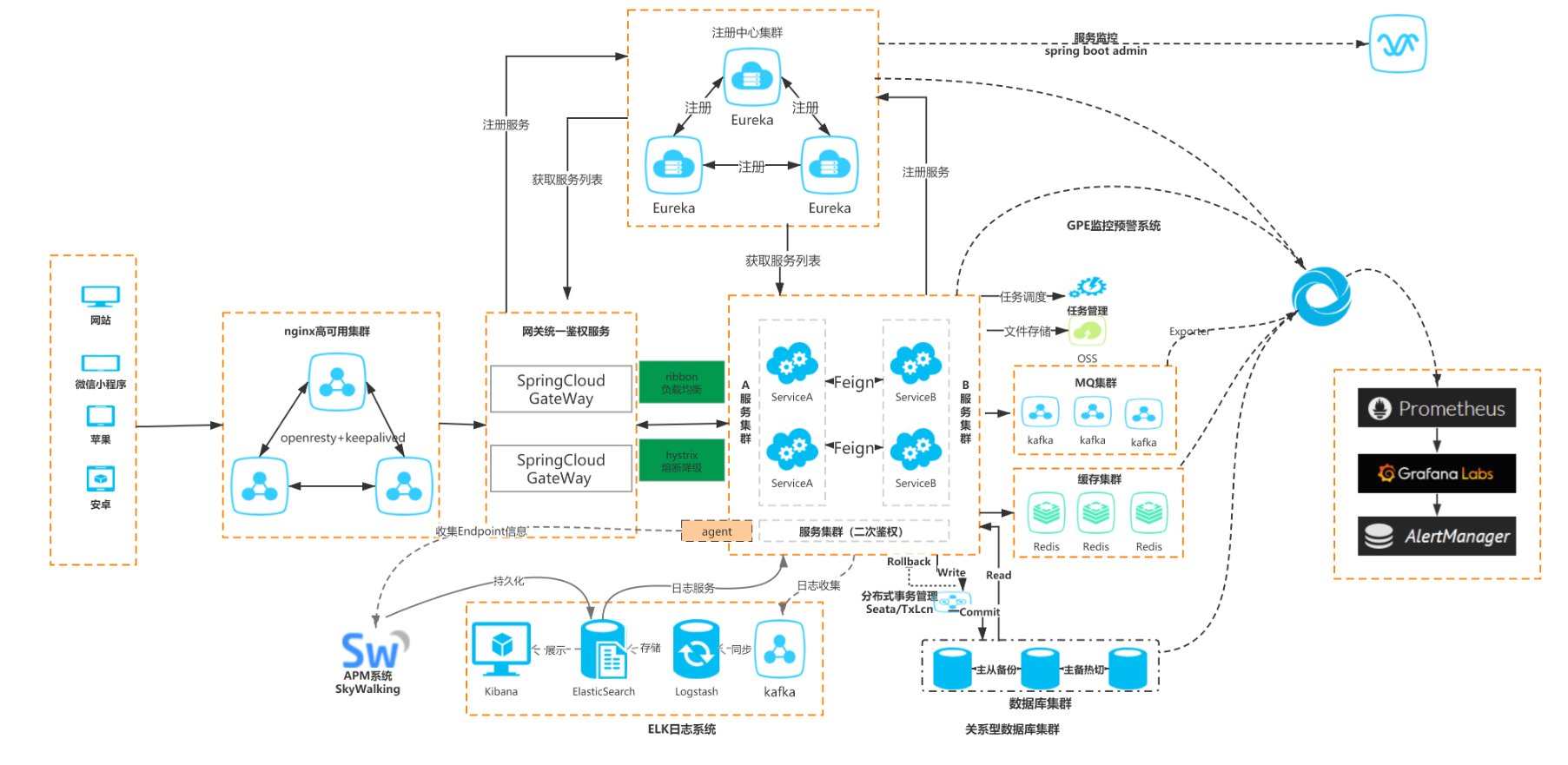 |
# **功能介绍**
- 统一安全认证中心
- 支持oauth的四种模式登录
- 支持用户名、密码加图形验证码登录
- 支持第三方系统单点登录
- 微服务架构基础支撑
- 服务注册发现、路由与负载均衡
- 服务熔断与限流
- 统一配置中心
- 统一日志中心
- 分布式锁
- 分布式任务调度器
- 系统服务监控中心
- 服务调用链监控
- 应用吞吐量监控
- 服务降级、熔断监控
- 微服务服务监控
- 能力开放平台业务支撑
- 网关基于应用方式API接口隔离
- 网关基于应用限制调用次数
- 下游服务基于RBAC权限管理,实现细粒度控制
- 代码生成器中心
- 网关聚合服务内部Swagger接口文档
- 统一跨域处理
- 统一异常处理
- docker容器化部署
- 基于rancher的容器化部署
- 基于docker的elk日志监控
- 基于docker的服务动态扩容
## 工程结构
> open-capacity-platform
>
> > common -- 基础公共模块
> >
> > > common-spring-starter --工具类、常量、基础配置、基础基类封装
> > >
> > > db-spring-boot-starter -- 关系型数据库逻辑及依赖封装
> > >
> > > redis-spring-boot-starter -- 非关系型数据库逻辑及依赖封装
> > >
> > > uaa-server-spring-boot-starter -- 认证服务器封装
> > >
> > > uaa-client-spring-boot-starter -- 资源服务器封装
> > >
> > > log-spring-boot-starter -- 日志封装
> > >
> > > rabbitmq-spring-boot-starter -- mq封装
> > >
> > > ribbon-spring-boot-starter -- 自定义负载均衡策略
> > >
> > > swagger-spring-boot-starter -- api文档封装
> >
> > business-center -- 业务中心
> >
> > >business-demo -- demo模块用于示例部分代码
> > >
> > >deposit -- 存款服务业务模块
> > >
> > >financial -- 理财服务业务模块
> > >
> > >life -- 生活服务业务模块
> > >
> > >loan -- 贷款服务业务模块
> > >
> > >payment -- 支付结算服务业务模块
> > >
> > >user-account -- 用户/账户服务业务模块
> >
> > gateway-center -- 网关中心
> >
> > > external-gateway -- 内联网关
> > >
> > > inside-gateway -- 外联网关
> >
> > oauth-center --认证中心
> >
> > > auth-server -- 认证服务
> > >
> > > auth-sso -- 单点登陆示例代码
> >
> > monitor-center
> >
> > >admin-server -- spring boot监控和管理模块
> > >
> > >gray-console
> > >
> > >log-center -- 日志中心
> > >
> > >maintenance -- 运维管理平台
> > >
> > >transaction-center -- 分部式事务中心
> >
> > task-center --分部式任务中心
> >
> > >task-executor -- 任务执行器
> > >
> > >task-scheduler -- 任务调度器
> >
> > web-portal web前端
# IDEA项目导入
#### 1. 由于整个项目依赖于Lombok,所以使用idea开发的过程中请使用Lombok插件
#### 2.导入项目
- 在maven工程中导入,根目录下的pom文件

- 安装整个项目,在maven工程的open-capacity-platform(root)模块下install,等待安装完成

# 业务开发
### 代码结构
- 业务模块在business_center父模块下进行子模块开发,结构如下:

- java目录

- 包结构
- config:统一存放配置类相关代码
- controller:统一存放控制器相关代码
- dao: 统一存放数据访问层相关代码包括xml
- model: 统一存放实体类
- service: 统一存服务层存着代码
- feign:统一存放服务间调用接口
- fallback:存放熔断处理相关类
- strategy:
- resource目录

- resources目录
- application.yml: spring-boot配置文件
- bootstrap.yml:
- logback-spring.xml: 日志配置文件
- mybatis.cfg.xml: mybatis配置文件
- view目录: 用于存放静态资源
- docker目录: 存放Dockerfile文件,用于快数部署
### 相关示例代码及配置使用
---
- #### 统一结果对象
```java
package com.open.capacity.common.web;
@Data
@NoArgsConstructor
@AllArgsConstructor
public class Result implements Serializable {
private static final long serialVersionUID = -4696008537295855861L;
private T data;
private Integer resp_code;
private String resp_msg;
public static Result succeed(String msg) {
return succeedWith(CodeEnum.SUCCESS.getCode(), msg, null);
}
public static Result succeed(String msg, T data) {
return succeedWith(CodeEnum.SUCCESS.getCode(), msg, data);
}
public static Result succeedWith(Integer code, String msg) {
return succeedWith(code, msg, null);
}
public static Result succeedWith(Integer code, String msg, T data) {
return new Result(data, code, msg);
}
public static Result failed(String msg) {
return failedWith(CodeEnum.ERROR.getCode(), msg, null);
}
public static Result failed(String msg, T data) {
return failedWith(CodeEnum.ERROR.getCode(), msg, data);
}
public static Result failedWith(Integer code, String msg) {
return failedWith(code, msg, null);
}
public static Result failedWith(Integer code, String msg, T data) {
return new Result(data, code, msg);
}
}
```
---
- #### feign接口的调用
##### 开户FeignClient
- 启动类上添加注解@@EnableFeignClients(basePackages = {"com.open.capacity.xxx.feign"})
- basePackages中指定扫描的feign接口包名
- 引入FeignInterceptorConfig.class, RestTemplateConfig.class配置类,用于access_token的传递
- 以com.open.capacity.BusinessDemoApp为例
```java
@SpringBootApplication
@EnableFeignClients(basePackages = {"com.open.capacity.demo.feign"})
@Import({FeignInterceptorConfig.class, RestTemplateConfig.class})
public class BusinessDemoApp {
public static void main(String[] args) {
// 固定端口启动
// SpringApplication.run(UserCenterApp.class, args);
//随机端口启动
SpringApplication app = new SpringApplication(BusinessDemoApp.class);
app.addListeners(new PortApplicationEnvironmentPreparedEventListener());
app.run(args);
}
}
```
##### 建立feign接口,用于远程调用
- 在相应模块下com.open.capacity.xxx.feign建立feign接口,以com.open.capacity.demo.feign.UserFeignClient接口为例
```java
@FeignClient(value="user-account",configuration = FeignExceptionConfig.class ,fallbackFactory = UserFeignClientFallbackFactory.class)
public interface UserFeignClient {
@GetMapping("/users/current")
public Result getLoginAppUser();
}
```
##### 建立UserFeignClientFallbackFactory接口,用于熔断处理
- 在com.open.capacity.xxx.feign.fallback建立feignFeignClientFallbackFactory接口(功能不需要可不用),以com.open.capacity.demo.feign.fallback.UserFeignClientFallbackFactory为例
```java
@Slf4j
@Component
public class UserFeignClientFallbackFactory implements FallbackFactory {
/**这里进行熔断后的处理,这里直接进行了异常的抛出,并未处理*/
@Override
public UserFeignClient create(Throwable throwable) {
return new UserFeignClient() {
@Override
public Result getLoginAppUser() {
log.error("查询登陆用户异常", throwable.getMessage());
throw new RuntimeException(throwable);
}
};
}
}
```
---
- #### swagger
##### 配置
- 以com.open.capacity.demo.config.SwaggerConfig为例
```java
@Component
@Configuration
@EnableSwagger2
public class SwaggerConfig implements WebMvcConfigurer {
@Bean
public Docket createRestApi() {
ParameterBuilder tokenPar = new ParameterBuilder();
List pars = new ArrayList<>();
tokenPar.name("Authorization").description("令牌").
modelRef(new ModelRef("string")).
parameterType("header").required(false).build();
pars.add(tokenPar.build());
return new Docket(DocumentationType.SWAGGER_2).apiInfo(apiInfo()).select()
// .apis(RequestHandlerSelectors.basePackage("com.open.capacity"))
.apis(RequestHandlerSelectors.any())
/**配置api资源uri*/
.paths(input ->
PathSelectors.regex("/demo.*").apply(input) ||
PathSelectors.regex("/auth.*").apply(input)
)
// .paths(PathSelectors.any())
.build().globalOperationParameters(pars);
}
/**swagger 标题、版本、描述*/
private ApiInfo apiInfo() {
return new ApiInfoBuilder().title("demo api").description("demo api").version("1.0").build();
}
@Bean
public ViewResolver viewResolver() {
InternalResourceViewResolver resolver = new InternalResourceViewResolver();
resolver.setViewClass(JstlView.class);
resolver.setPrefix("/");
resolver.setSuffix(".html");
return resolver;
}
@Bean
public MessageSource messageSource() {
ResourceBundleMessageSource messageSource = new ResourceBundleMessageSource();
messageSource.setBasename("messages");
return messageSource;
}
/**资源地址*/
@Override
public void addResourceHandlers(ResourceHandlerRegistry registry) {
// super.addResourceHandlers(registry);
registry.addResourceHandler("swagger-ui.html").addResourceLocations("classpath:/META-INF/resources/");
registry.addResourceHandler("/webjars/**").addResourceLocations("classpath:/META-INF/resources/webjars/");
}
@Override
public void configureDefaultServletHandling(DefaultServletHandlerConfigurer configurer) {
configurer.enable();
}
}
```
---
##### controller上使用
- 以com.open.capacity.demo.controller.DemoController为例
```java
@Slf4j
@RestController
/**api 标签*/
@Api(tags = "Demo API")
@RequestMapping("/demo")
public class DemoController {
@Autowired
private DemoService demoService;
@PostMapping("/save")
/**@ApiOperation,value:api摘要,notes:api注释,response返回的数据类型*/
@ApiOperation(value = "demo数据保存",notes = "",response=Result.class)
public Result