# Arch-Hyprland
**Repository Path**: SmithCLL/Arch-Hyprland
## Basic Information
- **Project Name**: Arch-Hyprland
- **Description**: No description available
- **Primary Language**: Unknown
- **License**: GPL-3.0
- **Default Branch**: development
- **Homepage**: None
- **GVP Project**: No
## Statistics
- **Stars**: 0
- **Forks**: 0
- **Created**: 2025-04-23
- **Last Updated**: 2025-04-23
## Categories & Tags
**Categories**: Uncategorized
**Tags**: None
## README
# 💌 ** KooL's Arch - Hyprland Install Script ** 💌

  

👇 KOOL's Hyprland-Dots related Links 👇
 KooL Hyprland-Dotfiles Showcase
https://github.com/user-attachments/assets/49bc12b2-abaf-45de-a21c-67aacd9bb872
### Gallery and Videos
#### 🎥 Feb 2025 Video explanation of installation with preset
- [YOUTUBE-LINK](https://youtu.be/wQ70lo7P6vA?si=_QcbrNKh_Bg0L3wC)
- [YOUTUBE-Hyprland-Playlist](https://youtube.com/playlist?list=PLDtGd5Fw5_GjXCznR0BzCJJDIQSZJRbxx&si=iaNjLulFdsZ6AV-t)
### 🪧🪧🪧 ANNOUNCEMENT 🪧🪧🪧
- This Repo does not contain Hyprland Dots or configs! Dotfiles can be checked here [`Hyprland-Dots`](https://github.com/JaKooLit/Hyprland-Dots) . During installation, if you opt to copy pre-configured dots, it will be downloaded from that centralized repo.
- Hyprland-Dots use are constantly evolving / improving. you can check CHANGELOGS here [`Hyprland-Dots-Changelogs`](https://github.com/JaKooLit/Hyprland-Dots/wiki/Changelogs)
- Since the Hyprland-Dots are evolving, some of the screenshots maybe old
- the wallpaper offered to be downloaded towards the end is from this [`REPO`](https://github.com/JaKooLit/Wallpaper-Bank)
> [!IMPORTANT]
> install a backup tool like `snapper` or `timeshift`. and Backup your system before installing hyprland using this script (HIGHLY RECOMMENDED)
> [!CAUTION]
> Download this script on a directory where you have write permissions. ie. HOME. Or any directory within your home directory. Else script will fail
#### 🆕 Prerequisites
- This install script is intended for atleast Server type / Minimal Arch Linux installed.
> [!NOTE]
> 🔘 Pipewire and Pipewire audio
- This script will install pipewire and will also disable or will uninstall pulseaudio. If you dont want it, edit install.sh, about line 191 and comment the line `execute_script "pipewire.sh"` or you can simply just delete pipewire.sh in install-scripts directory before installing.
#### ✨ Customize the packages to be installed
- inside the install-scripts directory, you can edit 00-hypr-pkgs.sh. Care though as the Hyprland Dots may not work properly!
#### 🚩 Switching to SDDM assuming you have GDM installed and running
- if you really want switch to SDDM from GDM, you need to disable the gdm first.
- `sudo systemctl disable gdm.service` then reboot
- after reboot, need to ran the install script via tty. So suggest download the install script first. Then disable gdm. reboot and once logged in, cd into Distro-Hyprland then `./install.sh` and then choose SDDM and SDDM theme in the options.
- NOTE: Distro-Hyprland is Arch-Hyprland, or Fedora-Hyprland .. depends on which install scripts you downloaded.
#### 💫 SDDM and GTK Themes offered
- If you opted to install SDDM theme, here's the [`LINK`](https://codeberg.org/JaKooLit/sddm-sequoia) which is a fork of [`LINK`](https://codeberg.org/minMelody/sddm-sequoia)
- If you opted to install GTK Themes, Icons, here's the [`LINK`](https://github.com/JaKooLit/GTK-themes-icons). This also includes Bibata Modern Ice cursor.
#### 👀 NVidia GPU Owners.
- By default, nvidia-dkms will be installed. and only supports GTX 900 and newer. If required to install older driver, edit the nvidia.sh in install-scripts directory
> [!IMPORTANT]
> If you want to use nouveau driver, dont choose nvidia in the option. This is because the nvidia installer part, it will blacklist nouveau. Hyprland will still be installed but it will skip blacklisting nouveau.
- After installation, check [`THIS`](https://github.com/JaKooLit/Hyprland-Dots/wiki/Notes_to_remember#--for-nvidia-gpu-users)
## ✨ Auto clone and install
- you can use this command to automatically clone the installer and ran the script for you
- NOTE: `curl` package is required before running this command
```bash
sh <(curl -L https://raw.githubusercontent.com/JaKooLit/Arch-Hyprland/main/auto-install.sh)
```
- if you are using like fish or a non-POSIX compliant terminal
```bash
curl -sL https://raw.githubusercontent.com/JaKooLit/Arch-Hyprland/main/auto-install.sh | bash
```
## ✨ to use this script
- clone this repo (latest commit only) to reduce file size download by using git. Change directory, make executable and run the script
```bash
git clone --depth=1 https://github.com/JaKooLit/Arch-Hyprland.git ~/Arch-Hyprland
cd ~/Arch-Hyprland
chmod +x install.sh
./install.sh
```
### 💥 💥 UNINSTALL SCRIPT / Removal of Config Files
- 11 March 2025, due to popular request, created a guided `uninstall.sh` script. USE this with caution as it may render your system unstable.
- I will not be responsible if your system breaks
- The best still to revert to previous state of your system is via `timeshift or snapper`
#### ✨ for ZSH and OH-MY-ZSH installation
> installer should auto change your default shell to zsh. However, if it does not, do this
```bash
chsh -s $(which zsh)
zsh
source ~/.zshrc
```
- reboot or logout
- by default `agnosterzak` theme is installed. Which is from external oh-my-zsh theme. You can find more themes from this [`OH-MY-ZSH-THEMES`](https://github.com/ohmyzsh/ohmyzsh/wiki/Themes)
- to change the theme, `SUPER SHIFT O` , choose desired theme, and close and open terminal.
- or manually edit `~/.zshrc` . Look for ZSH_THEME="desired theme"
#### 🎞️ AGS Overview DEMO
- in case you wonder, here is a short demo of AGS overview [Youtube LINK](https://youtu.be/zY5SLNPBJTs)
#### ✨ TO DO once installation done and dotfiles copied
- SUPER H for HINT or click on the waybar HINT! Button
- Head over to [KooL Hyprland WIKI](https://github.com/JaKooLit/Hyprland-Dots/wiki)
#### 🙋 Got a questions regarding the Hyprland Dots or configurations? 🙋
- Head over to wiki Link [`WIKI`](https://github.com/JaKooLit/Hyprland-Dots/wiki)
#### ⌨ Keybinds
- Keybinds [`CLICK`](https://github.com/JaKooLit/Hyprland-Dots/wiki/Keybinds)
> [!TIP]
> KooL Hyprland has a searchable keybind function via rofi. (SUPER SHIFT K) or right click the `HINTS` waybar button
#### 🔄 switching between Hyprland-git and none Hyprland-git
- you can use my prepared script [`LINK`](https://github.com/JaKooLit/Arch-Hyprland/tree/main/assets/hyprland-install)
- Readme is also there
#### 🙋 👋 Having issues or questions?
- for the install part, kindly open issue on this repo
- for the Pre-configured Hyprland dots / configuration, submit issue [`here`](https://github.com/JaKooLit/Hyprland-Dots/issues)
#### 🔧 Proper way to re-installing a particular script from install-scripts directory
- CD into Arch-Hyprland directory and then ran the below command.
- i.e. `./install-scripts/gtk-themes.sh` - For reinstall GTK Themes or
- `./install-scripts/sddm.sh` - For reinstall sddm
> [!IMPORTANT]
> DO NOT cd into install-scripts directory as script will most likely to fail
#### 🛣️ Roadmap:
- [ ] show a progress bar in downloading and compiling part when installing outside AUR or official repo
#### ❗ some known issues for nvidia
- reports from members of my discord, states that some users of nvidia are getting stuck on sddm login. credit to @Kenni Fix stated was
```
while in sddm press ctrl+alt+F2 or F3
log into your account
`lspci -nn`, find the id of your nvidia card
`ls /dev/dri/by-path` find the matching id
`ls -l /dev/dri/by-path` to check where the symlink points to
)
```
- add "env = WLR_DRM_DEVICES,/dev/dri/cardX" to the ENVvariables config `~/.config/hypr/UserConfigs/ENVariables.conf` ; X being where the symlink of the gpu points to
- more info from the hyprland wiki [`Hyprland Wiki Link`](https://wiki.hyprland.org/FAQ/#my-external-monitor-is-blank--doesnt-render--receives-no-signal-laptop)
- reports from a member of discord for Nvidia for additional env's
- remove # from the following env's on
```
env = GBM_BACKEND,nvidia-drm
env = WLR_RENDERER_ALLOW_SOFTWARE,1
```
#### ❗ other known issues
- [ ] If you are using this script on an Arch-Based distros like Arco linux, or cachy OS or EOS or Manjaro, make sure to install pipewire, pipewire-pulse & pipewire-audio first. Arco Linux, on some of their ISO's still shipped with pulseaudio as audio backend. You will experience getting "stuck" on installation.
- [ ] To install pipewire and its services , `sudo pacman -S pipewire wireplumber pipewire-audio pipewire-pulse` . When prompted, remove / replace pulseaudio. After that, you can ran `./install.sh`
- [ ] installing of cava-git on a newly installed Arch makes the install keep hanging. Switched back to cava. After booting and logged in, if cava dont work, replace it cava-git `yay -S cava-git` or `paru -S cava-git`
> [!NOTE]
> Auto start of Hyprland after login (no SDDM or GDM or any login managers)
- [ ] This was disabled a few days ago. (19 May 2024). This was because some users, after they used the Distro-Hyprland scripts with other DE (gnome-wayland or plasma-wayland), if they choose to login into gnome-wayland for example, Hyprland is starting.
- [ ] to avoid this, I disabled it. You can re-enable again by editing `~/.zprofile` . Remove all the # on the first lines
- [ ] ROFI issues (scaling, unexplained scaling etc). This is most likely to experience if you are installing on a system where rofi is currently installed. To fix it uninstall rofi and install rofi-wayland . `sudo pacman -Rns rofi` . Install rofi-wayland with `sudo pacman -S rofi-wayland`. Rofi-wayland is compatible with x11 so no need to worry.
#### 🫥 Improving performance for Older Nvidia Cards using driver 470
- [`SEE HERE`](https://github.com/JaKooLit/Hyprland-Dots/discussions/123#discussion-6035205)
#### 📒 Final Notes
- join my discord channel [`Discord`](https://discord.com/invite/kool-tech-world)
- Feel free to copy, re-distribute, and use this script however you want. Would appreciate if you give me some loves by crediting my work :)
#### ⏩ Contributing
- As stated above, these script does not contain actual config files. These are only the installer of packages
- The development branch of this script is pulling the latest "stable" releases of the Hyprland-Dotfiles.
- If you want to contribute and/or test the Hyprland-Dotfiles (development branch), [`Hyprland-Dots-Development`](https://github.com/JaKooLit/Hyprland-Dots/tree/development)
#### 👍👍👍 Thanks and Credits!
- [`Hyprland`](https://hyprland.org/) Of course to Hyprland and @vaxerski for this awesome Dynamic Tiling Manager.
## 💖 Support
- a Star on my Github repos would be nice 🌟
- Subscribe to my Youtube Channel [YouTube](https://www.youtube.com/@Ja.KooLit)
- you can also give support through coffee's or btc 😊
[](https://ko-fi.com/jakoolit)
or
[](https://www.buymeacoffee.com/JaKooLit)
Or you can donate cryto on my btc wallet :)
> 1N3MeV2dsX6gQB42HXU6MF2hAix1mqjo8i

#### 📹 Youtube videos (Click to view and watch the playlist) 📹
[](https://youtube.com/playlist?list=PLDtGd5Fw5_GjXCznR0BzCJJDIQSZJRbxx&si=iaNjLulFdsZ6AV-t)
## 🥰🥰 💖💖 👍👍👍
[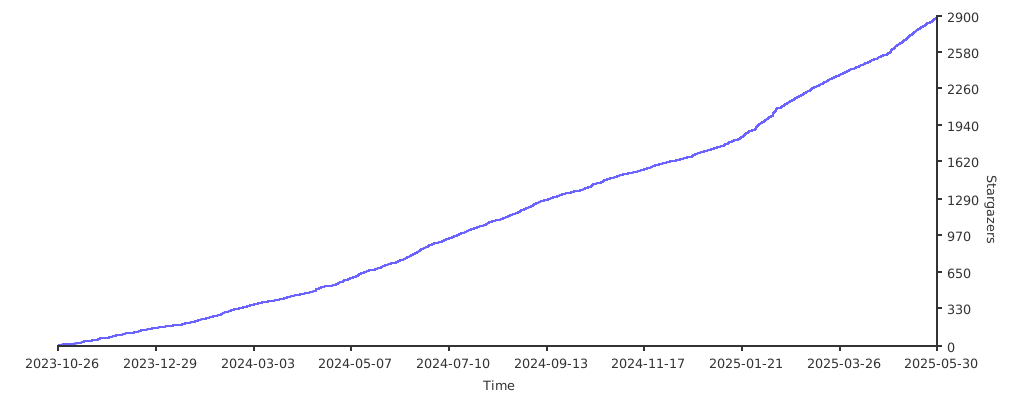](https://starchart.cc/JaKooLit/Arch-Hyprland)