# smart-doc-gradle-plugin
**Repository Path**: TongchengOpenSource/smart-doc-gradle-plugin
## Basic Information
- **Project Name**: smart-doc-gradle-plugin
- **Description**: smart-doc官方gradle插件
- **Primary Language**: Java
- **License**: Apache-2.0
- **Default Branch**: master
- **Homepage**: None
- **GVP Project**: No
## Statistics
- **Stars**: 12
- **Forks**: 7
- **Created**: 2020-05-10
- **Last Updated**: 2025-11-14
## Categories & Tags
**Categories**: Uncategorized
**Tags**: None
## README
Smart-Doc Gradle Plugin

[](https://www.apache.org/licenses/LICENSE-2.0)



[](https://github.com/smart-doc-group/smart-doc-gradle-plugin/blob/master/README_CN.md)
## Introduce
`smart-doc-gradle-plugin` is a `gradle` plugin developed by the `smart-doc` official team.
This plugin is available from `smart-doc 1.8.6`.
Using `smart-doc-gradle-plugin` makes it easier to integrate `smart-doc` into your project, and integration is more lightweight.
You no longer need to write unit tests in your project to
Start `smart-doc` to scan source code analysis and generate API documents.
You can run the `gradle` command directly or click on the preset` goal` of the `smart-doc-maven-plugin` in the IDE to generate API documentation.
smart-doc-gradle-plugin will also make smart-doc's ability to generate API documentation more powerful.
[About smart-doc](https://smart-doc-group.github.io)
## Best Practice
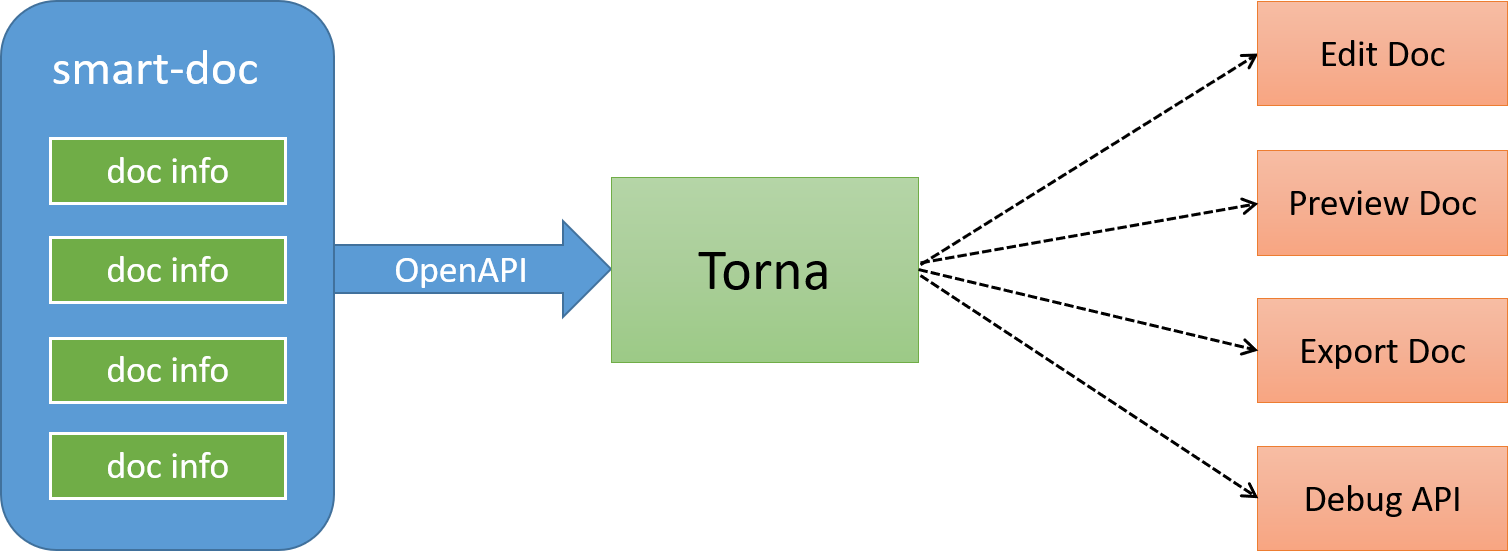
smart-doc + [Torna](http://torna.cn) form an industry-leading document generation and management solution, using `smart-doc` to complete Java source code analysis and extract annotations to generate API documents without intrusion,
and automatically push the documents to the `Torna` enterprise-level interface document management platform.
## Getting started
### Add plugin
Using the plugins DSL:
```
plugins {
id "com.ly.smart-doc" version "[latest]"
}
```
Using legacy plugin application:
```
buildscript {
repositories {
maven {
url "https://plugins.gradle.org/m2/"
}
}
dependencies {
classpath "com.ly.smart-doc:smart-doc-gradle-plugin:[latest]"
}
}
apply plugin: "com.ly.smart-doc"
```
### Plugin options
| Option | Default value | Description |
|------------|---------------------------------|---------------------------------------------------------------------------------------------------------------------------|
| configFile | src/main/resources/default.json | |
| exclude | | exclude artifact,usage:exclude 'org.springframework.boot:spring-boot-starter-tomcat' |
| include | | Let the plugin download the specified java lib source,usage:include 'org.springframework.boot:spring-boot-starter-tomcat' |
Example setting of options:
```
smartdoc {
configFile = file("src/main/resources/default.json")
// exclude example
// exclude artifact
exclude 'org.springframework.boot:spring-boot-starter-tomcat'
// exclude artifact use pattern
exclude 'org.springframework.boot.*'
// You can use the include configuration to let the plugin automatically load the specified source.
// include example
include 'org.springframework.boot:spring-boot-starter-tomcat'
}
```
For the configuration of `configFile`, you can also dynamically override it through the `gradle` command line. Before version `3.0.3`, you can add dynamic configuration to get the `configFile` in `build.gradle`, for example:
```groovy
smartdoc {
configFile = project.hasProperty('smartdoc.configFile') ? file(project.getProperty('smartdoc.configFile')) : file("src/main/resources/smart-doc.json")
}
```
After configuring, you can directly override it through the command line:
```shell
gradle smartdoc -Psmartdoc.configFile=src/main/resources/smart-doc.json
```
From version `3.0.3` onwards, the configuration of dynamically configuring `configFile` in `build.gradle` is very simple, and the plugin has the ability to completely override it.
```groovy
smartdoc {
configFile = file("src/main/resources/smart-doc.json")
}
```
After configuration, you can directly use `-Psmartdoc.configFile` to override it.
For multi-module gradle projects, if you do not want to configure in each module, you can put the `smart-doc` plugin related configuration into subprojects.
```
subprojects{
apply plugin: 'com.github.shalousun.smart-doc'
smartdoc {
//
configFile = file("src/main/resources/smart-doc.json")
// exclude artifact
exclude 'org.springframework.boot:xx'
exclude 'org.springframework.boot:ddd'
// You can use the include configuration to let the plugin automatically load the specified source.
// include example
include 'org.springframework.boot:spring-boot-starter-tomcat'
}
}
```
### Create a json config
Create a json configuration file in your project. If it is multiple modules, put them in the modules that need to generate documents.
The `smart-doc-gradle-plugin` plugin will use this configuration information.
For example, create `/src/main/resources/smart-doc.json` in the project.
The configuration contents are as follows.
**Minimize configuration:**
```
{
"allInOne": true, // whether to merge documents into one file, generally recommended as true
"isStrict": false,//If the strict mode is set to true, Smart-doc forces that the public method in each interface in the code has a comment.
"outPath": "/src/main/resources" //Set the api document output path.
}
```
Only three configuration items are required to use the `smart-doc-gradle-plugin` to generate API documentation. In fact, only `outPath` must be configured.
**Detailed configuration content:**
`smart-doc` provides a lot of configuration options. For more configuration options,
please refer to the [official documentation](https://smart-doc-group.github.io/guide/advanced/config)
### Generated document
#### Use Gradle command
```
// Generate documentation into HTML
gradle smartDocRestHtml
// Generate markdown
gradle smartDocRestMarkdown
// Generate adoc
gradle smartDocRestAdoc
// Generate Postman JSON data
gradle smartDocPostman
// Generate Open API 3.0 + specification JSON documentation, since smart-doc-gradle-plugin 1.1.4
gradle smartDocOpenApi
// Generate REST API documentation and push to Torna platform, @since 2.0.9
gradle tornaRest
// Generate JMeter performance test scripts, since 3.0.0
gradle smartDocJmeter
// Generate documentation output to Word, since 3.0.0
gradle word
// Apache Dubbo RPC generation
// Generate html
gradle smartDocRpcHtml
// Generate markdown
gradle smartDocRpcMarkdown
// Generate adoc
gradle smartDocRpcAdoc
// Push RPC interfaces to torna
gradle tornaRpc
```
#### Use In IntelliJ IDEA
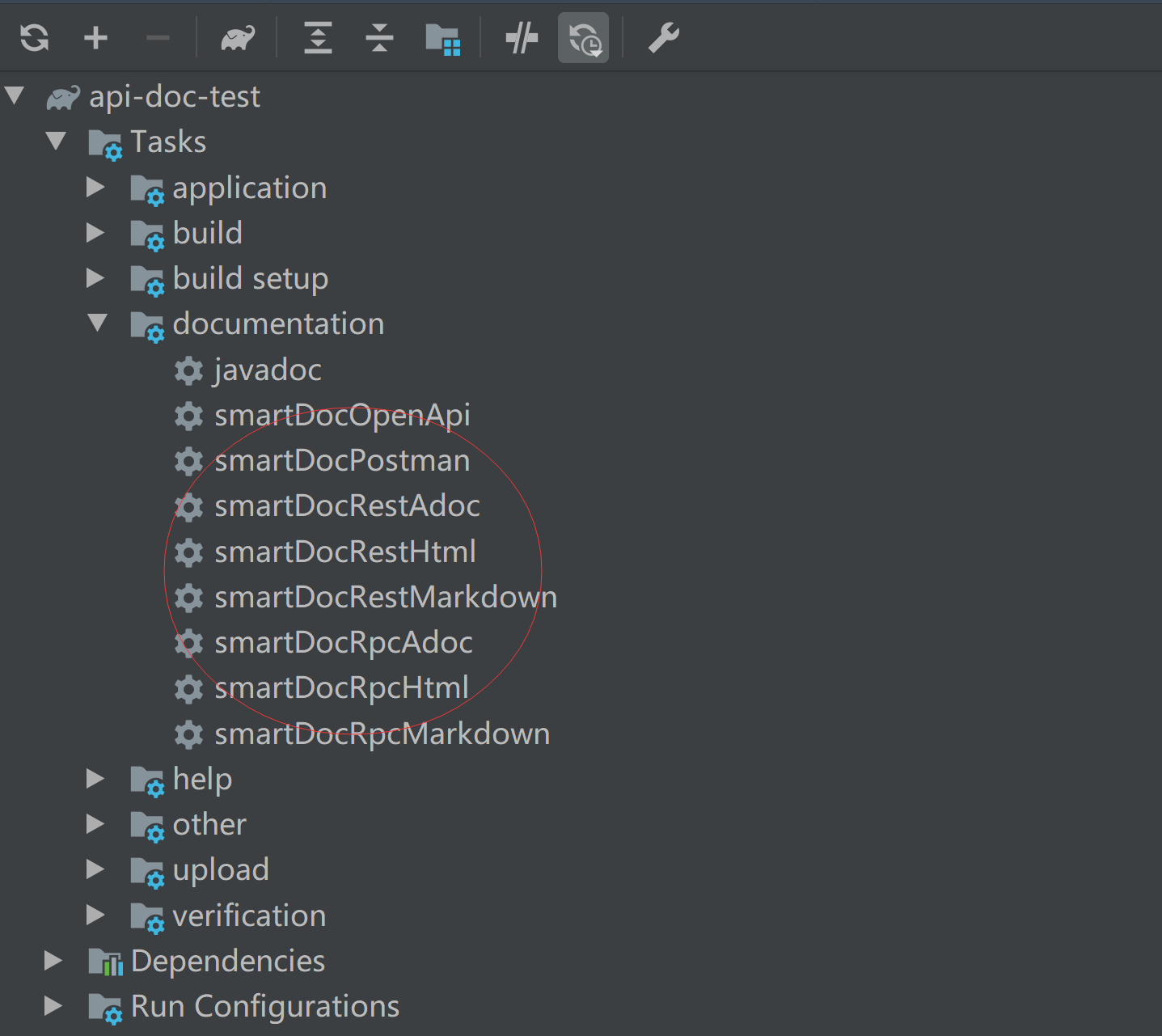
On Use IntelliJ IDE, if you have added `smart-doc-gradle-plugin` to the project,
you can directly find the plugin `smart-doc` plugin and click to generate API documentation.
### Generated document example
#### Interface header rendering

#### Request parameter example rendering

#### Response parameter example renderings

## Building and publish
you can build with the following commands. (`JDK 1.8+`, `Gradle 7.6+`is required to build the master branch)
### Publish to Maven local
Install the gradle plugin to the local Maven repository, which is located at `~/.m2/repository`.
If your local Maven repository path is not `~/.m2/repository`, it is recommended to set a global `M2_HOME` (Maven installation path) system variable first.
Gradle will then automatically search for it.
```groovy
gradle publishToMavenLocal
```
### Publish to Nexus
Publish the gradle plugin to your own `Nexus` repository by modifying the repository address configuration in `build.gradle`.
```groovy
gradle publish
```
### Publish to Gradle Plugin Portal
publish to https://plugins.gradle.org/
```groovy
gradlew publishPlugins -PskipSigning
// or
make publishToPortal
```
## Other reference
- [Smart-doc manual](https://smart-doc-group.github.io)
## Who is using
These are only part of the companies using `smart-doc`, for reference only. If you are using `smart-doc`, please [add your company here](https://github.com/TongchengOpenSource/smart-doc/issues/12) to tell us your scenario to make smart-doc better.















 ## License
smart-doc-gradle-plugin is under the Apache 2.0 license. See the [LICENSE](https://raw.githubusercontent.com/shalousun/smart-doc-maven-plugin/master/LICENSE) file for details.
## Contact
Email: opensource@ly.com
## License
smart-doc-gradle-plugin is under the Apache 2.0 license. See the [LICENSE](https://raw.githubusercontent.com/shalousun/smart-doc-maven-plugin/master/LICENSE) file for details.
## Contact
Email: opensource@ly.com