# BubbleTransition
**Repository Path**: WWDC14/BubbleTransition
## Basic Information
- **Project Name**: BubbleTransition
- **Description**: No description available
- **Primary Language**: Unknown
- **License**: MIT
- **Default Branch**: master
- **Homepage**: None
- **GVP Project**: No
## Statistics
- **Stars**: 0
- **Forks**: 0
- **Created**: 2020-03-13
- **Last Updated**: 2020-12-19
## Categories & Tags
**Categories**: Uncategorized
**Tags**: None
## README

[](http://cocoapods.org/?q=bubbletransition)
[](https://github.com/Carthage/Carthage)

[](https://codebeat.co/projects/github-com-andreamazz-bubbletransition)
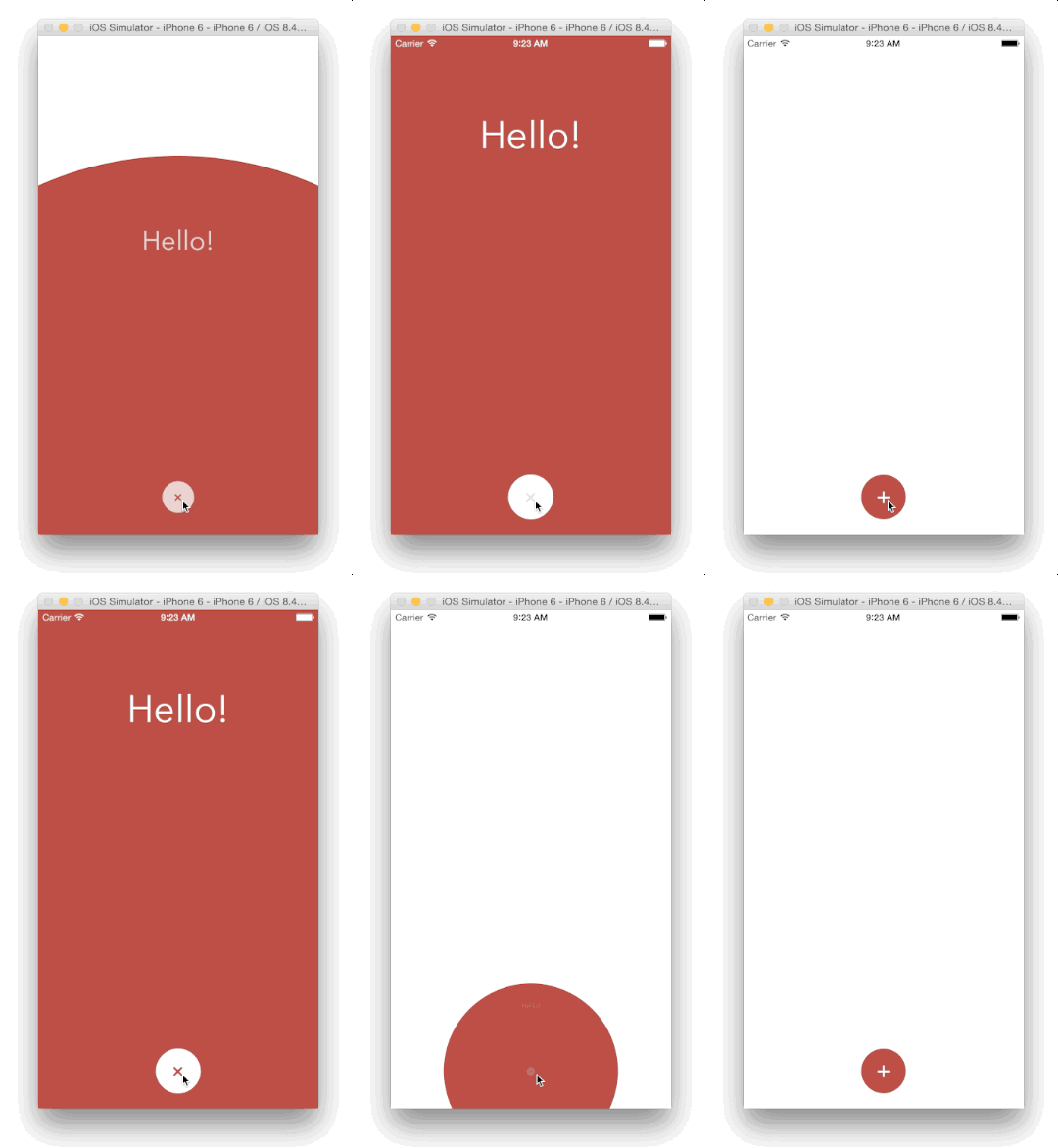
A custom modal transition that presents and dismiss a controller inside an expanding and shrinking _bubble_.

# Screenshot
# Usage
Install through [CocoaPods](http://cocoapods.org):
```
pod 'BubbleTransition', '~> 3.2.0'
use_frameworks!
```
Install through [Carthage](https://github.com/Carthage/Carthage):
```
github "andreamazz/BubbleTransition"
```
# Setup
Have your view controller conform to `UIViewControllerTransitioningDelegate`. Set the `transitionMode`, the `startingPoint`, the `bubbleColor` and the `duration`.
```swift
let transition = BubbleTransition()
public override func prepare(for segue: UIStoryboardSegue, sender: Any?) {
let controller = segue.destination
controller.transitioningDelegate = self
controller.modalPresentationCapturesStatusBarAppearance = true
controller.modalPresentationStyle = .custom
}
// MARK: UIViewControllerTransitioningDelegate
public func animationController(forPresented presented: UIViewController, presenting: UIViewController, source: UIViewController) -> UIViewControllerAnimatedTransitioning? {
transition.transitionMode = .present
transition.startingPoint = someButton.center
transition.bubbleColor = someButton.backgroundColor!
return transition
}
public func animationController(forDismissed dismissed: UIViewController) -> UIViewControllerAnimatedTransitioning? {
transition.transitionMode = .dismiss
transition.startingPoint = someButton.center
transition.bubbleColor = someButton.backgroundColor!
return transition
}
```
You can find the Objective-C equivalent [here](https://gist.github.com/andreamazz/9b0d6c7db065555ec0d7).
# Swipe to dismiss
You can use an interactive gesture to dismiss the presented controller. To enable this gesture, prepare the interactive transition:
```swift
let interactiveTransition = BubbleInteractiveTransition()
override func prepare(for segue: UIStoryboardSegue, sender: Any?) {
if let controller = segue.destination as? ModalViewController {
controller.transitioningDelegate = self
controller.modalPresentationStyle = .custom
controller.modalPresentationCapturesStatusBarAppearance = true
controller.interactiveTransition = interactiveTransition
interactiveTransition.attach(to: controller)
}
}
```
and implement `interactionControllerForDismissal` in your presenting controller:
```swift
func interactionControllerForDismissal(using animator: UIViewControllerAnimatedTransitioning) -> UIViewControllerInteractiveTransitioning? {
return interactiveTransition
}
```
In the presented controller make sure to call `finish()` on the interactive gesture if you need to quickly dismiss from a button press instead. Check the sample code for more info.
You can decide the gesture threshold and the swipe direction:
```swift
interactiveTransition.interactionThreshold = 0.5
interactionThreshold.swipeDirection = .up
```
# Properties
```swift
var startingPoint = CGPointZero
```
The point that originates the bubble.
```swift
var duration = 0.5
```
The transition duration.
```swift
var transitionMode: BubbleTranisionMode = .present
```
The transition direction. Either `.present`, `.dismiss` or `.pop`.
```swift
var bubbleColor: UIColor = .white
```
The color of the bubble. Make sure that it matches the destination controller's background color.
Checkout the sample project for the full implementation.
# Author
[Andrea Mazzini](https://twitter.com/theandreamazz). I'm available for freelance work, feel free to contact me.
Want to support the development of [these free libraries](https://cocoapods.org/owners/734)? Buy me a coffee ☕️ via [Paypal](https://www.paypal.me/andreamazzini).
# Contributors
Thanks to [everyone](https://github.com/andreamazz/BubbleTransition/graphs/contributors) kind enough to submit a pull request.
# MIT License
Copyright (c) 2018-2020 Andrea Mazzini. All rights reserved.
Permission is hereby granted, free of charge, to any person obtaining a
copy of this software and associated documentation files (the "Software"),
to deal in the Software without restriction, including
without limitation the rights to use, copy, modify, merge, publish,
distribute, sublicense, and/or sell copies of the Software, and to
permit persons to whom the Software is furnished to do so, subject to
the following conditions:
The above copyright notice and this permission notice shall be included
in all copies or substantial portions of the Software.
THE SOFTWARE IS PROVIDED "AS IS", WITHOUT WARRANTY OF ANY KIND, EXPRESS
OR IMPLIED, INCLUDING BUT NOT LIMITED TO THE WARRANTIES OF
MERCHANTABILITY, FITNESS FOR A PARTICULAR PURPOSE AND NONINFRINGEMENT.
IN NO EVENT SHALL THE AUTHORS OR COPYRIGHT HOLDERS BE LIABLE FOR ANY
CLAIM, DAMAGES OR OTHER LIABILITY, WHETHER IN AN ACTION OF CONTRACT,
TORT OR OTHERWISE, ARISING FROM, OUT OF OR IN CONNECTION WITH THE
SOFTWARE OR THE USE OR OTHER DEALINGS IN THE SOFTWARE.