# MessageKit
**Repository Path**: WWDC14/MessageKit
## Basic Information
- **Project Name**: MessageKit
- **Description**: No description available
- **Primary Language**: Unknown
- **License**: MIT
- **Default Branch**: master
- **Homepage**: None
- **GVP Project**: No
## Statistics
- **Stars**: 0
- **Forks**: 0
- **Created**: 2020-09-18
- **Last Updated**: 2020-12-19
## Categories & Tags
**Categories**: Uncategorized
**Tags**: None
## README
 A community-driven replacement for JSQMessagesViewController https://messagekit.github.io
[](https://github.com/MessageKit/MessageKit/actions?query=workflow%3A%22Tests%22)
[](https://github.com/MessageKit/MessageKit/actions?query=workflow%3A%22Build+Framework%22)
[](https://github.com/MessageKit/MessageKit/actions?query=workflow%3A%22PR+Example+app%22)
[](https://github.com/MessageKit/MessageKit/actions?query=workflow%3A%22Danger%22)
[](https://codecov.io/gh/MessageKit/MessageKit)
[](https://github.com/Carthage/Carthage)



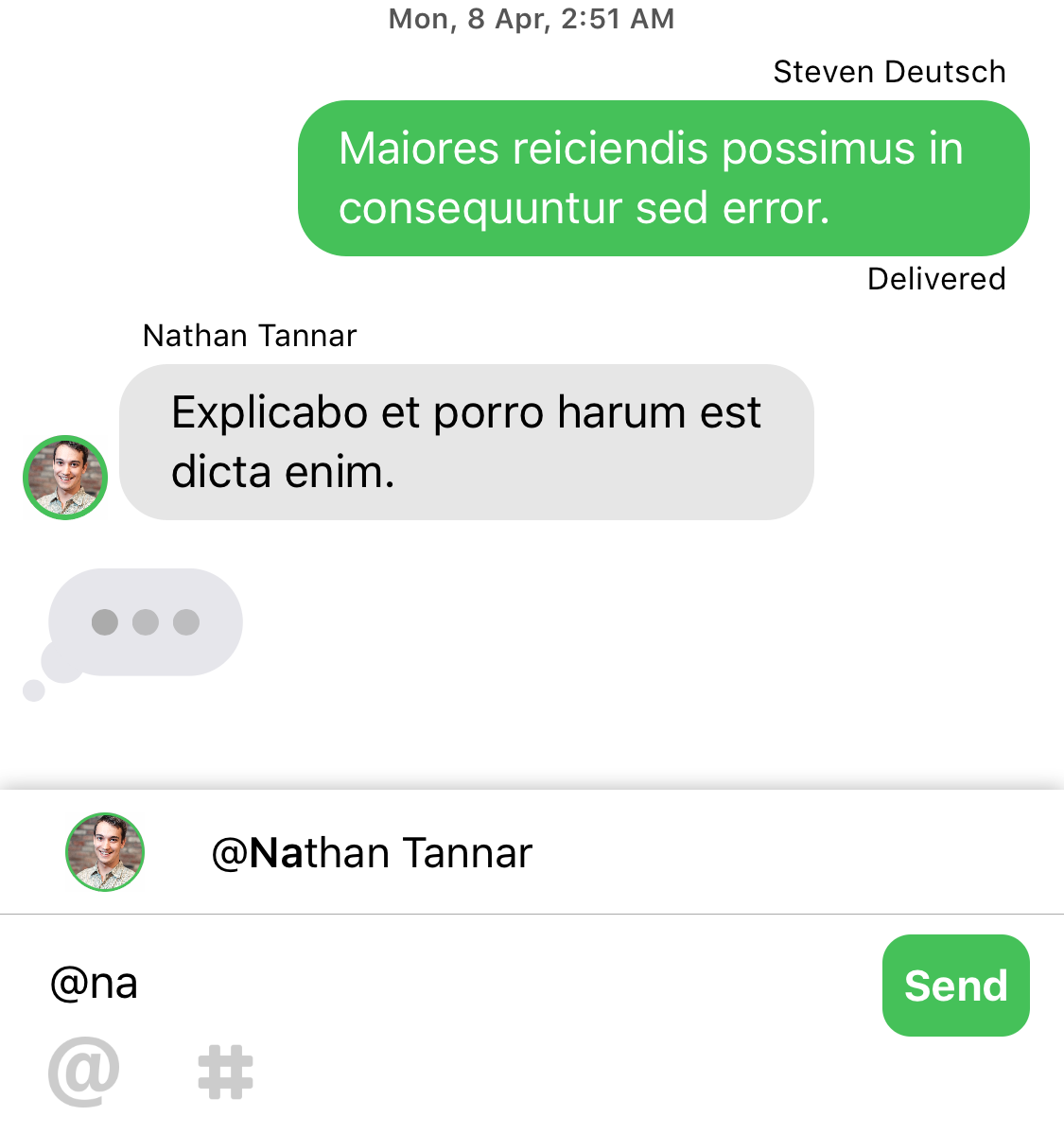
## Goals
- Provide a :rotating_light:safe:rotating_light: environment for others to learn and grow through Open Source.
- Make adding Chat:speech_balloon: to a project easy.
- Enable beautiful and customizable Chat UI's.
- Provide an awesome Open Source project for the iOS open source community.
- Help others learn.
## Vision
See [VISION.md](https://github.com/MessageKit/MessageKit/blob/master/VISION.md) for Goals, Scope, & Technical Considerations.
## Installation
### [CocoaPods](https://cocoapods.org/) **Recommended**
```ruby
# Swift 5.3
pod 'MessageKit'
```
> For Swift 5.0 use version 3.3.0
```ruby
# Swift 5.0
pod 'MessageKit', '~> 3.3.0'
```
> For Swift 4.2 use version 3.0.0
```ruby
# Swift 4.2
pod 'MessageKit', '~> 3.0.0'
```
### [Carthage](https://github.com/Carthage/Carthage)
To integrate MessageKit using Carthage, add the following to your `Cartfile`:
```
github "MessageKit/MessageKit"
```
### [Swift Package Manager](https://swift.org/package-manager/)
Swift 5.3 in Xcode 12 [added support](https://github.com/apple/swift-evolution/blob/master/proposals/0271-package-manager-resources.md) for assets in Swift Packages.
You can [just add](https://developer.apple.com/documentation/xcode/adding_package_dependencies_to_your_app) MessageKit package to your project by entering it's repository URL
```
https://github.com/MessageKit/MessageKit
```
Older versions of Swift and XCode don't support MessageKit via SPM.
### [Manual](https://github.com/MessageKit/MessageKit/blob/master/Documentation/MANUAL_INSTALLATION.md)
## Requirements
- **iOS 12** or later
- **Swift 5.3** or later
> For iOS 11 please use version 3.3.0
> For iOS 9 and iOS 10 please use version 3.1.0
## Getting Started
### Cell Structure
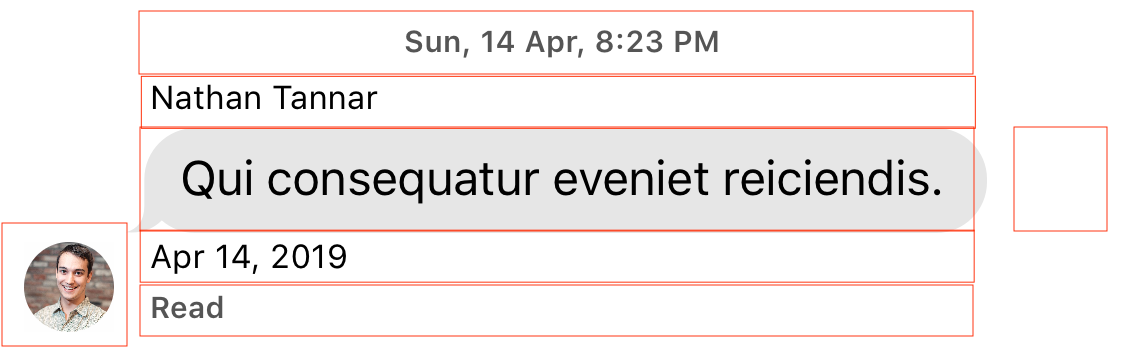
Each default cell is a subclass of [`MessageContentCell`](https://github.com/MessageKit/MessageKit/blob/master/Sources/Views/Cells/MessageContentCell.swift) which has 7 parts. From top down we have a: `cellTopLabel`, `messageTopLabel`, `messageContainerView`, `messageBottomLabel`, `cellBottomLabel` with the `avatarView` and `accessoryView` on either side respectively. Above we see the basic [`TextMessageCell`](https://github.com/MessageKit/MessageKit/blob/master/Sources/Views/Cells/TextMessageCell.swift) which uses a `MessageLabel` as its main content.
This structure will allow you to create a layout that suits your needs as you can customize the size, appearance and padding of each. If you need something more advanced you can implement a custom cell, which we show how to do in the [Example](https://github.com/MessageKit/MessageKit/tree/master/Example) project.
### MessageInputBar Structure
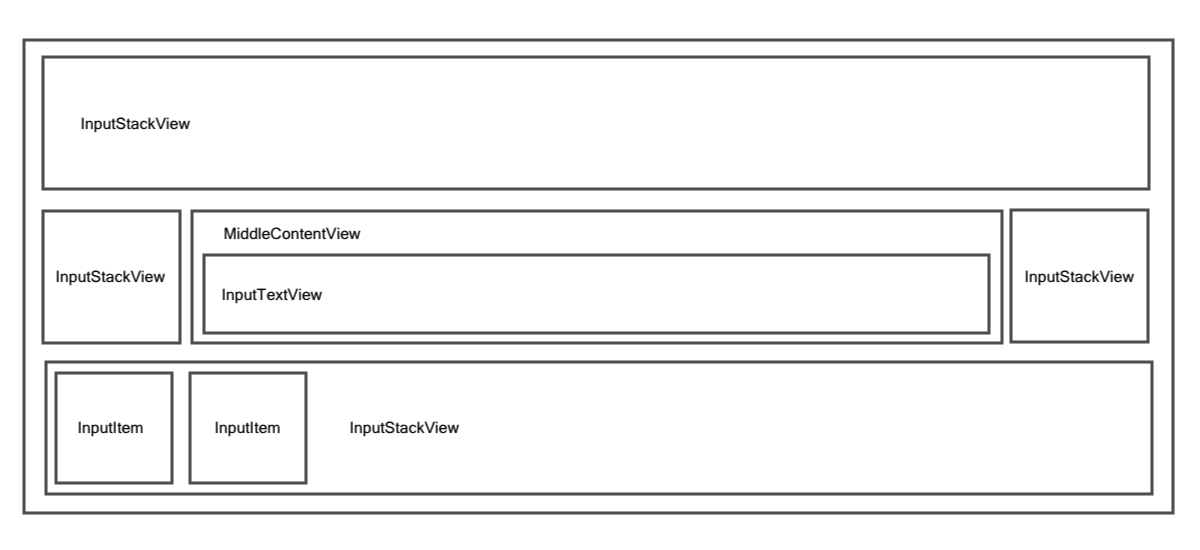
The `MessageInputBar`, derrived from [InputBarAccessoryView](https://github.com/nathantannar4/InputBarAccessoryView) is a flexible and robust way of creating any kind of input layout you wish. It is self-sizing which means as the user types it will grow to fill available space. It is centered around the `middleContentView` which by default holds the `InputTextView`. This is surrounded by `InputStackView`'s that will also grow in high based on the needs of their subviews `intrinsicContentSize`. See the [Example](https://github.com/MessageKit/MessageKit/tree/master/Example) project for examples on how to taylor the layout for your own needs.
### Guides
Please have a look at the [Quick Start guide](https://github.com/MessageKit/MessageKit/blob/master/Documentation/QuickStart.md) and the [FAQs](https://github.com/MessageKit/MessageKit/blob/master/Documentation/FAQs.md).
We recommend you start by looking at the [Example](https://github.com/MessageKit/MessageKit/tree/master/Example) project or write a question with the "messagekit" tag on [Stack Overflow](https://stackoverflow.com/questions/tagged/messagekit). You can also look at previous issues here on GitHub with the **"Question"** tag.
For more on how to use the MessageInputBar, see the dependency it is based on [InputBarAccessoryView](https://github.com/nathantannar4/InputBarAccessoryView). You can also see this [short guide]([https://github.com/MessageKit/MessageKit/blob/master/Documentation/MessageInputBar.md)
## Default Cells
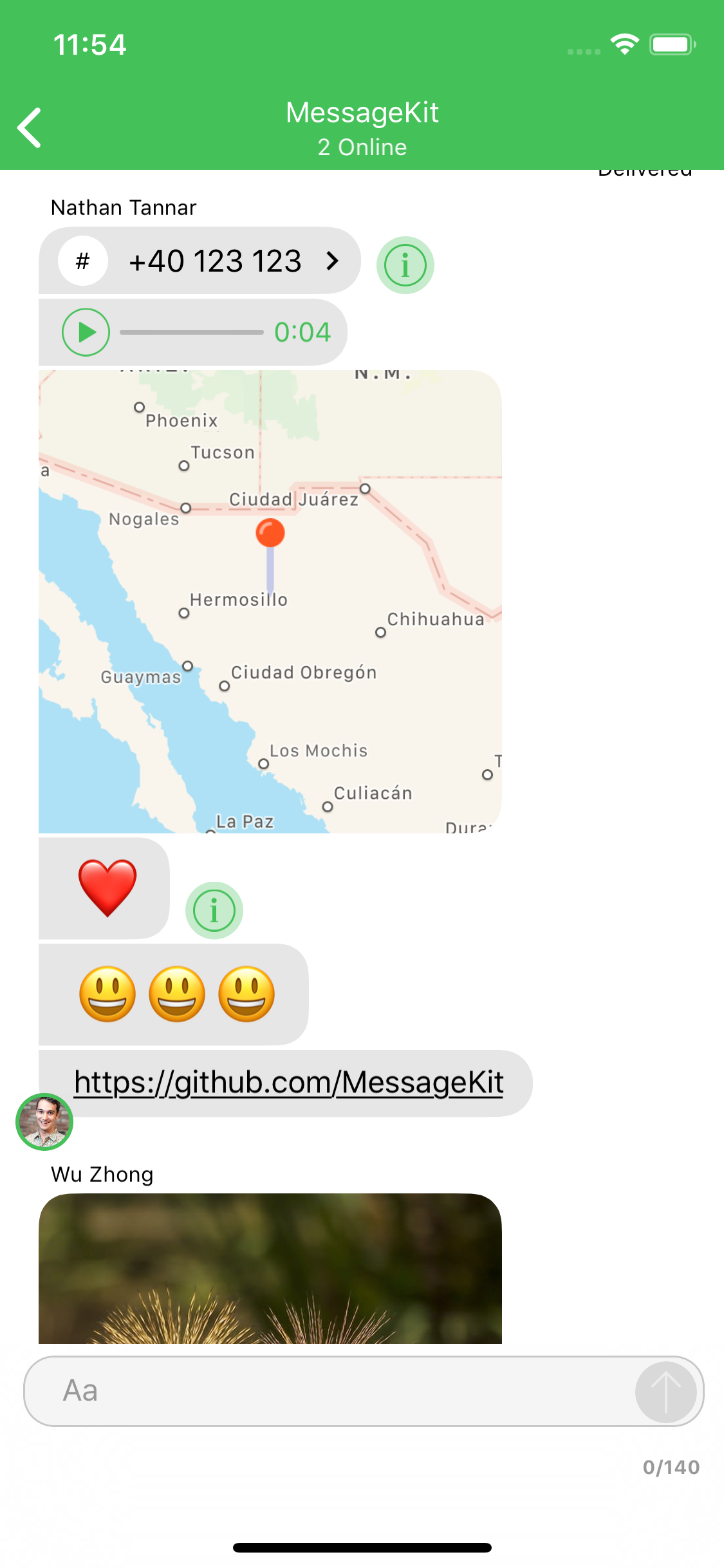
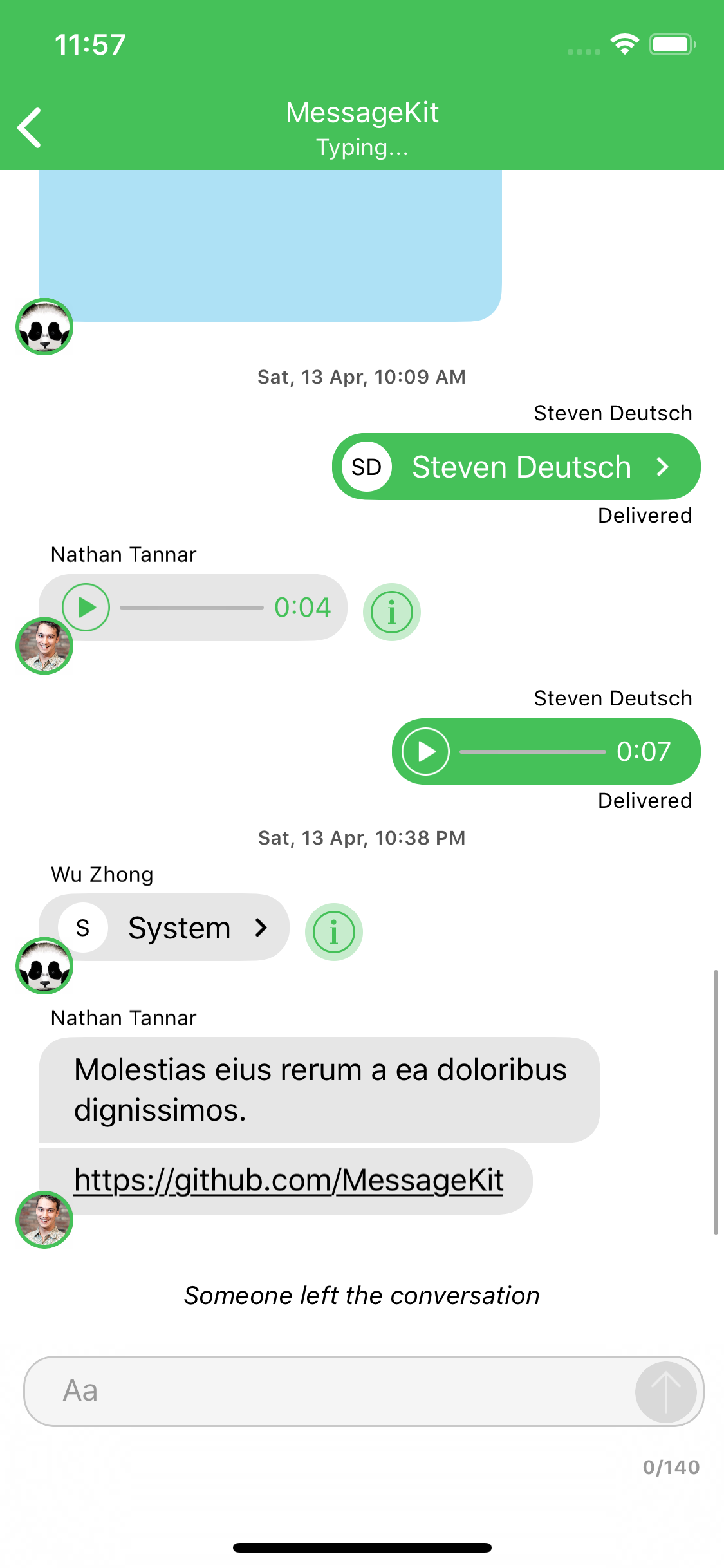
The type of cell rendered for a given message is based on the `MessageKind`
```swift
public enum MessageKind {
case text(String) // TextMessageCell
case attributedText(NSAttributedString) // TextMessageCell
case photo(MediaItem) // MediaMessageCell
case video(MediaItem) // MediaMessageCell
case location(LocationItem) // LocationMessageCell
case emoji(String) // TextMessageCell
case audio(AudioItem) // AudioMessageCell
case contact(ContactItem) // ContactMessageCell
case linkPreview(LinkItem) // LinkPreviewMessageCell
/// A custom message.
/// - Note: Using this case requires that you implement the following methods and handle this case:
/// - MessagesDataSource: customCell(for message: MessageType, at indexPath: IndexPath, in messagesCollectionView: MessagesCollectionView) -> UICollectionViewCell
/// - MessagesLayoutDelegate: customCellSizeCalculator(for message: MessageType, at indexPath: IndexPath, in messagesCollectionView: MessagesCollectionView) -> CellSizeCalculator
case custom(Any?)
}
```
If you choose to use the `.custom` kind you are responsible for all of the cells layout. Any `UICollectionViewCell` can be returned for custom cells which means any of the styling you provide from the `MessageDisplayDelegate` will not effect your custom cell. Even if you subclass your cell from `MessageContentCell`.
[Read more about custom cells](https://github.com/MessageKit/MessageKit/blob/master/Documentation/CUSTOM_CELLS.md)
[Read more about the cases on the Quick Start guide.](https://github.com/MessageKit/MessageKit/blob/master/Documentation/QuickStart.md#messagekind)
## Contributing
Great! Look over these things first.
- Please read our [Code of Conduct](https://github.com/MessageKit/MessageKit/blob/master/CODE_OF_CONDUCT.md)
- Check the [Contributing Guide Lines](https://github.com/MessageKit/MessageKit/blob/master/CONTRIBUTING.md).
- Come join us on [Slack](https://join.slack.com/t/messagekit/shared_invite/MjI4NzIzNzMyMzU0LTE1MDMwODIzMDUtYzllYzIyNTU4MA) and 🗣 don't be a stranger.
- Check out the [current issues](https://github.com/MessageKit/MessageKit/issues) and see if you can tackle any of those.
- Download the project and check out the current code base. Suggest any improvements by opening a new issue.
- Check out the [What's Next](#whats-next) section :point_down: to see where we are headed.
- Check [StackOverflow](https://stackoverflow.com/questions/tagged/messagekit)
- Install [SwiftLint](https://github.com/realm/SwiftLint) to keep yourself in :neckbeard: style.
- Be kind and helpful.
## What's Next?
Check out the [Releases](https://github.com/MessageKit/MessageKit/releases) to see what we are working on next.
## Contact
Have a question or an issue about MessageKit? Create an [issue](https://github.com/MessageKit/MessageKit/issues/new)!
Interested in contributing to MessageKit? Click here to join our [Slack](https://join.slack.com/t/messagekit/shared_invite/MjI4NzIzNzMyMzU0LTE1MDMwODIzMDUtYzllYzIyNTU4MA).
### Apps using this library
Add your app to the list of apps using this library and make a pull request.
- [Ring4](https://www.ring4.com)
- [Formacar](https://itunes.apple.com/ru/app/id1180117334)
- [HopUp](https://itunes.apple.com/us/app/hopup-airsoft-community/id1128903141?mt=8)
- [MediQuo](https://www.mediquo.com)
- [RappresentaMe](https://itunes.apple.com/it/app/rappresentame/id1330914443)
- [WiseEyes](https://itunes.apple.com/us/app/wiseeyes/id1391408511?mt=8)
- [SwiftHub](https://github.com/khoren93/SwiftHub)
- [Studievenn](https://studievenn.no)
- [SmooveText](https://apps.apple.com/np/app/smoove-text/id1362792811)
- [COYO Engage](https://apps.apple.com/app/coyo-engage/id1341588804)
- [HitchPin](https://www.hitchpin.com)
_Please provide attribution, it is greatly appreciated._
## Core Team
- [@SD10](https://github.com/sd10), Steven Deutsch
- [@nathantannar4](https://github.com/nathantannar4), Nathan Tannar
- [@zhongwuzw](https://github.com/zhongwuzw), Wu Zhong
- [@austinwright](https://github.com/austinwright), Austin Wright
## Thanks
Many thanks to [**the contributors**](https://github.com/MessageKit/MessageKit/graphs/contributors) of this project.
## License
MessageKit is released under the [MIT License](https://github.com/MessageKit/MessageKit/blob/master/LICENSE.md).
## Inspiration
Inspired by [JSQMessagesViewController](https://github.com/jessesquires/JSQMessagesViewController) :point_left: :100: