# SunnyCapturer
**Repository Path**: XMuli/SunnyCapturer
## Basic Information
- **Project Name**: SunnyCapturer
- **Description**: A simple and beautiful cross-platform screenshot software, It also supports OCR and image translation features. | SunnyCapturer 是一款简单且漂亮的跨平台截图软件,亦支持在线和离线
GitHub: https://github.com/XMuli/sunnycaptu
- **Primary Language**: C++
- **License**: Not specified
- **Default Branch**: master
- **Homepage**: https://sunnycapturer.xmuli.tech
- **GVP Project**: No
## Statistics
- **Stars**: 5
- **Forks**: 0
- **Created**: 2023-10-24
- **Last Updated**: 2026-09-22
## Categories & Tags
**Categories**: Uncategorized
**Tags**: 跨平台, 截图, 贴图, ocr, 图片翻译
## README
本项目历经多次大版本的多次迭代和推送,现在将早期源码开源共享,提供参考
其中每一个文件夹都是一个时期的版本完整源码。
> Provide a README introduction in multiple languages
>
> 提供多语言版本的README介绍
>
> → [English](./README.md) / [简体中文](./README.zh_CN.md)
## 官方网址
- 最新官网 / 发布日志:[https://sunnycapturer.xmuli.tech](https://sunnycapturer.xmuli.tech/)
- 下载地址:[https://github.com/XMuli/SunnyCapturer/releases](https://github.com/XMuli/SunnyCapturer/releases)
- 软件商城:微软商城 & Linux 各大应用商城
Note:支持平台版本、芯片,版本可以参考历史日志;GitHub Release 永远是最新的首发地址,而应用商城可能版本稍落后一些。
## 里程碑
### 5th 版本 - SunnyCapturer 5.x
- 名称:SunnyCapturer 5.x
- 简介:Capturer是一款主打快速截图、贴图、快速预览、录屏和录制GIF的软件;使用快捷键可以快速选择感兴趣的桌面区域或窗口进行截图/录制,并将截图快速钉在桌面上;并且支持 OCR(多平台的在线接入 和 本地 CPU / GPU ) 和图片翻译
- 札记:
1. 主力开发时间为 6/9/2025 - 至今;会一直持续维护中。是当前最新的版本
2. 核心功能:
- 全新 UI 设计,更加简约和美观,同时支持多种暗色主题
- 保留之前全部截图和标注功能;离线 OCR(CPU / GPU) 和 在线 OCR,在线图片翻译
- 上架微软商店,以及Linux 多个发行版的软件商店
- 支持视频录制功能
- 支持 GIF 录制功能
- 支持相机拍照功能
- 支持多文件类型快速预览
- 支持多设备时,切换当前麦克风、扬声器、相机
- 支持全局本机和仅当前用户的安装路径选择
- 支持多国语言翻译:English、简体中文、繁体中文、日本語、Português Brasil、Русский、Deutsch
3. 构建环境:
Qt >= 6.8 | CMake >= 3.20 | MSVC >= 2022 | GCC >= 13
4. 支持 Windows 10-11 / Linux (Ubuntu 24.04 LTS / Deepin V23)
- 源码:
1. 官网介绍:[https://sunnycapturer.xmuli.tech](https://sunnycapturer.xmuli.tech/)
2. 源码镜像地址: [5th-SunnyCapturer-v5.x-Code](https://github.com/XMuli/SunnyCapturer/tree/master/5th-SunnyCapturer-v5.x-Code) TBD
3. 原始仓库地址: GitHub
4. 累计发布版本: [Release](https://github.com/XMuli/SunnyCapturer/releases) V5.0.0 - 至今(截至当前累计 ≥ 2个版本)
- 截图效果:
### 4th 版本 - SunnyCapturer 3.x
- 名称:SunnyCapturer 3.x
- 简介:A screenshot tool, and to achieve the function of the general module encapsulation
- 札记:
1. 主力开发时间为 11/22/2024 - 5/16/2025 ;现在已停止维护。转向开发 SunnyCapturer v5.x 版本;
2. 核心功能:
- 全新 UI 设计,更加简约和美观,同时支持多种暗色主题
- 保留之前全部截图和标注功能;离线 OCR(CPU / GPU) 和 在线 OCR,在线图片翻译
- 上架微软商店,以及Linux 多个发行版的软件商店
3. 构建环境:
Qt >= 6.8 | CMake >= 3.20 | MSVC >= 2022 | GCC >= 913
4. 支持 Windows 10-11 / Linux (Ubuntu 24.04 LTS / Deepin V23)
- 源码:
1. 官网介绍:[https://sunnycapturer.xmuli.tech](https://sunnycapturer.xmuli.tech/)
2. 源码镜像地址: [4th-SunnyCapturer-v3.x-Code](https://github.com/XMuli/SunnyCapturer/tree/master/4th-SunnyCapturer-v3.x-Code) TBD
3. 原始仓库地址: GitHub
4. 累计发布版本: [Release](https://github.com/XMuli/SunnyCapturer/releases) V3.0 - V3.2(累计 ≥ 6个版本)
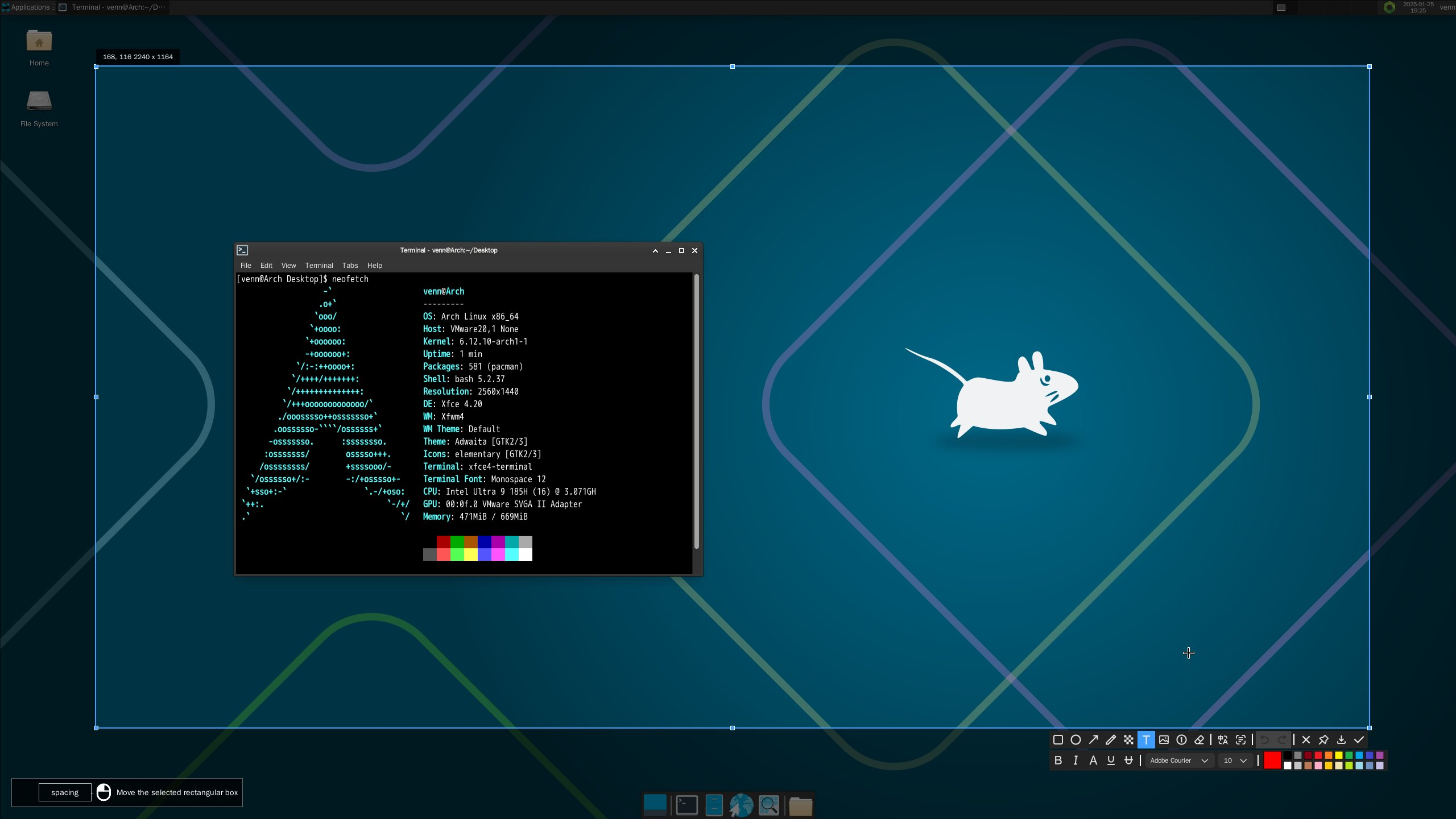
- 截图效果:
 ### 3rd 版本 - SunnyCapturer 2.x
- 名称:sunny-screenshot
- 简介:A screenshot tool, and to achieve the function of the general module encapsulation
- 札记:
1. 主力开发时间为 8/8/2024 - 12/1/2024 ;现在已停止维护。转向开发 SunnyCapturer v3.x 版本;
2. 核心功能:
在线 OCR 和在线图片翻译
支持脚本自动在 Window 和 Linux 各种平台自动都见 .deb / .dmg /
**离线 OCR (CPU & GPU)**
> 通过本地离线引擎,离线提取图片中的文字
- 无需要任何注册和 key 的输入
- 全程断网离线本地运行和识别
- 支持 CPU 和 GPU 模式(叉腰):
- CPU 版本:通用性强,占用内存更少,对于单张图片解析快,批量图片耗时大(普通用户推荐)
- GPU 版本:仅支持 N 卡,占用内用多,但对于批量解析大量图片,耗时是 CPU 版本是 1/2 ~ 1/3 时间,很快(高级 N 卡推荐)
- 仅支持 win 64 bit 系统;均支持单张图片和批量图片识别解析,直接拖曳到窗口即可。
3. 构建环境:
Qt >= 5.15.2 | CMake >= 3.16 | MSVC >= 2019 | MinGW >= 8.1.0 | GCC >= 9.4 | Clang >= 12.0
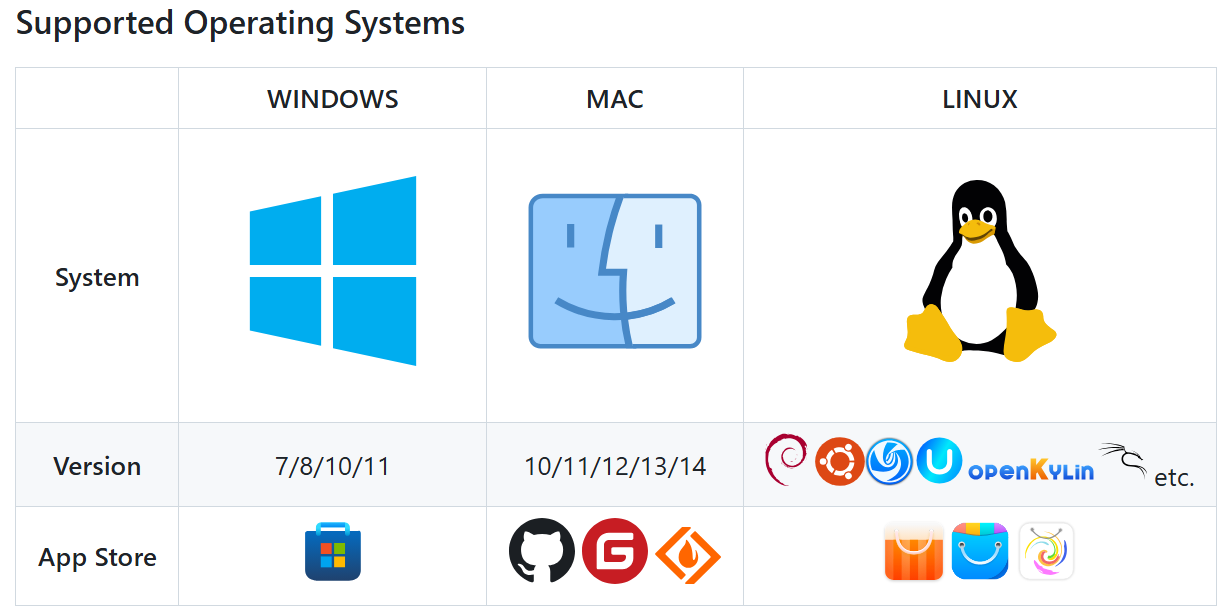
4. 支持 Windows 10-11 / Macos 13.2 / Linux (Ubuntu 24.04 LTS / Deepin V20.9-V23 / openKylin 1.0.x)
5. FLIPPED 已采用 MIT 宽松协议,开源全部代码,帮助新人降低 C++ / Qt 门槛,可轻松编写一个截图项目
- 源码:
1. 官网介绍:[https://sunny.xmuli.tech](https://sunny.xmuli.tech/#/)
2. 源码镜像地址: [3rd-SunnyCapturer-v2.x-Code](https://github.com/XMuli/SunnyCapturer/tree/master/3rd-SunnyCapturer-v2.x-Code) TBD
3. 原始仓库地址: GitHub
4. 累计发布版本: [Release](https://github.com/XMuli/SunnyCapturer/releases) V2.0 - V2.4(累计 ≥ 5个版本)
- 截图效果:
### 3rd 版本 - SunnyCapturer 2.x
- 名称:sunny-screenshot
- 简介:A screenshot tool, and to achieve the function of the general module encapsulation
- 札记:
1. 主力开发时间为 8/8/2024 - 12/1/2024 ;现在已停止维护。转向开发 SunnyCapturer v3.x 版本;
2. 核心功能:
在线 OCR 和在线图片翻译
支持脚本自动在 Window 和 Linux 各种平台自动都见 .deb / .dmg /
**离线 OCR (CPU & GPU)**
> 通过本地离线引擎,离线提取图片中的文字
- 无需要任何注册和 key 的输入
- 全程断网离线本地运行和识别
- 支持 CPU 和 GPU 模式(叉腰):
- CPU 版本:通用性强,占用内存更少,对于单张图片解析快,批量图片耗时大(普通用户推荐)
- GPU 版本:仅支持 N 卡,占用内用多,但对于批量解析大量图片,耗时是 CPU 版本是 1/2 ~ 1/3 时间,很快(高级 N 卡推荐)
- 仅支持 win 64 bit 系统;均支持单张图片和批量图片识别解析,直接拖曳到窗口即可。
3. 构建环境:
Qt >= 5.15.2 | CMake >= 3.16 | MSVC >= 2019 | MinGW >= 8.1.0 | GCC >= 9.4 | Clang >= 12.0
4. 支持 Windows 10-11 / Macos 13.2 / Linux (Ubuntu 24.04 LTS / Deepin V20.9-V23 / openKylin 1.0.x)
5. FLIPPED 已采用 MIT 宽松协议,开源全部代码,帮助新人降低 C++ / Qt 门槛,可轻松编写一个截图项目
- 源码:
1. 官网介绍:[https://sunny.xmuli.tech](https://sunny.xmuli.tech/#/)
2. 源码镜像地址: [3rd-SunnyCapturer-v2.x-Code](https://github.com/XMuli/SunnyCapturer/tree/master/3rd-SunnyCapturer-v2.x-Code) TBD
3. 原始仓库地址: GitHub
4. 累计发布版本: [Release](https://github.com/XMuli/SunnyCapturer/releases) V2.0 - V2.4(累计 ≥ 5个版本)
- 截图效果:

 ### 2nd 版本 - SUNNY 1.x
- 名称:Sunny
- 简介:A screenshot tool, and to achieve the function of the general module encapsulation
- 札记:
1. 主力开发时间为 8/23/2023 - 5/28/2024 ,后维护至 8/28/2024 ;现在已停止维护。转向开发 SunnyCapturer v2.x 版本;
2. 核心功能是支持在线 OCR 和图片翻译功能
3. 构建环境:
Qt >= 5.15.2 | CMake >= 3.16 | MSVC >= 2019 | MinGW >= 8.1.0 | GCC >= 9.4 | Clang >= 12.0
4. 支持 Windows 10-11 / Macos 13.2 / Linux (Ubuntu 22.04 LTS / Deepin V20.9-V23 / openKylin 1.0.x)
5. FLIPPED 已采用 MIT 宽松协议,开源全部代码,帮助新人降低 C++ / Qt 门槛,可轻松编写一个截图项目
- 源码:
1. 官网介绍:[https://sunny.xmuli.tech](https://sunny.xmuli.tech/#/)
2. 视频演示:[FLIPPED 跨平台的截图贴图软件 -- MACOS / WINDOWS / LINUX 运行演示](https://www.bilibili.com/video/BV1rX4y1D7EZ)
3. 源码镜像地址: [2nd-SunnyCapturer-v1.x-Code](https://github.com/XMuli/SunnyCapturer/tree/master/2nd-SunnyCapturer-v1.x-Code)
4. 原始仓库地址: [SunnyCapturer-2nd](https://github.com/SunnyCapturer/SunnyCapturer-2nd)
5. 累计发布版本: [Release](https://github.com/XMuli/SunnyCapturer/releases?page=2) V1.0 - V1.6.3 & [SunnyPages](https://github.com/XMuli/SunnyPages) (累计 ≥ 8个版本)
- 截图效果:
### 2nd 版本 - SUNNY 1.x
- 名称:Sunny
- 简介:A screenshot tool, and to achieve the function of the general module encapsulation
- 札记:
1. 主力开发时间为 8/23/2023 - 5/28/2024 ,后维护至 8/28/2024 ;现在已停止维护。转向开发 SunnyCapturer v2.x 版本;
2. 核心功能是支持在线 OCR 和图片翻译功能
3. 构建环境:
Qt >= 5.15.2 | CMake >= 3.16 | MSVC >= 2019 | MinGW >= 8.1.0 | GCC >= 9.4 | Clang >= 12.0
4. 支持 Windows 10-11 / Macos 13.2 / Linux (Ubuntu 22.04 LTS / Deepin V20.9-V23 / openKylin 1.0.x)
5. FLIPPED 已采用 MIT 宽松协议,开源全部代码,帮助新人降低 C++ / Qt 门槛,可轻松编写一个截图项目
- 源码:
1. 官网介绍:[https://sunny.xmuli.tech](https://sunny.xmuli.tech/#/)
2. 视频演示:[FLIPPED 跨平台的截图贴图软件 -- MACOS / WINDOWS / LINUX 运行演示](https://www.bilibili.com/video/BV1rX4y1D7EZ)
3. 源码镜像地址: [2nd-SunnyCapturer-v1.x-Code](https://github.com/XMuli/SunnyCapturer/tree/master/2nd-SunnyCapturer-v1.x-Code)
4. 原始仓库地址: [SunnyCapturer-2nd](https://github.com/SunnyCapturer/SunnyCapturer-2nd)
5. 累计发布版本: [Release](https://github.com/XMuli/SunnyCapturer/releases?page=2) V1.0 - V1.6.3 & [SunnyPages](https://github.com/XMuli/SunnyPages) (累计 ≥ 8个版本)
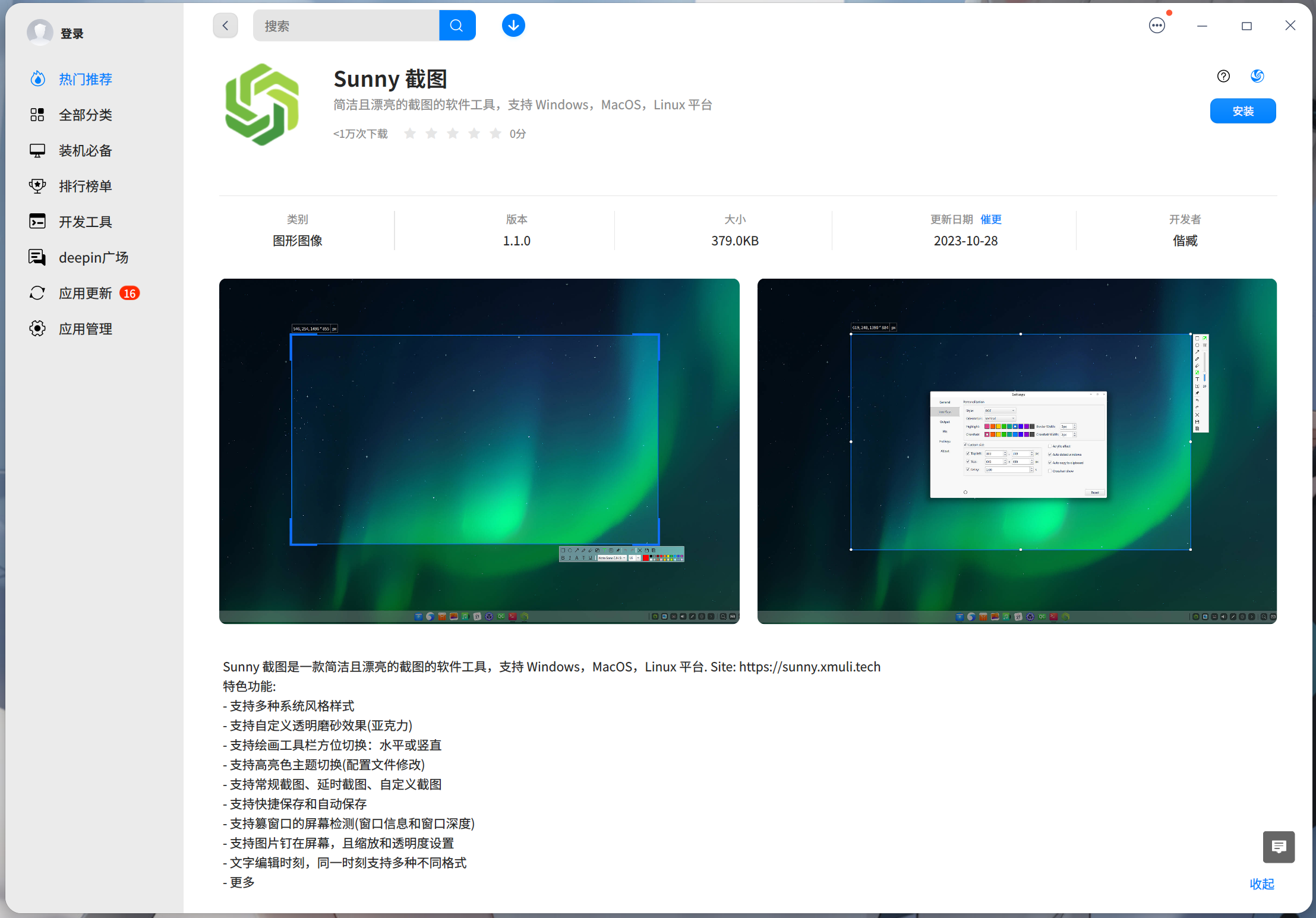
- 截图效果:
 ### 1st 版本 - FLIPPED
- 名称:FLIPPED
- 简介:简洁且漂亮的截图的软件工具,支持 Windows,MacOS,Linux 平台
- 札记:
1. 主力开发时间为 9/25/2021 - 8/21/2023,后维护至 1/25/2025;现在已停止维护。转向开发 SunnyCapturer v1.x 版本;
2. 核心功能是支持基础的离线全部标注功能,且同时支持三大操作系统平台,构建原生包
3. 构建环境:
Qt >= 5.15.2 | CMake >= 3.16 | MSVC >= 2019 | MinGW >= 8.1.0 | GCC >= 9.4 | Clang >= 12.0
4. 支持 Windows 10-11 / Macos 13.2 / Linux (Ubuntu 22.04 LTS / Deepin V20.9-V23 / openKylin 1.0.x)
5. FLIPPED 已采用 MIT 宽松协议,开源全部代码,帮助新人降低 C++ / Qt 门槛,可轻松编写一个截图项目
- 源码:
1. 官网介绍:[https://flipped.xmuli.tech/](https://flipped.xmuli.tech/)
2. 视频演示:[FLIPPED 跨平台的截图贴图软件 -- MACOS / WINDOWS / LINUX 运行演示](https://www.bilibili.com/video/BV1rX4y1D7EZ)
3. 源码镜像地址: [1st_FLIPPED-Screenshot-Code](https://github.com/XMuli/SunnyCapturer/tree/master/1st_FLIPPED-Screenshot-Code)
4. 原始仓库地址: [FLIPPED](https://github.com/SunnyCapturer/FLIPPED)
5. 累计发布版本: [releases](https://github.com/SunnyCapturer/FLIPPED/releases) V0.1 - V1.3.2 (累计 ≥ 27 个版本)
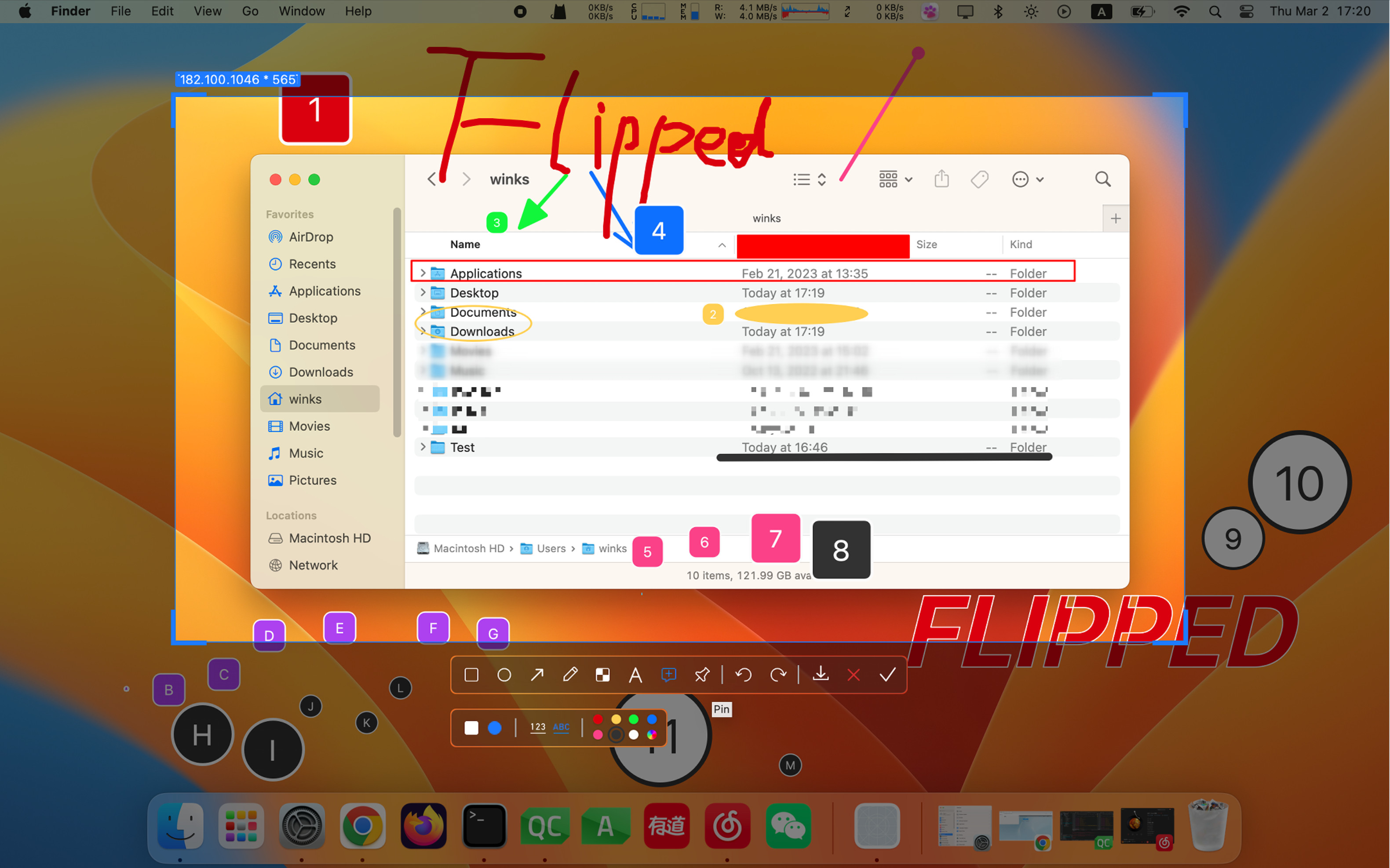
- 截图效果:
### 1st 版本 - FLIPPED
- 名称:FLIPPED
- 简介:简洁且漂亮的截图的软件工具,支持 Windows,MacOS,Linux 平台
- 札记:
1. 主力开发时间为 9/25/2021 - 8/21/2023,后维护至 1/25/2025;现在已停止维护。转向开发 SunnyCapturer v1.x 版本;
2. 核心功能是支持基础的离线全部标注功能,且同时支持三大操作系统平台,构建原生包
3. 构建环境:
Qt >= 5.15.2 | CMake >= 3.16 | MSVC >= 2019 | MinGW >= 8.1.0 | GCC >= 9.4 | Clang >= 12.0
4. 支持 Windows 10-11 / Macos 13.2 / Linux (Ubuntu 22.04 LTS / Deepin V20.9-V23 / openKylin 1.0.x)
5. FLIPPED 已采用 MIT 宽松协议,开源全部代码,帮助新人降低 C++ / Qt 门槛,可轻松编写一个截图项目
- 源码:
1. 官网介绍:[https://flipped.xmuli.tech/](https://flipped.xmuli.tech/)
2. 视频演示:[FLIPPED 跨平台的截图贴图软件 -- MACOS / WINDOWS / LINUX 运行演示](https://www.bilibili.com/video/BV1rX4y1D7EZ)
3. 源码镜像地址: [1st_FLIPPED-Screenshot-Code](https://github.com/XMuli/SunnyCapturer/tree/master/1st_FLIPPED-Screenshot-Code)
4. 原始仓库地址: [FLIPPED](https://github.com/SunnyCapturer/FLIPPED)
5. 累计发布版本: [releases](https://github.com/SunnyCapturer/FLIPPED/releases) V0.1 - V1.3.2 (累计 ≥ 27 个版本)
- 截图效果: