# Emu3
**Repository Path**: Yang-chl/Emu3
## Basic Information
- **Project Name**: Emu3
- **Description**: No description available
- **Primary Language**: Unknown
- **License**: Apache-2.0
- **Default Branch**: main
- **Homepage**: None
- **GVP Project**: No
## Statistics
- **Stars**: 0
- **Forks**: 0
- **Created**: 2024-10-11
- **Last Updated**: 2024-10-11
## Categories & Tags
**Categories**: Uncategorized
**Tags**: None
## README
Emu3: Next-Token Prediction is All You Need
[Emu3 Team, BAAI](https://www.baai.ac.cn/english.html)
| [Project Page](https://emu.baai.ac.cn) | [Paper](https://arxiv.org/pdf/2409.18869) | [🤗HF Models](https://huggingface.co/collections/BAAI/emu3-66f4e64f70850ff358a2e60f) | [Modelscope](https://modelscope.cn/organization/BAAI?tab=model) | [Demo](https://huggingface.co/spaces/BAAI/Emu3) |
We introduce **Emu3**, a new suite of state-of-the-art multimodal models trained solely with **next-token prediction**! By tokenizing images, text, and videos into a discrete space, we train a single transformer from scratch on a mixture of multimodal sequences.
### Emu3 excels in both generation and perception
**Emu3** outperforms several well-established task-specific models in both generation and perception tasks, surpassing flagship open models such as SDXL, LLaVA-1.6 and OpenSora-1.2, while eliminating the need for diffusion or compositional architectures.
### Highlights
- **Emu3** is capable of generating high-quality images following the text input, by simply predicting the next vision token. The model naturally supports flexible resolutions and styles.
- **Emu3** shows strong vision-language understanding capabilities to see the physical world and provides coherent text responses. Notably, this capability is achieved without depending on a CLIP and a pretrained LLM.
- **Emu3** simply generates a video causally by predicting the next token in a video sequence, unlike the video diffusion model as in Sora. With a video in context, Emu3 can also naturally extend the video and predict what will happen next.
### TODO
- [X] Release model weights of tokenizer, Emu3-Chat and Emu3-Gen
- [X] Release the inference code.
- [ ] Release the evaluation code.
- [ ] Release training scripts for pretrain, sft and dpo.
### Setup
Clone this repository and install required packages:
```shell
git clone https://github.com/baaivision/Emu3
cd Emu3
pip install -r requirements.txt
```
### Model Weights
| Model name | HF Weight | Modelscope |
| ------------------ | ------------------------------------------------------- | -------------------------------------------------------------- |
| **Emu3-Chat** | [🤗 HF link](https://huggingface.co/BAAI/Emu3-Chat) | [Modelscope link](https://modelscope.cn/models/BAAI/Emu3-Chat) |
| **Emu3-Gen** | [🤗 HF link](https://huggingface.co/BAAI/Emu3-Gen) | [Modelscope link](https://modelscope.cn/models/BAAI/Emu3-Gen) |
| **Emu3-VisionTokenizer** | [🤗 HF link](https://huggingface.co/BAAI/Emu3-VisionTokenizer) | [Modelscope link](https://modelscope.cn/models/BAAI/Emu3-VisionTokenizer) |
### Quickstart
#### Use 🤗Transformers to run Emu3-Gen for image generation
```python
from PIL import Image
from transformers import AutoTokenizer, AutoModel, AutoImageProcessor, AutoModelForCausalLM
from transformers.generation.configuration_utils import GenerationConfig
from transformers.generation import LogitsProcessorList, PrefixConstrainedLogitsProcessor, UnbatchedClassifierFreeGuidanceLogitsProcessor
import torch
from emu3.mllm.processing_emu3 import Emu3Processor
# model path
EMU_HUB = "BAAI/Emu3-Gen"
VQ_HUB = "BAAI/Emu3-VisionTokenizer"
# prepare model and processor
model = AutoModelForCausalLM.from_pretrained(
EMU_HUB,
device_map="cuda:0",
torch_dtype=torch.bfloat16,
attn_implementation="flash_attention_2",
trust_remote_code=True,
)
tokenizer = AutoTokenizer.from_pretrained(EMU_HUB, trust_remote_code=True)
image_processor = AutoImageProcessor.from_pretrained(VQ_HUB, trust_remote_code=True)
image_tokenizer = AutoModel.from_pretrained(VQ_HUB, device_map="cuda:0", trust_remote_code=True).eval()
processor = Emu3Processor(image_processor, image_tokenizer, tokenizer)
# prepare input
POSITIVE_PROMPT = " masterpiece, film grained, best quality."
NEGATIVE_PROMPT = "lowres, bad anatomy, bad hands, text, error, missing fingers, extra digit, fewer digits, cropped, worst quality, low quality, normal quality, jpeg artifacts, signature, watermark, username, blurry."
classifier_free_guidance = 3.0
prompt = "a portrait of young girl."
prompt += POSITIVE_PROMPT
kwargs = dict(
mode='G',
ratio="1:1",
image_area=model.config.image_area,
return_tensors="pt",
)
pos_inputs = processor(text=prompt, **kwargs)
neg_inputs = processor(text=NEGATIVE_PROMPT, **kwargs)
# prepare hyper parameters
GENERATION_CONFIG = GenerationConfig(
use_cache=True,
eos_token_id=model.config.eos_token_id,
pad_token_id=model.config.pad_token_id,
max_new_tokens=40960,
do_sample=True,
top_k=2048,
)
h, w = pos_inputs.image_size[0]
constrained_fn = processor.build_prefix_constrained_fn(h, w)
logits_processor = LogitsProcessorList([
UnbatchedClassifierFreeGuidanceLogitsProcessor(
classifier_free_guidance,
model,
unconditional_ids=neg_inputs.input_ids.to("cuda:0"),
),
PrefixConstrainedLogitsProcessor(
constrained_fn ,
num_beams=1,
),
])
# generate
outputs = model.generate(
pos_inputs.input_ids.to("cuda:0"),
GENERATION_CONFIG,
logits_processor=logits_processor
)
mm_list = processor.decode(outputs[0])
for idx, im in enumerate(mm_list):
if not isinstance(im, Image.Image):
continue
im.save(f"result_{idx}.png")
```
#### Use 🤗Transformers to run Emu3-Chat for vision-language understanding
```python
from PIL import Image
from transformers import AutoTokenizer, AutoModel, AutoImageProcessor, AutoModelForCausalLM
from transformers.generation.configuration_utils import GenerationConfig
import torch
from emu3.mllm.processing_emu3 import Emu3Processor
# model path
EMU_HUB = "BAAI/Emu3-Chat"
VQ_HUB = "BAAI/Emu3-VisionTokenier"
# prepare model and processor
model = AutoModelForCausalLM.from_pretrained(
EMU_HUB,
device_map="cuda:0",
torch_dtype=torch.bfloat16,
attn_implementation="flash_attention_2",
trust_remote_code=True,
)
tokenizer = AutoTokenizer.from_pretrained(EMU_HUB, trust_remote_code=True)
image_processor = AutoImageProcessor.from_pretrained(VQ_HUB, trust_remote_code=True)
image_tokenizer = AutoModel.from_pretrained(VQ_HUB, device_map="cuda:0", trust_remote_code=True).eval()
processor = Emu3Processor(image_processor, image_tokenizer, tokenizer)
# prepare input
text = "Please describe the image"
image = Image.open("assets/demo.png")
inputs = processor(
text=text,
image=image,
mode='U',
padding_side="left",
padding="longest",
return_tensors="pt",
)
# prepare hyper parameters
GENERATION_CONFIG = GenerationConfig(pad_token_id=tokenizer.pad_token_id, bos_token_id=tokenizer.bos_token_id, eos_token_id=tokenizer.eos_token_id)
# generate
outputs = model.generate(
inputs.input_ids.to("cuda:0"),
GENERATION_CONFIG,
max_new_tokens=320,
)
outputs = outputs[:, inputs.input_ids.shape[-1]:]
print(processor.batch_decode(outputs, skip_special_tokens=True)[0])
```
#### Use 🤗Transformers to run Emu3-VisionTokenzier for vision encoding and decoding
```python
import os
import os.path as osp
from PIL import Image
import torch
from transformers import AutoModel, AutoImageProcessor
MODEL_HUB = "BAAI/Emu3-VisionTokenizer"
model = AutoModel.from_pretrained(MODEL_HUB, trust_remote_code=True).eval().cuda()
processor = AutoImageProcessor.from_pretrained(MODEL_HUB, trust_remote_code=True)
# TODO: you need to modify the path here
VIDEO_FRAMES_PATH = "YOUR_VIDEO_FRAMES_PATH"
video = os.listdir(VIDEO_FRAMES_PATH)
video.sort()
video = [Image.open(osp.join(VIDEO_FRAMES_PATH, v)) for v in video]
images = processor(video, return_tensors="pt")["pixel_values"]
images = images.unsqueeze(0).cuda()
# image autoencode
image = images[:, 0]
print(image.shape)
with torch.no_grad():
# encode
codes = model.encode(image)
# decode
recon = model.decode(codes)
recon = recon.view(-1, *recon.shape[2:])
recon_image = processor.postprocess(recon)["pixel_values"][0]
recon_image.save("recon_image.png")
# video autoencode
images = images.view(
-1,
model.config.temporal_downsample_factor,
*images.shape[2:],
)
print(images.shape)
with torch.no_grad():
# encode
codes = model.encode(images)
# decode
recon = model.decode(codes)
recon = recon.view(-1, *recon.shape[2:])
recon_images = processor.postprocess(recon)["pixel_values"]
for idx, im in enumerate(recon_images):
im.save(f"recon_video_{idx}.png")
```
## Acknowledgement
We thank the great work from [Emu Series](https://github.com/baaivision/Emu), [QWen2-VL](https://github.com/QwenLM/Qwen2-VL) and [MoVQGAN](https://github.com/ai-forever/MoVQGAN)
## Citation
If you find Emu3 useful for your research and applications, please consider starring this repository and citing:
```
@article{wang2024emu3,
title={Emu3: Next-Token Prediction is All You Need},
author={Wang, Xinlong and Zhang, Xiaosong and Luo, Zhengxiong and Sun, Quan and Cui, Yufeng and Wang, Jinsheng and Zhang, Fan and Wang, Yueze and Li, Zhen and Yu, Qiying and others},
journal={arXiv preprint arXiv:2409.18869},
year={2024}
}
```
## Misc
[](https://github.com/baaivision/Emu3/stargazers)
[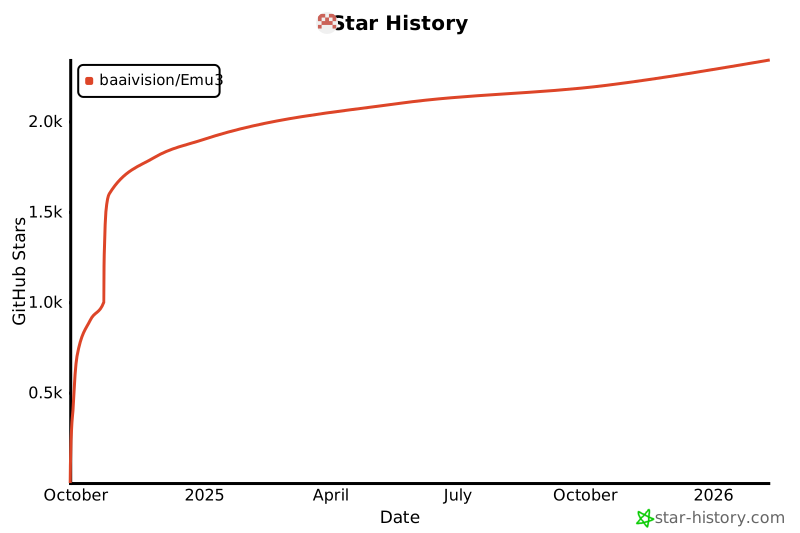](https://star-history.com/#baaivision/Emu3&Date)

