# neogit **Repository Path**: Ziphold/neogit ## Basic Information - **Project Name**: neogit - **Description**: No description available - **Primary Language**: Unknown - **License**: MIT - **Default Branch**: master - **Homepage**: None - **GVP Project**: No ## Statistics - **Stars**: 0 - **Forks**: 0 - **Created**: 2024-03-28 - **Last Updated**: 2024-07-15 ## Categories & Tags **Categories**: Uncategorized **Tags**: None ## README

Neogit

A git interface for Neovim, inspired by Magit.
[![Lua](https://img.shields.io/badge/Lua-blue.svg?style=for-the-badge&logo=lua)](http://www.lua.org) [![Neovim](https://img.shields.io/badge/Neovim%200.9+-green.svg?style=for-the-badge&logo=neovim)](https://neovim.io) [![MIT](https://img.shields.io/badge/MIT-yellow.svg?style=for-the-badge)](https://opensource.org/licenses/MIT)
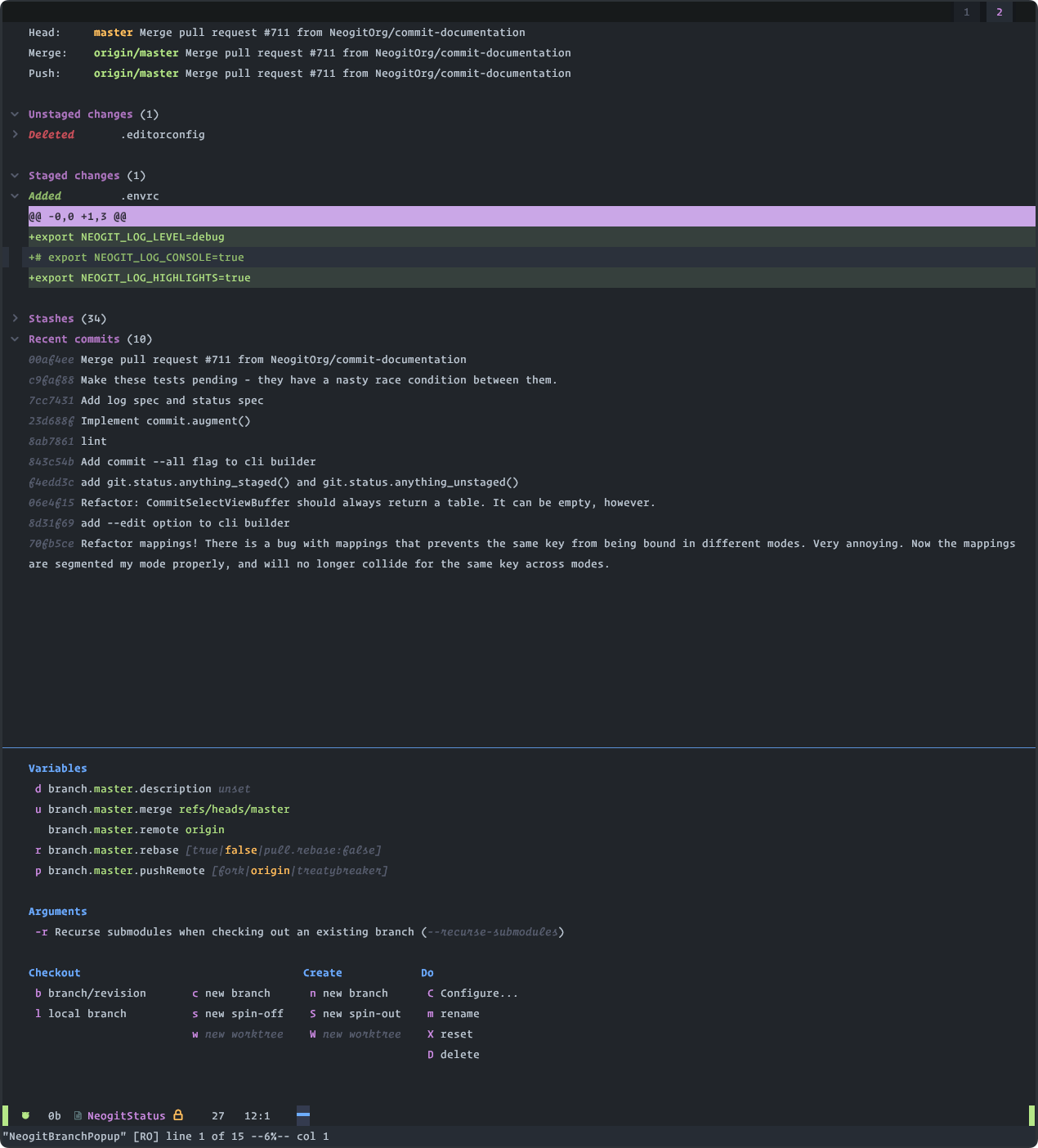
![preview](https://github.com/NeogitOrg/neogit/assets/7228095/d964cbb4-a557-4e97-ac5b-ea571a001f5c) ## Installation Here's an example spec for [Lazy](https://github.com/folke/lazy.nvim), but you're free to use whichever plugin manager suits you. ```lua { "NeogitOrg/neogit", dependencies = { "nvim-lua/plenary.nvim", -- required "sindrets/diffview.nvim", -- optional - Diff integration -- Only one of these is needed, not both. "nvim-telescope/telescope.nvim", -- optional "ibhagwan/fzf-lua", -- optional }, config = true } ``` If you're not using lazy, you'll need to require and setup the plugin like so: ```lua -- init.lua local neogit = require('neogit') neogit.setup {} ``` ## Compatibility The `master` branch will always be compatible with the latest **stable** release of Neovim, and with the latest **nightly** build as well. Some features may only be available using unreleased (neovim nightly) API's - to use them, set your plugin manager to track the `nightly` branch instead. The `nightly` branch has the same stability guarantees as the `master` branch. ## Configuration You can configure neogit by running the `neogit.setup()` function, passing a table as the argument.
Default Config ```lua local neogit = require("neogit") neogit.setup { -- Hides the hints at the top of the status buffer disable_hint = false, -- Disables changing the buffer highlights based on where the cursor is. disable_context_highlighting = false, -- Disables signs for sections/items/hunks disable_signs = false, -- Changes what mode the Commit Editor starts in. `true` will leave nvim in normal mode, `false` will change nvim to -- insert mode, and `"auto"` will change nvim to insert mode IF the commit message is empty, otherwise leaving it in -- normal mode. disable_insert_on_commit = "auto", -- When enabled, will watch the `.git/` directory for changes and refresh the status buffer in response to filesystem -- events. filewatcher = { interval = 1000, enabled = true, }, -- "ascii" is the graph the git CLI generates -- "unicode" is the graph like https://github.com/rbong/vim-flog graph_style = "ascii", -- Used to generate URL's for branch popup action "pull request". git_services = { ["github.com"] = "https://github.com/${owner}/${repository}/compare/${branch_name}?expand=1", ["bitbucket.org"] = "https://bitbucket.org/${owner}/${repository}/pull-requests/new?source=${branch_name}&t=1", ["gitlab.com"] = "https://gitlab.com/${owner}/${repository}/merge_requests/new?merge_request[source_branch]=${branch_name}", }, -- Allows a different telescope sorter. Defaults to 'fuzzy_with_index_bias'. The example below will use the native fzf -- sorter instead. By default, this function returns `nil`. telescope_sorter = function() return require("telescope").extensions.fzf.native_fzf_sorter() end, -- Persist the values of switches/options within and across sessions remember_settings = true, -- Scope persisted settings on a per-project basis use_per_project_settings = true, -- Table of settings to never persist. Uses format "Filetype--cli-value" ignored_settings = { "NeogitPushPopup--force-with-lease", "NeogitPushPopup--force", "NeogitPullPopup--rebase", "NeogitCommitPopup--allow-empty", "NeogitRevertPopup--no-edit", }, -- Configure highlight group features highlight = { italic = true, bold = true, underline = true }, -- Set to false if you want to be responsible for creating _ALL_ keymappings use_default_keymaps = true, -- Neogit refreshes its internal state after specific events, which can be expensive depending on the repository size. -- Disabling `auto_refresh` will make it so you have to manually refresh the status after you open it. auto_refresh = true, -- Value used for `--sort` option for `git branch` command -- By default, branches will be sorted by commit date descending -- Flag description: https://git-scm.com/docs/git-branch#Documentation/git-branch.txt---sortltkeygt -- Sorting keys: https://git-scm.com/docs/git-for-each-ref#_options sort_branches = "-committerdate", -- Change the default way of opening neogit kind = "tab", -- Disable line numbers and relative line numbers disable_line_numbers = true, -- The time after which an output console is shown for slow running commands console_timeout = 2000, -- Automatically show console if a command takes more than console_timeout milliseconds auto_show_console = true, status = { recent_commit_count = 10, }, commit_editor = { kind = "auto", }, commit_select_view = { kind = "tab", }, commit_view = { kind = "vsplit", verify_commit = os.execute("which gpg") == 0, -- Can be set to true or false, otherwise we try to find the binary }, log_view = { kind = "tab", }, rebase_editor = { kind = "auto", }, reflog_view = { kind = "tab", }, merge_editor = { kind = "auto", }, tag_editor = { kind = "auto", }, preview_buffer = { kind = "split", }, popup = { kind = "split", }, signs = { -- { CLOSED, OPENED } hunk = { "", "" }, item = { ">", "v" }, section = { ">", "v" }, }, -- Each Integration is auto-detected through plugin presence, however, it can be disabled by setting to `false` integrations = { -- If enabled, use telescope for menu selection rather than vim.ui.select. -- Allows multi-select and some things that vim.ui.select doesn't. telescope = nil, -- Neogit only provides inline diffs. If you want a more traditional way to look at diffs, you can use `diffview`. -- The diffview integration enables the diff popup. -- -- Requires you to have `sindrets/diffview.nvim` installed. diffview = nil, -- If enabled, uses fzf-lua for menu selection. If the telescope integration -- is also selected then telescope is used instead -- Requires you to have `ibhagwan/fzf-lua` installed. fzf_lua = nil, }, sections = { -- Reverting/Cherry Picking sequencer = { folded = false, hidden = false, }, untracked = { folded = false, hidden = false, }, unstaged = { folded = false, hidden = false, }, staged = { folded = false, hidden = false, }, stashes = { folded = true, hidden = false, }, unpulled_upstream = { folded = true, hidden = false, }, unmerged_upstream = { folded = false, hidden = false, }, unpulled_pushRemote = { folded = true, hidden = false, }, unmerged_pushRemote = { folded = false, hidden = false, }, recent = { folded = true, hidden = false, }, rebase = { folded = true, hidden = false, }, }, mappings = { commit_editor = { ["q"] = "Close", [""] = "Submit", [""] = "Abort", }, rebase_editor = { ["p"] = "Pick", ["r"] = "Reword", ["e"] = "Edit", ["s"] = "Squash", ["f"] = "Fixup", ["x"] = "Execute", ["d"] = "Drop", ["b"] = "Break", ["q"] = "Close", [""] = "OpenCommit", ["gk"] = "MoveUp", ["gj"] = "MoveDown", [""] = "Submit", [""] = "Abort", }, finder = { [""] = "Select", [""] = "Close", [""] = "Close", [""] = "Next", [""] = "Previous", [""] = "Next", [""] = "Previous", [""] = "MultiselectToggleNext", [""] = "MultiselectTogglePrevious", [""] = "NOP", }, -- Setting any of these to `false` will disable the mapping. popup = { ["?"] = "HelpPopup", ["A"] = "CherryPickPopup", ["D"] = "DiffPopup", ["M"] = "RemotePopup", ["P"] = "PushPopup", ["X"] = "ResetPopup", ["Z"] = "StashPopup", ["b"] = "BranchPopup", ["c"] = "CommitPopup", ["f"] = "FetchPopup", ["l"] = "LogPopup", ["m"] = "MergePopup", ["p"] = "PullPopup", ["r"] = "RebasePopup", ["v"] = "RevertPopup", ["w"] = "WorktreePopup", }, status = { ["q"] = "Close", ["I"] = "InitRepo", ["1"] = "Depth1", ["2"] = "Depth2", ["3"] = "Depth3", ["4"] = "Depth4", [""] = "Toggle", ["x"] = "Discard", ["s"] = "Stage", ["S"] = "StageUnstaged", [""] = "StageAll", ["u"] = "Unstage", ["U"] = "UnstageStaged", ["$"] = "CommandHistory", ["#"] = "Console", ["Y"] = "YankSelected", [""] = "RefreshBuffer", [""] = "GoToFile", [""] = "VSplitOpen", [""] = "SplitOpen", [""] = "TabOpen", ["{"] = "GoToPreviousHunkHeader", ["}"] = "GoToNextHunkHeader", }, }, } ```
## Usage You can either open Neogit by using the `Neogit` command: ```vim :Neogit " Open the status buffer in a new tab :Neogit cwd= " Use a different repository path :Neogit cwd=%:p:h " Uses the repository of the current file :Neogit kind= " Open specified popup directly :Neogit commit " Open commit popup ``` Or using the lua api: ```lua local neogit = require('neogit') -- open using defaults neogit.open() -- open commit popup neogit.open({ "commit" }) -- open with split kind neogit.open({ kind = "split" }) -- open home directory neogit.open({ cwd = "~" }) ``` The `kind` option can be one of the following values: - `tab` (default) - `replace` - `floating` (EXPERIMENTAL! This currently doesn't work with popups. Very unstable) - `split` - `split_above` - `vsplit` - `auto` (`vsplit` if window would have 80 cols, otherwise `split`) ## Buffers ### Log Buffer `ll`, `lh`, `lo`, ... Shows a graph of the commit history. Hitting `` will open the Commit View for that commit. The following popups are available from the log buffer, and will use the commit under the cursor, or selected, instead of prompting: * Branch Popup * Cherry Pick Popup * Revert Popup * Rebase Popup * Commit Popup * Reset Popup ### Reflog Buffer `lr`, `lH`, `lO` Shows your reflog history. Hitting `` will open the Commit View for that commit. The following popups are available from the reflog buffer, and will use the commit under the cursor, or selected, instead of prompting: * Branch Popup * Cherry Pick Popup * Revert Popup * Rebase Popup * Commit Popup * Reset Popup ### Commit View `` on a commit. Shows details for a specific commit. The following popups are available from the commit buffer, using it's SHA instead of prompting: * Branch Popup * Cherry Pick Popup * Revert Popup * Rebase Popup * Commit Popup * Reset Popup ### Status Buffer A full list of status buffer commands can be found above under "configuration". ### Fuzzy Finder A full list of fuzzy-finder commands can be found above under "configuration". If [nvim-telescope](https://github.com/nvim-telescope/telescope.nvim) is installed, a custom finder will be used that allows for multi-select (in some places) and some other cool things. Otherwise, `vim.ui.select` will be used as a slightly less featurefull fallback. ## Highlight Groups See the built-in documentation for a comprehensive list of highlight groups. If your theme doesn't style a particular group, we'll try our best to do a nice job. ## Events Neogit emits the following events: | Event | Description | Event Data | |-------------------------|------------------------------------------|-------------------------------------------------| | `NeogitStatusRefreshed` | Status has been reloaded | `{}` | | `NeogitCommitComplete` | Commit has been created | `{}` | | `NeogitPushComplete` | Push has completed | `{}` | | `NeogitPullComplete` | Pull has completed | `{}` | | `NeogitFetchComplete` | Fetch has completed | `{}` | | `NeogitBranchCreate` | Branch was created, starting from `base` | `{ branch_name: string, base: string? }` | | `NeogitBranchDelete` | Branch was deleted | `{ branch_name: string }` | | `NeogitBranchCheckout` | Branch was checked out | `{ branch_name: string }` | | `NeogitBranchReset` | Branch was reset to a commit/branch | `{ branch_name: string, resetting_to: string }` | | `NeogitBranchRename` | Branch was renamed | `{ branch_name: string, new_name: string }` | | `NeogitRebase` | A rebase finished | `{ commit: string, status: "ok"\|"conflict" }` | | `NeogitReset` | A branch was reset to a certain commit | `{ commit: string, mode: "soft"\|"mixed"\|"hard"\|"keep"\|"index" }` | | `NeogitTagCreate` | A tag was placed on a certain commit | `{ name: string, ref: string }` | | `NeogitTagDelete` | A tag was removed | `{ name: string }` | | `NeogitCherryPick` | One or more commits were cherry-picked | `{ commits: string[] }` | | `NeogitMerge` | A merge finished | `{ branch: string, args = string[], status: "ok"\|"conflict" }` | You can listen to the events using the following code: ```vim autocmd User NeogitStatusRefreshed echo "Hello World!" ``` Or, if you prefer to configure autocommands via Lua: ```lua local group = vim.api.nvim_create_augroup('MyCustomNeogitEvents', { clear = true }) vim.api.nvim_create_autocmd('User', { pattern = 'NeogitPushComplete', group = group, callback = require('neogit').close, }) ``` ## Refreshing Neogit If you would like to refresh Neogit manually, you can use `neogit#refresh_manually` in Vimscript or `require('neogit').refresh_manually` in lua. They both require a single file parameter. This allows you to refresh Neogit on your own custom events ```vim augroup DefaultRefreshEvents au! au BufWritePost,BufEnter,FocusGained,ShellCmdPost,VimResume * call neogit#refresh_manually(expand('')) augroup END ``` ## Testing Run `make test` after checking out the repo. All dependencies should get automatically downloaded to `/tmp/neogit-test/` See [CONTRIBUTING.md](https://github.com/NeogitOrg/neogit/blob/master/CONTRIBUTING.md) for more details. ## Credit Thank you to [kolja](https://github.com/kolja) for the Neogit Logo