# rustaceanvim
**Repository Path**: Ziphold/rustaceanvim
## Basic Information
- **Project Name**: rustaceanvim
- **Description**: No description available
- **Primary Language**: Unknown
- **License**: GPL-2.0
- **Default Branch**: master
- **Homepage**: None
- **GVP Project**: No
## Statistics
- **Stars**: 0
- **Forks**: 0
- **Created**: 2024-04-11
- **Last Updated**: 2024-04-11
## Categories & Tags
**Categories**: Uncategorized
**Tags**: None
## README
[![Neovim][neovim-shield]][neovim-url]
[![Lua][lua-shield]][lua-url]
[![Rust][rust-shield]][rust-url]
[![Nix][nix-shield]][nix-url]
[![GPL2 License][license-shield]][license-url]
[![Issues][issues-shield]][issues-url]
[![Build Status][ci-shield]][ci-url]
[![LuaRocks][luarocks-shield]][luarocks-url]
> [!NOTE]
>
> - Just works. [No need to call `setup`!](https://mrcjkb.dev/posts/2023-08-22-setup.html)
> - No dependency on `lspconfig`.
> - Lazy initialization by design.
## Quick Links
- [Installation](#installation)
- [Quick setup](#quick-setup)
- [Usage](#usage)
- [Advanced configuration](#advanced-configuration)
- [Troubleshooting](#troubleshooting)
- [FAQ](#faq)
- [Migrating from rust-tools](https://github.com/mrcjkb/rustaceanvim/discussions/122)
## Prerequisites
### Required
- `neovim >= 0.9`
- [`rust-analyzer`](https://rust-analyzer.github.io/)
### Optional
- [`dot` from `graphviz`](https://graphviz.org/doc/info/lang.html),
for crate graphs.
- [`cargo`](https://doc.rust-lang.org/cargo/),
required for Cargo projects.
- A debug adapter (e.g. [`lldb`](https://lldb.llvm.org/)
or [`codelldb`](https://github.com/vadimcn/codelldb))
and [`nvim-dap`](https://github.com/mfussenegger/nvim-dap),
required for debugging.
- A tree-sitter parser for Rust (required for the `:Rustc unpretty` command).
Can be installed using [nvim-treesitter](https://github.com/nvim-treesitter/nvim-treesitter),
which also provides highlights, etc.
## Installation
This plugin is [available on LuaRocks][luarocks-url]:
[`:Rocks install rustaceanvim`](https://github.com/nvim-neorocks/rocks.nvim)
Example using [`lazy.nvim`](https://github.com/folke/lazy.nvim):
```lua
{
'mrcjkb/rustaceanvim',
version = '^4', -- Recommended
ft = { 'rust' },
}
```
>[!TIP]
>
>It is suggested to pin to tagged releases if you would like to avoid breaking changes.
To manually generate documentation, use `:helptags ALL`.
>[!NOTE]
>
> For NixOS users with flakes enabled, this project provides outputs in the
> form of a package and an overlay; use it as you wish in your NixOS or
> home-manager configuration.
> It is also available in `nixpkgs`.
Look at the configuration information below to get started.
## Quick Setup
This plugin automatically configures the `rust-analyzer` builtin LSP
client and integrates with other Rust tools.
See the [Usage](#usage) section for more info.
>[!WARNING]
>
> Do not call the [`nvim-lspconfig.rust_analyzer`](https://github.com/neovim/nvim-lspconfig)
> setup or set up the lsp client for `rust-analyzer` manually,
> as doing so may cause conflicts.
This is a filetype plugin that works out of the box,
so there is no need to call a `setup` function or configure anything
to get this plugin working.
You will most likely want to add some keymaps.
Most keymaps are only useful in rust files,
so I suggest you define them in `~/.config/nvim/after/ftplugin/rust.lua`[^1]
[^1]: See [`:help base-directories`](https://neovim.io/doc/user/starting.html#base-directories)
Example:
```lua
local bufnr = vim.api.nvim_get_current_buf()
vim.keymap.set(
"n",
"a",
function()
vim.cmd.RustLsp('codeAction') -- supports rust-analyzer's grouping
-- or vim.lsp.buf.codeAction() if you don't want grouping.
end,
{ silent = true, buffer = bufnr }
)
```
>[!TIP]
>
> - For more LSP related keymaps, [see the `nvim-lspconfig` suggestions](https://github.com/neovim/nvim-lspconfig#suggested-configuration).
> - If you want to share keymaps with `nvim-lspconfig`,
> you can also use the `vim.g.rustaceanvim.server.on_attach` function,
> or an `LspAttach` autocommand.
> - See the [Advanced configuration](#advanced-configuration) section
> for more configuration options.
>[!IMPORTANT]
>
> - Do **not** set `vim.g.rustaceanvim`
> in `after/ftplugin/rust.lua`, as
> the file is sourced after the plugin
> is initialized.
## Usage
Debugging
- `debuggables` opens a prompt to select from available targets.
- `debug` searches for a target at the current cursor position.
```vim
:RustLsp[!] debuggables {args[]}?
:RustLsp[!] debug {args[]}?
```
```lua
vim.cmd.RustLsp('debug')
vim.cmd.RustLsp('debuggables')
-- or, to run the previous debuggable:
vim.cmd.RustLsp { 'debuggables', bang = true }
-- or, to override the executable's args:
vim.cmd.RustLsp {'debuggables', 'arg1', 'arg2' }
```
Calling the command with a bang `!` will rerun the last debuggable.
Requires:
- [`nvim-dap`](https://github.com/mfussenegger/nvim-dap)
(Please read the plugin's documentation).
- A debug adapter (e.g. [`lldb`](https://lldb.llvm.org/)
or [`codelldb`](https://github.com/vadimcn/codelldb)
By default, this plugin will silently attempt to autoload `nvim-dap`
configurations when the LSP client attaches.
You can call them with `require('dap').continue()` or `:DapContinue` once
they have been loaded. The feature can be disabled by setting
`vim.g.rustaceanvim.dap.autoload_configurations = false`.
It is disabled by default in neovim 0.9, as it can block the UI.
- `:RustLsp debuggables` will only load debug configurations
created by `rust-analyzer`.
- `require('dap').continue()` will load all Rust debug configurations,
including those specified in a `.vscode/launch.json`
(see [`:h dap-launch.json`](https://github.com/mfussenegger/nvim-dap/blob/9adbfdca13afbe646d09a8d7a86d5d031fb9c5a5/doc/dap.txt#L316)).
- Note that rustaceanvim may only be able to load DAP configurations
when rust-analyzer has finished initializing (which may be after
the client attaches, in large projects). This means that the
DAP configurations may not be loaded immediately upon startup.

Runnables
- `runnables` opens a prompt to select from available targets.
- `run` searches for a target at the current cursor position.
```vim
:RustLsp[!] runnables {args[]}?
:RustLsp[!] run {args[]}?
```
```lua
vim.cmd.RustLsp('run')
vim.cmd.RustLsp('runnables')
-- or, to run the previous runnable:
vim.cmd.RustLsp { 'runnables', bang = true }
-- or, to override the executable's args:
vim.cmd.RustLsp {'runnables', 'arg1', 'arg2' }
```
Calling the command with a bang `!` will rerun the last runnable.
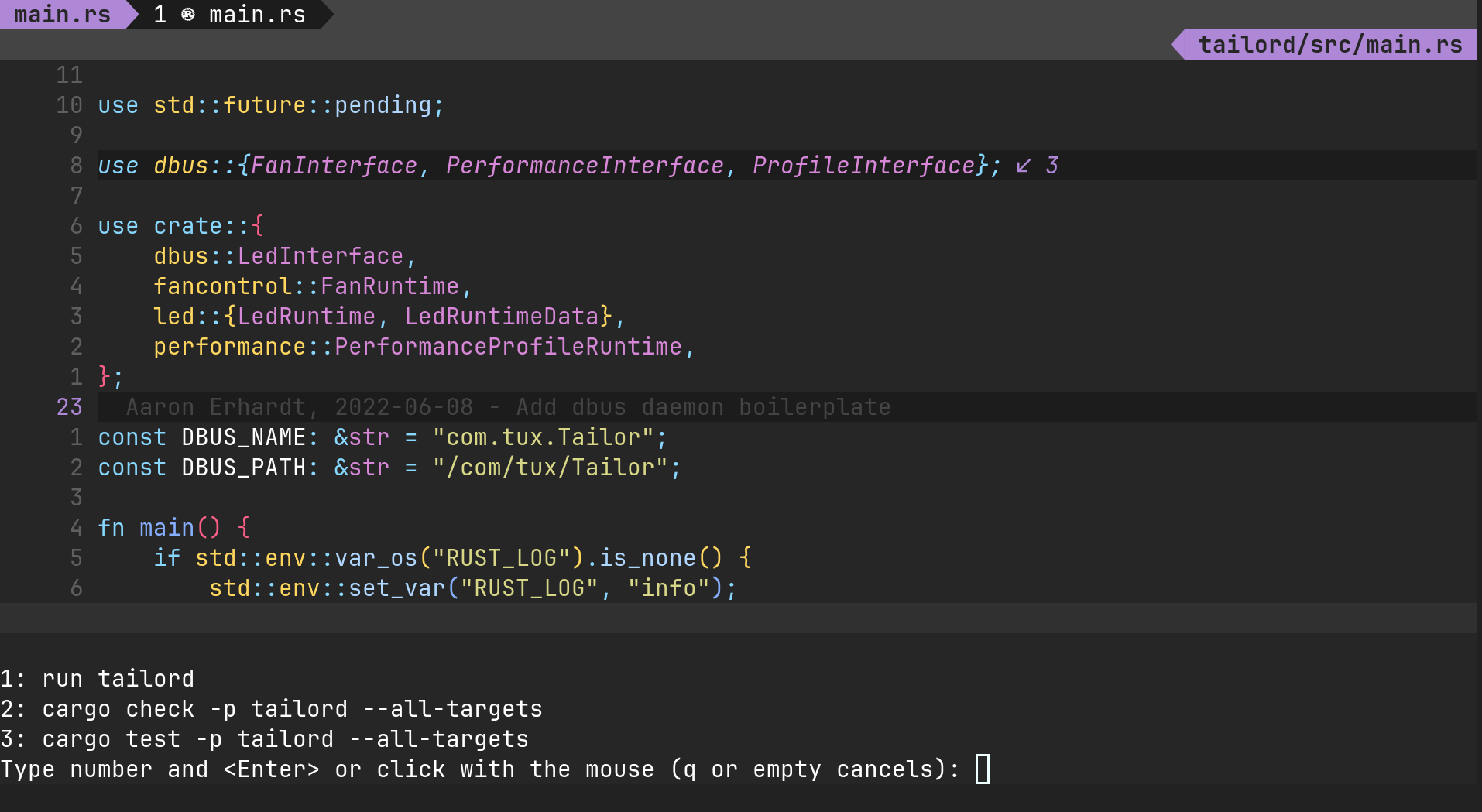
Testables and failed test diagnostics
If you are using Neovim >= 0.10, you can set the `vim.g.rustaceanvim.tools.test_executor`
option to `'background'`, and this plugin will run tests in the background,
parse the results, and - if possible - display failed tests as diagnostics.
This is also possible in Neovim 0.9, but tests won't be run in the background,
and will block the UI.
```vim
:RustLsp[!] testables {args[]}?
```
```lua
vim.cmd.RustLsp('testables')
-- or, to run the previous testables:
vim.cmd.RustLsp { 'testables', bang = true }
-- or, to override the executable's args:
vim.cmd.RustLsp {'testables', 'arg1', 'arg2' }
```
Calling the command with a bang `!` will rerun the last testable.

Neotest integration
This plugin provides a [neotest](https://github.com/nvim-neotest/neotest) adapter,
which you can add to neotest as follows:
```lua
require('neotest').setup {
-- ...,
adapters = {
-- ...,
require('rustaceanvim.neotest')
},
}
```
Note: If you use rustaceanvim's neotest adapter,
do not add [neotest-rust](https://github.com/rouge8/neotest-rust).
Here is a comparison between rustaceanvim's adapter and neotest-rust:
| | rustaceanvim | neotest-rust |
|:--|:--|:--|
| Test discovery | rust-analyzer (LSP) | tree-sitter |
| Command construction | rust-analyzer (LSP) | tree-sitter |
| DAP strategy | Automatic DAP detection (reuses `debuggables`); overridable with `vim.g.rustaceanvim.dap` | Defaults to `codelldb`; manual configuration |
| Test runner | `cargo` or `cargo-nextest`, if detected | `cargo-nextest` |
If you configure rustaceanvim to use neotest, the `tools.test_executor`
will default to using neotest for `testables` and `runnables` that are tests.

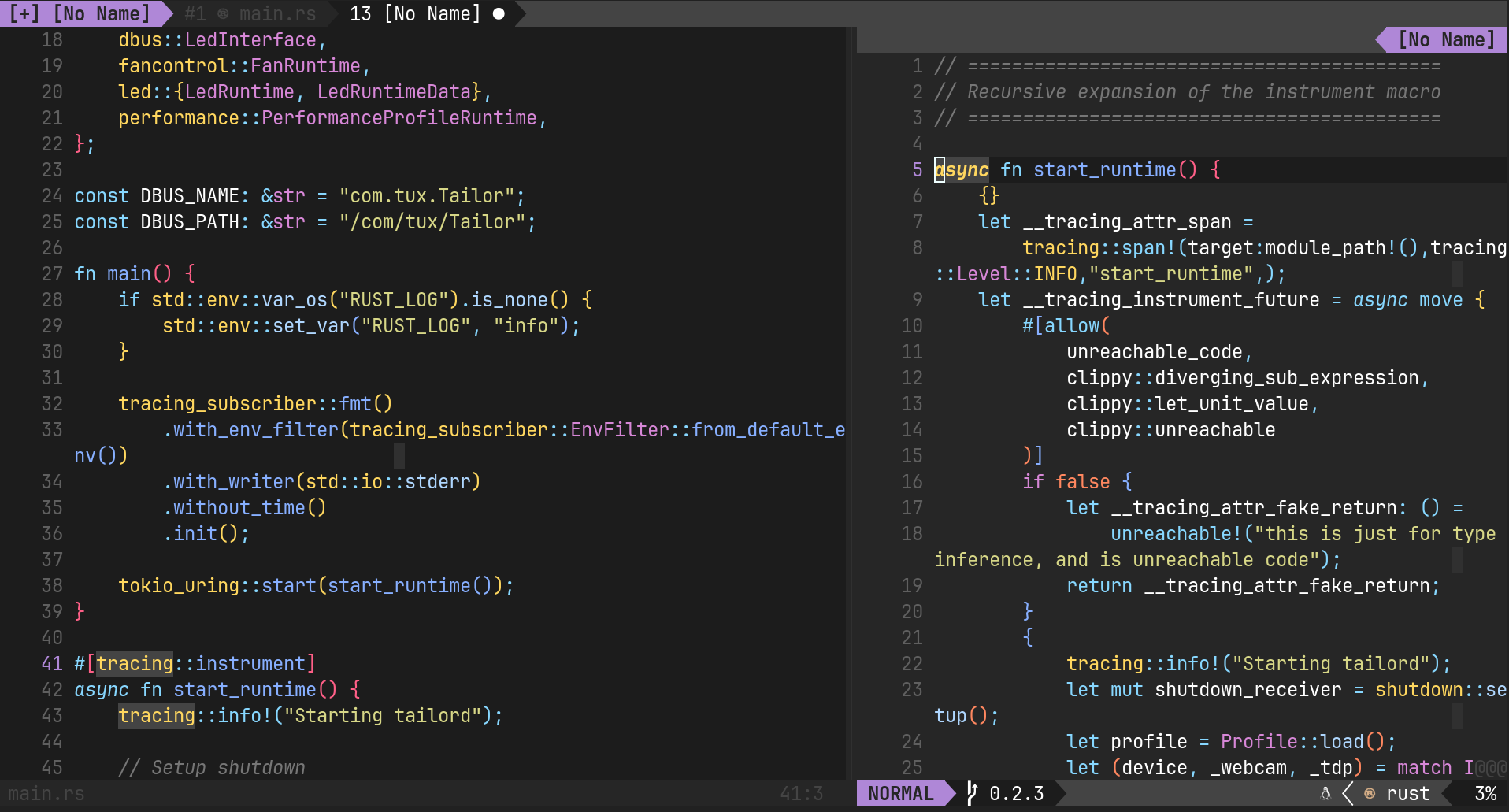
Expand macros recursively
```vim
:RustLsp expandMacro
```
```lua
vim.cmd.RustLsp('expandMacro')
```
Rebuild proc macros
```vim
:RustLsp rebuildProcMacros
```
```lua
vim.cmd.RustLsp('rebuildProcMacros')
```
Move item up/down
```vim
:RustLsp moveItem {up|down}
```
```lua
vim.cmd.RustLsp { 'moveItem', 'up' }
vim.cmd.RustLsp { 'moveItem', 'down' }
```
Grouped code actions
Sometimes, rust-analyzer groups code actions by category,
which is not supported by Neovim's built-in `vim.lsp.buf.codeAction`.
This plugin provides a command with a UI that does:
```vim
:RustLsp codeAction
```
```lua
vim.cmd.RustLsp('codeAction')
```
If you set the option `vim.g.rustaceanvim.tools.code_actions.ui_select_fallback`
to `true` (defaults to `false`), it will fall back to `vim.ui.select`
if there are no grouped code actions.

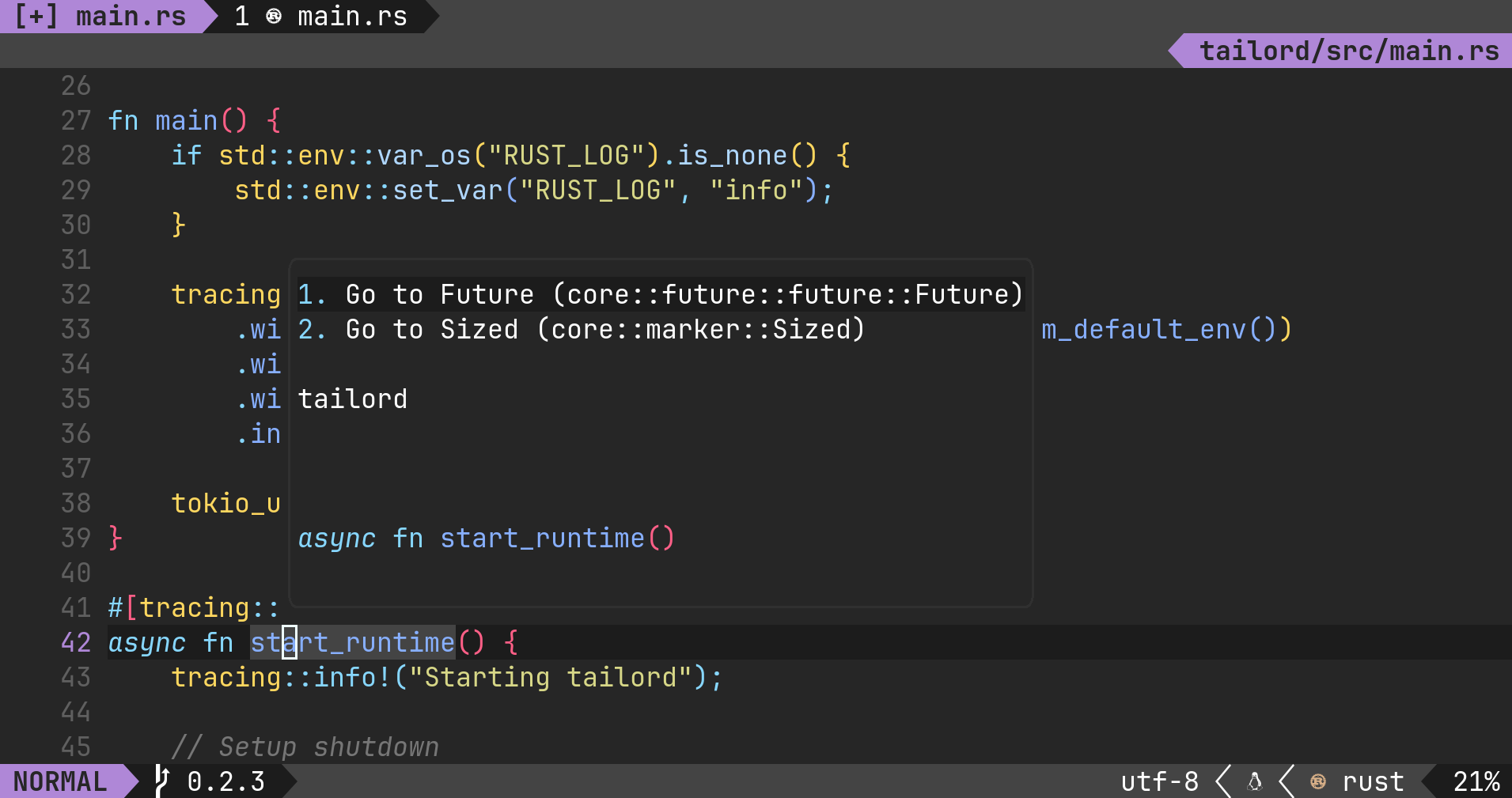
Hover actions
Note: To activate hover actions, run the command twice.
This will move you into the window, then press enter on the selection you want.
Alternatively, you can set `auto_focus` to `true` in your config and you will
automatically enter the hover actions window.
```vim
:RustLsp hover actions
```
```lua
vim.cmd.RustLsp { 'hover', 'actions' }
```
By default, this plugin replaces Neovim's built-in hover handler with hover
actions, so you can also use `vim.lsp.buf.hover()`.
Hover range
```vim
:RustLsp hover range
```
```lua
vim.cmd.RustLsp { 'hover', 'range' }
```
Explain errors
Display a hover window with explanations from the [rust error codes index](https://doc.rust-lang.org/error_codes/error-index.html)
over error diagnostics (if they have an error code).
```vim
:RustLsp explainError
```
```lua
vim.cmd.RustLsp('explainError')
```

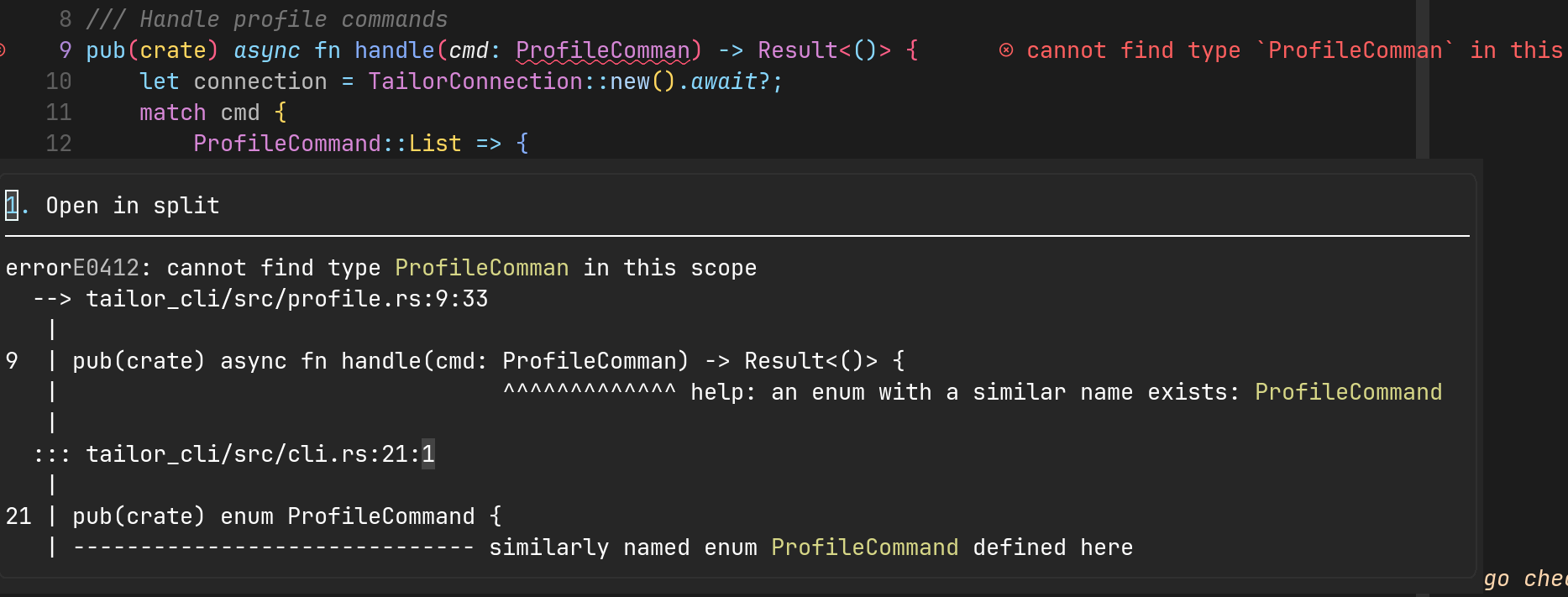
Render diagnostics
Display a hover window with the rendered diagnostic, as displayed
during `cargo build`.
Useful for solving bugs around borrowing and generics,
as it consolidates the important bits (sometimes across files)
together.
```vim
:RustLsp renderDiagnostic
```
```lua
vim.cmd.RustLsp('renderDiagnostic')
```
Open Cargo.toml
```vim
:RustLsp openCargo
```
```lua
vim.cmd.RustLsp('openCargo')
```
Open docs.rs documentation
Open docs.rs documentation for the symbol under the cursor.
```vim
:RustLsp openDocs
```
```lua
vim.cmd.RustLsp('openDocs')
```
Parent Module
```vim
:RustLsp parentModule
```
```lua
vim.cmd.RustLsp('parentModule')
```
Filtered workspace symbol searches
rust-analyzer supports filtering workspace symbol searches.
```vim
:RustLsp[!] workspaceSymbol {onlyTypes?|allSymbols?} {query?}
```
```lua
vim.cmd.RustLsp('workspaceSymbol')
-- or
vim.cmd.RustLsp {
'workspaceSymbol',
'' --[[ optional ]],
'' --[[ optional ]],
bang = true --[[ optional ]]
}
```
- Calling the command with a bang `!` will include dependencies in the search.
- You can also influence the behaviour of [`vim.lsp.buf.workspace_symbol()`](https://neovim.io/doc/user/lsp.html#vim.lsp.buf.workspace_symbol())
by setting the rust-analyzer
`workspace.symbol.search` server option.
Join lines
Join selected lines into one, smartly fixing up whitespace, trailing commas, and braces.
Works with individual lines in normal mode and multiple lines in visual mode.
```vim
:RustLsp joinLines
```
```lua
vim.cmd.RustLsp('joinLines')
```

Structural search replace
- Searches the entire buffer in normal mode.
- Searches the selection in visual mode.
```vim
:RustLsp ssr {query}
```
```lua
vim.cmd.RustLsp { 'ssr', '' --[[ optional ]] }
```

View crate graph
```vim
:RustLsp crateGraph {backend {output}}
```
```lua
vim.cmd.RustLsp { 'crateGraph', '[backend]', '[output]' }
```
Requires:
- [`dot` from `graphviz`](https://graphviz.org/doc/info/lang.html)
View syntax tree
```vim
:RustLsp syntaxTree
```
```lua
vim.cmd.RustLsp('syntaxTree')
```

Fly check
Run `cargo check` or another compatible command (f.x. `clippy`)
in a background thread and provide LSP diagnostics based on
the output of the command.
Useful in large projects where running `cargo check` on each save
can be costly.
```vim
:RustLsp flyCheck {run?|clear?|cancel?}
```
```lua
vim.cmd.RustLsp('flyCheck') -- defaults to 'run'
vim.cmd.RustLsp { 'flyCheck', 'run' }
vim.cmd.RustLsp { 'flyCheck', 'clear' }
vim.cmd.RustLsp { 'flyCheck', 'cancel' }
```
> [!NOTE]
>
> This is only useful if you set the option,
> `['rust-analzyer'].checkOnSave = false`.
View HIR / MIR
Opens a buffer with a textual representation of the HIR or MIR
of the function containing the cursor.
Useful for debugging or when working on rust-analyzer itself.
```vim
:RustLsp view {hir|mir}
```
```lua
vim.cmd.RustLsp { 'view', 'hir' }
vim.cmd.RustLsp { 'view', 'mir' }
```
Rustc unpretty
Opens a buffer with a textual representation of the MIR or others things,
of the function closest to the cursor.
Achieves an experience similar to Rust Playground.
NOTE: This currently requires a tree-sitter parser for Rust,
and a nightly compiler toolchain.
```vim
:Rustc unpretty {hir|mir|...}
```
```lua
vim.cmd.Rustc { 'unpretty', 'hir' }
vim.cmd.Rustc { 'unpretty', 'mir' }
-- ...
```
Requires:
- A tree-sitter parser for Rust (required for the `:Rustc unpretty` command).
Can be installed using [nvim-treesitter](https://github.com/nvim-treesitter/nvim-treesitter).
## Advanced configuration
To modify the default configuration, set `vim.g.rustaceanvim`.
- See [`:help rustaceanvim.config`](./doc/rustaceanvim.txt) for a detailed
documentation of all available configuration options.
You may need to run `:helptags ALL` if the documentation has not been installed.
- The default configuration [can be found here (see `RustaceanDefaultConfig`)](./lua/rustaceanvim/config/internal.lua).
- For detailed descriptions of the language server configs,
see the [`rust-analyzer` documentation](https://rust-analyzer.github.io/manual.html#configuration).
You only need to specify the keys
that you want to be changed, because defaults
are applied for keys that are not provided.
Example config:
```lua
vim.g.rustaceanvim = {
-- Plugin configuration
tools = {
},
-- LSP configuration
server = {
on_attach = function(client, bufnr)
-- you can also put keymaps in here
end,
default_settings = {
-- rust-analyzer language server configuration
['rust-analyzer'] = {
},
},
},
-- DAP configuration
dap = {
},
}
```
> [!TIP]
>
> `vim.g.rustaceanvim` can also be a function that returns
> a table.
### Using `codelldb` for debugging
For Rust, `codelldb` from the [CodeLLDB VSCode extension](https://marketplace.visualstudio.com/items?itemName=vadimcn.vscode-lldb)
provides a better experience than `lldb`.
If you are using a distribution that lets you install the `codelldb`
executable, this plugin will automatically detect it and configure
itself to use it as a debug adapter.
Some examples:
- NixOS: [`vscode-extensions.vadimcn.vscode-lldb.adapter`](https://github.com/NixOS/nixpkgs/blob/nixos-unstable/pkgs/applications/editors/vscode/extensions/vadimcn.vscode-lldb/default.nix#L134)
- This repository's Nix flake provides a `codelldb` package.
- Arch Linux: [`codelldb-bin` (AUR)](https://aur.archlinux.org/packages/codelldb-bin)
- Using [`mason.nvim`](https://github.com/williamboman/mason.nvim):
`:MasonInstall codelldb`
If your distribution does not have a `codelldb` package,
you can configure it as follows:
1. Install the [CodeLLDB VSCode extension](https://marketplace.visualstudio.com/items?itemName=vadimcn.vscode-lldb).
1. Find out where it is installed.
On Linux, this is typically in `$HOME/.vscode/extensions/`
1. Update your configuration:
```lua
vim.g.rustaceanvim = function()
-- Update this path
local extension_path = vim.env.HOME .. '/.vscode/extensions/vadimcn.vscode-lldb-1.10.0/'
local codelldb_path = extension_path .. 'adapter/codelldb'
local liblldb_path = extension_path .. 'lldb/lib/liblldb'
local this_os = vim.uv.os_uname().sysname;
-- The path is different on Windows
if this_os:find "Windows" then
codelldb_path = extension_path .. "adapter\\codelldb.exe"
liblldb_path = extension_path .. "lldb\\bin\\liblldb.dll"
else
-- The liblldb extension is .so for Linux and .dylib for MacOS
liblldb_path = liblldb_path .. (this_os == "Linux" and ".so" or ".dylib")
end
local cfg = require('rustaceanvim.config')
return {
dap = {
adapter = cfg.get_codelldb_adapter(codelldb_path, liblldb_path),
},
}
end
```
### How to dynamically load different `rust-analyzer` settings per project
By default, this plugin will look for a `rust-analyzer.json`[^2]
file in the project root directory, and attempt to load it.
If the file does not exist, or it can't be decoded,
the `server.default_settings` will be used.
[^2]: See [this example](https://github.com/rust-analyzer/rust-project.json-example/blob/master/.vscode/settings.json)
and the rust-analyzer [configuration manual](https://rust-analyzer.github.io/manual.html#configuration).
You can change this behaviour with the `server.settings` config:
```lua
vim.g.rustaceanvim = {
-- ...
server = {
---@param project_root string Path to the project root
settings = function(project_root)
local ra = require('rustaceanvim.config.server')
return ra.load_rust_analyzer_settings(project_root, {
settings_file_pattern = 'rust-analyzer.json'
})
end,
},
}
```
## Troubleshooting
### Health checks
For a health check, run `:checkhealth rustaceanvim`
### `rust-analyzer` log file
To open the `rust-analyzer` log file, run `:RustLsp logFile`.
### Minimal config
To troubleshoot this plugin with a minimal config in a temporary directory,
you can try [minimal.lua](./troubleshooting/minimal.lua).
```console
mkdir -p /tmp/minimal/
NVIM_DATA_MINIMAL="/tmp/minimal" NVIM_APP_NAME="nvim-minimal" nvim -u NORC -u minimal.lua
```
> [!NOTE]
>
> If you use Nix, you can run
> `nix run "github:mrcjkb/rustaceanvim#nvim-minimal-stable"`.
> or
> `nix run "github:mrcjkb/rustaceanvim#nvim-minimal-nightly"`.
If you cannot reproduce your issue with a minimal config,
it may be caused by another plugin,
or a setting of your plugin manager.
In this case, add additional plugins and configurations to `minimal.lua`,
until you can reproduce it.
### rust-analyzer troubleshooting
For issues related to rust-analyzer
(e.g. LSP features not working), see also
[the rust-analyzer troubleshooting guide](https://rust-analyzer.github.io/manual.html#troubleshooting).
### FAQ
#### Where are inlay hints?
As Neovim >= 0.10 supports inlay hints natively, I have removed the
code from this plugin.
To enable inlay hints in Neovim < 0.10, see [this discussion](https://github.com/mrcjkb/rustaceanvim/discussions/46#discussioncomment-7620822).
#### mason.nvim and nvim-lspconfig
See [`:h rustaceanvim.mason`](./doc/mason.txt) for details about troubleshooting
mason.nvim and nvim-lspconfig issues, or configuring rustaceanvim to use
a rust-analyzer installation that is managed by mason.nvim.
## Related Projects
- [`rouge8/neotest-rust`](https://github.com/rouge8/neotest-rust)
A [`neotest`](https://github.com/nvim-neotest/neotest)
adapter for Rust, using [`cargo-nextest`](https://nexte.st/).
- [`Saecki/crates.nvim`](https://github.com/Saecki/crates.nvim)
- [`vxpm/ferris.nvim`](https://github.com/vxpm/ferris.nvim)
Geared towards people who prefer manual LSP client configuration.
Has some features that have not yet
been implemented by this plugin.
## Inspiration
`rust-tools.nvim` draws inspiration from [`akinsho/flutter-tools.nvim`](https://github.com/akinsho/flutter-tools.nvim)
[neovim-shield]: https://img.shields.io/badge/NeoVim-%2357A143.svg?&style=for-the-badge&logo=neovim&logoColor=white
[neovim-url]: https://neovim.io/
[lua-shield]: https://img.shields.io/badge/lua-%232C2D72.svg?style=for-the-badge&logo=lua&logoColor=white
[lua-url]: https://www.lua.org/
[nix-shield]: https://img.shields.io/badge/nix-0175C2?style=for-the-badge&logo=NixOS&logoColor=white
[nix-url]: https://nixos.org/
[rust-shield]: https://img.shields.io/badge/Rust-000000?style=for-the-badge&logo=rust&logoColor=white
[rust-url]: https://www.rust-lang.org/
[issues-shield]: https://img.shields.io/github/issues/mrcjkb/rustaceanvim.svg?style=for-the-badge
[issues-url]: https://github.com/mrcjkb/rustaceanvim/issues
[license-shield]: https://img.shields.io/github/license/mrcjkb/rustaceanvim.svg?style=for-the-badge
[license-url]: https://github.com/mrcjkb/rustaceanvim/blob/master/LICENSE
[ci-shield]: https://img.shields.io/github/actions/workflow/status/mrcjkb/rustaceanvim/nix-build.yml?style=for-the-badge
[ci-url]: https://github.com/mrcjkb/rustaceanvim/actions/workflows/nix-build.yml
[luarocks-shield]: https://img.shields.io/luarocks/v/MrcJkb/rustaceanvim?logo=lua&color=purple&style=for-the-badge
[luarocks-url]: https://luarocks.org/modules/MrcJkb/rustaceanvim 