# FastScroll
**Repository Path**: aceyun/FastScroll
## Basic Information
- **Project Name**: FastScroll
- **Description**: No description available
- **Primary Language**: Unknown
- **License**: Not specified
- **Default Branch**: master
- **Homepage**: None
- **GVP Project**: No
## Statistics
- **Stars**: 0
- **Forks**: 0
- **Created**: 2020-03-20
- **Last Updated**: 2024-11-25
## Categories & Tags
**Categories**: Uncategorized
**Tags**: None
## README
# FastScroll
[](http://www.apache.org/licenses/LICENSE-2.0) [](https://developer.android.com/about/versions/android-4.0.html) [](https://bintray.com/l4digital/maven/FastScroll/_latestVersion)
A ListView-like FastScroller for Android’s RecyclerView.
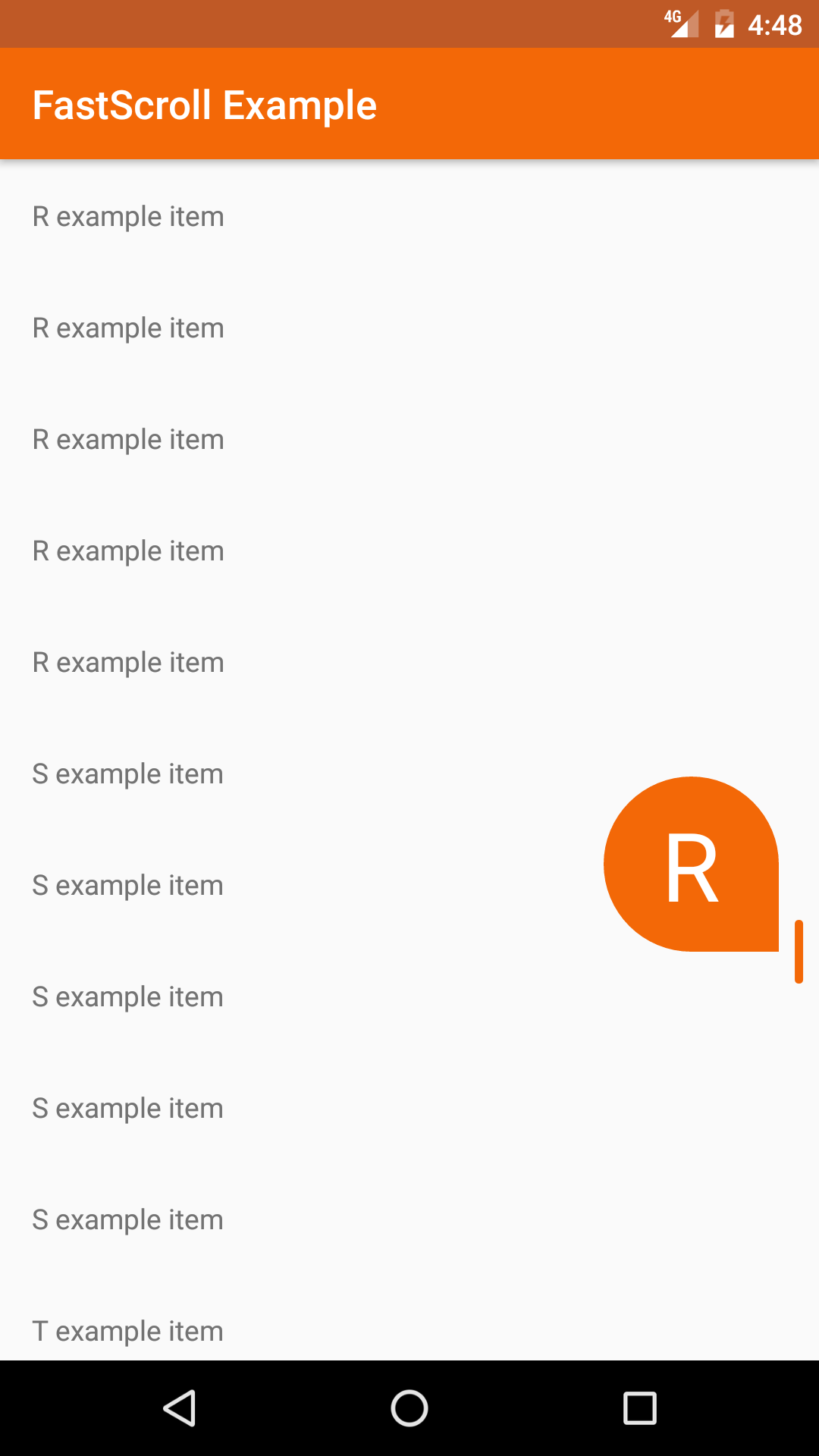 FastScroll brings the popular fast scrolling and section indexing features of Android’s ListView to the RecyclerView with a Lollipop styled scrollbar and section “bubble” view. The scrollbar provides a handle for quickly navigating a list while the bubble view displays the currently visible section index.
FastScroll was inspired by this [Styling Android blog post](https://blog.stylingandroid.com/recyclerview-fastscroll-part-1/).
## Download
#### Gradle:
~~~groovy
dependencies {
implementation 'com.l4digital.fastscroll:fastscroll:2.0.1'
}
~~~
#### Maven:
~~~xml
com.l4digital.fastscroll
fastscroll
2.0.1
~~~
## Usage
There are a few ways to implement the FastScroll library:
* The [FastScrollRecyclerView](#fastscrollrecyclerview) is a `RecyclerView` that creates and adds the `FastScroller` to its parent ViewGroup.
* The [FastScrollView](#fastscrollview) is a layout that creates and manages a `RecyclerView` with a `FastScroller`. `FastScrollView` is particularly useful when the parent ViewGroup requires a single child view, for example a `SwipeRefreshLayout`.
#### FastScrollRecyclerView:
Add the `FastScrollRecyclerView` to your xml layout and set your customizations using attributes.
*The parent ViewGroup must be a ConstraintLayout, CoordinatorLayout, FrameLayout, or RelativeLayout in order for the FastScroller to be properly displayed on top of the RecyclerView.*
~~~xml
~~~
`FastScrollRecyclerView` extends Android's `RecyclerView` and can be setup the same way.
~~~kotlin
override fun onCreate(savedInstanceState: Bundle?) {
super.onCreate(savedInstanceState)
setContentView(R.layout.activity_example)
val recyclerView: FastScrollRecyclerView? = findViewById(R.id.recycler_view)
recyclerView?.layoutManager = LinearLayoutManager(this)
recyclerView?.adapter = ExampleAdapter()
}
~~~
Implement the `FastScroller.SectionIndexer` interface in your RecyclerView Adapter and override `getSectionText()`.
~~~kotlin
class ExampleAdapter : RecyclerView.Adapter(), FastScroller.SectionIndexer {
...
override fun getSectionText(position: Int): CharSequence {
return getItem(position).getIndex()
}
}
~~~
#### FastScrollView:
Add the `FastScrollView` to your xml layout and set your customizations using attributes.
~~~xml
~~~
`FastScrollView` contains a `RecyclerView` and a `FastScroller` that can be accessed with public methods.
~~~kotlin
override fun onCreate(savedInstanceState: Bundle?) {
super.onCreate(savedInstanceState)
setContentView(R.layout.activity_example)
val fastScrollView: FastScrollView? = findViewById(R.id.fastscroll_view)
fastScrollView?.setLayoutManager(LinearLayoutManager(this))
fastScrollView?.setAdapter(ExampleAdapter())
}
~~~
Implement the `FastScroller.SectionIndexer` interface in your RecyclerView Adapter and override `getSectionText()`.
~~~kotlin
class ExampleAdapter : RecyclerView.Adapter(), FastScroller.SectionIndexer {
...
override fun getSectionText(position: Int): CharSequence {
return getItem(position).getIndex()
}
}
~~~
#### Alternative Usage:
If you are unable to use the `FastScrollRecyclerView` or `FastScrollView`, you can add a `FastScroller` to your layout and implement with any `RecyclerView`. See this [github issue](https://github.com/L4Digital/FastScroll/issues/4#issuecomment-256975634) for an example.
## Customization
The following attributes can be set to customize the visibility and appearance of the elements within the FastScroller view:
* `app:hideScrollbar=["true" | "false"]` *Hides the scrollbar when not scrolling*
* `app:showBubble=["true" | "false"]` *Shows the section bubble while scrolling*
* `app:showTrack=["true" | "false"]` *Shows the scroll track while scrolling*
* `app:handleColor=["#rrggbb" | "@color"]` *Sets the color of the scroll handle*
* `app:trackColor=["#rrggbb" | "@color"]` *Sets the color of the scroll track*
* `app:bubbleColor=["#rrggbb" | "@color"]` *Sets the background color of the section bubble*
* `app:bubbleSize=["normal" | "small"]` *Sets the size of the section bubble*
* `app:bubbleTextColor=["#rrggbb" | "@color"]` *Sets the text color of the section bubble*
* `app:bubbleTextSize=["sp" | "@dimen"]` *Sets the scaled pixel text size of the section bubble*
## License
Copyright 2018 L4 Digital. All rights reserved.
Licensed under the Apache License, Version 2.0 (the "License");
you may not use this file except in compliance with the License.
You may obtain a copy of the License at
http://www.apache.org/licenses/LICENSE-2.0
Unless required by applicable law or agreed to in writing, software
distributed under the License is distributed on an "AS IS" BASIS,
WITHOUT WARRANTIES OR CONDITIONS OF ANY KIND, either express or implied.
See the License for the specific language governing permissions and
limitations under the License.
FastScroll brings the popular fast scrolling and section indexing features of Android’s ListView to the RecyclerView with a Lollipop styled scrollbar and section “bubble” view. The scrollbar provides a handle for quickly navigating a list while the bubble view displays the currently visible section index.
FastScroll was inspired by this [Styling Android blog post](https://blog.stylingandroid.com/recyclerview-fastscroll-part-1/).
## Download
#### Gradle:
~~~groovy
dependencies {
implementation 'com.l4digital.fastscroll:fastscroll:2.0.1'
}
~~~
#### Maven:
~~~xml
com.l4digital.fastscroll
fastscroll
2.0.1
~~~
## Usage
There are a few ways to implement the FastScroll library:
* The [FastScrollRecyclerView](#fastscrollrecyclerview) is a `RecyclerView` that creates and adds the `FastScroller` to its parent ViewGroup.
* The [FastScrollView](#fastscrollview) is a layout that creates and manages a `RecyclerView` with a `FastScroller`. `FastScrollView` is particularly useful when the parent ViewGroup requires a single child view, for example a `SwipeRefreshLayout`.
#### FastScrollRecyclerView:
Add the `FastScrollRecyclerView` to your xml layout and set your customizations using attributes.
*The parent ViewGroup must be a ConstraintLayout, CoordinatorLayout, FrameLayout, or RelativeLayout in order for the FastScroller to be properly displayed on top of the RecyclerView.*
~~~xml
~~~
`FastScrollRecyclerView` extends Android's `RecyclerView` and can be setup the same way.
~~~kotlin
override fun onCreate(savedInstanceState: Bundle?) {
super.onCreate(savedInstanceState)
setContentView(R.layout.activity_example)
val recyclerView: FastScrollRecyclerView? = findViewById(R.id.recycler_view)
recyclerView?.layoutManager = LinearLayoutManager(this)
recyclerView?.adapter = ExampleAdapter()
}
~~~
Implement the `FastScroller.SectionIndexer` interface in your RecyclerView Adapter and override `getSectionText()`.
~~~kotlin
class ExampleAdapter : RecyclerView.Adapter(), FastScroller.SectionIndexer {
...
override fun getSectionText(position: Int): CharSequence {
return getItem(position).getIndex()
}
}
~~~
#### FastScrollView:
Add the `FastScrollView` to your xml layout and set your customizations using attributes.
~~~xml
~~~
`FastScrollView` contains a `RecyclerView` and a `FastScroller` that can be accessed with public methods.
~~~kotlin
override fun onCreate(savedInstanceState: Bundle?) {
super.onCreate(savedInstanceState)
setContentView(R.layout.activity_example)
val fastScrollView: FastScrollView? = findViewById(R.id.fastscroll_view)
fastScrollView?.setLayoutManager(LinearLayoutManager(this))
fastScrollView?.setAdapter(ExampleAdapter())
}
~~~
Implement the `FastScroller.SectionIndexer` interface in your RecyclerView Adapter and override `getSectionText()`.
~~~kotlin
class ExampleAdapter : RecyclerView.Adapter(), FastScroller.SectionIndexer {
...
override fun getSectionText(position: Int): CharSequence {
return getItem(position).getIndex()
}
}
~~~
#### Alternative Usage:
If you are unable to use the `FastScrollRecyclerView` or `FastScrollView`, you can add a `FastScroller` to your layout and implement with any `RecyclerView`. See this [github issue](https://github.com/L4Digital/FastScroll/issues/4#issuecomment-256975634) for an example.
## Customization
The following attributes can be set to customize the visibility and appearance of the elements within the FastScroller view:
* `app:hideScrollbar=["true" | "false"]` *Hides the scrollbar when not scrolling*
* `app:showBubble=["true" | "false"]` *Shows the section bubble while scrolling*
* `app:showTrack=["true" | "false"]` *Shows the scroll track while scrolling*
* `app:handleColor=["#rrggbb" | "@color"]` *Sets the color of the scroll handle*
* `app:trackColor=["#rrggbb" | "@color"]` *Sets the color of the scroll track*
* `app:bubbleColor=["#rrggbb" | "@color"]` *Sets the background color of the section bubble*
* `app:bubbleSize=["normal" | "small"]` *Sets the size of the section bubble*
* `app:bubbleTextColor=["#rrggbb" | "@color"]` *Sets the text color of the section bubble*
* `app:bubbleTextSize=["sp" | "@dimen"]` *Sets the scaled pixel text size of the section bubble*
## License
Copyright 2018 L4 Digital. All rights reserved.
Licensed under the Apache License, Version 2.0 (the "License");
you may not use this file except in compliance with the License.
You may obtain a copy of the License at
http://www.apache.org/licenses/LICENSE-2.0
Unless required by applicable law or agreed to in writing, software
distributed under the License is distributed on an "AS IS" BASIS,
WITHOUT WARRANTIES OR CONDITIONS OF ANY KIND, either express or implied.
See the License for the specific language governing permissions and
limitations under the License.