# LakuePagingButton
**Repository Path**: aceyun/LakuePagingButton
## Basic Information
- **Project Name**: LakuePagingButton
- **Description**: No description available
- **Primary Language**: Unknown
- **License**: Not specified
- **Default Branch**: master
- **Homepage**: None
- **GVP Project**: No
## Statistics
- **Stars**: 0
- **Forks**: 0
- **Created**: 2020-04-17
- **Last Updated**: 2020-12-19
## Categories & Tags
**Categories**: Uncategorized
**Tags**: None
## README
# LakuePagingButton
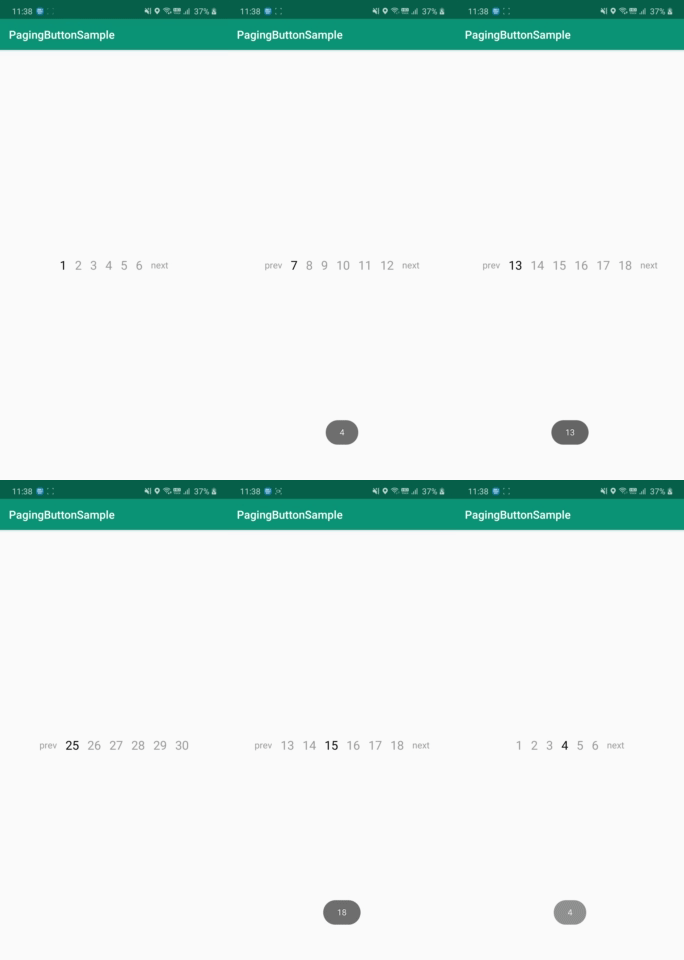
LakuePagingButton make it easy to page through when loading a lot of data.
* When you select a button, you simply get the page you selected and call it.
* You can customize it for ease of use.
[](https://jitpack.io/#lakue119/LakuePagingButton)
# Sample
# Install
Add Jitpack to your repositories in your build.gradle file
  allprojects {
      repositories {
        // ...
        maven { url 'https://jitpack.io' }
      }
  }
Add the below to your dependencies, again in your gradle.build file
dependencies {
    //Add LakuePagingButton Library
    implementation 'com.github.lakue119:LakuePagingButton:1.0.0'
}
# Code
add following code in xml
```
```
How to write in Java code
        //Number of buttons displayed at one time (Default : 5)
        lpb_buttonlist.setPageItemCount(4);

        //Set the total number of page buttons and the current page
        lpb_buttonlist.addBottomPageButton(max_page,1);

        //Event when we clicked page Listener
        lpb_buttonlist.setOnPageSelectListener(new OnPageSelectListener() {
            //PrevButton Click
            @Override
            public void onPageBefore(int now_page) {
                //When you click the prev button, it resets and draws the button.
                lpb_buttonlist.addBottomPageButton(max_page,now_page);
                Toast.makeText(MainActivity.this, ""+now_page, Toast.LENGTH_SHORT).show();
                //Write source code for there page
                //...
            }

            @Override
            public void onPageCenter(int now_page) {
                Toast.makeText(MainActivity.this, ""+now_page, Toast.LENGTH_SHORT).show();
                //Write source code for there page
                //...
            }

            //NextButton Click
            @Override
            public void onPageNext(int now_page) {
                //When you click the next button, it resets and draws the button.
                lpb_buttonlist.addBottomPageButton(max_page,now_page);
                Toast.makeText(MainActivity.this, ""+now_page, Toast.LENGTH_SHORT).show();
                //Write source code for there page
                //...
            }
        });
# Note
https://lakue.tistory.com/34