# bd
**Repository Path**: acr09/bd
## Basic Information
- **Project Name**: bd
- **Description**: linux cd 命令置反,快速返回上级目录。
Quickly go back to a specific parent directory in bash instead of typing "cd ../../.." redundantly.
- **Primary Language**: Unknown
- **License**: MIT
- **Default Branch**: master
- **Homepage**: None
- **GVP Project**: No
## Statistics
- **Stars**: 0
- **Forks**: 0
- **Created**: 2020-11-11
- **Last Updated**: 2020-12-19
## Categories & Tags
**Categories**: Uncategorized
**Tags**: None
## README
# bd
#### Description
Quickly go back to a specific parent directory in bash instead of typing "cd ../../.." redundantly.
---
**Installation**
***For OS X/macOS***
Using [MacPorts](https://ports.macports.org/port/bd):
```bash
sudo port install bd
```
***For Debian/Ubuntu***
Packages available here:
https://tracker.debian.org/pkg/bd
https://launchpad.net/ubuntu/+source/bd
***For other OS***
```shell
wget --no-check-certificate -O /usr/local/bin/bd https://raw.github.com/vigneshwaranr/bd/master/bd
chmod +rx /usr/local/bin/bd
echo 'alias bd=". bd -si"' >> ~/.bashrc
source ~/.bashrc
# If you need autocomplete support, follow these two steps
wget -O /etc/bash_completion.d/bd https://raw.github.com/vigneshwaranr/bd/master/bash_completion.d/bd
source /etc/bash_completion.d/bd
```
To enable case-sensitive directory name matching, use `-s` instead of `-si` in the alias.
---
**How to use:**
If you are in this path `/home/user/project/src/org/main/site/utils/file/reader/whatever`
and you want to go to `site` directory quickly,
then just type:
`bd site`
In fact, You can simply type bd *\* like `bd s` or `bd si`
If there are more than one directories with same name up in the hierarchy, bd will take you to the closest. (Not considering the immediate parent.)
---
**Other uses:**
Using bd within backticks (\`bd \\`) prints out the path without changing the current directory.
You can take advantage of that by combining \`bd \\` with other commands such as ls, ln, echo, zip, tar etc..
**Example:**
1. If you just want to list the contents of a parent directory,
without going there, then you can use:
ls \`bd p\`
in the given example, it will list the contents of
`/home/user/project/`
2. If you want to execute a file somewhere in a parent directory,
\`bd p\`/build.sh
will execute `/home/user/project/build.sh` while not changing the
current directory.
3. If you reside in `/home/user/project/src/org/main/site/utils/file/reader/whatever`
and want to change to `/home/user/project/test`, then try
cd \`bd p\`/test
---
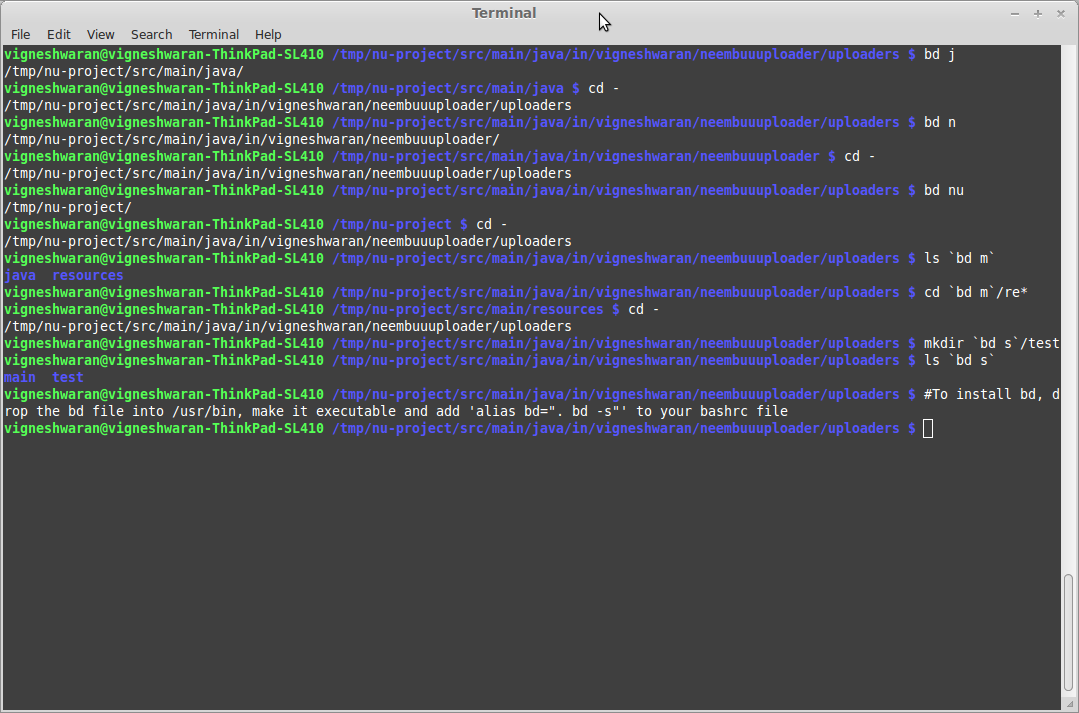
**Screenshot:**
---
**Thanks:**
* [@jaysh](https://github.com/jaysh) - Autocomplete support
* [@rmhsilva](https://github.com/rmhsilva) - Case-Insensitive directory name matching
* [@janosgyerik](https://github.com/janosgyerik) - Test cases, BSD support
* [@phls](https://github.com/phls) - Packaging bd for Debian
---
**See also:**
* [Tarrasch/zsh-bd](https://github.com/Tarrasch/zsh-bd) - bd for zsh
* [0rax/fish-bd](https://github.com/0rax/fish-bd) - bd for [fish](http://fishshell.com/) shell
* [rvraghav93/win-bd](https://github.com/rvraghav93/win-bd) - bd for command prompt
* [peterwvj/eshell-up](https://github.com/peterwvj/eshell-up) - bd inspired command for Emacs' eshell
* [alebcay/awesome-shell](https://github.com/alebcay/awesome-shell) - A curated list of awesome command-line frameworks, toolkits, guides and gizmos