# monia-cli
**Repository Path**: aibabelx/monia-cli
## Basic Information
- **Project Name**: monia-cli
- **Description**: No description available
- **Primary Language**: Unknown
- **License**: Not specified
- **Default Branch**: main
- **Homepage**: None
- **GVP Project**: No
## Statistics
- **Stars**: 0
- **Forks**: 0
- **Created**: 2023-12-06
- **Last Updated**: 2023-12-06
## Categories & Tags
**Categories**: Uncategorized
**Tags**: None
## README
Language: 中文简体 | [English](README-EN.md)


什么是 monia ? monia 取名灵感来自于希腊神话掌握和谐的女神:[哈耳摩尼亚](https://zh.wikipedia.org/wiki/%E5%93%88%E8%80%B3%E6%91%A9%E5%B0%BC%E4%BA%9E_(%E5%B8%8C%E8%87%98%E7%A5%9E%E8%A9%B1))
寓意着 "联系所有人的爱"。从而达到和谐共存的状态。
所以这是一款同时支持 Vue、React、Flutter 的脚手架。
> 注:使用 ` monia-cli` 创建 `flutter`项目之前,请确保你的本地已经安装了`flutter`的开发环境.
### 特性
💡 快速生成项目模板
⚡️ 支持 `react + typescript + hooks`
🌈 支持`Vue 2.x`
🛠️ 支持 `Vue 3.x` (`vite + typescript`)
🔩 支持 `flutter` + `getx`(现已更新空安全)
🌟 错误提示
🔗 命令联想☁
> flutter 现有更新至空安全,主要架构为`flutter v2.x + getx4.x`
### 模版仓库
[flutter-getx-with-null-safety-template](https://github.com/xieyezi/flutter-getx-template)
[flutter-without-null-safety-template](https://github.com/xieyezi/flutter-template)
[vue3-vite-typescript-template](https://github.com/xieyezi/vue-vite-template)
[vue2-template](https://github.com/xieyezi/vue-template)
[react-vite-typescript-template](https://github.com/xieyezi/react-template)
### 安装
```js
yarn global add monia-cli || npm install -g monia-cli
```
### 参数和命令
```
Usage: monia [options]
Options:
-V, --version output the version number
-h, --help output usage information
Commands:
create Create a project with template from monia git repository.
init Generate new flutter getx page from monia.
```
### 命令示例
- 创建 `vue3` 新项目:
```shell
monia create vue3-demo
```
```
? Which framework do you want to create Vue
? Which vue version do you want to create Vue3
? Please input your project description description
? Please input your author name author
? Please input project version 1.0.0
? Which package manager do you want to use Yarn
✨ Creating project in /Users/xieyezi/Desktop/vue3-demo.
🗃 Initializing git repository....
📦 Installing additional dependencies...
yarn install v1.22.10
[1/4] 🔍 Resolving packages...
[2/4] 🚚 Fetching packages...
[3/4] 🔗 Linking dependencies...
[4/4] 🔨 Building fresh packages...
✨ Done in 6.84s.
🎉 Successfully created project vue3-demo.
👉 Get started with the following commands:
$ cd vue3-demo
$ yarn start
_ _ _
_ __ ___ ___ _ __ (_) __ _ ___| (_)
| '_ ` _ \ / _ \| '_ \| |/ _` |_____ / __| | |
| | | | | | (_) | | | | | (_| |_____| (__| | |
|_| |_| |_|\___/|_| |_|_|\__,_| \___|_|_|
```
- 生成`flutter getx` 新页面:
```shell
monia init detail
```
```
✨ Generate page in /Users/xieyezi/Desktop/flutter_demo/lib/pages/detail.
⠋ Generating, it's will not be wait long...
generate detail lib success.
generate /Users/xieyezi/Desktop/flutter_demo/lib/pages/detail/detail_view.dart success.
generate /Users/xieyezi/Desktop/flutter_demo/lib/pages/detail/detail_controller.dart success.
generate /Users/xieyezi/Desktop/flutter_demo/lib/pages/detail/detail_binding.dart success.
🎉 Successfully generate page detail.
```
> 注意:当你想生成一个新的`flutter` 新页面时,命名尽量采用`下划线`命名方式(虽然你输入`大驼峰`或者`小驼峰` `monia`也能正确处理,但是我们不建议你这样做)。
### vscode 插件
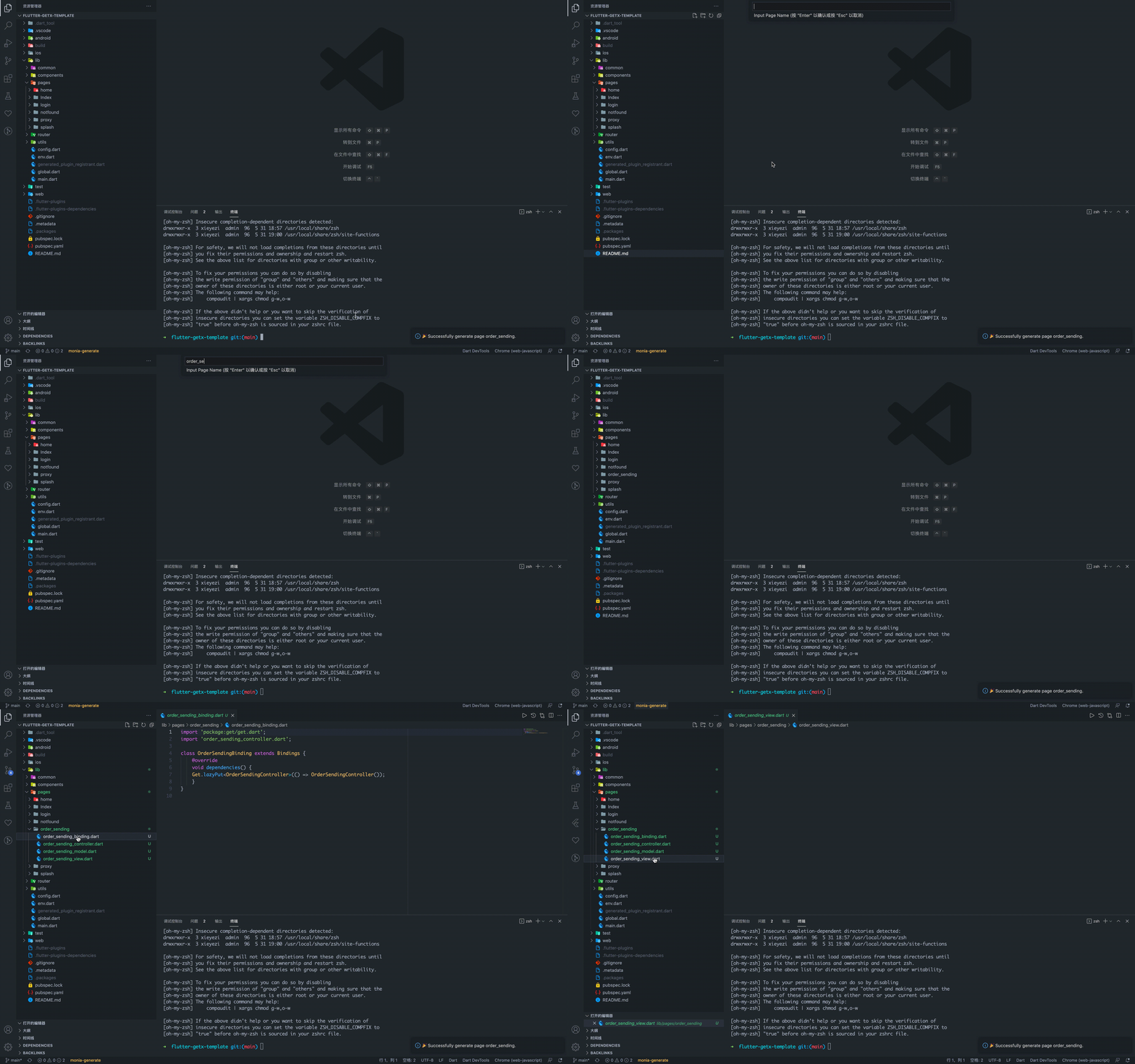
对于`flutter-getx-template`,`monia` 还提供了`vscode` 插件: [monia-vscode-extension](https://marketplace.visualstudio.com/items?itemName=xieyezi.monia-getx-template)
点击左下角的`monia-generate` 文字按钮,输入`pageName`,即可在`pages`目录下新建一个`flutter getx page`:
### 模版目录
#### flutter + getx
```
.
├── README.md
├── android
├── ios
├── lib
│ ├── common
│ ├── components
│ ├── config.dart
│ ├── env.dart
│ ├── global.dart
│ ├── main.dart
│ ├── pages
│ ├── router
│ ├── services
│ └── utils
├── pubspec.lock
├── pubspec.yaml
├── test
├── web
└── xsds.iml
```
#### react + vite + typescript
```
.
├── README.md
├── apiTemplate.ts
├── package-lock.json
├── package.json
├── pont-config.json
├── public
├── setupProxy.js
├── src
│ ├── App.css
│ ├── App.test.tsx
│ ├── App.tsx
│ ├── assets
│ ├── components
│ ├── config
│ ├── index.css
│ ├── index.tsx
│ ├── logo.svg
│ ├── models
│ ├── pages
│ ├── react-app-env.d.ts
│ ├── router-menu-mapping
│ ├── routes
│ ├── serviceWorker.ts
│ ├── setupTests.ts
│ ├── style
│ └── utils
├── tsconfig.json
├── tsconfig.paths.json
├── tsconfig.prod.json
├── tslint.json
└── yarn.lock
```
#### vue3 + vite + typescript
```
.
├── README.md
├── commitlint.config.js
├── index.html
├── package.json
├── public
├── src
│ ├── App.vue
│ ├── assets
│ ├── components
│ ├── config
│ ├── directive
│ ├── hooks
│ ├── main.ts
│ ├── router
│ ├── store
│ ├── views
│ └── vue-shim.d.ts
├── tsconfig.json
├── vite.config.ts
├── yarn-error.log
└── yarn.lock
```