# dingding
**Repository Path**: airgwl/dingding
## Basic Information
- **Project Name**: dingding
- **Description**: 没有下载权限下载钉钉录播抓视频
- **Primary Language**: Python
- **License**: Not specified
- **Default Branch**: master
- **Homepage**: None
- **GVP Project**: No
## Statistics
- **Stars**: 1
- **Forks**: 0
- **Created**: 2024-10-25
- **Last Updated**: 2024-10-27
## Categories & Tags
**Categories**: Uncategorized
**Tags**: None
## README
# 爬取钉钉视频
# 免责声明
**此脚本仅供学习参考,切勿违法使用下载他人资源进行售卖,本人不但任何责任!**
图片看不到请科学上网
执行顺序
```
poxyM3u8开启代理
getM3u8url用于获取m3u8文件
userAgent随机请求头
downVideo|downVideoThreadTqdm单线程下载和多线程下载,二选一即可
启动顺序
poxyM3u8开启代理 -> getM3u8url获取文件->downVideo遍历文件进行下载
```
像这样别人给的钉钉链接我想要它的视频, 但是又没有下载按钮,我该怎么办呢?
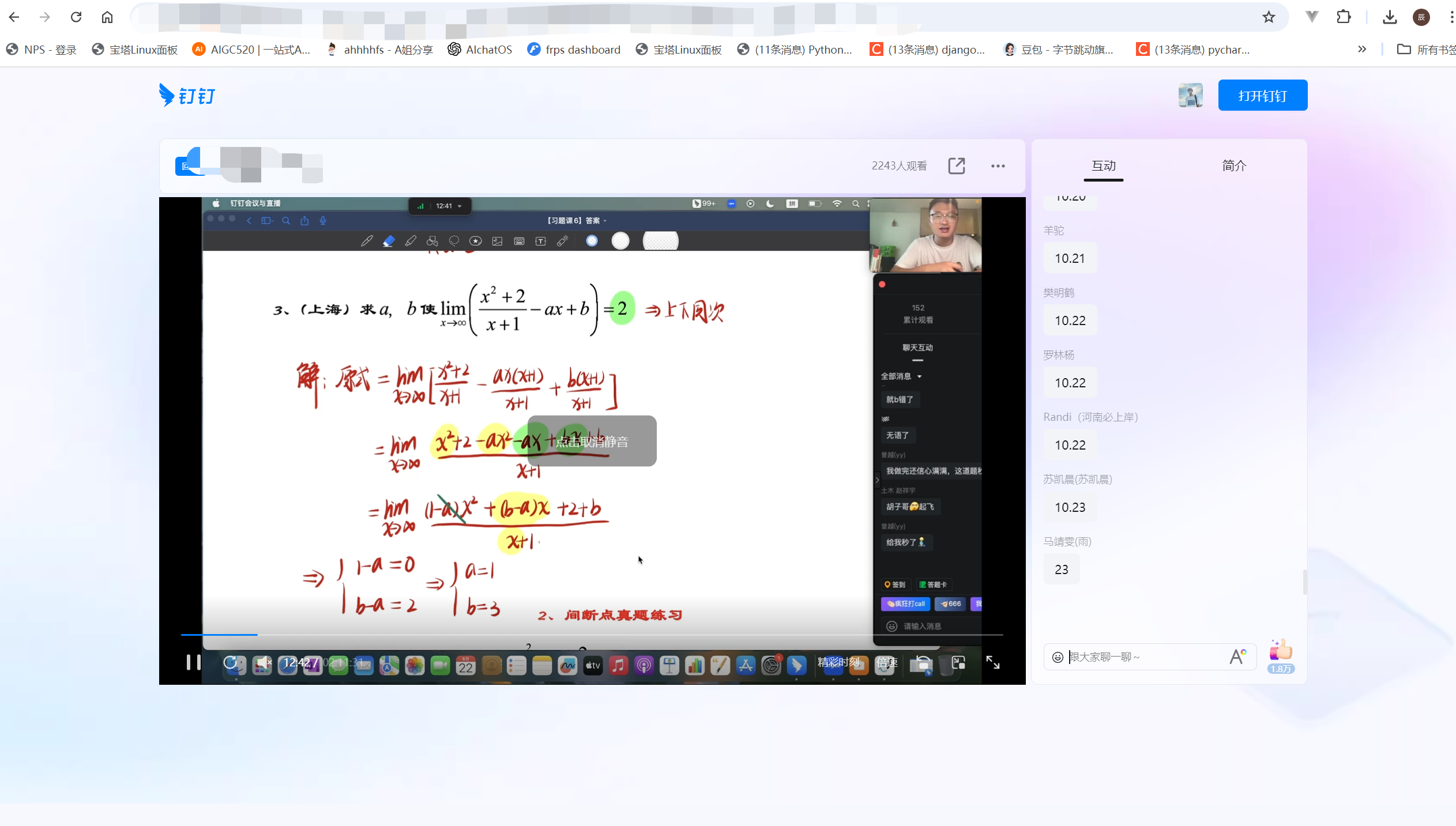
我想到了用爬虫爬取
## 方案一
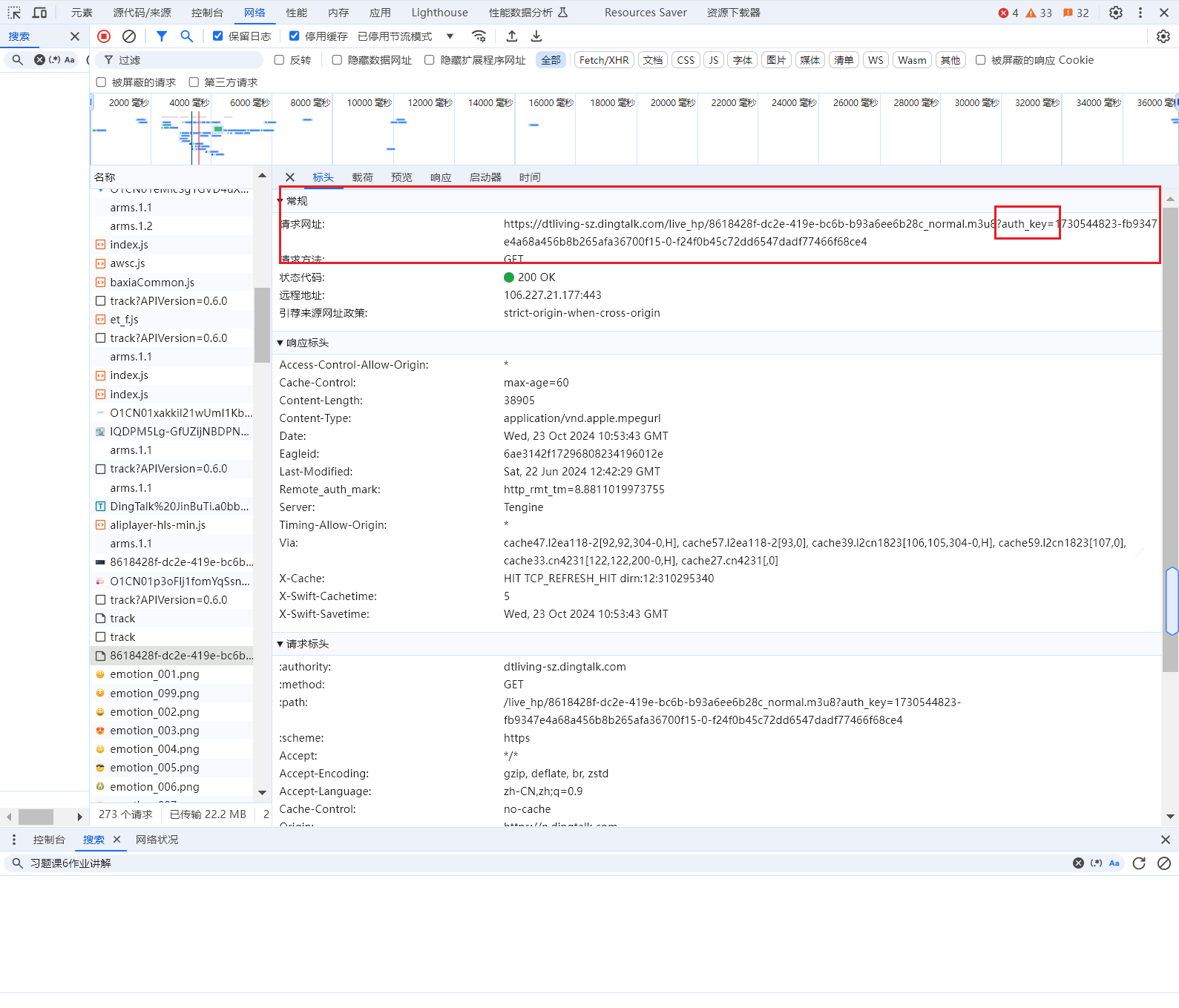
检查了一下网络请求发现它是采用m3u8文件格式保存的,所以找m3u8的文件。
找到了
- 
- 对它写代码进行保存:
```python
with open("4f8122f4-f8fb-43d5-b8c8-7c1c9a4a70f7_normal.m3u8", "r", encoding="utf-8") as f:
centen = f.read()
print(centen)
pattern = r'([0-9a-fA-F]{8}-[0-9a-fA-F]{4}-[0-9a-fA-F]{4}-[0-9a-fA-F]{4}-[0-9a-fA-F]{12}\/[\d]+\.ts\?auth_key=[\d\w-]+)'
matches = re.findall(pattern, centen)
print(matches)
#
urls = []
for match in matches:
url = "https://dtliving-bj.dingtalk.com/live_hp/" + match
urls.append(url)
#
print(len(urls))
# for i in urls:
# print(i)
for item in tqdm(urls,disable="下载"):
response = requests.get(item)
with open("E:/a.mp4", "ab", ) as f:
f.write(response.content)
```
下载是下载下来了, 可是我有很多很多集,我自己下载是不是太麻烦了,也累。所以我就分析了一下这个地址
发现:
```
m3u8:
https://dtliving-sz.dingtalk.com/live_hp/8618428f-dc2e-419e-bc6b-b93a6ee6b28c_normal.m3u8?auth_key=1730544823-fb9347e4a68a456b8b265afa36700f15-0-f24f0b45c72dd6547dadf77466f68ce4
url:
https://n.dingtalk.com/dingding/live-room/index.html?roomId=ZxaInSr3io8j9iZf&liveUuid=8618428f-dc2e-419e-bc6b-b93a6ee6b28c
8618428f-dc2e-419e-bc6b-b93a6ee6b28c_normal.m3u8,其中8618428f-dc2e-419e-bc6b-b93a6ee6b28c是Uuid
```
既然:`8618428f-dc2e-419e-bc6b-b93a6ee6b28c`是房间号的话那我把好多集的房间号爬下来然后拼接到dtliving-sz.dingtalk.com/live_hp/房间号_normal.m3u8这样不就行了?
然后拼接好我就发了一个请求发现并不能下载下来
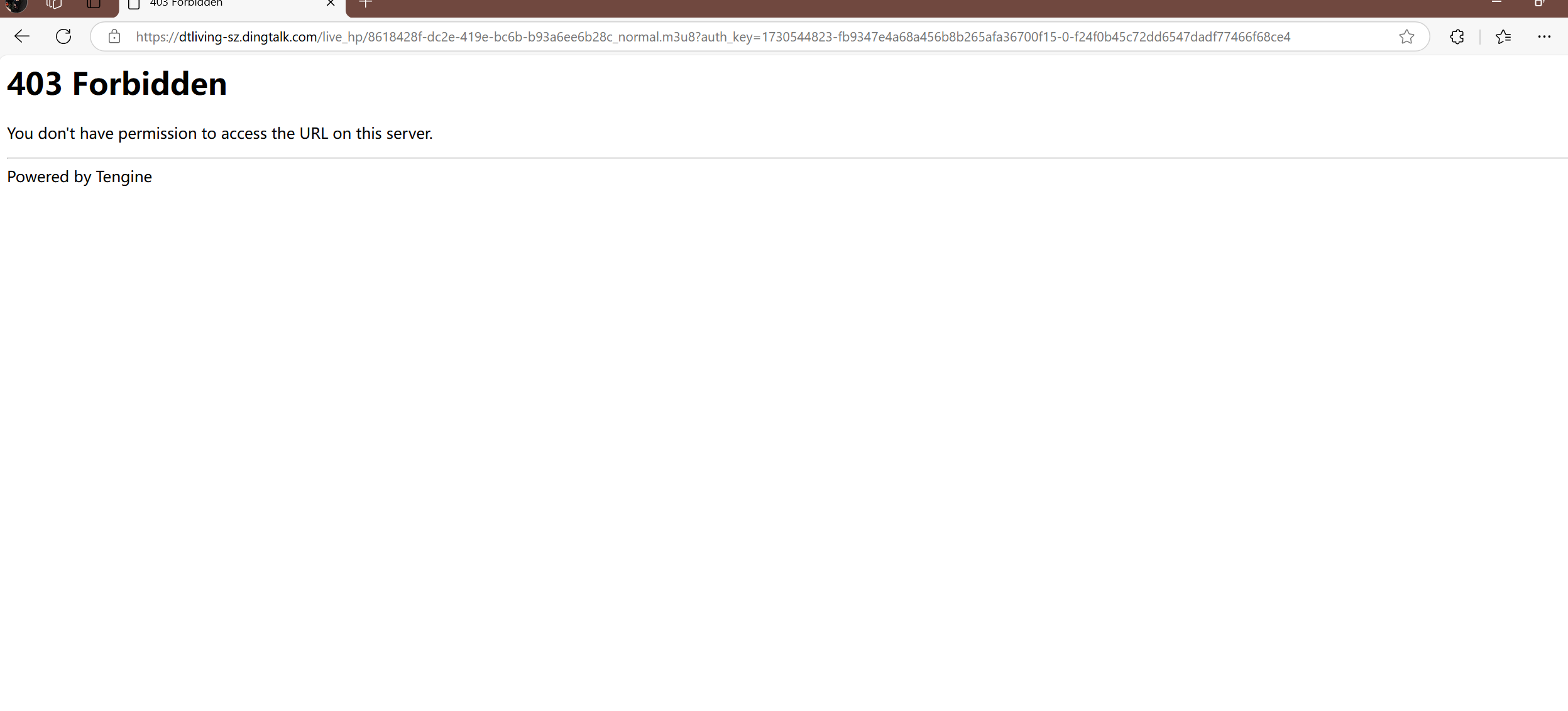
原因是`auth_key`的原因, 然后我尝试寻找`auth_key`
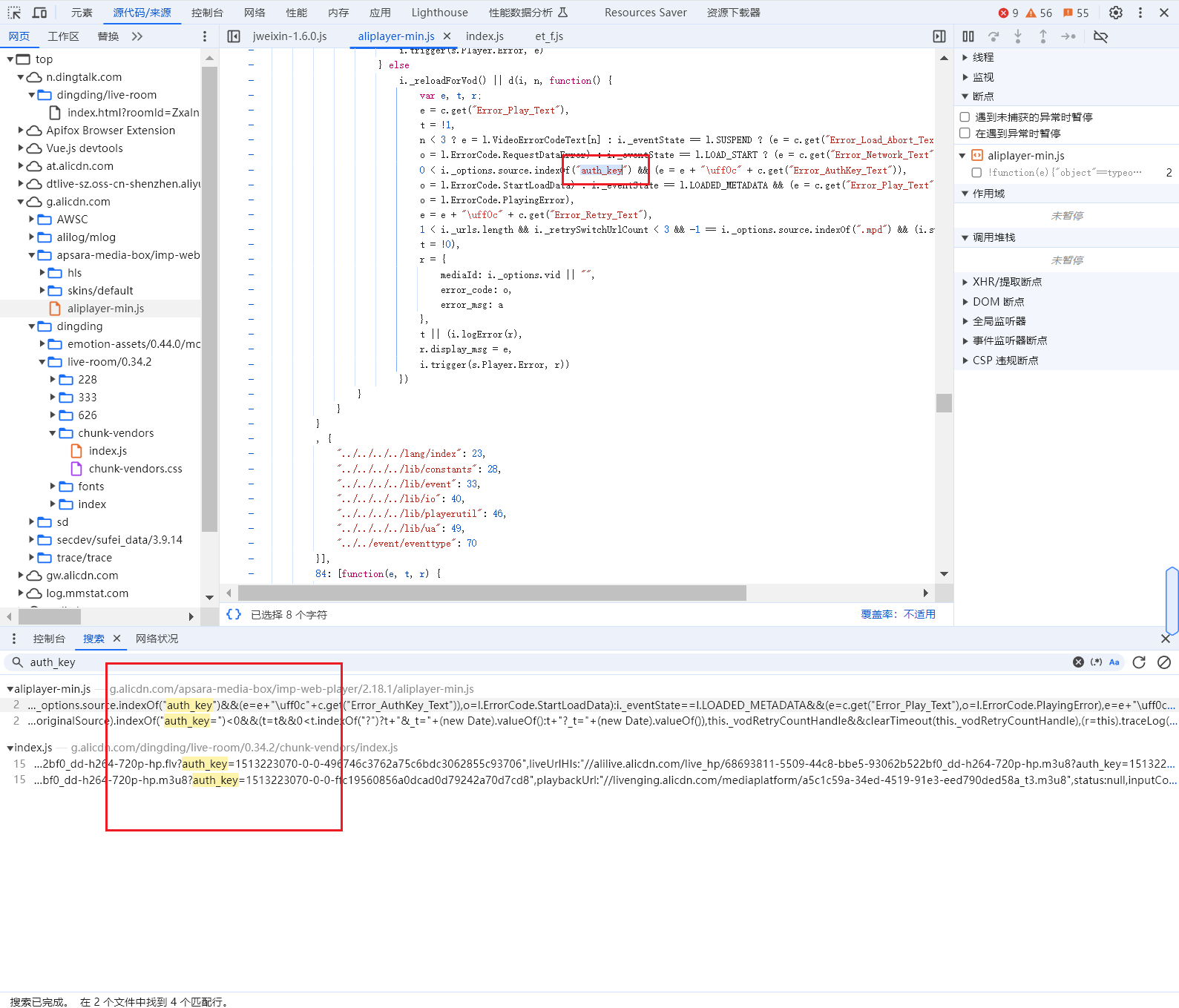
emmm, 找了许久,打扰了。还是能力不够, 所以打算换一个方式。
## 方案二
我发现浏览器是可以获取到auth_key的那我不如我去拿浏览器的响应值。
相当于做了一件中间人的方式把我想要的东西抓取出来。
我使用了`mitmproxy`当我的代理
```bash
pip install mitmproxy
```
然后写一段代码来捕捉我想要抓取的url的响应
```python
from mitmproxy import ctx,http
# http://mitm.it/ 证书
# mitmdump.exe -s .\test5.py
# mitmweb
import re
import requests
def request(flow):
# 获取请求对象
request = flow.request
# 实例化输出类
math = re.match("^(.*?)_normal.m3u8", request.url)
if math:
info = ctx.log.info
# 打印请求的url
info("请求地址: " + request.url + "\n")
string = request.url
start_index = string.find("auth_key=") + len("auth_key=")
end_index = len(string)
result = string[start_index:end_index]
print(result)
info("请求体: " + request.text + "\n")
# # 打印请求方法
info("请求方法: " + request.method)
def response(flow):
m3u8math = re.match("^(.*?)_normal.m3u8", flow.request.url)
if m3u8math:
print("===============这是m3u8格式的文件响应============================")
centen = flow.response.get_text()
with open("./m3u8s/{0}.m3u8".format(title), "w") as f:
f.write(centen)
print("===============结束============================")
```
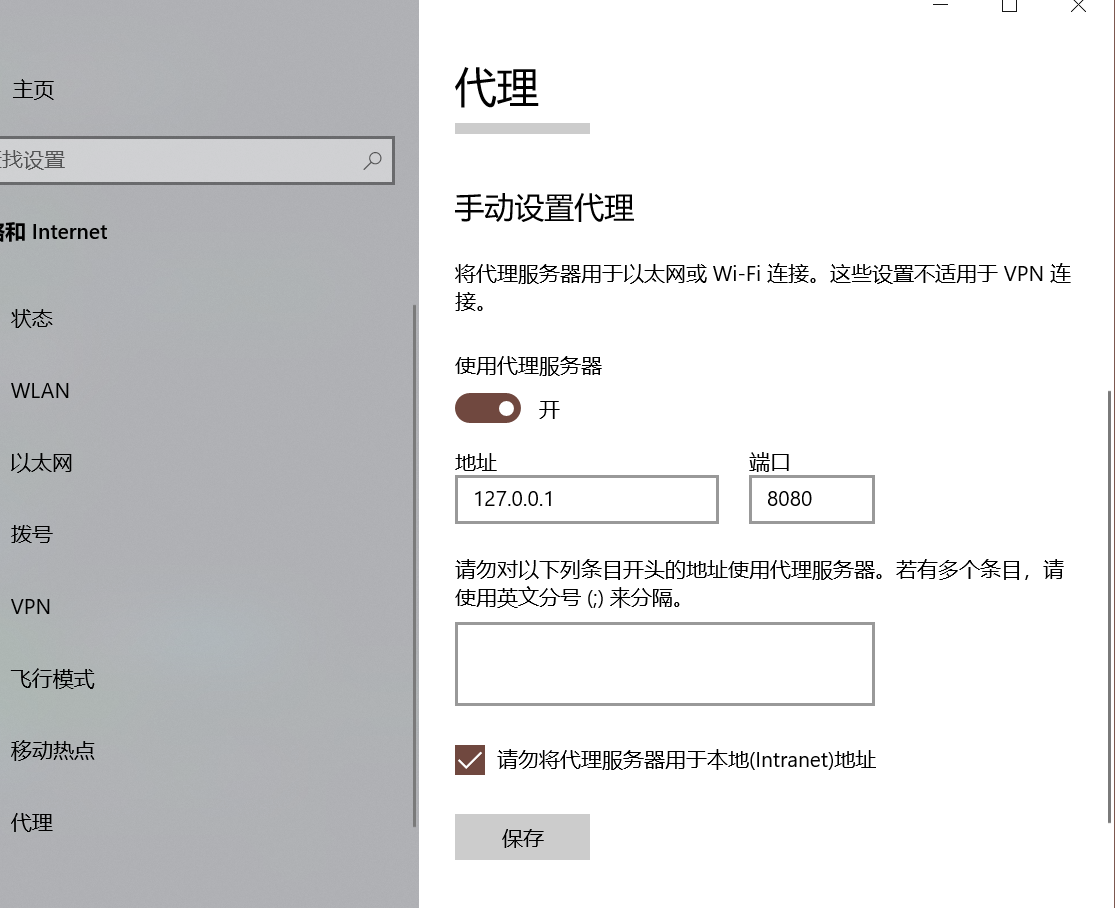
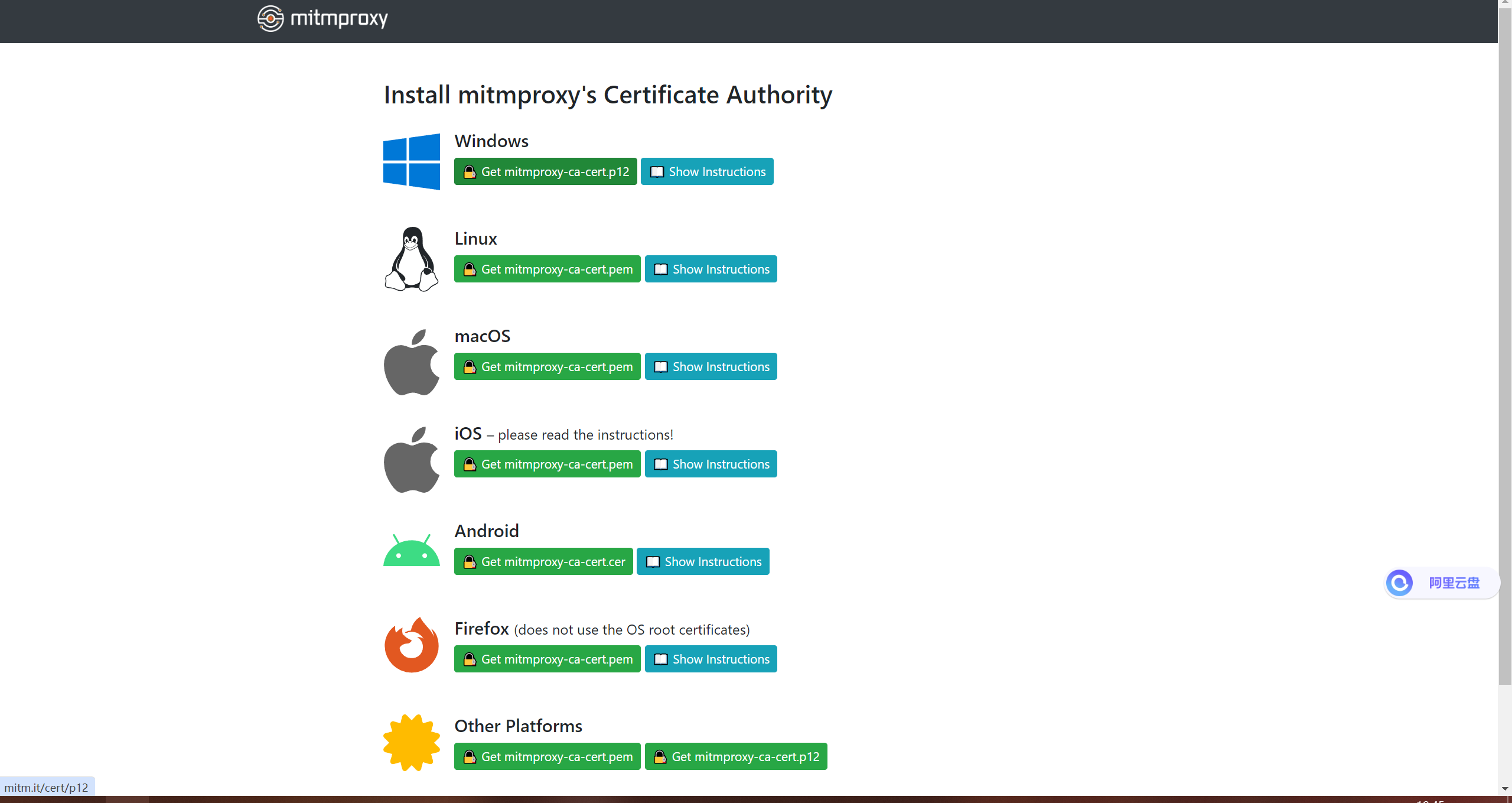
代码写好了,然后打开本机代理改成mitmproxy的代理然后安装证书,之后就可以愉快的抓请求了
1、代码启动

2、代理设置:
3、证书安装:
- 设置好系统代理后,浏览器输入`http://mitm.it/`, 然后选择对应系统的证书安装就行。
4、抓取
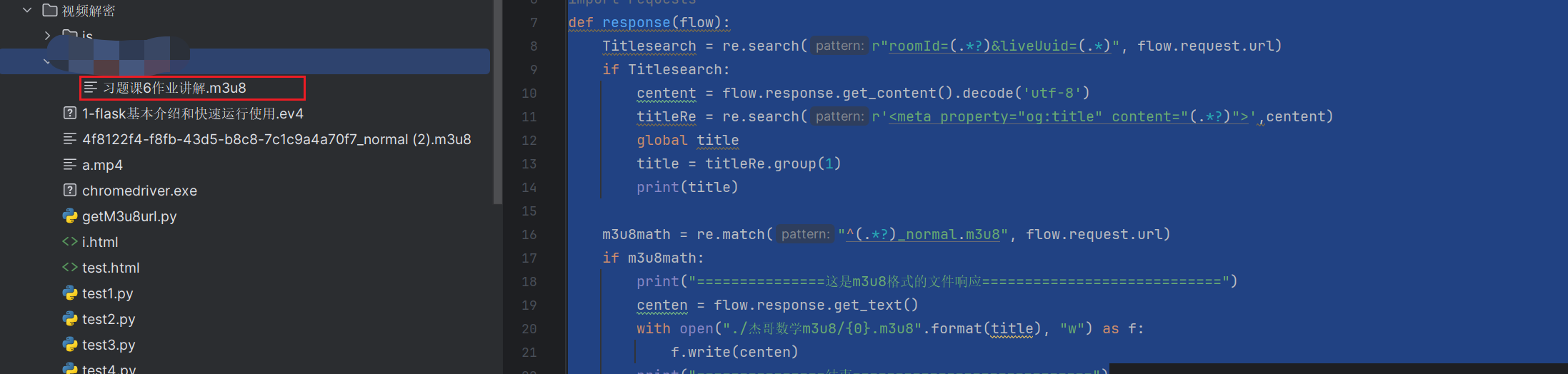
- 当我使用浏览器打开`https://n.dingtalk.com/dingding/live-room/index.html?roomId=AAToXdFAVGArvaQx&liveUuid=9aac3549-698f-46b9-9bb0-f2f44d4faaca`的时候它就会帮我把特定m3u8的请求响应做文件保存
```python
from mitmproxy import ctx,http
# http://mitm.it/ 证书
# mitmdump.exe -s .\xiaoyuan.py
# mitmweb
import re
import requests
def response(flow):
titlesearch = re.search(r"roomId=(.*?)&liveUuid=(.*)", flow.request.url)
if titlesearch:
global roomIdAndUid
roomIdAndUid = titlesearch
centent = flow.response.get_content().decode('utf-8')
titleRe = re.search(r'',centent)
global title
title = titleRe.group(1)
print(title)
else:
m3u8math = re.match(r"^(.*)/(.*?)_normal.m3u8", flow.request.url)
if m3u8math:
print("===============这是m3u8格式的文件响应============================")
print("房间号:", roomIdAndUid.group(2), "========", roomIdAndUid.group(1))
centen = flow.response.get_text()
try:
with open("./杰哥数学m3u8/{0}.m3u8".format(title), "w") as f:
f.write(centen)
except OSError:
with open("./log.txt".format(title), "a") as f:
f.write("标题: {0}, roomId:{1}, UuId: {2}, url:https://n.dingtalk.com/dingding/live-room/index.html?roomId={3}&liveUuid={4}\n".
format(title,
roomIdAndUid.group(1),
roomIdAndUid.group(2),
roomIdAndUid.group(1),
roomIdAndUid.group(2),
))
print("===============结束============================")
```
可是我有很多个链接
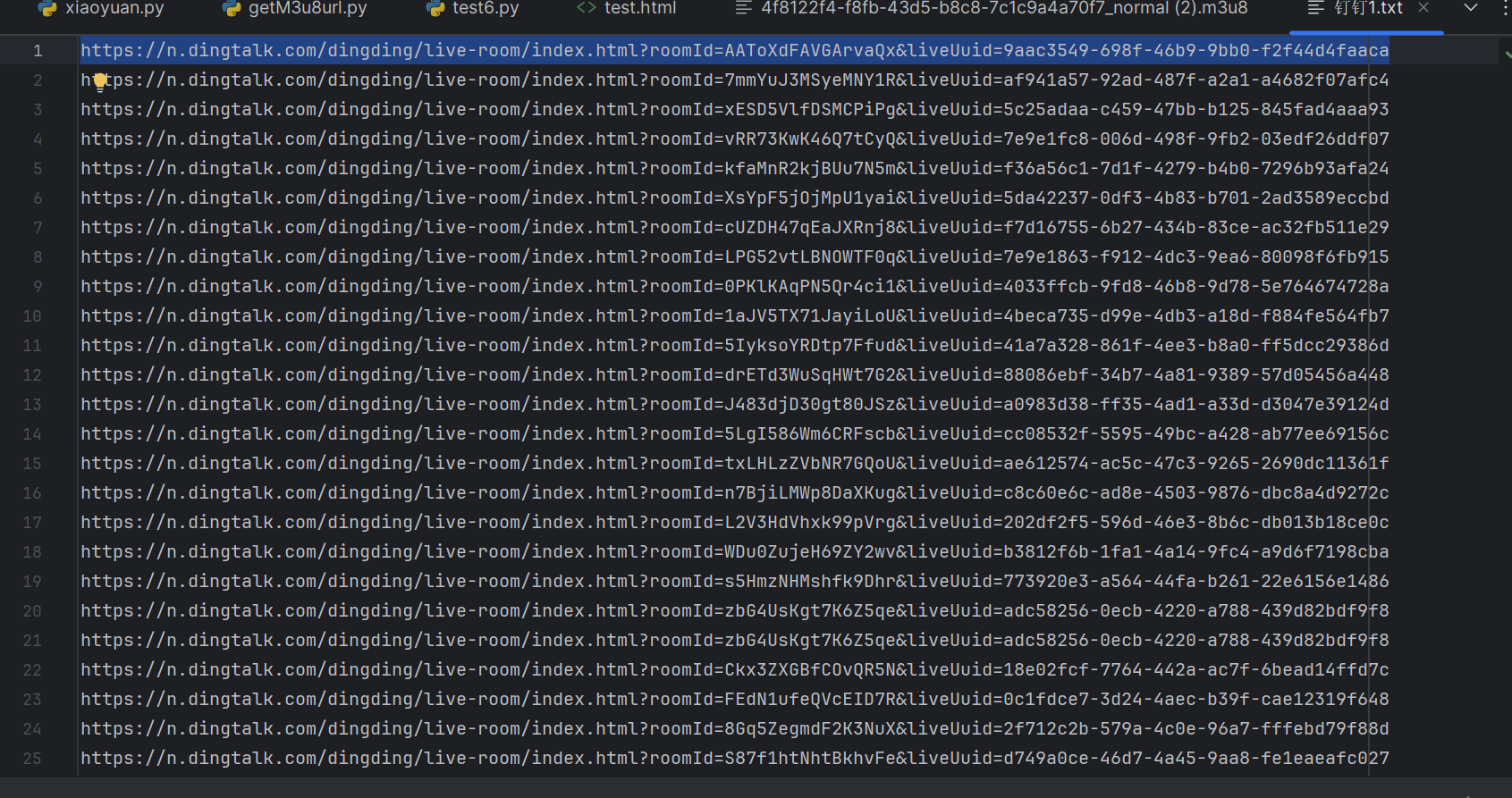
所以我打算使用webdriver帮我做批量的链接请求, 而且这个必须要登录才能播放而webdriver会打断我的登录状态,为了保存我的登录状态所以我直接调试本机的chrome。
1、关闭chrome浏览器
2、终端输入
```
chrome.exe --remote-debugging-port=9222
```
3、确认是登录状态后,执行代码
```python
import time
from selenium import webdriver
from selenium import webdriver
options = webdriver.ChromeOptions()
options.set_headless()
options.add_experimental_option("debuggerAddress", "127.0.0.1:9222")
driver = webdriver.Chrome("chromedriver-win64/chromedriver-win64/chromedriver.exe",chrome_options=options)
driver.get('https://n.dingtalk.com/dingding/live-room/index.html?roomId=AAToXdFAVGArvaQx&liveUuid=9aac3549-698f-46b9-9bb0-f2f44d4faaca')
```
这段代码一执行马上就把这个m3u8文件下载下来了
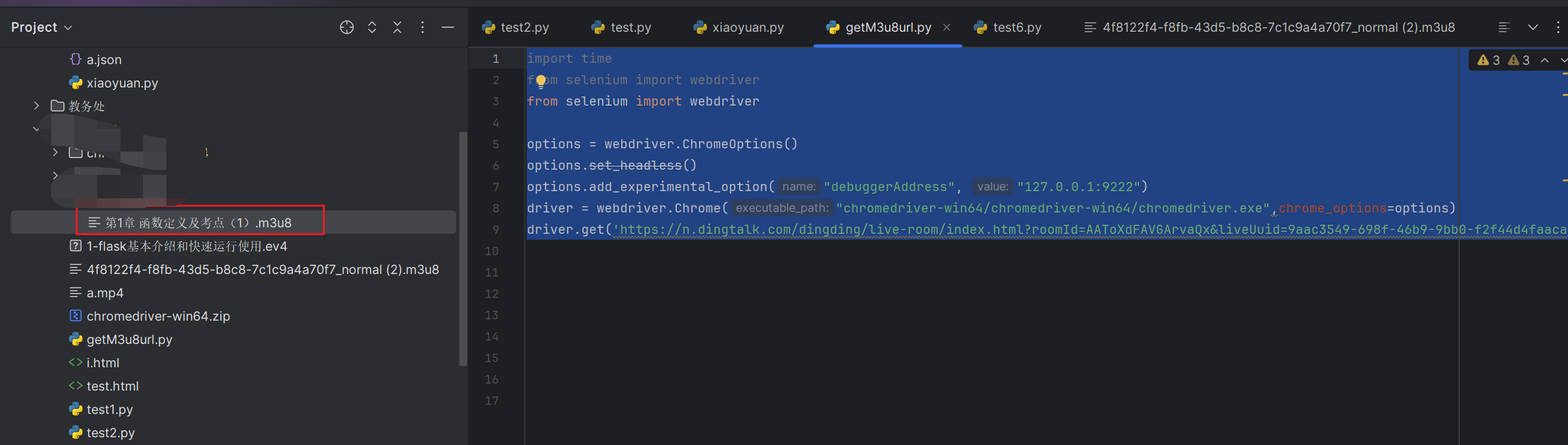
接下来执行多个url把他们m3u8都下载下来,我只需要把它们都打开然后进行代理检测到就会帮我们下载m3u8文件
```python
import time
from selenium.webdriver.support.ui import WebDriverWait
from selenium.webdriver.common.by import By
from selenium import webdriver
from selenium.webdriver.support import expected_conditions as EC
options = webdriver.ChromeOptions()
options.set_headless()
options.add_experimental_option("debuggerAddress", "127.0.0.1:9222")
driver = webdriver.Chrome("chromedriver-win64/chromedriver-win64/chromedriver.exe",chrome_options=options)
driver.implicitly_wait(10)
def newTable(urls, i):
if len(urls) > i:
window_handles = driver.window_handles
# 切换到新标签页
print(window_handles)
new_tab = window_handles[-1]
driver.switch_to.window(new_tab)
driver.get(urls[i])
login_btn = WebDriverWait(driver, 10, 0.5).until(EC.visibility_of_element_located((By.ID, "live-room")))
if login_btn:
time.sleep(5)
i += 1
print(i)
newTable(urls, i)
with open("钉钉1.txt", "r", encoding="utf-8") as f:
urls = f.readlines()
driver.get(urls[0])
time.sleep(5)
newTable(urls, 1)
```
然后再对m3u8文件进行遍历下载
```python
import re
import requests
import os
import tqdm
requests.packages.urllib3.disable_warnings()
with open("m3u8/af941a57-92ad-487f-a2a1-a4682f07afc4_normal.m3u8", "r", encoding="utf-8") as file:
content = file.read()
# fileName = os.path.basename(file_path).split(".")[0]
# print(f"文件 {os.path.basename(file_path)} 的内容为:{content}")
pattern = r'([0-9a-fA-F]{8}-[0-9a-fA-F]{4}-[0-9a-fA-F]{4}-[0-9a-fA-F]{4}-[0-9a-fA-F]{12}\/[\d]+\.ts\?auth_key=[\d\w-]+)'
matches = re.findall(pattern, content)
m3u8Url = ["https://dtliving-sz.dingtalk.com/live_hp/", "https://dtliving-sh.dingtalk.com/live_hp/"]
def getStatusUrl():
for status in m3u8Url:
url = status + matches[0]
responseStatus = requests.get(url, verify=False)
print(status, responseStatus.status_code)
if responseStatus.status_code == 200:
return status
def getMp4Url():
urls = []
status = getStatusUrl()
for match in matches:
url = status+match
urls.append(url)
return urls
def run():
urls = getMp4Url()
for item in tqdm.tqdm(urls):
response = requests.get(item, verify=False)
if response.status_code == 200:
# with open("/disk/data/杰哥数学/{0}.mp4".format("习题课1"), "ab", ) as f:
with open(r"E:\杰哥数学\{0}.mp4".format("习题课1"), "ab", ) as f:
f.write(response.content)
run()
```
这样就可以下载文件了
# 总结
## 流程分析
由于解密困难,所以采用mitmproxy进行代理实现直接抓取视频需要请求的m3u8格式的文件,然后进行保存
- 启动代理
- 模拟浏览器访问视频地址
- 下载所有m3u8的文件
- 对m3u8文件进行清洗
- 拼装ts片段视频的地址
- 保存视频
## 完整代码
### 1、启动代理
poxyM3u8.py
```python
from mitmproxy import ctx,http
# http://mitm.it/ 证书
# mitmdump.exe -s .\xiaoyuan.py
# mitmweb
import re
import requests
def setM3u8Status():
"""1 表示下载好了 """
with open("m3u8Status.txt", "w") as f:
f.write("0")
def response(flow):
titlesearch = re.search(r"roomId=(.*?)&liveUuid=(.*)", flow.request.url)
if titlesearch:
global roomIdAndUid
roomIdAndUid = titlesearch
centent = flow.response.get_content().decode('utf-8')
titleRe = re.search(r'',centent)
global title
title = titleRe.group(1)
print(title)
else:
m3u8math = re.match(r"^(.*)/(.*?)_normal.m3u8", flow.request.url)
if m3u8math:
print("===============这是m3u8格式的文件响应============================")
print("房间号:", roomIdAndUid.group(2), "========", roomIdAndUid.group(1))
centen = flow.response.get_text()
try:
with open(r"./m3u8/{0}.m3u8".format(title.replace("/", "-")).replace("\t", " "), "w") as f:
f.write(centen)
setM3u8Status()
except OSError as e:
print("==================================错误====================================")
print(e)
print("==================================错误====================================")
with open("./log.txt".format(title), "a") as f:
f.write("标题: {0}, roomId:{1}, UuId: {2}, url:https://n.dingtalk.com/dingding/live-room/index.html?roomId={3}&liveUuid={4}\n".
format(title,
roomIdAndUid.group(1),
roomIdAndUid.group(2),
roomIdAndUid.group(1),
roomIdAndUid.group(2),
))
print("===============结束============================")
```
### 2、模拟浏览器进行请求
getM3u8.py
```python
import time
from selenium.webdriver.support.ui import WebDriverWait
from selenium.webdriver.common.by import By
from selenium import webdriver
from selenium.webdriver.support import expected_conditions as EC
options = webdriver.ChromeOptions()
options.set_headless()
options.add_experimental_option("debuggerAddress", "127.0.0.1:9222")
driver = webdriver.Chrome("../chromedriver-win64/chromedriver-win64/chromedriver.exe", chrome_options=options)
driver.implicitly_wait(10)
def newTable(urls, i):
if len(urls) > i:
window_handles = driver.window_handles
# 切换到新标签页
print(window_handles)
new_tab = window_handles[-1]
driver.switch_to.window(new_tab)
setM3u8Status()
driver.get(urls[i])
while getM3u8FileStatus():
time.sleep(5)
i += 1
print(i)
newTable(urls, i)
# login_btn = WebDriverWait(driver, 10, 0.5).until(EC.visibility_of_element_located((By.ID, "live-room")))
# if login_btn:
# time.sleep(5)
# i += 1
# print(i)
# newTable(urls, i)
def getM3u8FileStatus():
with open("m3u8Status.txt", "r", encoding="utf-8") as f:
status = f.read()
time.sleep(2)
return "1" == status
def setM3u8Status():
"""0 表示新的请求等待 """
with open("m3u8Status.txt", "w") as f:
f.write("1")
time.sleep(2)
with open("钉钉1.txt", "r", encoding="utf-8") as f:
urls = f.readlines()
driver.get(urls[0])
while getM3u8FileStatus():
time.sleep(5)
newTable(urls, 1)
```
### 3、最后下载文件
`我发现m3u8里面的ts请求不止一个域名`
```
有两个,用错了域名会报404状态码
m3u8Url = ["https://dtliving-sz.dingtalk.com/live_hp/", "https://dtliving-sh.dingtalk.com/live_hp/"]
```
userAgent 随机请求头
```python
import random
import string
browsers = ["Chrome", "Firefox", "Safari", "Edge", "Opera"]
operating_systems = ["Windows NT", "Macintosh", "Linux", "iPhone", "iPad", "Android"]
versions = [str(i) for i in range(80, 130)]
def generate_random_string(length):
return ''.join(random.choices(string.ascii_letters + string.digits, k=length))
def generate_user_agents(num):
user_agents = []
for _ in range(num):
browser = random.choice(browsers)
os = random.choice(operating_systems)
version = random.choice(versions)
if os == "Windows NT":
ua = f"Mozilla/5.0 ({os}; Win64; x64) AppleWebKit/537.36 (KHTML, like Gecko) {browser}/{version} Safari/537.36"
elif os == "Macintosh":
ua = f"Mozilla/5.0 ({os}; Intel Mac OS X 10_15_7) AppleWebKit/537.36 (KHTML, like Gecko) {browser}/{version} Safari/537.36"
elif os == "Linux":
ua = f"Mozilla/5.0 ({os}; x86_64) AppleWebKit/537.36 (KHTML, like Gecko) {browser}/{version} Safari/537.36"
elif os == "iPhone":
ua = f"Mozilla/5.0 (iPhone; CPU iPhone OS {generate_random_string(2)}_0 like Mac OS X) AppleWebKit/605.1.15 (KHTML, like Gecko) Version/{version} Mobile/15E148 Safari/604.1"
elif os == "iPad":
ua = f"Mozilla/5.0 (iPad; CPU OS {generate_random_string(2)}_0 like Mac OS X) AppleWebKit/605.1.15 (KHTML, like Gecko) Version/{version} Mobile/15E148 Safari/604.1"
elif os == "Android":
ua = f"Mozilla/5.0 (Linux; Android {generate_random_string(2)}; {generate_random_string(10)}) AppleWebKit/537.36 (KHTML, like Gecko) {browser}/{version} Mobile Safari/537.36"
user_agents.append(ua)
return user_agents
# print(random.choice(generate_user_agents(100)))
```
downVideo.py
```python
import os
import random
import time
import requests
import re
from tqdm import tqdm
requests.packages.urllib3.disable_warnings()
import glob
from userAgent import generate_user_agents
headers = {'User-Agent': random.choice(generate_user_agents(100))}
folder_path = 'm3u8'
# 获取文件列表并添加进度条
file_paths = list(tqdm(glob.glob(folder_path + '/**/*', recursive=True), desc="获取文件列表进度"))
m3u8Url = ["https://dtliving-sz.dingtalk.com/live_hp/", "https://dtliving-sh.dingtalk.com/live_hp/", "https://dtliving-bj.dingtalk.com/live_hp/"]
def getStatusUrl(fileName, m3u8, i):
url = m3u8Url[i] + m3u8
print(f"第{i}次,正在检测{url}....")
response = requests.get(url, headers=headers, verify=False)
if response.status_code == 200:
print(f"域名检测成功{m3u8}的域名是{m3u8Url[i]}")
return m3u8Url[i]
else:
i+=1
if len(m3u8Url) > i:
print(f"第{i},次检测{url}....")
getStatusUrl(fileName, m3u8, i)
else:
print(f"错误")
with open("./errorUrl.txt", "a", encoding="utf-8") as f:
f.write(f"{m3u8}没有找到合适的域名, 文件名称是: {fileName}")
def getMp4Url(matches,fileName, m3u8, i):
urls = []
status = getStatusUrl(fileName, m3u8, i)
for match in matches:
url = status+match
urls.append(url)
return urls
for file_path in file_paths:
if os.path.isfile(file_path):
with open(file_path, 'r', encoding="utf-8") as file:
content = file.read()
fileName = os.path.basename(file_path).split(".")[0]
# print(f"文件 {os.path.basename(file_path)} 的内容为:{content}")
pattern = r'([0-9a-fA-F]{8}-[0-9a-fA-F]{4}-[0-9a-fA-F]{4}-[0-9a-fA-F]{4}-[0-9a-fA-F]{12}\/[\d]+\.ts\?auth_key=[\d\w-]+)'
matches = re.findall(pattern, content)
urls = getMp4Url(matches, fileName, matches[0], 0)
# 处理每个文件中的链接列表并添加进度条
for item in tqdm(urls, desc=f"处理 {fileName} 文件内链接进度"):
response = requests.get(item, verify=False)
time.sleep(2)
# with open("/disk/data/杰哥数学/{0}.mp4".format(fileName), "ab", ) as f:
with open(r"E:\杰哥数学\{0}.mp4".format(fileName), "ab", ) as f:
f.write(response.content)
```
也可以是多线程这样下载更快
```python
import os
import random
import time
import requests
import re
from tqdm import tqdm
import glob
from userAgent import generate_user_agents
import threading
requests.packages.urllib3.disable_warnings()
# 设置请求头
headers = {'User-Agent': random.choice(generate_user_agents(100))}
# 设置文件夹路径
folder_path = 'm3u8'
# 获取文件列表并添加进度条
file_paths = list(tqdm(glob.glob(folder_path + '/**/*', recursive=True), desc="获取文件列表进度"))
# 定义m3u8的URL列表
m3u8Url = ["https://dtliving-sz.dingtalk.com/live_hp/", "https://dtliving-sh.dingtalk.com/live_hp/", "https://dtliving-bj.dingtalk.com/live_hp/"]
def getStatusUrl(fileName, m3u8, i):
url = m3u8Url[i] + m3u8
print(f"第{i}次,正在检测{url}....")
log.write(f"第{i}次,正在检测{url}....")
response = requests.get(url, headers=headers, verify=False)
if response.status_code == 200:
print(f"域名检测成功{m3u8}的域名是{m3u8Url[i]}")
log.write(f"域名检测成功{m3u8}的域名是{m3u8Url[i]}")
return m3u8Url[i]
else:
i += 1
if len(m3u8Url) > i:
print(f"第{i},次检测{url}....")
log.write(f"第{i},次检测{url}....")
return getStatusUrl(fileName, m3u8, i)
else:
log.write(f"第{i},{url}域名匹配失败....")
with open("./errorUrl.txt", "a", encoding="utf-8") as f:
f.write(f"{m3u8}没有找到合适的域名, 文件名称是: {fileName}")
def getMp4Url(matches, fileName, m3u8, i):
urls = []
status = getStatusUrl(fileName, m3u8, i)
for match in matches:
url = status+match
urls.append(url)
return urls
def process_file(file_path):
global log
log = open("log.txt", "a", encoding="utf-8")
if os.path.isfile(file_path):
with open(file_path, 'r', encoding="utf-8") as file:
content = file.read()
fileName = os.path.basename(file_path).split(".")[0]
pattern = r'([0-9a-fA-F]{8}-[0-9a-fA-F]{4}-[0-9a-fA-F]{4}-[0-9a-fA-F]{4}-[0-9a-fA-F]{12}\/[\d]+\.ts\?auth_key=[\d\w-]+)'
matches = re.findall(pattern, content)
urls = getMp4Url(matches, fileName, matches[0], 0)
# 处理每个文件中的链接列表并添加进度条
for item in tqdm(urls, desc=f"处理 {fileName} 文件内链接进度"):
response = requests.get(item, verify=False)
time.sleep(2)
# with open(r"E:\杰哥数学\{0}.mp4".format(fileName), "ab", ) as f:
with open("/disk/data/杰哥数学/{0}.mp4".format(fileName), "ab", ) as f:
f.write(response.content)
log.close()
# 创建线程列表
threads = []
# 遍历文件路径列表,为每个文件创建一个线程进行处理
for file_path in file_paths:
thread = threading.Thread(target=process_file, args=(file_path,))
threads.append(thread)
thread.start()
# 等待所有线程完成
for thread in threads:
thread.join()
```
# 效果
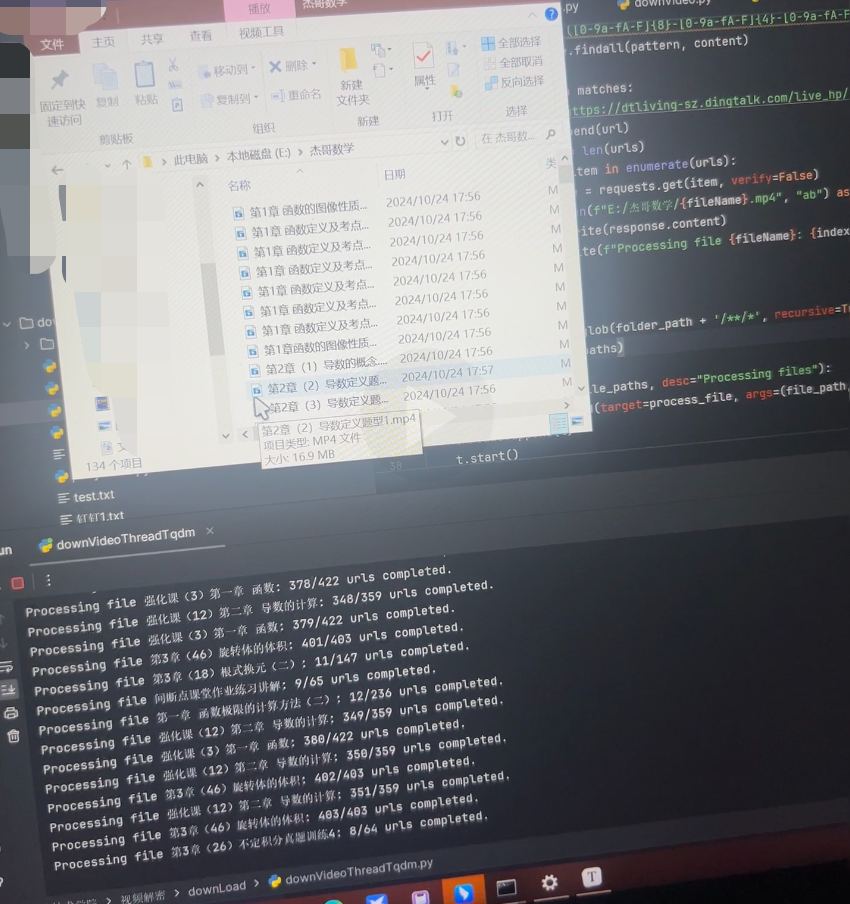
# 注意事项
- 不要忘记开系统代理
- chrome浏览器需要全部关闭才可以`chrome.exe --remote-debugging-port=9222`这个命令,不然selenium会没反应
- 不要忘记安装证书
- 要是下载请求失败的话,请注意访问的频率、更换请求头和IP