# bosssoft_nontax_cloud
**Repository Path**: aleco/bosssoft_nontax_cloud
## Basic Information
- **Project Name**: bosssoft_nontax_cloud
- **Description**: 非税财政端
- **Primary Language**: Java
- **License**: Not specified
- **Default Branch**: master
- **Homepage**: None
- **GVP Project**: No
## Statistics
- **Stars**: 8
- **Forks**: 2
- **Created**: 2021-03-16
- **Last Updated**: 2022-04-21
## Categories & Tags
**Categories**: Uncategorized
**Tags**: None
## README
# bosssoft_nontax_cloud
[](https://gitee.com/aleco/bosssoft_nontax_cloud/stargazers)
 [](https://gitee.com/aleco/bosssoft_nontax_cloud)
## 项目简介
### 组织结构
```
├─bosssoft_nontax_cloud //项目主干
│ ├─bosssoft_common //通用模块
│ │ ├─common_base //核心模块
│ │ ├─common_log //日志
│ │ ├─common_redis //缓存
│ │ ├─common_security //安全
│ │ ├─common_swagger //swagger接口
│ │ └─common_util //工具模块
│ ├─bosssoft_gateway //网关
│ └─bosssoft_service //业务
│ ├─service_activiti7 //工作流
```
### 技术选型
#### 后端技术
| 技术 | 说明 | 官网 |
| -------------------- | ------------------- | ---------------------------------------------- |
| SpringBoot | 容器+MVC框架 | https://spring.io/projects/spring-boot |
| SpringSecurity | 认证和授权框架 | https://spring.io/projects/spring-security |
| MyBatis | ORM框架 | http://www.mybatis.org/mybatis-3/zh/index.html |
| MyBatisGenerator | 数据层代码生成 | http://www.mybatis.org/generator/index.html |
| RabbitMQ | 消息队列 | https://www.rabbitmq.com/ |
| Redis | 分布式缓存 | https://redis.io/ |
| LogStash | 日志收集工具 | https://github.com/elastic/logstash |
| Kibina | 日志可视化查看工具 | https://github.com/elastic/kibana |
| Nginx | 静态资源服务器 | https://www.nginx.com/ |
| Docker | 应用容器引擎 | https://www.docker.com |
| Jenkins | 自动化部署工具 | https://github.com/jenkinsci/jenkins |
| Druid | 数据库连接池 | https://github.com/alibaba/druid |
| OSS | 对象存储 | https://github.com/aliyun/aliyun-oss-java-sdk |
| JWT | JWT登录支持 | https://github.com/jwtk/jjwt |
| Lombok | 简化对象封装工具 | https://github.com/rzwitserloot/lombok |
| Hutool | Java工具类库 | https://github.com/looly/hutool |
| Swagger-UI | 文档生成工具 | https://github.com/swagger-api/swagger-ui |
| activiti7 | 工作流 | https://github.com/Activiti/Activiti/projects/1 |
### 环境搭建
#### 开发工具
| 工具 | 说明 | 官网 |
| ------------- | ------------------- | ----------------------------------------------- |
| IDEA | 开发IDE | https://www.jetbrains.com/idea/download |
| RedisDesktop | redis客户端连接工具 | https://github.com/qishibo/AnotherRedisDesktopManager |
| X-shell | Linux远程连接工具 | http://www.netsarang.com/download/software.html |
| Navicat | 数据库连接工具 | http://www.formysql.com/xiazai.html |
| PowerDesigner | 数据库设计工具 | http://powerdesigner.de/ |
| Axure | 原型设计工具 | https://www.axure.com/ |
| ProcessOn | 流程图绘制工具 | https://www.processon.com/ |
| Postman | API接口调试工具 | https://www.postman.com/ |
| Typora | Markdown编辑器 | https://typora.io/ |
#### 开发环境
| 工具 | 版本号 | 下载 |
| ------------- | ------ | ------------------------------------------------------------ |
| JDK | 1.8 | https://www.oracle.com/technetwork/java/javase/downloads/jdk8-downloads-2133151.html |
| Mysql | 8.0.18 | https://www.mysql.com/ |
| Redis | 5.0 | https://redis.io/download |
| RabbitMQ | 3.7.14 | http://www.rabbitmq.com/download.html |
| Nginx | 1.10 | http://nginx.org/en/download.html |
| Elasticsearch | 7.6.2 | https://www.elastic.co/downloads/elasticsearch |
| Logstash | 7.6.2 | https://www.elastic.co/cn/downloads/logstash |
| Kibana | 7.6.2 | https://www.elastic.co/cn/downloads/kibana |
## 开发必读
> 请项目开发人员认真阅读以下文档!!!
### 读前需知
* 由于本项目开发人员众多,为规范代码和提高开发效率,本文档作出以下的开发规约以及共用模块的使用。
* 本文档大多提供一些自认为团队开发过程中较为良好的开发规范,如果你有更好的解决方案,**请积极提出**。
* 该文档还在不断完善中,难免会有所错误纰漏和需要补充修改的地方,欢迎大家集思广益,**积极并及时指出**,完善该文档。
* 在开发过程中遇到的问题请录入[项目报错解决方案总结.md](./项目报错解决方案总结.md) ,避免他人再次踩坑。
### 开发规约
> 多数开发规约参照《阿里巴巴Java开发手册》
#### 数据库规约
1. 【强制】表达是与否概念的字段,必须使用is_xxx的方式命名,数据类型是`unsigned tinyint`( 1表示是,0表示否)。
说明:任何字段如果为非负数,必须是`unsigned`。
正例: 表达逻辑删除的字段名 is_deleted 1 表示删除, 0 表示未删除。
2. 【强制】表名、字段名必须使用小写字母或数字,禁止出现数字开头,禁止两个下划线中间只出现数字。数据库字段名的修改代价很大,因为无法进行预发布,所以字段名称需要慎重考虑。 说明: MySQL 在 Windows 下不区分大小写,但在
Linux 下默认是区分大小写。因此,数据库 名、表名、字段名,都不允许出现任何大写字母,避免节外生枝。
正例:aliyun_admin,rdc_config,level3_name
反例:AliyunAdmin,rdcConfig,level_3_name
3. 【强制】表必备三字段:`id`, `gmt_create`, `gmt_modified`。
说明:
* 其中 id 必为主键,类型为`unsigned bigint`、单表时自增、步长为 1 。 gmt_create, gmt_modified的类型均为`date_time`类型,前者现在时表示主动创建,后者过去分词表示被动更新。
* id类型问题:[完美解决方案-雪花算法ID到前端之后精度丢失问题](https://zhuanlan.zhihu.com/p/197148602)
4. 【强制】主键索引名为`pk_`字段名;唯一索引名为`uk_`字段名;普通索引名则为`idx_`字段名。
说明:`pk_`即primary key;`uk_ `即 unique key;`idx_`即index的简称。
#### 代码注释规约
1. 【强制】类、类属性、类方法的注释必须使用Javadoc规范,使用`/**内容*/`格式,不得使用// xxx方式。
说明:在IDE编辑窗口中,Javadoc方式会提示相关注释,生成Javadoc可以正确输出相应注释;在IDE中,工程调用方法时,不进入方法即可悬浮提示方法、参数、返回值的意义,提高阅读效率。
2. 【推荐】推荐设置IDE的注释模板,提高开发效率
说明:具体使用参考[IntelliJ IDEA 符合 JavaDOC 的注释模板设置方法](https://zhuanlan.zhihu.com/p/76592599)
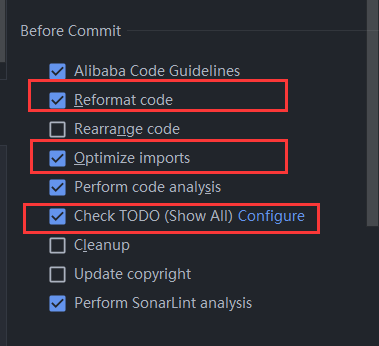
3. 【推荐】使用IDEA开发的开发人员,强烈推荐在Commit前勾选以下三项
说明:
* Reformat code 重新格式化代码
* Optimize imports 优化导入
* Check TODO(show all) 检测需要修改的代码
#### 包名规约
**基本包名统一使用`com.bosssoft.trainee.nontax`**
### Git规约
#### Git Commit规约
1. 【强制】本项目采用的是常用的Git Commit message规范 ———— Angular规范。
说明:具体规范参考[Commit message 和 Change log 编写指南](http://www.ruanyifeng.com/blog/2016/01/commit_message_change_log.html)
2. 【推荐】使用IDEA开发的开发人员,强烈推荐使用插件`Git Commit Template`
说明:具体使用参考[Git Commit提交规范和IDEA插件Git Commit Template的使用](https://blog.csdn.net/qq_35854212/article/details/103856299)
#### Git 分支规约
> 具体参考[您必须知道的 Git 分支开发规范](https://juejin.cn/post/6844903635533594632)
1. 【强制】开发新功能时,以develop为基础创建feature分支
2. 【强制】分支命名: `feature/` 开头的为特性分支, 命名规则: `feature/service_activiti`、 `feature/service_base`等
### 通用模块的使用
> 大多通用模块都使用Spring Boot的扩展机制——`Spring Factories`(SPI扩展机制)实现自动装配,推荐大家在写一些通用的服务接口使用以增加模块间的解耦。
#### 全局统一返回
* 统一返回结果状态类:`ResultCodeEnum`
* 具体的枚举状态参考源代码
* 全局统一返回结果:`Result`
* 基本使用:
* 成功:`ok()`、`ok(T data)`
* 失败:`fail()`、`fail(T data)`
* 自定义构建
* `build(Integer code, String message, T data)`
* `build(T data, ResultCodeEnum resultCodeEnum)`
#### Entity基类
`BaseEntity`
* 包括主键`id`、逻辑删除`isDeleted`、创建时间`gmtCreate`、修改时间`gmtCreate`
* `id`已使用mybatis-plus的雪花算法自动生成
* `isDeleted`已使用mybatis-plus内置逻辑删除
* `gmtCreate`和`gmtCreate`已实现自动更新创建时间更新时间
* 其他业务实体类(推荐使用代码生成器)实现`BaseEntity`即可
#### Redis缓存模块
本项目已经封装了Redis工具类,需要使用是直接注入`RedisService`使用即可
[](https://gitee.com/aleco/bosssoft_nontax_cloud)
## 项目简介
### 组织结构
```
├─bosssoft_nontax_cloud //项目主干
│ ├─bosssoft_common //通用模块
│ │ ├─common_base //核心模块
│ │ ├─common_log //日志
│ │ ├─common_redis //缓存
│ │ ├─common_security //安全
│ │ ├─common_swagger //swagger接口
│ │ └─common_util //工具模块
│ ├─bosssoft_gateway //网关
│ └─bosssoft_service //业务
│ ├─service_activiti7 //工作流
```
### 技术选型
#### 后端技术
| 技术 | 说明 | 官网 |
| -------------------- | ------------------- | ---------------------------------------------- |
| SpringBoot | 容器+MVC框架 | https://spring.io/projects/spring-boot |
| SpringSecurity | 认证和授权框架 | https://spring.io/projects/spring-security |
| MyBatis | ORM框架 | http://www.mybatis.org/mybatis-3/zh/index.html |
| MyBatisGenerator | 数据层代码生成 | http://www.mybatis.org/generator/index.html |
| RabbitMQ | 消息队列 | https://www.rabbitmq.com/ |
| Redis | 分布式缓存 | https://redis.io/ |
| LogStash | 日志收集工具 | https://github.com/elastic/logstash |
| Kibina | 日志可视化查看工具 | https://github.com/elastic/kibana |
| Nginx | 静态资源服务器 | https://www.nginx.com/ |
| Docker | 应用容器引擎 | https://www.docker.com |
| Jenkins | 自动化部署工具 | https://github.com/jenkinsci/jenkins |
| Druid | 数据库连接池 | https://github.com/alibaba/druid |
| OSS | 对象存储 | https://github.com/aliyun/aliyun-oss-java-sdk |
| JWT | JWT登录支持 | https://github.com/jwtk/jjwt |
| Lombok | 简化对象封装工具 | https://github.com/rzwitserloot/lombok |
| Hutool | Java工具类库 | https://github.com/looly/hutool |
| Swagger-UI | 文档生成工具 | https://github.com/swagger-api/swagger-ui |
| activiti7 | 工作流 | https://github.com/Activiti/Activiti/projects/1 |
### 环境搭建
#### 开发工具
| 工具 | 说明 | 官网 |
| ------------- | ------------------- | ----------------------------------------------- |
| IDEA | 开发IDE | https://www.jetbrains.com/idea/download |
| RedisDesktop | redis客户端连接工具 | https://github.com/qishibo/AnotherRedisDesktopManager |
| X-shell | Linux远程连接工具 | http://www.netsarang.com/download/software.html |
| Navicat | 数据库连接工具 | http://www.formysql.com/xiazai.html |
| PowerDesigner | 数据库设计工具 | http://powerdesigner.de/ |
| Axure | 原型设计工具 | https://www.axure.com/ |
| ProcessOn | 流程图绘制工具 | https://www.processon.com/ |
| Postman | API接口调试工具 | https://www.postman.com/ |
| Typora | Markdown编辑器 | https://typora.io/ |
#### 开发环境
| 工具 | 版本号 | 下载 |
| ------------- | ------ | ------------------------------------------------------------ |
| JDK | 1.8 | https://www.oracle.com/technetwork/java/javase/downloads/jdk8-downloads-2133151.html |
| Mysql | 8.0.18 | https://www.mysql.com/ |
| Redis | 5.0 | https://redis.io/download |
| RabbitMQ | 3.7.14 | http://www.rabbitmq.com/download.html |
| Nginx | 1.10 | http://nginx.org/en/download.html |
| Elasticsearch | 7.6.2 | https://www.elastic.co/downloads/elasticsearch |
| Logstash | 7.6.2 | https://www.elastic.co/cn/downloads/logstash |
| Kibana | 7.6.2 | https://www.elastic.co/cn/downloads/kibana |
## 开发必读
> 请项目开发人员认真阅读以下文档!!!
### 读前需知
* 由于本项目开发人员众多,为规范代码和提高开发效率,本文档作出以下的开发规约以及共用模块的使用。
* 本文档大多提供一些自认为团队开发过程中较为良好的开发规范,如果你有更好的解决方案,**请积极提出**。
* 该文档还在不断完善中,难免会有所错误纰漏和需要补充修改的地方,欢迎大家集思广益,**积极并及时指出**,完善该文档。
* 在开发过程中遇到的问题请录入[项目报错解决方案总结.md](./项目报错解决方案总结.md) ,避免他人再次踩坑。
### 开发规约
> 多数开发规约参照《阿里巴巴Java开发手册》
#### 数据库规约
1. 【强制】表达是与否概念的字段,必须使用is_xxx的方式命名,数据类型是`unsigned tinyint`( 1表示是,0表示否)。
说明:任何字段如果为非负数,必须是`unsigned`。
正例: 表达逻辑删除的字段名 is_deleted 1 表示删除, 0 表示未删除。
2. 【强制】表名、字段名必须使用小写字母或数字,禁止出现数字开头,禁止两个下划线中间只出现数字。数据库字段名的修改代价很大,因为无法进行预发布,所以字段名称需要慎重考虑。 说明: MySQL 在 Windows 下不区分大小写,但在
Linux 下默认是区分大小写。因此,数据库 名、表名、字段名,都不允许出现任何大写字母,避免节外生枝。
正例:aliyun_admin,rdc_config,level3_name
反例:AliyunAdmin,rdcConfig,level_3_name
3. 【强制】表必备三字段:`id`, `gmt_create`, `gmt_modified`。
说明:
* 其中 id 必为主键,类型为`unsigned bigint`、单表时自增、步长为 1 。 gmt_create, gmt_modified的类型均为`date_time`类型,前者现在时表示主动创建,后者过去分词表示被动更新。
* id类型问题:[完美解决方案-雪花算法ID到前端之后精度丢失问题](https://zhuanlan.zhihu.com/p/197148602)
4. 【强制】主键索引名为`pk_`字段名;唯一索引名为`uk_`字段名;普通索引名则为`idx_`字段名。
说明:`pk_`即primary key;`uk_ `即 unique key;`idx_`即index的简称。
#### 代码注释规约
1. 【强制】类、类属性、类方法的注释必须使用Javadoc规范,使用`/**内容*/`格式,不得使用// xxx方式。
说明:在IDE编辑窗口中,Javadoc方式会提示相关注释,生成Javadoc可以正确输出相应注释;在IDE中,工程调用方法时,不进入方法即可悬浮提示方法、参数、返回值的意义,提高阅读效率。
2. 【推荐】推荐设置IDE的注释模板,提高开发效率
说明:具体使用参考[IntelliJ IDEA 符合 JavaDOC 的注释模板设置方法](https://zhuanlan.zhihu.com/p/76592599)
3. 【推荐】使用IDEA开发的开发人员,强烈推荐在Commit前勾选以下三项

说明:
* Reformat code 重新格式化代码
* Optimize imports 优化导入
* Check TODO(show all) 检测需要修改的代码
#### 包名规约
**基本包名统一使用`com.bosssoft.trainee.nontax`**
### Git规约
#### Git Commit规约
1. 【强制】本项目采用的是常用的Git Commit message规范 ———— Angular规范。
说明:具体规范参考[Commit message 和 Change log 编写指南](http://www.ruanyifeng.com/blog/2016/01/commit_message_change_log.html)
2. 【推荐】使用IDEA开发的开发人员,强烈推荐使用插件`Git Commit Template`
说明:具体使用参考[Git Commit提交规范和IDEA插件Git Commit Template的使用](https://blog.csdn.net/qq_35854212/article/details/103856299)
#### Git 分支规约
> 具体参考[您必须知道的 Git 分支开发规范](https://juejin.cn/post/6844903635533594632)
1. 【强制】开发新功能时,以develop为基础创建feature分支
2. 【强制】分支命名: `feature/` 开头的为特性分支, 命名规则: `feature/service_activiti`、 `feature/service_base`等
### 通用模块的使用
> 大多通用模块都使用Spring Boot的扩展机制——`Spring Factories`(SPI扩展机制)实现自动装配,推荐大家在写一些通用的服务接口使用以增加模块间的解耦。
#### 全局统一返回
* 统一返回结果状态类:`ResultCodeEnum`
* 具体的枚举状态参考源代码
* 全局统一返回结果:`Result`
* 基本使用:
* 成功:`ok()`、`ok(T data)`
* 失败:`fail()`、`fail(T data)`
* 自定义构建
* `build(Integer code, String message, T data)`
* `build(T data, ResultCodeEnum resultCodeEnum)`
#### Entity基类
`BaseEntity`
* 包括主键`id`、逻辑删除`isDeleted`、创建时间`gmtCreate`、修改时间`gmtCreate`
* `id`已使用mybatis-plus的雪花算法自动生成
* `isDeleted`已使用mybatis-plus内置逻辑删除
* `gmtCreate`和`gmtCreate`已实现自动更新创建时间更新时间
* 其他业务实体类(推荐使用代码生成器)实现`BaseEntity`即可
#### Redis缓存模块
本项目已经封装了Redis工具类,需要使用是直接注入`RedisService`使用即可