# visdom
**Repository Path**: alsd51/visdom
## Basic Information
- **Project Name**: visdom
- **Description**: facebook数据可视化分析工具
- **Primary Language**: Unknown
- **License**: Not specified
- **Default Branch**: master
- **Homepage**: https://github.com/facebookresearch/visdom.git
- **GVP Project**: No
## Statistics
- **Stars**: 1
- **Forks**: 0
- **Created**: 2017-10-19
- **Last Updated**: 2024-10-12
## Categories & Tags
**Categories**: Uncategorized
**Tags**: None
## README
# **Visdom**

A flexible tool for creating, organizing, and sharing visualizations of live, rich data. Supports Torch and Numpy.
* [Overview](#overview)
* [Concepts](#concepts)
* [Setup](#setup)
* [Usage](#usage)
* [API](#api)
* [To Do](#to-do)
* [Contributing](#contributing)
## Overview
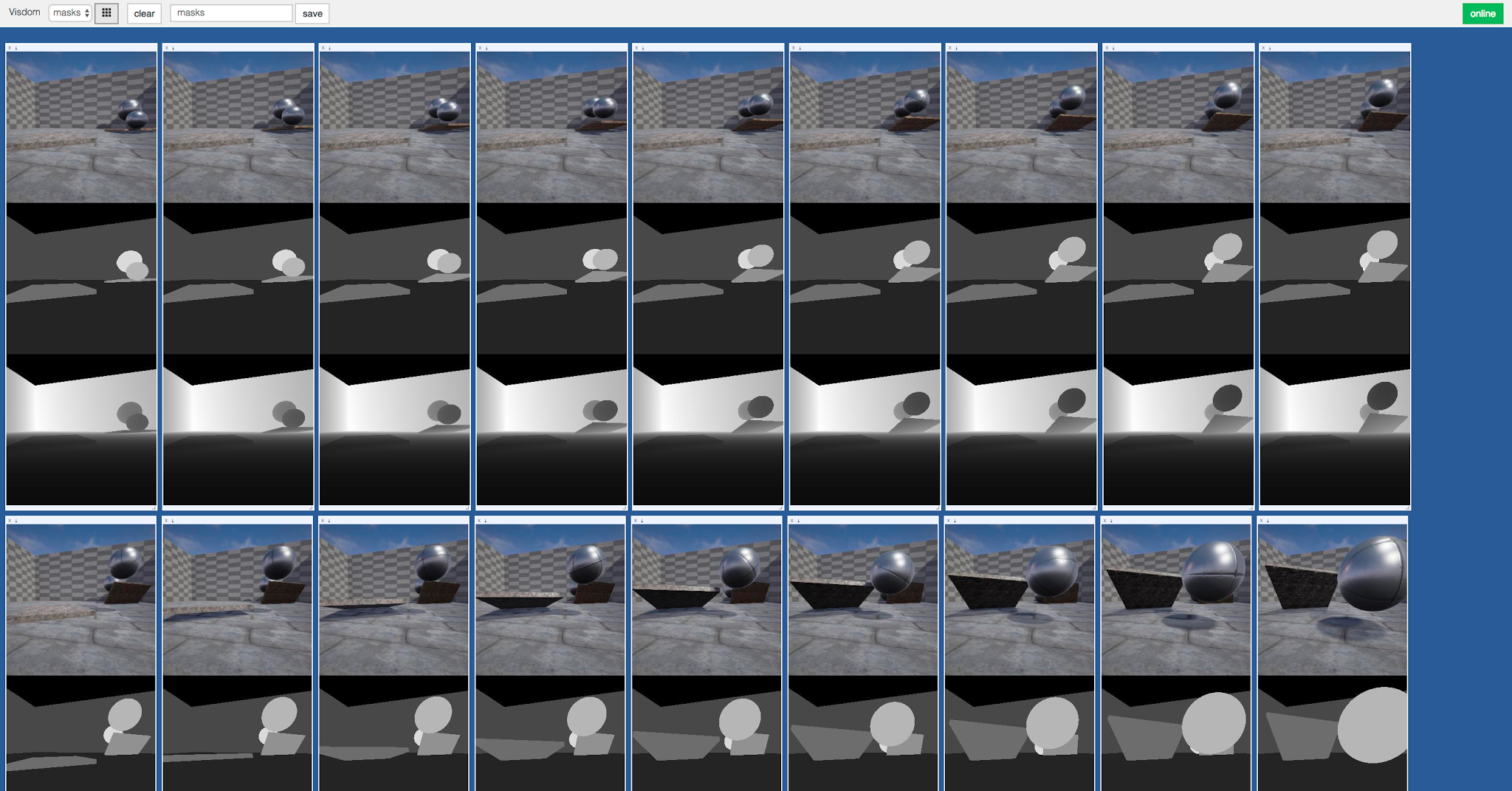
Visdom aims to facilitate visualization of (remote) data with an emphasis on supporting scientific experimentation.

Broadcast visualizations of plots, images, and text for yourself and your collaborators.

Organize your visualization space programmatically or through the UI to create dashboards for live data, inspect results of experiments, or debug experimental code.
## Concepts
Visdom has a simple set of features that can be composed for various use-cases.
#### Panes
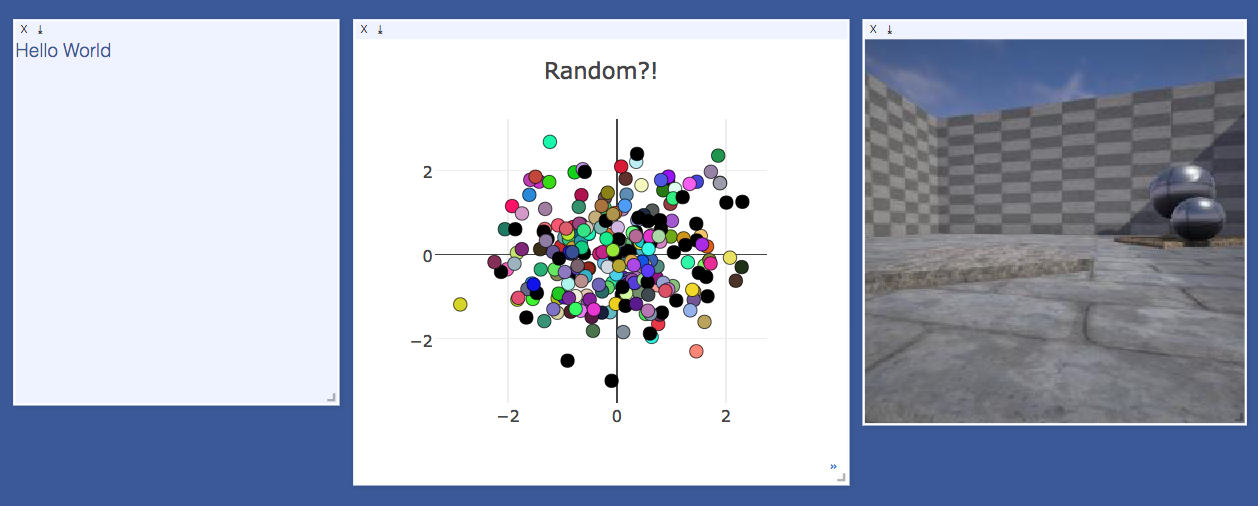
The UI begins as a blank slate -- you can populate it with plots, images, and text. These appear in windows that you can drag, drop, resize, and destroy. The windows live in `envs` and the state of `envs` is stored across sessions. You can download the content of windows -- including your plots in `svg`.
> **Tip**: You can use the zoom of your browser to adjust the scale of the UI.
#### Environments

You can partition your visualization space with `envs`. By default, every user will have an env called `main`. New envs can be created in the UI or programmatically. The state of envs is chronically saved.
You can access a specific env via url: `http://localhost.com:8097/env/main`. If your server is hosted, you can share this url so others can see your visualizations too.
>**Managing Envs:**
>Your envs are loaded at initialization of the server, by default from `$HOME/.visdom/`. Custom paths can be passed as a cmd-line argument. Envs are removed by deleting the corresponding `.json` file from the env dir.
#### State
Once you've created a few visualizations, state is maintained. The server automatically caches your visualizations -- if you reload the page, your visualizations reappear.
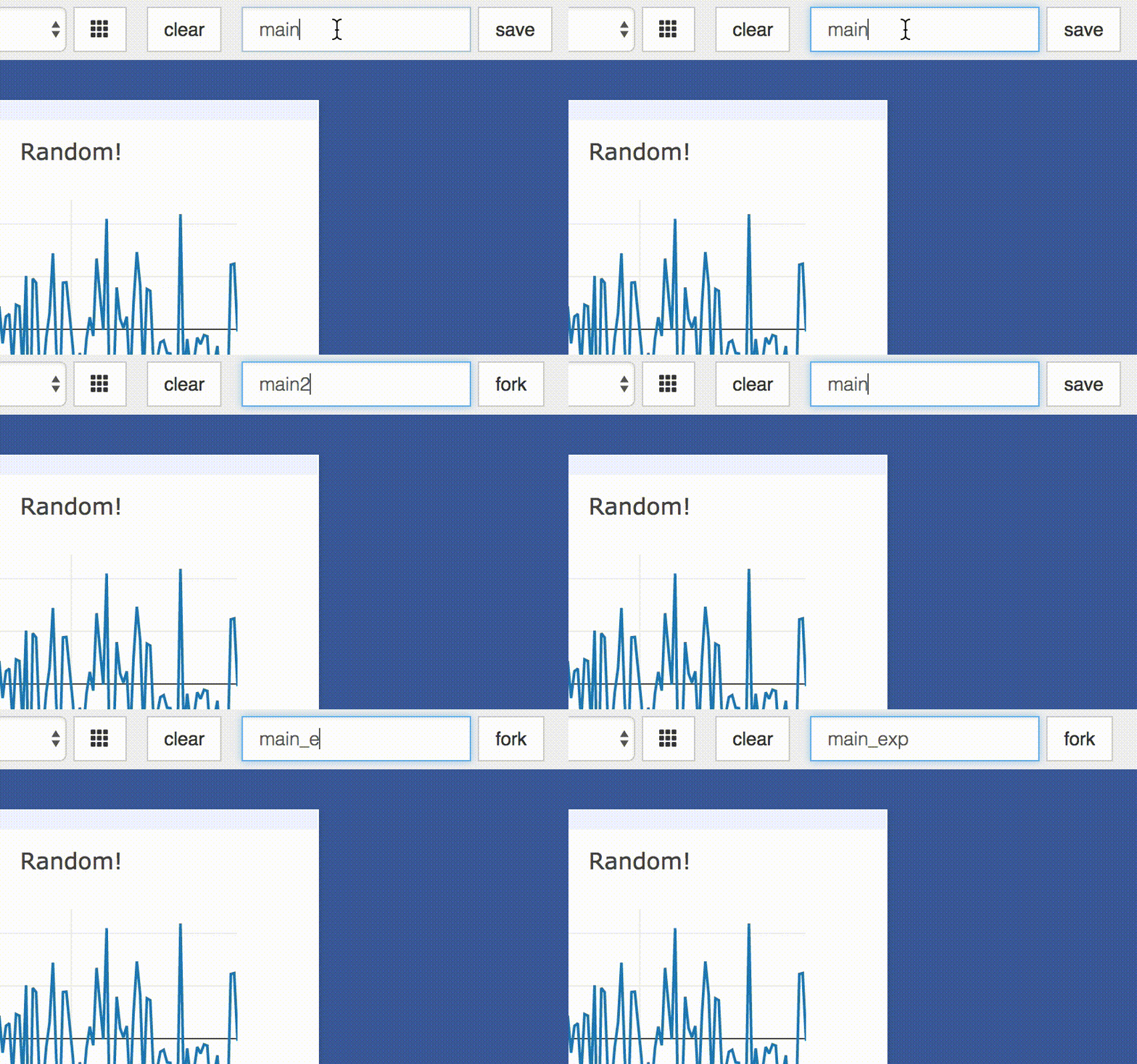
* **Save:** You can manually do so with the `save` button. This will serialize the env's state (to disk, in JSON), including window positions. You can save an `env` programmatically.
This is helpful for more sophisticated visualizations in which configuration is meaningful, e.g. a data-rich demo, a model training dashboard, or systematic experimentation. This also makes them easy to share and reuse.
* **Fork:** If you enter a new env name, saving will create a new env -- effectively **forking** the previous env.
#### Filter
You can use the `filter` to dynamically sift through windows present in an env -- just provide a regular expression with which to match titles of window you want to show. This can be helpful in use cases involving an env with many windows e.g. when systematically checking experimental results.

## Setup
Requires Python 2.7/3 (and optionally Torch7)
```bash
# Install Python server and client
pip install visdom
# Install Torch client
luarocks install visdom
```
```bash
# Install python from source
pip install -e .
# If the above runs into issues, you can try the below
easy_install .
# Install Torch client from source (from th directory)
luarocks make
```
## Usage
Start the server (probably in a `screen` or `tmux`) :
```bash
python -m visdom.server
```
Visdom now can be accessed by going to `http://localhost:8097` in your browser, or your own host address if specified.
>If the above does not work, try using an SSH tunnel to your server by adding the following line to your local `~/.ssh/config`:
```LocalForward 127.0.0.1:8097 127.0.0.1:8097```.
#### Python example
```python
import visdom
import numpy as np
vis = visdom.Visdom()
vis.text('Hello, world!')
vis.image(np.ones((3, 10, 10)))
```
#### Torch example
```lua
require 'image'
vis = require 'visdom'()
vis:text{text = 'Hello, world!'}
vis:image{img = image.fabio()}
```
Some users have reported issues when connecting Lua clients to the Visdom server.
A potential work-around may be to switch off IPv6:
```
vis = require 'visdom'()
vis.ipv6 = false -- switches off IPv6
vis:text{text = 'Hello, world!'}
```
### Demos
```bash
python example/demo.py
th example/demo1.lua
th example/demo2.lua
```
## API
For a quick introduction into the capabilities of `visdom`, have a look at the `example` directory, or read the details below.
### Basics
Visdom offers the following basic visualization functions:
- [`vis.image`](#visimage) : image
- [`vis.images`](#visimages) : list of images
- [`vis.text`](#vistext) : arbitrary HTML
- [`vis.video`](#visvideo) : videos
- [`vis.svg`](#vissvg) : SVG object
- [`vis.save`](#vissave) : serialize state server-side
### Plotting
We have wrapped several common plot types to make creating basic visualizations easily. These visualizations are powered by [Plotly](https://plot.ly/).
The following API is currently supported:
- [`vis.scatter`](#visscatter) : 2D or 3D scatter plots
- [`vis.line`](#visline) : line plots
- [`vis.updateTrace`](#visupdatetrace) : update existing line/scatter plots
- [`vis.stem`](#visstem) : stem plots
- [`vis.heatmap`](#visheatmap) : heatmap plots
- [`vis.bar`](#visbar) : bar graphs
- [`vis.histogram`](#vishistogram) : histograms
- [`vis.boxplot`](#visboxplot) : boxplots
- [`vis.surf`](#vissurf) : surface plots
- [`vis.contour`](#viscontour) : contour plots
- [`vis.quiver`](#visquiver) : quiver plots
- [`vis.mesh`](#vismesh) : mesh plots
### Generic Plots
Note that the server API adheres to the Plotly convention of `data` and `layout` objects, such that you can produce your own arbitrary `Plotly` visualizations:
```python
import visdom
vis = visdom.Visdom()
trace = dict(x=[1, 2, 3], y=[4, 5, 6], mode="markers+lines", type='custom'
marker={'color': 'red', 'symbol': 104, 'size': "10"},
text=["one", "two", "three"], name='1st Trace')
layout = dict(title="First Plot", xaxis={'title': 'x1'}, yaxis={'title': 'x2'})
vis._send({'data': [trace], 'layout': layout, 'win': 'mywin'})
```
### Others
- [`vis.close`](#visclose) : close a window by id
- [`vis.win_exists`](#viswin_exists) : check if a window already exists by id
- [`vis.check_connection`](#vischeck_connection): check if the server is connected
## Details

### Basics
#### vis.image
This function draws an `img`. It takes as input an `CxHxW` tensor `img`
that contains the image.
The following `opts` are supported:
- `opts.jpgquality`: JPG quality (`number` 0-100; default = 100)
- `opts.caption`: Caption for the image
#### vis.images
This function draws a list of `images`. It takes an input `B x C x H x W` tensor or a `list of images` all of the same size. It makes a grid of images of size (B / nrow, nrow).
The following arguments and `opts` are supported:
- `nrow`: Number of images in a row
- `padding`: Padding around the image, equal padding around all 4 sides
- `opts.jpgquality`: JPG quality (`number` 0-100; default = 100)
- `opts.caption`: Caption for the image
#### vis.text
This function prints text in a box. You can use this to embed arbitrary HTML.
It takes as input a `text` string.
No specific `opts` are currently supported.
#### vis.video
This function plays a video. It takes as input the filename of the video
`videofile` or a `LxCxHxW`-sized `tensor` (in Lua) or a or a `LxHxWxC`-sized
`tensor` (in Python) containing all the frames of the video as input. The
function does not support any plot-specific `opts`.
The following `opts` are supported:
- `opts.fps`: FPS for the video (`integer` > 0; default = 25)
Note: Using `tensor` input requires that ffmpeg is installed and working.
Your ability to play video may depend on the browser you use: your browser has
to support the Theano codec in an OGG container (Chrome supports this).
#### vis.svg
This function draws an SVG object. It takes as input a SVG string `svgstr` or
the name of an SVG file `svgfile`. The function does not support any specific
`opts`.
#### vis.save
This function saves the `envs` that are alive on the visdom server. It takes input a list (in python) or table (in lua) of env ids to be saved.
### Plotting
Further details on the wrapped plotting functions are given below.
The exact inputs into the plotting functions vary, although most of them take as input a tensor `X` than contains the data and an (optional) tensor `Y` that contains optional data variables (such as labels or timestamps). All plotting functions take as input an optional `win` that can be used to plot into a specific window; each plotting function also returns the `win` of the window it plotted in. One can also specify the `env` to which the visualization should be added.
#### vis.scatter
This function draws a 2D or 3D scatter plot. It takes as input an `Nx2` or
`Nx3` tensor `X` that specifies the locations of the `N` points in the
scatter plot. An optional `N` tensor `Y` containing discrete labels that
range between `1` and `K` can be specified as well -- the labels will be
reflected in the colors of the markers.
The following `opts` are supported:
- `opts.colormap` : colormap (`string`; default = `'Viridis'`)
- `opts.markersymbol`: marker symbol (`string`; default = `'dot'`)
- `opts.markersize` : marker size (`number`; default = `'10'`)
- `opts.markercolor` : color per marker. (`torch.*Tensor`; default = `nil`)
- `opts.legend` : `table` containing legend names
`opts.markercolor` is a Tensor with Integer values. The tensor can be of size `N` or `N x 3` or `K` or `K x 3`.
- Tensor of size `N`: Single intensity value per data point. 0 = black, 255 = red
- Tensor of size `N x 3`: Red, Green and Blue intensities per data point. 0,0,0 = black, 255,255,255 = white
- Tensor of size `K` and `K x 3`: Instead of having a unique color per data point, the same color is shared for all points of a particular label.
#### vis.line
This function draws a line plot. It takes as input an `N` or `NxM` tensor
`Y` that specifies the values of the `M` lines (that connect `N` points)
to plot. It also takes an optional `X` tensor that specifies the
corresponding x-axis values; `X` can be an `N` tensor (in which case all
lines will share the same x-axis values) or have the same size as `Y`.
The following `opts` are supported:
- `opts.fillarea` : fill area below line (`boolean`)
- `opts.colormap` : colormap (`string`; default = `'Viridis'`)
- `opts.markers` : show markers (`boolean`; default = `false`)
- `opts.markersymbol`: marker symbol (`string`; default = `'dot'`)
- `opts.markersize` : marker size (`number`; default = `'10'`)
- `opts.legend` : `table` containing legend names
#### vis.updateTrace
This function allows updating of data for extant line or scatter plots.
It is up to the user to specify `name` of an existing trace if they want
to add to it, and a new `name` if they want to add a trace to the plot.
By default, if no legend is specified at time of first creation,
the `name` is the index of the line in the legend.
If no `name` is specified, all traces should be updated.
Trace update data that is all `NaN` is ignored;
this can be used for masking update.
The `append` parameter determines if the update data should be appended
to or replaces existing data.
There are no `opts` because they are assumed to be inherited from the
specified plot.
#### vis.stem
This function draws a stem plot. It takes as input an `N` or `NxM` tensor
`X` that specifies the values of the `N` points in the `M` time series.
An optional `N` or `NxM` tensor `Y` containing timestamps can be specified
as well; if `Y` is an `N` tensor then all `M` time series are assumed to
have the same timestamps.
The following `opts` are supported:
- `opts.colormap`: colormap (`string`; default = `'Viridis'`)
- `opts.legend` : `table` containing legend names
#### vis.heatmap
This function draws a heatmap. It takes as input an `NxM` tensor `X` that
specifies the value at each location in the heatmap.
The following `opts` are supported:
- `opts.colormap` : colormap (`string`; default = `'Viridis'`)
- `opts.xmin` : clip minimum value (`number`; default = `X:min()`)
- `opts.xmax` : clip maximum value (`number`; default = `X:max()`)
- `opts.columnnames`: `table` containing x-axis labels
- `opts.rownames` : `table` containing y-axis labels
#### vis.bar
This function draws a regular, stacked, or grouped bar plot. It takes as
input an `N` or `NxM` tensor `X` that specifies the height of each of the
bars. If `X` contains `M` columns, the values corresponding to each row
are either stacked or grouped (depending on how `opts.stacked` is
set). In addition to `X`, an (optional) `N` tensor `Y` can be specified
that contains the corresponding x-axis values.
The following plot-specific `opts` are currently supported:
- `opts.rownames`: `table` containing x-axis labels
- `opts.stacked` : stack multiple columns in `X`
- `opts.legend` : `table` containing legend labels
#### vis.histogram
This function draws a histogram of the specified data. It takes as input
an `N` tensor `X` that specifies the data of which to construct the
histogram.
The following plot-specific `opts` are currently supported:
- `opts.numbins`: number of bins (`number`; default = 30)
#### vis.boxplot
This function draws boxplots of the specified data. It takes as input
an `N` or an `NxM` tensor `X` that specifies the `N` data values of which
to construct the `M` boxplots.
The following plot-specific `opts` are currently supported:
- `opts.legend`: labels for each of the columns in `X`
#### vis.surf
This function draws a surface plot. It takes as input an `NxM` tensor `X`
that specifies the value at each location in the surface plot.
The following `opts` are supported:
- `opts.colormap`: colormap (`string`; default = `'Viridis'`)
- `opts.xmin` : clip minimum value (`number`; default = `X:min()`)
- `opts.xmax` : clip maximum value (`number`; default = `X:max()`)
#### vis.contour
This function draws a contour plot. It takes as input an `NxM` tensor `X`
that specifies the value at each location in the contour plot.
The following `opts` are supported:
- `opts.colormap`: colormap (`string`; default = `'Viridis'`)
- `opts.xmin` : clip minimum value (`number`; default = `X:min()`)
- `opts.xmax` : clip maximum value (`number`; default = `X:max()`)
#### vis.quiver
This function draws a quiver plot in which the direction and length of the
arrows is determined by the `NxM` tensors `X` and `Y`. Two optional `NxM`
tensors `gridX` and `gridY` can be provided that specify the offsets of
the arrows; by default, the arrows will be done on a regular grid.
The following `opts` are supported:
- `opts.normalize`: length of longest arrows (`number`)
- `opts.arrowheads`: show arrow heads (`boolean`; default = `true`)
#### vis.mesh
This function draws a mesh plot from a set of vertices defined in an
`Nx2` or `Nx3` matrix `X`, and polygons defined in an optional `Mx2` or
`Mx3` matrix `Y`.
The following `opts` are supported:
- `opts.color`: color (`string`)
- `opts.opacity`: opacity of polygons (`number` between 0 and 1)
### Customizing plots
The plotting functions take an optional `opts` table as input that can be used to change (generic or plot-specific) properties of the plots. All input arguments are specified in a single table; the input arguments are matches based on the keys they have in the input table.
The following `opts` are generic in the sense that they are the same for all visualizations (except `plot.image` and `plot.text`):
- `opts.title` : figure title
- `opts.width` : figure width
- `opts.height` : figure height
- `opts.showlegend` : show legend (`true` or `false`)
- `opts.xtype` : type of x-axis (`'linear'` or `'log'`)
- `opts.xlabel` : label of x-axis
- `opts.xtick` : show ticks on x-axis (`boolean`)
- `opts.xtickmin` : first tick on x-axis (`number`)
- `opts.xtickmax` : last tick on x-axis (`number`)
- `opts.xtickvals` : locations of ticks on x-axis (`table` of `number`s)
- `opts.xticklabels` : ticks labels on x-axis (`table` of `string`s)
- `opts.xtickstep` : distances between ticks on x-axis (`number`)
- `opts.ytype` : type of y-axis (`'linear'` or `'log'`)
- `opts.ylabel` : label of y-axis
- `opts.ytick` : show ticks on y-axis (`boolean`)
- `opts.ytickmin` : first tick on y-axis (`number`)
- `opts.ytickmax` : last tick on y-axis (`number`)
- `opts.ytickvals` : locations of ticks on y-axis (`table` of `number`s)
- `opts.yticklabels` : ticks labels on y-axis (`table` of `string`s)
- `opts.ytickstep` : distances between ticks on y-axis (`number`)
- `opts.marginleft` : left margin (in pixels)
- `opts.marginright` : right margin (in pixels)
- `opts.margintop` : top margin (in pixels)
- `opts.marginbottom`: bottom margin (in pixels)
The other options are visualization-specific, and are described in the
documentation of the functions.
### Others
#### vis.close
This function closes a specific window. It takes input window id `win` and environment id `eid`. Use `win` as `None` to close all windows in an environment.
#### vis.win_exists
This function returns a bool indicating whether or not a window `win` exists on the server already. Returns None if something went wrong.
Optional arguments:
- `env`: Environment to search for the window in. Default is `None`.
#### vis.check_connection
This function returns a bool indicating whether or not the server is connected.
## To Do
- [ ] Command line tool for easy systematic plotting from live logs.
- [ ] Filtering through windows with regex by title (or meta field)
- [ ] Compiling react by python server at runtime
## Contributing
See guidelines for contributing [here.](./CONTRIBUTING.md)
## Acknowledgments
Visdom was inspired by tools like [display](https://github.com/szym/display) and relies on [Plotly](https://plot.ly/) as a plotting front-end.