
# Toasty **Repository Path**: andlp/Toasty ## Basic Information - **Project Name**: Toasty - **Description**: The usual Toast, but with steroids - **Primary Language**: Java - **License**: LGPL-3.0 - **Default Branch**: master - **Homepage**: None - **GVP Project**: No ## Statistics - **Stars**: 0 - **Forks**: 0 - **Created**: 2019-12-12 - **Last Updated**: 2020-12-19 ## Categories & Tags **Categories**: Uncategorized **Tags**: None ## README # Toasty [![API](https://img.shields.io/badge/API-14%2B-brightgreen.svg?style=flat)](https://android-arsenal.com/api?level=14) [![](https://jitpack.io/v/GrenderG/Toasty.svg)](https://jitpack.io/#GrenderG/Toasty) [![Android Arsenal](https://img.shields.io/badge/Android%20Arsenal-Toasty-brightgreen.svg?style=flat)](https://android-arsenal.com/details/1/5102) [![Donate](https://img.shields.io/badge/Donate-PayPal-green.svg)](https://www.paypal.me/grenderg)
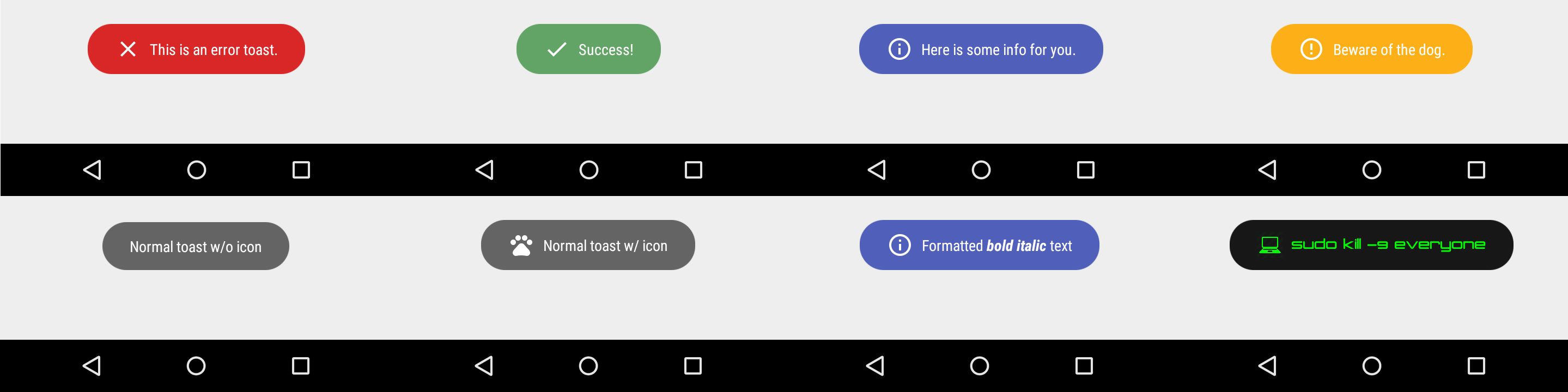
The usual Toast, but with steroids. ## Prerequisites Add this in your root `build.gradle` file (**not** your module `build.gradle` file): ```gradle allprojects { repositories { ... maven { url "https://jitpack.io" } } } ``` ## Dependency Add this to your module's `build.gradle` file (make sure the version matches the JitPack badge above): ```gradle dependencies { ... // implementation 'com.github.GrenderG:Toasty:1.3.0' implementation 'com.github.liupeng110:Toasty:1.3.1' } ``` ## Configuration This step is optional, but if you want you can configure some Toasty parameters. Place this anywhere in your app: ```java Toasty.Config.getInstance() .setErrorColor(@ColorInt int errorColor) // optional .setInfoColor(@ColorInt int infoColor) // optional .setSuccessColor(@ColorInt int successColor) // optional .setWarningColor(@ColorInt int warningColor) // optional .setTextColor(@ColorInt int textColor) // optional .tintIcon(boolean tintIcon) // optional (apply textColor also to the icon) .setToastTypeface(@NonNull Typeface typeface) // optional .setTextSize(int sizeInSp) // optional .apply(); // required ``` You can reset the configuration by using `reset()` method: ```java Toasty.Config.reset(); ``` ## Usage Each method always returns a `Toast` object, so you can customize the Toast much more. **DON'T FORGET THE `show()` METHOD!** To display an error Toast: ``` java Toasty.error(yourContext, "This is an error toast.", Toast.LENGTH_SHORT, true).show(); ``` To display a success Toast: ``` java Toasty.success(yourContext, "Success!", Toast.LENGTH_SHORT, true).show(); ``` To display an info Toast: ``` java Toasty.info(yourContext, "Here is some info for you.", Toast.LENGTH_SHORT, true).show(); ``` To display a warning Toast: ``` java Toasty.warning(yourContext, "Beware of the dog.", Toast.LENGTH_SHORT, true).show(); ``` To display the usual Toast: ``` java Toasty.normal(yourContext, "Normal toast w/o icon").show(); ``` To display the usual Toast with icon: ``` java Toasty.normal(yourContext, "Normal toast w/ icon", yourIconDrawable).show(); ``` You can also create your custom Toasts with the `custom()` method: ``` java Toasty.custom(yourContext, "I'm a custom Toast", yourIconDrawable, tintColor, duration, withIcon, shouldTint).show(); ``` ### Extra [You can pass formatted text to Toasty!](https://github.com/GrenderG/Toasty/blob/master/app/src/main/java/es/dmoral/toastysample/MainActivity.java#L98-L107) **There are variants of each method, feel free to explore this library.** ## Screenshots **Please click the image below to enlarge.** ## Third Party Bindings ### React Native You may now use this library with [React Native](https://github.com/facebook/react-native) via this [module](https://github.com/prscX/react-native-toasty). Apps using Toasty -- Want to be here? Open an `issue` or make a `pull request`.
ColorHub - Color Palette
Touch for Facebook
Daily – News flipped around
Oz! Comic Reader
Impactor Unroot
Fusemounter
BlueWords
Levipic - Photo Gallery & Map
Maki for Facebook & Twitter
Eva: Everything for Telegram
ModPE IDE
Rocket Notes
OpenHub for GitHub
AUTO Controle
Caller+
openHAB