# DKPhotoGallery
**Repository Path**: anzizhao/DKPhotoGallery
## Basic Information
- **Project Name**: DKPhotoGallery
- **Description**: No description available
- **Primary Language**: Unknown
- **License**: MIT
- **Default Branch**: develop
- **Homepage**: None
- **GVP Project**: No
## Statistics
- **Stars**: 0
- **Forks**: 0
- **Created**: 2024-12-12
- **Last Updated**: 2024-12-12
## Categories & Tags
**Categories**: Uncategorized
**Tags**: None
## README
DKPhotoGallery
=======================
[](http://travis-ci.org/zhangao0086/DKPhotoGallery) [][docsLink] [](https://github.com/Carthage/Carthage)
[][mitLink]
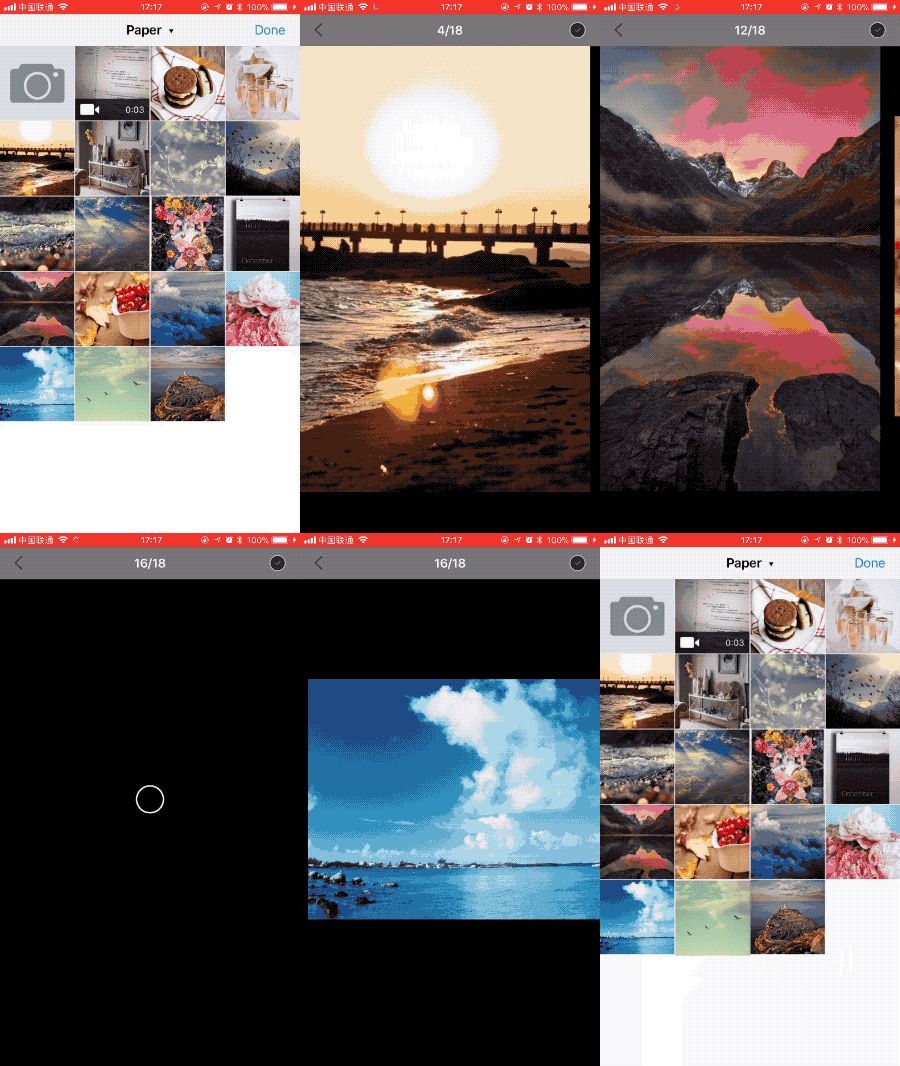
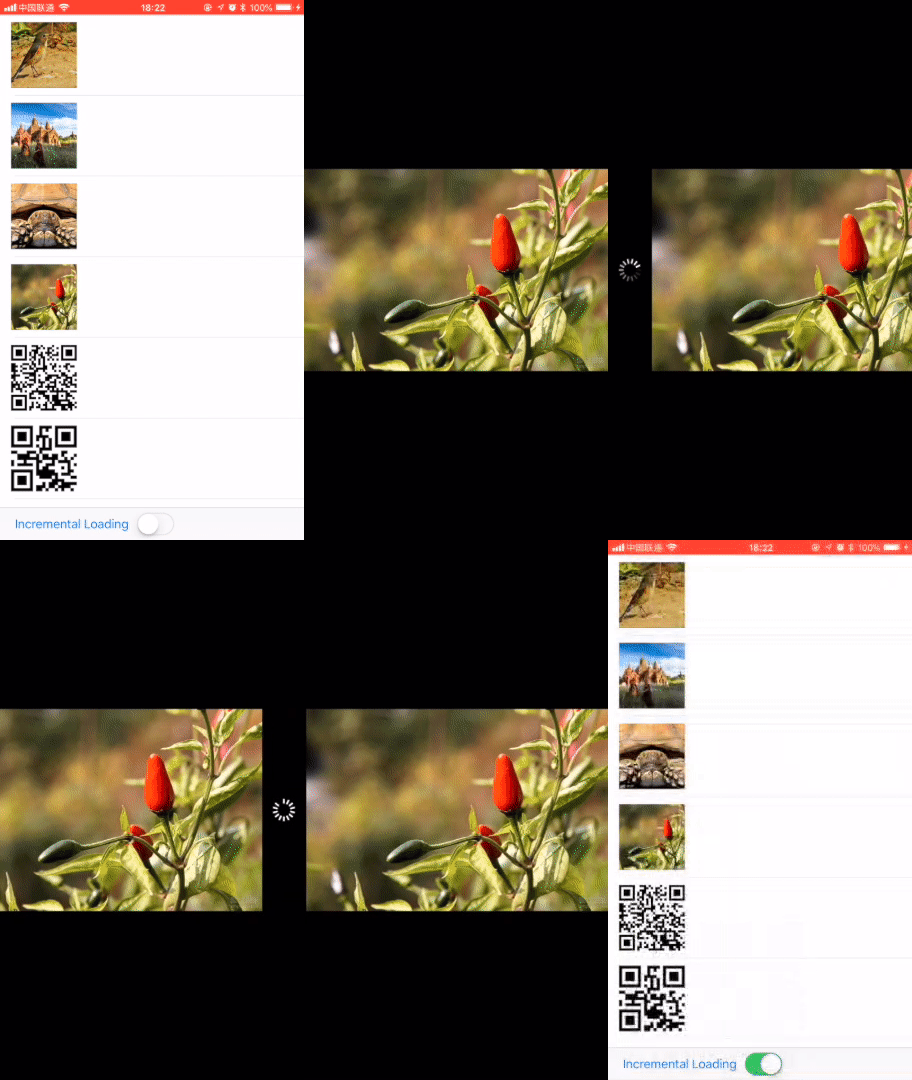 ### Features
- PNG|JPEG|GIF|PHAsset
- AVPlayer
- PDF
- Image caching with SDWebImage
- Original image download
- Extract QR Code(Text、URL)
- Incremental fetching items
- Localization
- 3D Touch
## Requirements
* iOS 9.0+ (Drop support for iOS 8 in 0.0.15 or above)
* ARC
* Swift 4.2 & 5
## Installation
#### CocoaPods
DKPhotoGallery is available on CocoaPods. Simply add the following line to your podfile:
```
# For latest release in cocoapods
pod 'DKPhotoGallery'
```
#### Carthage
```
github "zhangao0086/DKPhotoGallery"
```
If you use Carthage to build your dependencies, make sure you have added `DKPhotoGallery.framework` and `SDWebImage.framework` to the _"Linked Frameworks and Libraries"_ section of your target, and have included them in your Carthage framework copying build phase.
#### Swift Package Manager
```
https://github.com/zhangao0086/DKPhotoGallery.git
```
## Usage
```swift
let gallery = DKPhotoGallery()
gallery.singleTapMode = .dismiss
gallery.items = self.items
gallery.presentingFromImageView = self.imageView
gallery.presentationIndex = 0
gallery.finishedBlock = { dismissIndex, dismissItem in
if item == dismissItem {
return imageView
} else {
return nil
}
}
self.present(photoGallery: gallery)
```
## DKPhotoGalleryItem
Create a DKPhotoGalleryItem with a UIImage or a URL or a PHAsset.
```swift
@objc
open class DKPhotoGalleryItem: NSObject {
/// The image to be set initially, until the image request finishes.
open var thumbnail: UIImage?
open var image: UIImage?
open var imageURL: URL?
open var videoURL: URL?
/// iOS 11 or higher required.
@objc open var pdfURL: URL?
/**
DKPhotoGallery will automatically decide whether to create ImagePreview or PlayerPreview via the mediaType of the asset.
See more: DKPhotoPreviewFactory.swift
*/
open var asset: PHAsset?
open var assetLocalIdentifier: String?
/**
Used for some optional features.
For ImagePreview, you can enable the original image download feature with a key named DKPhotoGalleryItemExtraInfoKeyRemoteImageOriginalURL.
*/
open var extraInfo: [String: Any]?
}
```
## Extract QR Code
### Features
- PNG|JPEG|GIF|PHAsset
- AVPlayer
- PDF
- Image caching with SDWebImage
- Original image download
- Extract QR Code(Text、URL)
- Incremental fetching items
- Localization
- 3D Touch
## Requirements
* iOS 9.0+ (Drop support for iOS 8 in 0.0.15 or above)
* ARC
* Swift 4.2 & 5
## Installation
#### CocoaPods
DKPhotoGallery is available on CocoaPods. Simply add the following line to your podfile:
```
# For latest release in cocoapods
pod 'DKPhotoGallery'
```
#### Carthage
```
github "zhangao0086/DKPhotoGallery"
```
If you use Carthage to build your dependencies, make sure you have added `DKPhotoGallery.framework` and `SDWebImage.framework` to the _"Linked Frameworks and Libraries"_ section of your target, and have included them in your Carthage framework copying build phase.
#### Swift Package Manager
```
https://github.com/zhangao0086/DKPhotoGallery.git
```
## Usage
```swift
let gallery = DKPhotoGallery()
gallery.singleTapMode = .dismiss
gallery.items = self.items
gallery.presentingFromImageView = self.imageView
gallery.presentationIndex = 0
gallery.finishedBlock = { dismissIndex, dismissItem in
if item == dismissItem {
return imageView
} else {
return nil
}
}
self.present(photoGallery: gallery)
```
## DKPhotoGalleryItem
Create a DKPhotoGalleryItem with a UIImage or a URL or a PHAsset.
```swift
@objc
open class DKPhotoGalleryItem: NSObject {
/// The image to be set initially, until the image request finishes.
open var thumbnail: UIImage?
open var image: UIImage?
open var imageURL: URL?
open var videoURL: URL?
/// iOS 11 or higher required.
@objc open var pdfURL: URL?
/**
DKPhotoGallery will automatically decide whether to create ImagePreview or PlayerPreview via the mediaType of the asset.
See more: DKPhotoPreviewFactory.swift
*/
open var asset: PHAsset?
open var assetLocalIdentifier: String?
/**
Used for some optional features.
For ImagePreview, you can enable the original image download feature with a key named DKPhotoGalleryItemExtraInfoKeyRemoteImageOriginalURL.
*/
open var extraInfo: [String: Any]?
}
```
## Extract QR Code
 ## Enable the original image download
 ```swift
let item = DKPhotoGalleryItem(imageURL: URL(string:"https://sz-preview.oss-cn-hangzhou.aliyuncs.com/pics/10003/b29259d837d4aaeef4b33c9dbc964a5b?x-oss-process=image/resize,m_lfit,h_512,w_512/quality,Q_80")!)
item.extraInfo = [
DKPhotoGalleryItemExtraInfoKeyRemoteImageOriginalURL: URL(string:"https://sz-preview.oss-cn-hangzhou.aliyuncs.com/pics/10003/b29259d837d4aaeef4b33c9dbc964a5b")!
]
```
## Localization
The default supported languages:
- en.lproj
- zh-Hans.lproj
You can also add a hook to return your own localized strings:
```swift
DKPhotoGalleryResource.customLocalizationBlock = { title in
if title == "preview.image.longPress.cancel" {
return "This is a test."
} else {
return nil
}
}
```
## License
DKPhotoGallery is released under the MIT license. See LICENSE for details.
[docsLink]:http://cocoadocs.org/docsets/DKPhotoGallery
[mitLink]:http://opensource.org/licenses/MIT
```swift
let item = DKPhotoGalleryItem(imageURL: URL(string:"https://sz-preview.oss-cn-hangzhou.aliyuncs.com/pics/10003/b29259d837d4aaeef4b33c9dbc964a5b?x-oss-process=image/resize,m_lfit,h_512,w_512/quality,Q_80")!)
item.extraInfo = [
DKPhotoGalleryItemExtraInfoKeyRemoteImageOriginalURL: URL(string:"https://sz-preview.oss-cn-hangzhou.aliyuncs.com/pics/10003/b29259d837d4aaeef4b33c9dbc964a5b")!
]
```
## Localization
The default supported languages:
- en.lproj
- zh-Hans.lproj
You can also add a hook to return your own localized strings:
```swift
DKPhotoGalleryResource.customLocalizationBlock = { title in
if title == "preview.image.longPress.cancel" {
return "This is a test."
} else {
return nil
}
}
```
## License
DKPhotoGallery is released under the MIT license. See LICENSE for details.
[docsLink]:http://cocoadocs.org/docsets/DKPhotoGallery
[mitLink]:http://opensource.org/licenses/MIT