# face-alignment
**Repository Path**: arcfrontier/face-alignment
## Basic Information
- **Project Name**: face-alignment
- **Description**: :fire: 2D and 3D Face alignment library build using pytorch
- **Primary Language**: Python
- **License**: BSD-3-Clause
- **Default Branch**: master
- **Homepage**: None
- **GVP Project**: No
## Statistics
- **Stars**: 0
- **Forks**: 0
- **Created**: 2021-11-25
- **Last Updated**: 2021-11-25
## Categories & Tags
**Categories**: Uncategorized
**Tags**: None
## README
# Face Recognition
Detect facial landmarks from Python using the world's most accurate face alignment network, capable of detecting points in both 2D and 3D coordinates.
Build using [FAN](https://www.adrianbulat.com)'s state-of-the-art deep learning based face alignment method. For detecting faces the library makes use of [dlib](http://dlib.net/) library.

**Note:** The lua version is available [here](https://github.com/1adrianb/2D-and-3D-face-alignment).
For numerical evaluations it is highly recommended to use the lua version which uses indentical models with the ones evaluated in the paper. More models will be added soon.
**New retrained models will be posted at the end of november**
[](https://opensource.org/licenses/BSD-3-Clause) [](https://travis-ci.org/1adrianb/face-alignment)
## Features
#### Detect 2D facial landmarks in pictures

```python
import face_alignment
from skimage import io
fa = face_alignment.FaceAlignment(face_alignment.LandmarksType._2D, enable_cuda=True, flip_input=False)
input = io.imread('../test/assets/aflw-test.jpg')
preds = fa.get_landmarks(input)
```
#### Detect 3D facial landmarks in pictures
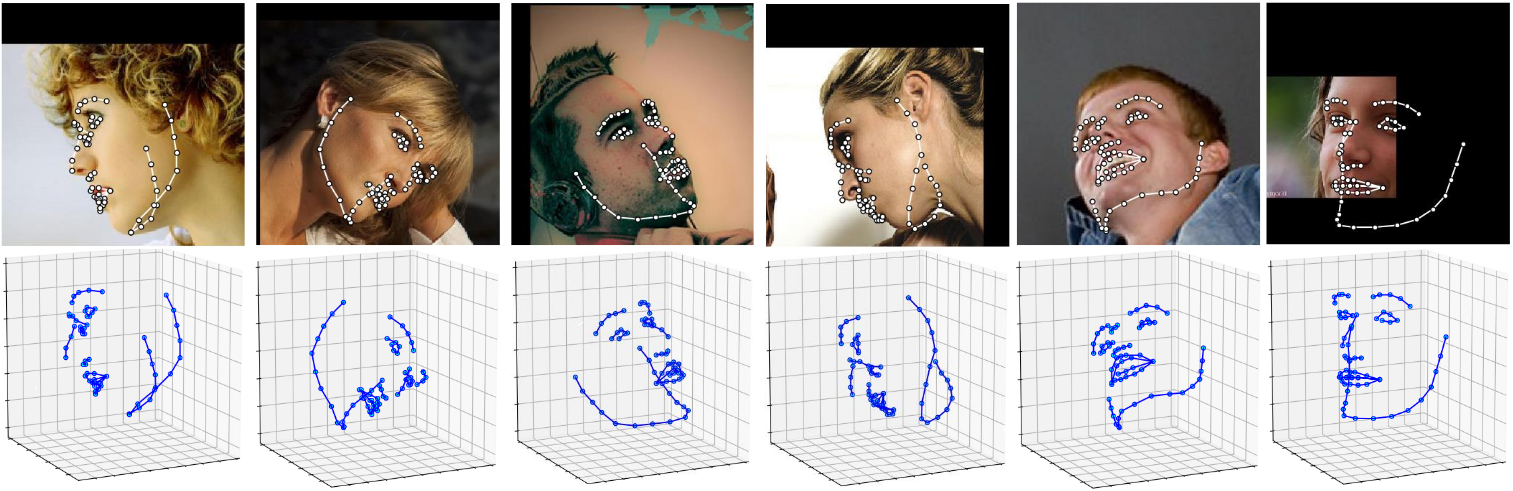
```python
import face_alignment
from skimage import io
fa = face_alignment.FaceAlignment(face_alignment.LandmarksType._3D, enable_cuda=True, flip_input=False)
input = io.imread('../test/assets/aflw-test.jpg')
preds = fa.get_landmarks(input)
```
#### Find all faces present in a given image
```python
import face_alignment
from skimage import io
fa = face_alignment.FaceAlignment(face_alignment.LandmarksType._2D, enable_cuda=False, flip_input=False)
input = io.imread('../test/assets/aflw-test.jpg')
preds = fa.detect_faces(input)
```
#### Process an entire directory in one go
```python
import face_alignment
from skimage import io
fa = face_alignment.FaceAlignment(face_alignment.LandmarksType._2D, enable_cuda=False, flip_input=False)
preds = fa.process_folder('../test/assets/', all_faces=True)
```
Please also see the ``examples`` folder
## Installation
### Requirements
* Python 3.5+ or Python 2.7 (it may work with other versions too)
* Linux or macOS (windows may work once pytorch gets supported)
* pytorch (>=0.2 recommended)
While not required, for optimal performance(especially for the detector) it is **highly** recommended to run the code using a CUDA enabled GPU.
### Binaries
Conda builds are coming soon!
### From source
Install pytorch and pytorch dependencies. Instructions taken from [pytorch readme](https://github.com/pytorch/pytorch). For a more updated version check the framework github page.
On Linux
```bash
export CMAKE_PREFIX_PATH="$(dirname $(which conda))/../" # [anaconda root directory]
# Install basic dependencies
conda install numpy pyyaml mkl setuptools cmake gcc cffi
# Add LAPACK support for the GPU
conda install -c soumith magma-cuda80 # or magma-cuda75 if CUDA 7.5
```
On OSX
```bash
export CMAKE_PREFIX_PATH=[anaconda root directory]
conda install numpy pyyaml setuptools cmake cffi
```
#### Get the PyTorch source
```bash
git clone --recursive https://github.com/pytorch/pytorch
```
#### Install PyTorch
On Linux
```bash
python setup.py install
```
On OSX
```bash
MACOSX_DEPLOYMENT_TARGET=10.9 CC=clang CXX=clang++ python setup.py install
```
#### Get the Face Alignment source code
```bash
git clone https://github.com/1adrianb/face-alignment
```
#### Install the Face Alignment lib
```bash
pip install -r requirements.txt
python setup.py install
```
### Docker image
A Dockerfile is provided to build images with cuda support and cudnn v5. For more instructions about running and building a docker image check the orginal Docker documentation.
```
docker build -t face-alignment .
```
## How does it work?
While here the work is presented as a black-box, if you want to know more about the intrisecs of the method please check the original paper either on arxiv or my [webpage](https://www.adrianbulat.com).
## Contributions
All contributions are welcomed. If you encounter any issue (including examples of images where it fails) feel free to open an issue.
## Citation
```
@inproceedings{bulat2017far,
title={How far are we from solving the 2D \& 3D Face Alignment problem? (and a dataset of 230,000 3D facial landmarks)},
author={Bulat, Adrian and Tzimiropoulos, Georgios},
booktitle={International Conference on Computer Vision},
year={2017}
}
```
For citing dlib, pytorch or any other packages used here please check the original page of their respective authors.
## Acknowledgements
* To the [dlib developers](http://dlib.net/) for making available the pretrained face detection model
* To the [pytorch](http://pytorch.org/) team for providing such an awesome deeplearning framework
* To [my supervisor](http://www.cs.nott.ac.uk/~pszyt/) for his patience and suggestions.
* To all other python developers that made available the rest of the packages used in this repository.