# WorldGen
**Repository Path**: blogstudy/WorldGen
## Basic Information
- **Project Name**: WorldGen
- **Description**: No description available
- **Primary Language**: Unknown
- **License**: Apache-2.0
- **Default Branch**: main
- **Homepage**: None
- **GVP Project**: No
## Statistics
- **Stars**: 0
- **Forks**: 0
- **Created**: 2025-10-17
- **Last Updated**: 2025-10-17
## Categories & Tags
**Categories**: Uncategorized
**Tags**: None
## README
# WorldGen: Generate Any 3D Scene in Seconds
[](https://worldgen.github.io/)
[](https://huggingface.co/LeoXie/WorldGen)

[](https://github.com/ZiYang-xie/WorldGen/stargazers/)
> Author 👨💻: [Ziyang Xie](https://ziyangxie.site/) @ [Manifolds-AI](https://www.linkedin.com/company/manifolds-ai/)
> Contact Email 📧: [ziyangxie01@gmail.com](mailto:ziyangxie01@gmail.com)
> Feel free to contact me for any questions or collaborations!
## 🌟 Introduction
🌏 **WorldGen** can generate 3D scenes in seconds from text prompts and images. It is a powerful tool for creating 3D environments and scenes for games, simulations, robotics, and virtual reality applications.
- **Instant 3D Generation** ⚡️ : Create full 3D scenes from input data in seconds
- **360° Free Exploration** 🧭 : WorldGen supports free 360° consistent exploration of the generated 3D scene with loop closure.
- **Diverse Scenes Support** 🌈 : WorldGen supports both indoor and outdoor scenes, both realistic and unrealistic scenes in any style.
- **Flexible Rendering** 📸 : WorldGen supports rendering at any resolution with any camera setting and trajectory in real-time.
Two lines of code to generate a 3D scene in seconds
```python
# Use our API to generate a 3D scene
worldgen = WorldGen()
worldgen.generate_world("")
```
## Text-to-Scene Generation
## Image-to-Scene Generation
---
## News and TODOs
- [x] `05.10.2025` 🔥 Add support for low-vram generation (Only use ~10GB VRAM for generation).
- [x] `04.26.2025` 📄 **New** Relase a project page for WorldGen
- [x] `04.22.2025` 🏡 Add support for mesh scene generation (Should give better results than splat)
- [x] `04.21.2025` 🎉 Opensource the WorldGen codebase
- [x] `04.19.2025` 🖼️ Add support for image-to-scene generation
- [x] `04.17.2025` 📝 Add support for text-to-scene generation
- [ ] 🏃🏻♀️ Release a better lora checkpoint.
- [ ] Release technical report and video
- [ ] Support higher resolution generation (e.g., 1080P, currently limited by computational resources)
- [ ] Release huggingface demo.
- [ ] Support better background inpainting (Invisible region inpainting)
## 📦 Installation
Getting started with WorldGen is simple!
```bash
# Clone the repository
git clone https://github.com/ZiYang-xie/WorldGen.git
cd WorldGen
# Create a new conda environment
conda create -n worldgen python=3.11
conda activate worldgen
# Install torch and torchvision (with GPU support)
pip3 install torch torchvision --index-url https://download.pytorch.org/whl/cu128
# Install worldgen
pip install .
```
## 🎮 Quick Start / Usage
### WorldGen API
Quick start with WorldGen (mode in `t2s` or `i2s`) and generate your first 3D scene in seconds:
- 📝 **Text to Scene:** Generate a 3D scene from a text prompt
```python
# Example using the Python API
from worldgen import WorldGen
device = torch.device("cuda" if torch.cuda.is_available() else "cpu")
worldgen = WorldGen(mode="t2s", device=device, low_vram=False) # Set low_vram to True if your GPU VRAM is less than 24GB.
splat = worldgen.generate_world("")
splat.save("path/to/your/output.ply") # Save splat file as a .ply file, which can be loaded and visualized using a standard gaussian splatting viewer
```
- 🖼️ **Image to Scene:** Generate a 3D scene from an image
```python
worldgen = WorldGen(mode="i2s", device=device, low_vram=False) # Set low_vram to True if your GPU VRAM is less than 24GB.
image = Image.open("path/to/your/image.jpg")
splat = worldgen.generate_world(
image=image,
prompt="",
)
```
- 🏡 Generate a 3D scene in mesh mode
```python
mesh = worldgen.generate_world("", return_mesh=True)
o3d.io.write_triangle_mesh("path/to/your/output.ply", mesh) # Save mesh as a .ply file
```
> [!Tip]
> We also support background inpainting for better scene generation, but it's currently an experimental feature, which may not work for all scenes.
> It can be enabled by setting `WorldGen(inpaint_bg=True)`.
```bash
# If want to use background inpainting feature, install iopaint
pip install iopaint --no-dependencies
```
## 🕹️ Demo with 3D Scene Visualization
We provide a demo script to help you quickly get started and visualize the 3D scene in a web browser. The script is powered by [Viser](https://github.com/nerfstudio-project/viser).
```bash
# Generate a 3D scene from a text prompt
python demo.py -p "A beautiful landscape with a river and mountains"
# Generate a 3D scene from an image
python demo.py -i "path/to/your/image.jpg" -p ""
# 🔥 New feature: Generate a 3D scene in mesh mode
# Make sure you installed my customized viser to correctly visualize the mesh without backface culling
# pip install git+https://github.com/ZiYang-xie/viser.git
python demo.py -p "A beautiful landscape with a river and mountains" --return_mesh
```
After running the demo script, A local viser server will be launched at `http://localhost:8080`, where you can explore the generated 3D scene in real-time.
### Free-viewpoint Exploration in 3D Scene
---
> [!Note]
> **WorldGen** internally support generating a 3D scene from a 360° panorama image 📸, which related to how WorldGen works:
> You can try it out if you happen to have a 360° panorama (equirectangular) image. Aspect ratio of the panorama image should be 2:1.
```python
pano_image = Image.open("path/to/your/pano_image.jpg")
splat = worldgen._generate_world(pano_image=pano_image)
```
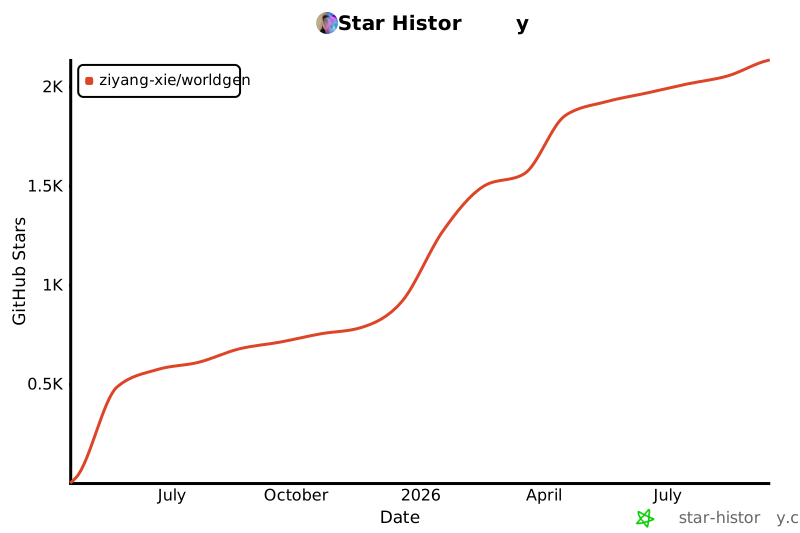
## ⭐️ Star History
Give a star to WorldGen if you like it!
[](https://www.star-history.com/#ZiYang-xie/WorldGen&Date)
## 📚 Citation
If you find this project useful, please consider citing it as follows:
```bibtex
@misc{worldgen2025ziyangxie,
author = {Ziyang Xie},
title = {WorldGen: Generate Any 3D Scene in Seconds},
year = {2025},
publisher = {GitHub},
journal = {GitHub repository},
howpublished = {\url{https://github.com/ZiYang-xie/WorldGen}},
}
```
---
## 🤝 Acknowledgements
This project is built on top of the follows, please consider citing them if you find them useful:
- [Unik3D](https://github.com/lpiccinelli-eth/UniK3D)
- [Layerpano3D](https://github.com/3DTopia/LayerPano3D)
- [Viser](https://github.com/nerfstudio-project/viser)
- [FLUX.1](https://huggingface.co/black-forest-labs/FLUX.1-dev)
- [OneFormer](https://github.com/SHI-Labs/OneFormer)
- [LaMa](https://github.com/saic-mdal/lama)
Some of the core methods and ideas in this project are inspired by the following projects, special thanks to them:
- [WonderWorld](https://kovenyu.com/wonderworld/) [RGBD to GS conversion]
- [WorldSheet](https://worldsheet.github.io/) [Mesh Generation] 


