# l8w8jwt
**Repository Path**: bm_github/l8w8jwt
## Basic Information
- **Project Name**: l8w8jwt
- **Description**: No description available
- **Primary Language**: Unknown
- **License**: Apache-2.0
- **Default Branch**: master
- **Homepage**: None
- **GVP Project**: No
## Statistics
- **Stars**: 0
- **Forks**: 0
- **Created**: 2025-11-24
- **Last Updated**: 2025-11-24
## Categories & Tags
**Categories**: Uncategorized
**Tags**: None
## README
> [!IMPORTANT]
>
> # **NOTICE:**
>
> ## Development of this project has been migrated to: https://codeberg.org/GlitchedPolygons/l8w8jwt
>
> ## All pull requests and issues on GitHub will be ignored from the 16th of August, 2025 onwards.
# l8w8jwt
[](https://circleci.com/gh/GlitchedPolygons/l8w8jwt/tree/master)
[](https://ci.appveyor.com/project/GlitchedPolygons/l8w8jwt/branch/master)
[](https://codecov.io/gh/GlitchedPolygons/l8w8jwt)
[](https://github.com/GlitchedPolygons/l8w8jwt/blob/master/LICENSE)
[](https://glitchedpolygons.github.io/l8w8jwt/files.html)
[](https://jwt.io/)
### `l8w8jwt` (say "lightweight jawt") is a minimal, OpenSSL-less and super lightweight JWT library written in C.
Its only significant dependency (in terms of heaviness) is [ARM's open-source MbedTLS library](https://github.com/ARMmbed/mbedtls).
The others are extremely lightweight header-only libraries for JSON handling and building strings.
> ᐳᐳ Check out the API docs [here on github.io](https://glitchedpolygons.github.io/l8w8jwt/files.html)
### How to clone
`git clone --recursive https://github.com/GlitchedPolygons/l8w8jwt.git`
Make sure to do a recursive clone, otherwise you need to `git submodule update --init --recursive` at a later point!
### How to use
Just add l8w8jwt as a git submodule to your project (e.g. into some `lib/` or `deps/` folder
inside your project's repo; `{repo_root}/lib/` is used here in the following example).
```
git submodule add https://github.com/GlitchedPolygons/l8w8jwt.git lib/l8w8jwt
git submodule update --init --recursive
```
If you don't want to use git submodules, you can also start vendoring a specific version of l8w8jwt
by copying its full repo content into the folder where you keep your project's external libraries/dependencies.
### Building and linking
If you use CMake you can just `add_subdirectory(path_to_git_submodule)`
and then `target_link_libraries(your_project PRIVATE l8w8jwt)` inside your **CMakeLists.txt** file.
If you use GCC, [check out this issue's log here](https://github.com/GlitchedPolygons/l8w8jwt/issues/2).
For devices with a particularly small stack, please define the `L8W8JWT_SMALL_STACK` pre-processor definition and set it to `1`.
For devices which do not support system time via standard C `time` API, please define the `MBEDTLS_PLATFORM_TIME_ALT`
pre-processor definition and set it to `1`.
Additionally, you would also need to provide the alternate time API via function pointer `l8w8jwt_time` defined in [timehelper.h](include/l8w8jwt/timehelper.h)
#### Build shared library/DLL
```bash
bash build.sh
```
If the build succeeds, you should have a new _.tar.gz_ file inside the `build/` directory.
This command works on Windows too: just use the [Git Bash for Windows](https://git-scm.com/download/win) CLI!
**NOTE:** If you use the l8w8jwt shared library in your project on Windows,
remember to `#define L8W8JWT_DLL 1` before including any of the l8w8jwt headers!
Maybe even set it as a pre-processor definition, otherwise the headers won't have the necessary `__declspec(dllimport)` declarations!
#### MinGW on Windows
```bash
bash build-mingw.sh
```
Run this using e.g. "Git Bash for Windows".
Make sure that you have your MinGW installation directory inside your `PATH` - otherwise this script will fail when trying to call `mingw32-make.exe`.
Official release builds are made using `mingw-w64/x86_64-8.1.0-posix-seh-rt_v6-rev0/mingw64/bin/gcc.exe`.
#### Build static library
```bash
mkdir -p build && cd build
cmake -DBUILD_SHARED_LIBS=Off -DL8W8JWT_PACKAGE=On -DCMAKE_BUILD_TYPE=Release ..
cmake --build . --config Release
```
**NOTE:** When compiling l8w8jwt as a static lib, remember to link against the MbedTLS libs too!
Those will be placed inside the `build/mbedtls/library/` directory after successful compilation.
### Custom allocators
If you want to provide some custom implementation of `malloc`, `calloc` or `realloc`,
please define the below pre-processor definitions and set their corresponding value to `1`.
Additionally, you would also need to provide the alternate implementation for the API
via function pointer defined in [utils.h](include/l8w8jwt/util.h)
| Method | Pre-processor | Function pointer |
|-----------|-----------------------------------|---------------------|
| malloc | L8W8JWT_PLATFORM_MALLOC_ALT | l8w8jwt_malloc |
| calloc | L8W8JWT_PLATFORM_CALLOC_ALT | l8w8jwt_calloc |
| realloc | L8W8JWT_PLATFORM_REALLOC_ALT | l8w8jwt_realloc |
## Examples
### Encoding and signing a token
```C
#include "l8w8jwt/encode.h"
int main(void)
{
char* jwt;
size_t jwt_length;
struct l8w8jwt_encoding_params params;
l8w8jwt_encoding_params_init(¶ms);
params.alg = L8W8JWT_ALG_HS512;
params.sub = "Gordon Freeman";
params.iss = "Black Mesa";
params.aud = "Administrator";
params.iat = l8w8jwt_time(NULL);
params.exp = l8w8jwt_time(NULL) + 600; /* Set to expire after 10 minutes (600 seconds). */
params.secret_key = (unsigned char*)"YoUR sUpEr S3krEt 1337 HMAC kEy HeRE";
params.secret_key_length = strlen(params.secret_key);
params.out = &jwt;
params.out_length = &jwt_length;
int r = l8w8jwt_encode(¶ms);
printf("\n l8w8jwt example HS512 token: %s \n", r == L8W8JWT_SUCCESS ? jwt : " (encoding failure) ");
/* Always free the output jwt string! */
l8w8jwt_free(jwt);
return 0;
}
```
---
### Decoding and verifying a token
```C
#include "l8w8jwt/decode.h"
static const char KEY[] = "YoUR sUpEr S3krEt 1337 HMAC kEy HeRE";
static const char JWT[] = "eyJhbGciOiJIUzUxMiIsInR5cCI6IkpXVCJ9.eyJpYXQiOjE1ODA5MzczMjksImV4cCI6MTU4MDkzNzkyOSwic3ViIjoiR29yZG9uIEZyZWVtYW4iLCJpc3MiOiJCbGFjayBNZXNhIiwiYXVkIjoiQWRtaW5pc3RyYXRvciJ9.7oNEgWxzs4nCtxOgiyTofP2bxZtL8dS7hgGXRPPDmwQWN1pjcwntsyK4Y5Cr9035Ro6Q16WOLiVAbj7k7TeCDA";
int main(void)
{
struct l8w8jwt_decoding_params params;
l8w8jwt_decoding_params_init(¶ms);
params.alg = L8W8JWT_ALG_HS512;
params.jwt = (char*)JWT;
params.jwt_length = strlen(JWT);
params.verification_key = (unsigned char*)KEY;
params.verification_key_length = strlen(KEY);
/*
* Not providing params.validate_iss_length makes it use strlen()
* Only do this when using properly NUL-terminated C-strings!
*/
params.validate_iss = "Black Mesa";
params.validate_sub = "Gordon Freeman";
/* Expiration validation set to false here only because the above example token is already expired! */
params.validate_exp = 0;
params.exp_tolerance_seconds = 60;
params.validate_iat = 1;
params.iat_tolerance_seconds = 60;
enum l8w8jwt_validation_result validation_result;
int decode_result = l8w8jwt_decode(¶ms, &validation_result, NULL, NULL);
if (decode_result == L8W8JWT_SUCCESS && validation_result == L8W8JWT_VALID)
{
printf("\n Example HS512 token validation successful! \n");
}
else
{
printf("\n Example HS512 token validation failed! \n");
}
/*
* decode_result describes whether decoding/parsing the token succeeded or failed;
* the output l8w8jwt_validation_result variable contains actual information about
* JWT signature verification status and claims validation (e.g. expiration check).
*
* If you need the claims, pass an (ideally stack pre-allocated) array of struct l8w8jwt_claim
* instead of NULL,NULL into the corresponding l8w8jwt_decode() function parameters.
* If that array is heap-allocated, remember to free it yourself!
*/
return 0;
}
```
**More examples can be found inside this repo's [`examples/`](https://github.com/GlitchedPolygons/l8w8jwt/tree/master/examples) folder - check them out now and find out how to encode/decode custom claims and sign using the various asymmetric algos!**
### Mandatory parameters
Some encoding/decoding parameters can be omitted, while others can't.
Here is the overview of minimal **required** parameters that can't be omitted for encoding and decoding JWTs:
Encode
Decode
### EdDSA
L8w8jwt supports the [EdDSA](https://en.wikipedia.org/wiki/EdDSA) signing algorithm. The [Ed25519 curve](https://ed25519.cr.yp.to) is used.
By default it is turned off though (to avoid a potentially unnecessary dependency to the Ed25519 library inside `lib/ed25519`).
To turn it on, define the compiler pre-processor definition `L8W8JWT_ENABLE_EDDSA` (set it to `1` to enable it).
Correspondingly, for shared library usage, you'd need to build the l8w8jwt DLL/.so yourself, since **the pre-built binary available on the [Releases page](https://github.com/GlitchedPolygons/l8w8jwt/releases) is built without it!**
=> For CMake, to do so you'd just need to pass `-DL8W8JWT_ENABLE_EDDSA=On` to the CMake command before building!
For generating the keys, you should use the library that is also used by l8w8jwt for signing and verifying JWT signatures:
[`lib/ed25519`](https://github.com/GlitchedPolygons/GlitchEd25519) (a fork of [ORLP's ed25519](https://github.com/orlp/ed25519), kudos to [Orson Peters](https://github.com/orlp) for writing this great and super-simple C lib!). It's inside this repo's `lib/` folder as a git submodule.
### Note for the key parameter
* When using the `HS256`, `HS384` and `HS512` signing algorithms (symmetric), the l8w8jwt key parameter is the HMAC secret.
* For the `RS256`, `RS384`, `RS512`, `PS256`, `PS384` and `PS512` signature algos it's the PEM-formatted RSA key string.
* `ES256` => PEM-formatted NIST P-256 key.
* `ES384` => PEM-formatted NIST P-384 key.
* `ES512` => PEM-formatted NIST P-521 key.
* `ES256K` => PEM-formatted secp256k1 key.
* `EdDSA` => Hex-encoded Ed25519 key string (Ref10 format)
* * For Ed25519 signing specifically, the private key must be in the Ref10 Ed25519 format: exactly like the ones you'd get out of [libsodium](https://github.com/jedisct1/libsodium), [NaCl](https://nacl.cr.yp.to), [SUPERCOP](https://bench.cr.yp.to/supercop.html), ...
* * Check out the l8w8jwt EdDSA examples for more information and demo usage!
To find out how you would go about generating these keys, check out the [`examples/`](https://github.com/GlitchedPolygons/l8w8jwt/tree/master/examples): there's comments at the top of those files containing the commands that were used for key generation.
[](https://jwt.io)
## GUI
There is also an official GUI application available for Linux, Windows and Mac that provides a relatively complete frontend to this library.
Check it out here on GitHub: https://github.com/GlitchedPolygons/l8w8jwtgui
Here's a neat screenshot of it in action:
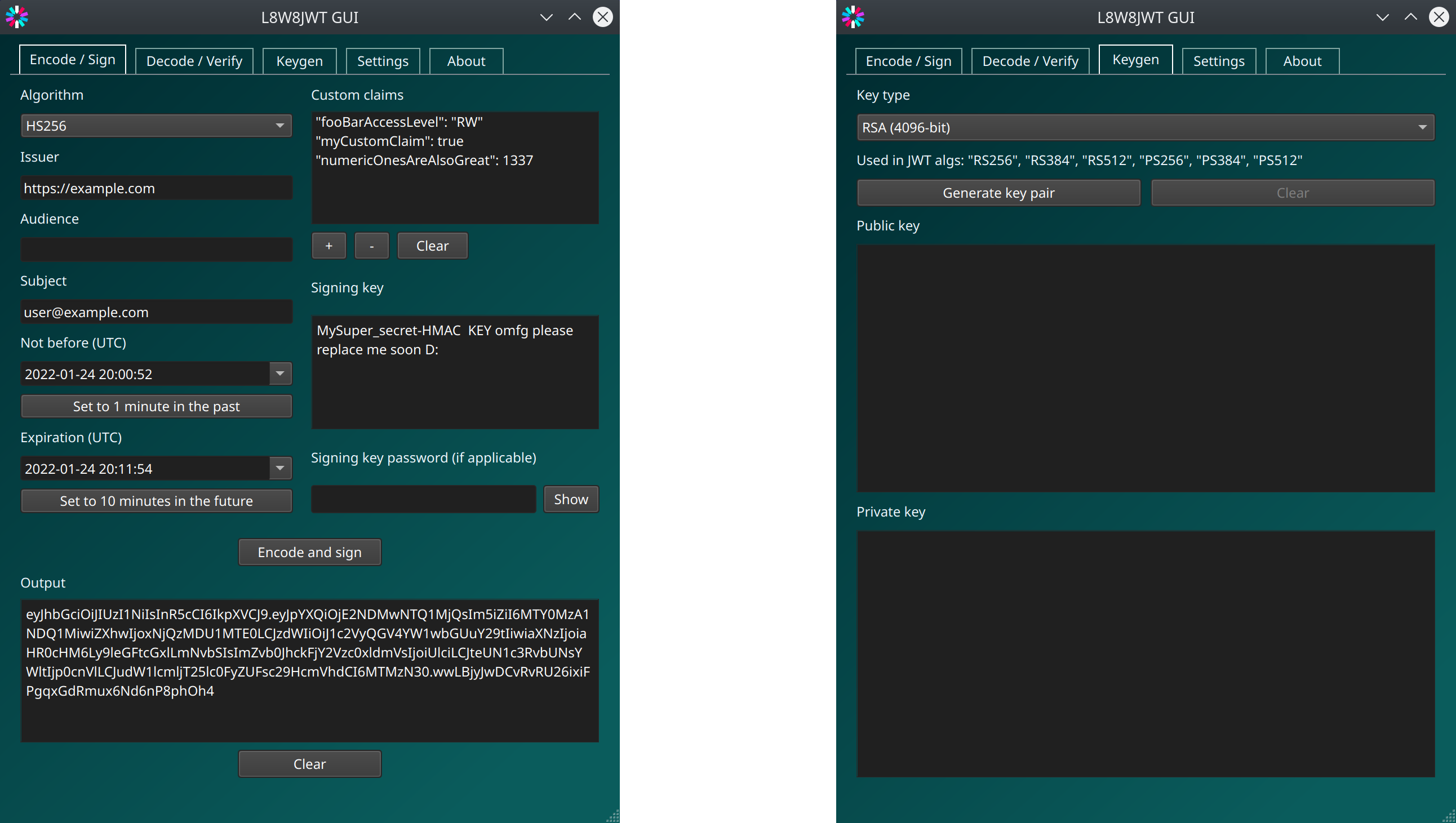
It's very comfortable to have a visual representation and all the `l8w8jwt` functions exposed to a graphical interface when developing and testing web services/applications that make use of JWT auth protocols.