# jirrit
**Repository Path**: bon-ami/jirrit
## Basic Information
- **Project Name**: jirrit
- **Description**: mirror from github
- **Primary Language**: Unknown
- **License**: Apache-2.0
- **Default Branch**: master
- **Homepage**: https://github.com/bon-ami/jirrit
- **GVP Project**: No
## Statistics
- **Stars**: 0
- **Forks**: 0
- **Created**: 2021-12-28
- **Last Updated**: 2024-12-24
## Categories & Tags
**Categories**: Uncategorized
**Tags**: Own
## README
# jirrit
## Command line parameters
run `jirrit -h` for more info on these parameters.
- `-h` help message.
- `-ver` / `-version` version info.
- `-v` logging enabled and more interactions. Most query actions need logging.
- `-vv` verbose messages.
- `-vvv` verbose messages with network I/O.
- `-getsvrcfg` prints configured servers.
- `-setsvrcfg` asks to configure servers.
- `-cfg string` provide a config file. It defaults to jirrit.xml under current dir or home dir.
- `-log string` provide a log file. It defaults to jirrit.log under current dir.
- `-reverse` reverse output results.
- `-r string` provide a server's name
- `-a string` provide an action's name.
- `-i string` provide an ID of issue, change, commit, assignee or build.
- `-b string` provide a branch.
- `-c string` provide a component or a comment.
- `-f string` provide a file/dir of attachment.
- `-hd string` provide an new assignee for issue transfer, or revision for cherrypicks.
- `-k string` provide a key, a description or a reject reason.
- `-l string` provide test steps, a linked issue, resolution or more params.
- `-p string` provide a project, state to transit to or job ID.
- `-s []string` provide multiple parts to be used with field configurations, or one complete solution for closure in bugzilla.
- `-w string` provide JIRA ID to store. To be used together with "-r".
- `-z int` provide max number of buils to show for Jenkins.
- `-fn string` provide a key or command to filter results. To be used together with "-fv" or "-fs".
- `-fv string` provide a value to filter results. To be used together with "-fn".
For example, for "-fn name -fv foo", the results with a line " name=foo" will be taken, and others will be skipped.
- `-fs string` provide a script file to filter results. To be used together with "-fn".
For example, for "-fn python -fs example_filter.py", the results with a line beginning with " name=MAD" will be taken, and others will be skipped.
`-r` and `-a` are meant to be used together to avoid user input.
## Config xml
As shown in example.xml, root name is **jirrit**.
**log** file name can be configured.
**eztoolscfg** file name of eztools configuration, for auto update.
**appup** configuration for auto update. **interval** defaults to 7 days.
**user** overall user name.
**pass** overall password.
**server** **type**s are **JIRA**, **Gerrit**, **Bugzilla** and **Jenkins**.
**name**s need to be unique within each type.
**url** is needed for every server.
**pass** can be provided, if not same as overall config.
**ip** is optional for a server for refernce only.
**user** is optional if a server needs a different user name than the overall configuration.
Three kinds of passwords can be configured.
- **basic** is the plain text password, or generated by a Jenkins server.
- **plain** is coded text password. Tools such as Postman can show this in the output message.
- **digest** is generated by a Gerrit server.
- **token** is generated by a Bugzilla server.
For Jira servers, there may be more to config for issue closure with some fields filled.
- **project** is the previous X part of an ID X-0, used. This is maintained by the program.
Usually, these fields can be seen in an issue's detail.
- **rejectrsn** is the field name for reject reasons.
- **testpre** is the field name for test condition.
- **teststep** is the field name for test steps.
- **testexp** is the field name for test expectation.
- **state** are state names. Supported attributes as **type**s:
- **not open** issues with states other than these will be listed as open issues
- **transition reject** transitions with these names as steps are tried in order to reject an issue
- **transition close** transitions with these names as steps are tried in order to close an issue
For Bugzilla servers, there may be more to config for state transitions with some fields filled.
- **solution** is a set of solution strings. Each will be asked to append more info and the set will be concatenated as one string to server.
- **state** are state names. Supported attributes as **type**s:
- **not open** issues with states other than these will be listed as open issues
- **transition reject** transitions with these names as steps are tried in order to reject an issue. If multiple, comment, if provided, is added during all steps.
- **transition close** transitions with these names as steps are tried in order to close an issue. If multiple, comment, if provided, is added during all steps.
- **resolved** are possible values for transition.
- **rejected** are possible values for transition.
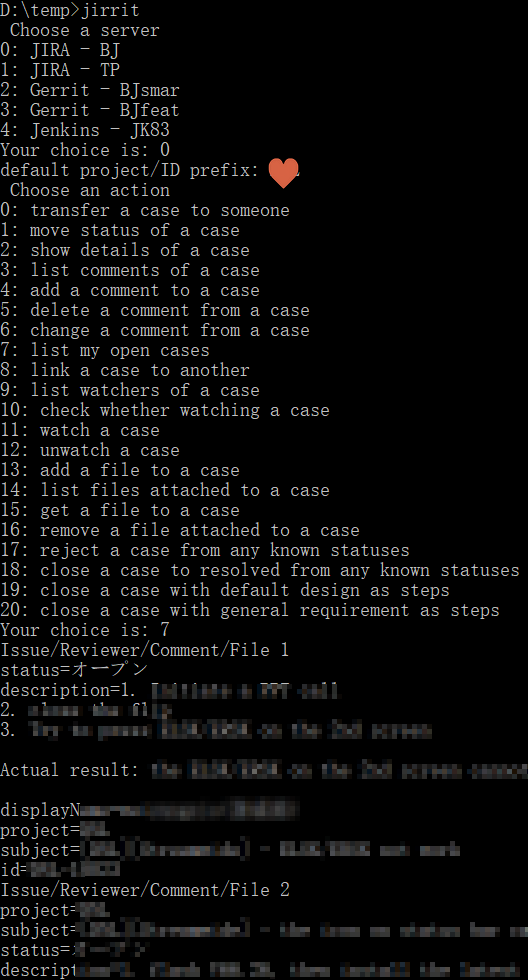
## Actions
- Jira
- transfer a case to someone
- move status of a case
- show details of a case
- list comments of a case
- add a comment to a case
- delete a comment from a case
- change a comment from a case
- link a case to another
- list my open cases
- list watchers of a case
- check whether watching a case
- watch a case
- unwatch a case
- add a file to a case
- list files attached to a case
- get a file to a case (specify a full path, a file name under current dir, or a dir in existence, without current file under it. If no file name provided, the original file name of the attachment will be taken. If destination file already exists, this will fail.)
- remove a file attached to a case
- reject a case from any known statuses
- close a case to resolved from any known statuses (change it to resolved)
- close a case with default design as steps (change it to resolved, adding test condition="none", steps="default design" and expectation="none")
- close a case with general requirement as steps (change it to resolved, adding test condition="none", steps="general requirement" and expectation="none")
- Gerrit
- list merged submits of someone
- list my open submits
- list sbs open submits
- list all my open revisions/commits
- list all open submits
- show details of a submit (by commit ID or change ID)
- show history of a submit
- show reviewers and scores of a submit
- show current revision or commit of a submit
- rebase a submit
- merge a submit
- show related submits of one
- add scores to a submit (Code-Review +2, Verified +1, and Manual-Testing, or other field as configured, +1)
- add scores, wait for it to be mergable and merge a submit
- add scores, wait for it to be mergable and merge sbs submits
- abandon all my open submits
- abandon a submit
- cherry pick all my open submits
- cherry pick a submit
- revert a submit
- list files of a submit by revision
- list config of a project
- download a file of a submit
- Jenkins
- list jobs
- show details of a build
- get log of a build
- list builds
- Bugzilla
- transfer a case to someone
- move status of a case
- show details of a case
- list comments of a case
- add a comment to a case
- list my open cases
- link a case to another
- list watchers of a case
- watch a case
- unwatch a case
- add a file to a case
- list files attached to a case
- get a file to a case
- reject a case from any known statuses
- close a case to resolved from any known statuses
## Input grammar
- For gerrit, in most cases, input an ID that can make it distinguished, such as commit.
Be aware Change IDs are same among cherrypicks.
- For most prompts, [Enter] without default value as shown is taken as an invalid input and return to previous menu.
- If previous value is in the format of ".+\-[0-9]+", or X-0, to be easier to read, and the new input is just a number, it will be taken as the number replacing the previous number part.
- In some cases, input support multiple lines. End an input with "\" to indicate it is a line of multiple ones and continue inputting.
- In some interactive input cases, and for parameter "-i",
- ".+\-[0-9]+[,][,][0-9]+", or "X-0,,1", or "0,,1", to be easier to read, to batch process all the ID's between, and including, the two numbers.
- "X-0,Y-1,2", to be easier to read, to batch process all the ID's listed, adding previous letter part. ("X-0,Y-1,2" will result in processing X-0, Y-1 and Y-2.)
[](https://ezproject.sourceforge.io/sc_jirrit.png)