# ZOOpt
**Repository Path**: boss-ding/ZOOpt
## Basic Information
- **Project Name**: ZOOpt
- **Description**: ZOOptZOOpt
- **Primary Language**: Unknown
- **License**: MIT
- **Default Branch**: master
- **Homepage**: None
- **GVP Project**: No
## Statistics
- **Stars**: 0
- **Forks**: 0
- **Created**: 2022-09-18
- **Last Updated**: 2022-09-19
## Categories & Tags
**Categories**: Uncategorized
**Tags**: None
## README
# ZOOpt
[](https://github.com/eyounx/ZOOpt/blob/master/LICENSE.txt) [](https://www.travis-ci.org/eyounx/ZOOpt) [](https://zoopt.readthedocs.io/en/latest/?badge=latest) [](https://codecov.io/gh/AlexLiuyuren/ZOOpt)
ZOOpt is a python package for Zeroth-Order Optimization.
Zeroth-order optimization (a.k.a. derivative-free optimization/black-box optimization) does not rely on the gradient of the objective function, but instead, learns from samples of the search space. It is suitable for optimizing functions that are nondifferentiable, with many local minima, or even unknown but only testable.
ZOOpt implements some state-of-the-art zeroth-order optimization methods and their parallel versions. Users only need to add several keywords to use parallel optimization on a single machine. For large-scale distributed optimization across multiple machines, please refer to [Distributed ZOOpt](https://github.com/eyounx/ZOOsrv).
**Documents**: [Tutorial of ZOOpt](http://zoopt.readthedocs.io/en/latest/index.html)
**Citation**:
> **Yu-Ren Liu, Yi-Qi Hu, Hong Qian, Chao Qian, Yang Yu. ZOOpt: Toolbox for Derivative-Free Optimization**. SCIENCE CHINA Information Sciences, 2022. [CORR abs/1801.00329](https://arxiv.org/abs/1801.00329)
(Features in this article are from version 0.2)
## Installation
The easiest way to install ZOOpt is to type `pip install zoopt` in the terminal/command line.
Alternatively, to install ZOOpt by source code, download this repository and sequentially run following commands in your terminal/command line.
```
$ python setup.py build
$ python setup.py install
```
## Quick tutorial for `Dimension2` class
Since release 0.4.1, `Dimension2` class in ZOOpt supports constructing THREE types of dimensions,
i.e.: `ValueType.CONTINUOUS`, `ValueType.DISCRETE`, and `ValueType.GRID`.
For **continuous dimensions**, the arguments should be like `(ValueType.CONTINUOUS, range, float_precision)`.
Where `ValueType.CONTINUOUS` indicates this dimension is continuous.
`range` is a list that indicates the search space, such as `[min, max]` (endpoints are inclusive).
`float_precision` means the precision of this dimension, e.g., if it is set to 1e-6, 0.001, or 10, the answer will be accurate to six decimal places, three decimal places, or tens places.
For **discrete dimensions**, the arguments should be like `(ValueType.DISCRETE, range, has_partial_order)`.
Where `ValueType.DISCRETE` indicates this dimension is discrete.
`range` is also a list that indicates the search space, such as `[min, max]` (endpoints are inclusive), but **ONLY integers can be sampled**.
`has_partial_order` means whether this dimension is ordered. `True` is for an ordered relation and `False` means not.
For **grid dimensions**, the arguments should be like `(ValueType.GRID, grid_list)`.
Where `ValueType.GRID` indicates this dimension is a grid, which is convenient to instance-wise search.
`grid_list` is a list whose values can be *str*, *int*, *float*, etc. All values in this list will be sampled like grid search.
For instance, you can define your own dimensions like:
```python
dim_list = [
(ValueType.CONTINUOUS, [-1, 1], 1e-6),
(ValueType.DISCRETE, [-10, 10], False),
(ValueType.DISCRETE, [10, 100], True),
(ValueType.GRID, [64, 128, 256, 512, 1024]),
(ValueType.GRID, ["relu", "leaky_relu", "tanh", "sigmoid"])
]
dim = Dimension2(dim_list)
```
## A simple example
We define the Ackley function for minimization (note that this function is for arbitrary dimensions, determined by the solution)
```python
import numpy as np
def ackley(solution):
x = solution.get_x()
bias = 0.2
value = -20 * np.exp(-0.2 * np.sqrt(sum([(i - bias) * (i - bias) for i in x]) / len(x))) - \
np.exp(sum([np.cos(2.0*np.pi*(i-bias)) for i in x]) / len(x)) + 20.0 + np.e
return value
```
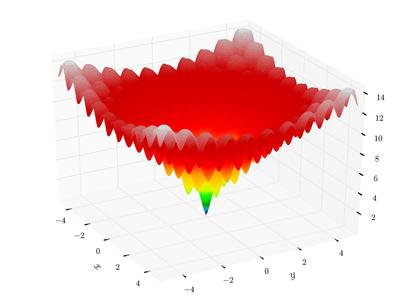
Ackley function is a classical function with many local minima. In 2-dimension, it looks like (from wikipedia)
Then, use ZOOpt to optimize a 100-dimension Ackley function:
```python
from zoopt import Dimension, ValueType, Dimension2, Objective, Parameter, Opt, ExpOpt
dim_size = 100 # dimension size
dim = Dimension(dim_size, [[-1, 1]]*dim_size, [True]*dim_size)
# dim = Dimension2([(ValueType.CONTINUOUS, [-1, 1], 1e-6)]*dim_size)
obj = Objective(ackley, dim)
# perform optimization
solution = Opt.min(obj, Parameter(budget=100*dim_size))
# print the solution
print(solution.get_x(), solution.get_value())
# parallel optimization for time-consuming tasks
solution = Opt.min(obj, Parameter(budget=100*dim_size, parallel=True, server_num=3))
```
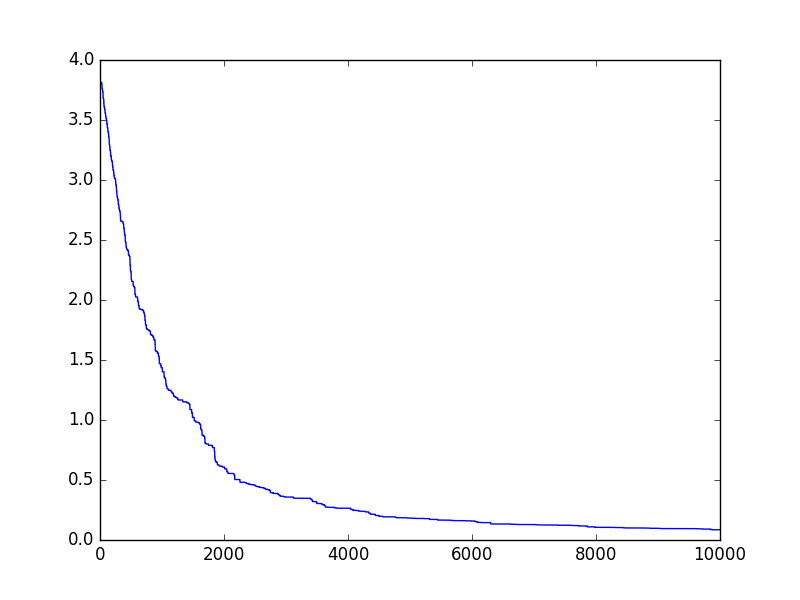
For a few seconds, the optimization is done. Then, we can visualize the optimization progress
```python
import matplotlib.pyplot as plt
plt.plot(obj.get_history_bestsofar())
plt.savefig('figure.png')
```
which looks like
We can also use `ExpOpt` to repeat the optimization for performance analysis, which will calculate the mean and standard deviation of multiple optimization results while automatically visualizing the optimization progress.
```python
solution_list = ExpOpt.min(obj, Parameter(budget=100*dim_size), repeat=3,
plot=True, plot_file="progress.png")
for solution in solution_list:
print(solution.get_x(), solution.get_value())
```
More examples are available in the `example` fold.
# Releases
## [release 0.4.2](https://github.com/polixir/ZOOpt/releases/tag/v0.4.2)
- Fix known bugs that may cause terrible outcomes while optimizing.
It is strongly recommended to upgrade to the latest version.
## [release 0.4.1](https://github.com/polixir/ZOOpt/releases/tag/v0.4.1)
- Fix known bugs when sampling for Tune and compatible with the latest Ray 0.8.7.
It is strongly recommended to update to this version if you are leveraging Ray.
- Add ValueType.GRID for instance-wise search in Dimension2 class.
## [release 0.4](https://github.com/eyounx/ZOOpt/releases/tag/v0.4)
- Add Dimension2 class, which provides another format to construct dimensions. Unlike Dimension class, Dimension2 allows users to specify optimization precision.
- Add SRacosTune class, which is used to suggest/provide trials and process results for [Tune](https://github.com/ray-project/ray) (a platform based on RAY for distributed model selection and training).
- Deprecate Python 2 support
## [release 0.3](https://github.com/eyounx/ZOOpt/releases/tag/v0.3)
- Add a parallel implementation of SRACOS, which accelarates the optimization by asynchronous parallelization.
- Add a function that enables users to set a customized stop criteria for the optimization.
- Rewrite the documentation to make it easier to follow.
## [release 0.2](https://github.com/eyounx/ZOOpt/releases/tag/v0.2.1)
- Add the noise handling strategies Re-sampling and Value Suppression (AAAI'18), and the subset selection method with noise handling PONSS (NIPS'17)
- Add high-dimensionality handling method Sequential Random Embedding (IJCAI'16)
- Rewrite Pareto optimization method. Bugs fixed.
## [release 0.1](https://github.com/eyounx/ZOOpt/releases/tag/v0.1)
- Include the general optimization method RACOS (AAAI'16) and Sequential RACOS (AAAI'17), and the subset selection method POSS (NIPS'15).
- The algorithm selection is automatic. See examples in the `example` fold.- Default parameters work well on many problems, while parameters are fully controllable
- Running speed optmized for Python
# Distributed ZOOpt
Distributed ZOOpt is consisted of a [server project](https://github.com/eyounx/ZOOsrv) and a [client project](https://github.com/eyounx/ZOOclient.jl). Details can be found in the [Tutorial of Distributed ZOOpt](http://zoopt.readthedocs.io/en/latest/Tutorial%20of%20Distributed%20ZOOpt.html)