# monigo
**Repository Path**: bysion/monigo
## Basic Information
- **Project Name**: monigo
- **Description**: No description available
- **Primary Language**: Go
- **License**: Apache-2.0
- **Default Branch**: feature/app-native-routes-integration
- **Homepage**: None
- **GVP Project**: No
## Statistics
- **Stars**: 0
- **Forks**: 1
- **Created**: 2024-12-23
- **Last Updated**: 2025-01-03
## Categories & Tags
**Categories**: Uncategorized
**Tags**: None
## README

# MoniGo - Performance Monitoring for Go Applications
[](https://goreportcard.com/report/github.com/iyashjayesh/monigo)
[](https://pkg.go.dev/github.com/iyashjayesh/monigo)
[](https://opensource.org/licenses/Apache-2.0)


 **MoniGo** is a performance monitoring library for Go applications. It provides real-time insights into application performance with an intuitive user interface, enabling developers to track and optimize both service-level and function-level metrics.
## Features
- **Real-Time Monitoring**: Access up-to-date performance metrics for your Go applications.
- **Detailed Insights**: Track and analyze both service and function-level performance.
- **Customizable Dashboard**: Manage performance data with an easy-to-use UI.
- **Visualizations**: Utilize graphs and charts to interpret performance trends.
- **Custom Thresholds**: Configure custom thresholds for your application's performance and resource usage.
## Installation
To install MoniGo, use the following command:
```bash
go get github.com/iyashjayesh/monigo@latest
```
## Example:
```go
package main
import (
"github.com/iyashjayesh/monigo"
)
func main() {
monigoInstance := &monigo.Monigo{
ServiceName: "data-api", // Mandatory field
DashboardPort: 8080, // Default is 8080
DataPointsSyncFrequency: "5s", // Default is 5 Minutes
DataRetentionPeriod: "4d", // Default is 7 days. Supported values: "1h", "1d", "1w", "1m"
TimeZone: "Local", // Default is Local timezone. Supported values: "Local", "UTC", "Asia/Kolkata", "America/New_York" etc. (https://en.wikipedia.org/wiki/List_of_tz_database_time_zones)
// MaxCPUUsage: 90, // Default is 95%
// MaxMemoryUsage: 90, // Default is 95%
// MaxGoRoutines: 100, // Default is 100
}
monigo.TraceFunction(highCPUUsage) // Trace function, when the function is called, it will be traced and the metrics will be displayed on the dashboard
go monigoInstance.Start() // Starting monigo dashboard
log.Println("Monigo dashboard started at port 8080")
// Optional
// routinesStats := monigoInstance.GetGoRoutinesStats() // Get go routines stats
// log.Println(routinesStats)
select {} // To keep the program running
}
// highCPUUsage is a function that simulates high CPU usage
func highCPUUsage() {
// Simulate high CPU usage by performing heavy computations
var sum float64
for i := 0; i < 1e8; i++ { // 100 million iterations
sum += math.Sqrt(float64(i))
}
}
```
For more detailed usage instructions, refer to the documentation.
By default, the dashboard will be available at `http://localhost:8080/` else at the port you have provided.
### Note:
The `monigo.TraceFunction(func())` method accept `func(){}` as a type.
### Example Usage:
```go
func apiHandler(w http.ResponseWriter, r *http.Request) {
// Trace function: when the highMemoryUsage function is called, it will be traced.
monigo.TraceFunction(highMemoryUsage)
w.Write([]byte("API1 response: memexpensiveFunc"))
}
func highMemoryUsage() {
// Simulate high memory usage by allocating a large slice
largeSlice := make([]float64, 1e8) // 100 million elements
for i := 0; i < len(largeSlice); i++ {
largeSlice[i] = float64(i)
}
}
```
## Bellow Reports are available
#### Note: You can download the reports in excel format.
1. **Load Statistics**: Provides an overview of the overall load of the service, CPU load, memory load, and system load.
| Field Name | Value (Datatype) |
| ------------------------- | ---------------- |
| `overall_load_of_service` | `float64` |
| `service_cpu_load` | `float64` |
| `service_memory_load` | `float64` |
| `system_cpu_load` | `float64` |
| `system_memory_load` | `float64` |
2. **CPU Statistics**: Displays the total number of cores, cores used by the service, and cores used by the system.
| Field Name | Value (Datatype) |
| ----------------------- | ---------------- |
| `total_cores` | `int` |
| `cores_used_by_service` | `int` |
| `cores_used_by_system` | `int` |
3. **Memory Statistics**: Shows the total system memory, memory used by the system, memory used by the service, available memory, GC pause duration, and stack memory usage.
| Field Name | Value (Datatype) |
| ------------------------ | ---------------- |
| `total_system_memory` | `float64` |
| `memory_used_by_system` | `float64` |
| `memory_used_by_service` | `float64` |
| `available_memory` | `float64` |
| `gc_pause_duration` | `float64` |
| `stack_memory_usage` | `float64` |
4. **Memory Profile**: Provides information on heap allocation by the service, heap allocation by the system, total allocation by the service, and total memory by the OS.
| Field Name | Value (Datatype) |
| ------------------------ | ---------------- |
| `heap_alloc_by_service` | `float64` |
| `heap_alloc_by_system` | `float64` |
| `total_alloc_by_service` | `float64` |
| `total_memory_by_os` | `float64` |
5. **Network IO**: Displays the number of bytes sent and received.
| Field Name | Value (Datatype) |
| ---------------- | ---------------- |
| `bytes_sent` | `float64` |
| `bytes_received` | `float64` |
6. **Health Metrics**: Provides an overall health percentage for the service.
| Field Name | Value (Datatype) |
| ------------------------ | ---------------- |
| `service_health_percent` | `float64` |
| `system_health_percent` | `float64` |
## API Reference
- You can access the MoniGo API by visiting the following URL: http://localhost:8080/monigo/api/v1/ (replace `` with the desired endpoint).
- API endpoints are available for the following:
| Endpoint | Description | Method | Request | Response | Example |
| ---------------------------------- | --------------------- | ------ | ----------------------------------------------------- | -------- | -------------------------------------------------- |
| `/monigo/api/v1/metrics` | Get all metrics | GET | None | JSON | [Example](./static/API/Res/metrics.json) |
| `/monigo/api/v1/go-routines-stats` | Get go routines stats | GET | None | JSON | [Example](./static/API/Res/go-routines-stats.json) |
| `/monigo/api/v1/service-info` | Get service info | GET | None | JSON | [Example](./static/API/Res/service-info.json) |
| `/monigo/api/v1/service-metrics` | Get service metrics | POST | JSON [Example](./static/API/Req/service-metrics.json) | JSON | [Example](./static/API/Res/service-metrics.json) |
| `/monigo/api/v1/reports` | Get history data | POST | JSON [Example](./static/API/Req/reports.json) | JSON | [Example](./static/API/Res/reports.json) |
## Contributing
We welcome contributions! If you encounter any issues or have suggestions, please submit a pull request or open an issue.
**If you find MoniGo useful, consider giving it a star! ⭐**
## Contact
For questions or feedback, please open an issue or contact me at `iyashjayesh@gmail.com` or at [LinkedIn](https://www.linkedin.com/in/iyashjayesh/)
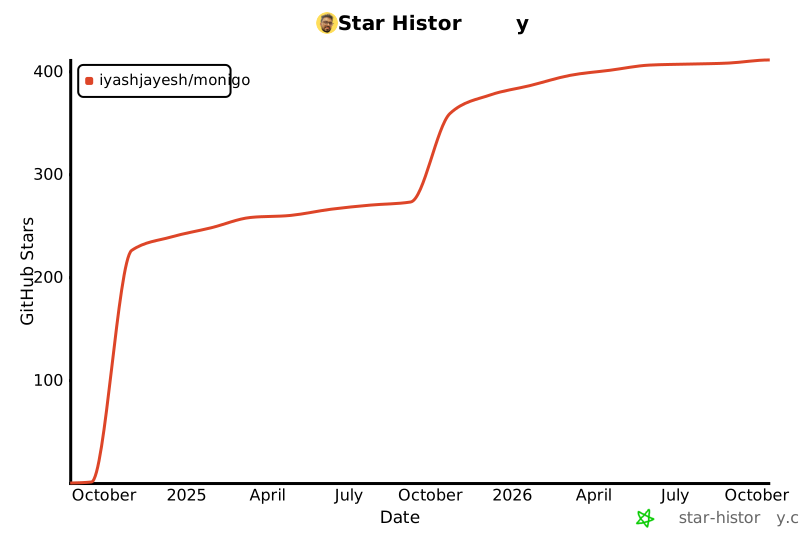
## Star History
[](https://star-history.com/#iyashjayesh/monigo&Date)
## License
This project is licensed under the Apache 2.0 License - see the [LICENSE file](https://github.com/iyashjayesh/monigo?tab=Apache-2.0-1-ov-file) for details.
**MoniGo** is a performance monitoring library for Go applications. It provides real-time insights into application performance with an intuitive user interface, enabling developers to track and optimize both service-level and function-level metrics.
## Features
- **Real-Time Monitoring**: Access up-to-date performance metrics for your Go applications.
- **Detailed Insights**: Track and analyze both service and function-level performance.
- **Customizable Dashboard**: Manage performance data with an easy-to-use UI.
- **Visualizations**: Utilize graphs and charts to interpret performance trends.
- **Custom Thresholds**: Configure custom thresholds for your application's performance and resource usage.
## Installation
To install MoniGo, use the following command:
```bash
go get github.com/iyashjayesh/monigo@latest
```
## Example:
```go
package main
import (
"github.com/iyashjayesh/monigo"
)
func main() {
monigoInstance := &monigo.Monigo{
ServiceName: "data-api", // Mandatory field
DashboardPort: 8080, // Default is 8080
DataPointsSyncFrequency: "5s", // Default is 5 Minutes
DataRetentionPeriod: "4d", // Default is 7 days. Supported values: "1h", "1d", "1w", "1m"
TimeZone: "Local", // Default is Local timezone. Supported values: "Local", "UTC", "Asia/Kolkata", "America/New_York" etc. (https://en.wikipedia.org/wiki/List_of_tz_database_time_zones)
// MaxCPUUsage: 90, // Default is 95%
// MaxMemoryUsage: 90, // Default is 95%
// MaxGoRoutines: 100, // Default is 100
}
monigo.TraceFunction(highCPUUsage) // Trace function, when the function is called, it will be traced and the metrics will be displayed on the dashboard
go monigoInstance.Start() // Starting monigo dashboard
log.Println("Monigo dashboard started at port 8080")
// Optional
// routinesStats := monigoInstance.GetGoRoutinesStats() // Get go routines stats
// log.Println(routinesStats)
select {} // To keep the program running
}
// highCPUUsage is a function that simulates high CPU usage
func highCPUUsage() {
// Simulate high CPU usage by performing heavy computations
var sum float64
for i := 0; i < 1e8; i++ { // 100 million iterations
sum += math.Sqrt(float64(i))
}
}
```
For more detailed usage instructions, refer to the documentation.
By default, the dashboard will be available at `http://localhost:8080/` else at the port you have provided.
### Note:
The `monigo.TraceFunction(func())` method accept `func(){}` as a type.
### Example Usage:
```go
func apiHandler(w http.ResponseWriter, r *http.Request) {
// Trace function: when the highMemoryUsage function is called, it will be traced.
monigo.TraceFunction(highMemoryUsage)
w.Write([]byte("API1 response: memexpensiveFunc"))
}
func highMemoryUsage() {
// Simulate high memory usage by allocating a large slice
largeSlice := make([]float64, 1e8) // 100 million elements
for i := 0; i < len(largeSlice); i++ {
largeSlice[i] = float64(i)
}
}
```
## Bellow Reports are available
#### Note: You can download the reports in excel format.
1. **Load Statistics**: Provides an overview of the overall load of the service, CPU load, memory load, and system load.
| Field Name | Value (Datatype) |
| ------------------------- | ---------------- |
| `overall_load_of_service` | `float64` |
| `service_cpu_load` | `float64` |
| `service_memory_load` | `float64` |
| `system_cpu_load` | `float64` |
| `system_memory_load` | `float64` |
2. **CPU Statistics**: Displays the total number of cores, cores used by the service, and cores used by the system.
| Field Name | Value (Datatype) |
| ----------------------- | ---------------- |
| `total_cores` | `int` |
| `cores_used_by_service` | `int` |
| `cores_used_by_system` | `int` |
3. **Memory Statistics**: Shows the total system memory, memory used by the system, memory used by the service, available memory, GC pause duration, and stack memory usage.
| Field Name | Value (Datatype) |
| ------------------------ | ---------------- |
| `total_system_memory` | `float64` |
| `memory_used_by_system` | `float64` |
| `memory_used_by_service` | `float64` |
| `available_memory` | `float64` |
| `gc_pause_duration` | `float64` |
| `stack_memory_usage` | `float64` |
4. **Memory Profile**: Provides information on heap allocation by the service, heap allocation by the system, total allocation by the service, and total memory by the OS.
| Field Name | Value (Datatype) |
| ------------------------ | ---------------- |
| `heap_alloc_by_service` | `float64` |
| `heap_alloc_by_system` | `float64` |
| `total_alloc_by_service` | `float64` |
| `total_memory_by_os` | `float64` |
5. **Network IO**: Displays the number of bytes sent and received.
| Field Name | Value (Datatype) |
| ---------------- | ---------------- |
| `bytes_sent` | `float64` |
| `bytes_received` | `float64` |
6. **Health Metrics**: Provides an overall health percentage for the service.
| Field Name | Value (Datatype) |
| ------------------------ | ---------------- |
| `service_health_percent` | `float64` |
| `system_health_percent` | `float64` |
## API Reference
- You can access the MoniGo API by visiting the following URL: http://localhost:8080/monigo/api/v1/ (replace `` with the desired endpoint).
- API endpoints are available for the following:
| Endpoint | Description | Method | Request | Response | Example |
| ---------------------------------- | --------------------- | ------ | ----------------------------------------------------- | -------- | -------------------------------------------------- |
| `/monigo/api/v1/metrics` | Get all metrics | GET | None | JSON | [Example](./static/API/Res/metrics.json) |
| `/monigo/api/v1/go-routines-stats` | Get go routines stats | GET | None | JSON | [Example](./static/API/Res/go-routines-stats.json) |
| `/monigo/api/v1/service-info` | Get service info | GET | None | JSON | [Example](./static/API/Res/service-info.json) |
| `/monigo/api/v1/service-metrics` | Get service metrics | POST | JSON [Example](./static/API/Req/service-metrics.json) | JSON | [Example](./static/API/Res/service-metrics.json) |
| `/monigo/api/v1/reports` | Get history data | POST | JSON [Example](./static/API/Req/reports.json) | JSON | [Example](./static/API/Res/reports.json) |
## Contributing
We welcome contributions! If you encounter any issues or have suggestions, please submit a pull request or open an issue.
**If you find MoniGo useful, consider giving it a star! ⭐**
## Contact
For questions or feedback, please open an issue or contact me at `iyashjayesh@gmail.com` or at [LinkedIn](https://www.linkedin.com/in/iyashjayesh/)
## Star History
[](https://star-history.com/#iyashjayesh/monigo&Date)
## License
This project is licensed under the Apache 2.0 License - see the [LICENSE file](https://github.com/iyashjayesh/monigo?tab=Apache-2.0-1-ov-file) for details.


