# remix-vscode
**Repository Path**: cattwo/remix-vscode
## Basic Information
- **Project Name**: remix-vscode
- **Description**: No description available
- **Primary Language**: Unknown
- **License**: Not specified
- **Default Branch**: master
- **Homepage**: None
- **GVP Project**: No
## Statistics
- **Stars**: 0
- **Forks**: 1
- **Created**: 2021-06-21
- **Last Updated**: 2021-06-21
## Categories & Tags
**Categories**: Uncategorized
**Tags**: None
## README
# Ethereum Remix Project extension for Visual Studio Code
This project brings Remix plugins to Visual Studio Code.
Remix plugins can perform a variety of tasks such as verifying contracts, linting, generating documentation, running tutorials, compiling, debugging and much more.
The Remix Plugin API allows plugins that run in Remix to run in Visual Studio Code too.
It allows developers to access and interact with the file system, components, extensions and other Remix plugins without actually having to create a different code base.
For more info on what Remix is and what plugins do please visit our [Remix IDE](https://remix.ethereum.org/) and [Remix Project website](https://remix-project.org/)
- [Ethereum Remix Project extension for Visual Studio Code](#ethereum-remix-project-extension-for-visual-studio-code)
- [A beta release.](#a-beta-release)
- [Installation from the Visual Studio Code Marketplace](#installation-from-the-visual-studio-code-marketplace)
- [Requirements](#requirements)
- [The plugins](#the-plugins)
- [Select, activate, deactivate a plugin](#select-activate-deactivate-a-plugin)
- [Load a development plugin](#load-a-development-plugin)
- [Compiling Solidity & Yul](#compiling-solidity--yul)
- [Deploying contracts & Wallet Connect](#deploying-contracts--wallet-connect)
- [Contributing and development](#contributing-and-development)
## A beta release.
As we are continuing development of Remix and the Plugin API more functionalities will open up.
So at first it might feel limited. In this beta release we show you a glimpse of what the possibilities are, inviting everybody to contribute & comment.
## Installation from the Visual Studio Code Marketplace
[Install from Visual Studio Code Marketplace](https://marketplace.visualstudio.com/items?itemName=RemixProject.ethereum-remix)
## Requirements
Before being able to use the extension, you need to have at least a folder opened or a workspace.
## The plugins
The extension loads with a default set of plugins. As time goes on we will add more plugins.
You can also suggest and create plugins using our plugin system and API. Feel free to contact us on our gitter channels.
[Remix](https://gitter.im/ethereum/remix) & [Remix Dev](https://gitter.im/ethereum/remix-dev) and read up on the basics
on [Read the docs](https://remix-plugins-directory.readthedocs.io/en/latest/)
## Select, activate, deactivate a plugin
Before you can use a plugin, it needs to be activated. Activation means you open it and it will run.
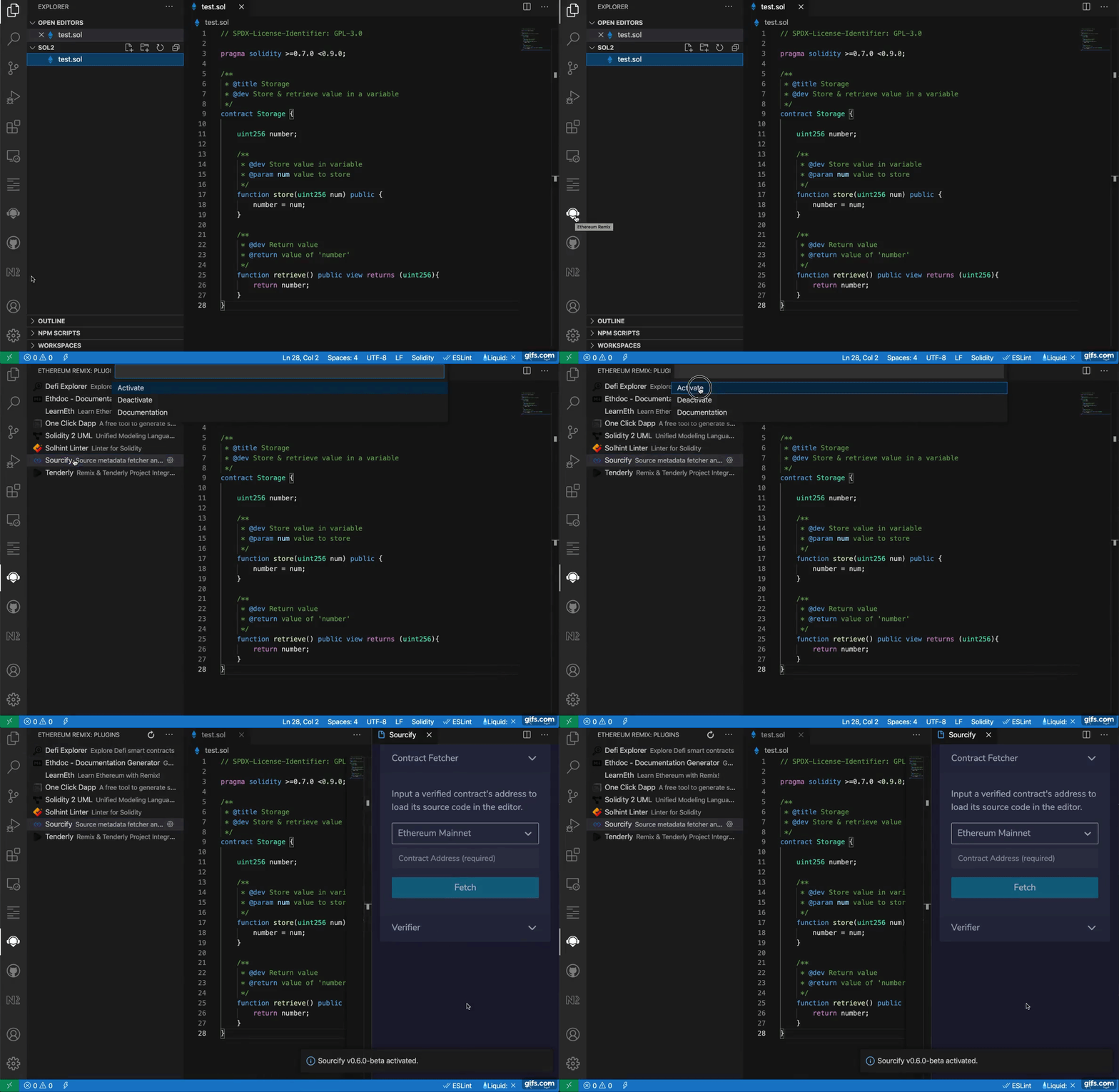
## Load a development plugin
As you develop your own plugin or you want to try out a plugin by using a custom URL you can easily add it to the list.
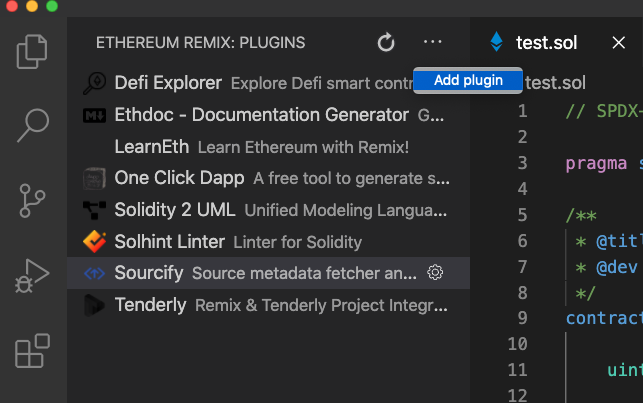
* Click on 'add plugin' from the `Remix Plugins More actions` menu on top right
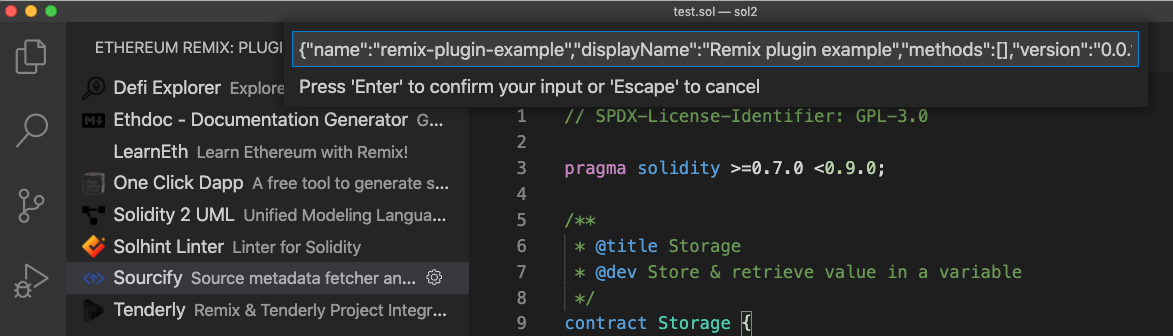
* The plugin system requires a valid JSON string that contains the information needed.
Add your `JSON` plugin info into the input box. An example is given below.
The URL can contain any URL or a local file.
Make sure to give your plugin a unique name. You can't have two plugins with the same name.
```json
{
"name": "dev-plugin",
"displayName": "My first plugin",
"methods": [],
"version": "0.0.1-dev",
"url": "http://localhost:3000",
"description": "A great plugin for the Remix project",
"icon": "https://raw.githubusercontent.com/protofire/solhint/master/solhint-icon.png",
"location": "sidePanel"
}
```
## Compiling Solidity & Yul
Our extension provides some basic functionality to get started with Solidity and Yul development.
Quite a few remix plugins use the results of compilation to generate content for you. So this is extremely useful.
At this time you can compile your files using two methods:
* the internal Remix compiler
* the compiler provided by the Solidity Extension (https://marketplace.visualstudio.com/items?itemName=JuanBlanco.solidity)
Compiling with the Solidity extension provides some extra features that are included in the Solidity extension.
*Warning: when you have the Solidity extension installed you usually hit F5 to compile.
This will not work (yet) in conjunction with Remix.
You
should compile with the 'Compile with Solidity extension'. This way you get the benefits of both extensions.*
*You should have a sol file actively selected when compiling. If you have the plugin in focus it won't be able to tell which file you want to compile.*
To compile use the command palette ( Shift+cmd+p ) and type in REMIX. You will see both options there.

You can also change the compiler version of both compilers from the command palette.

You can change to Yul development the same way using the language selector in the command palette.
## Deploying contracts & Wallet Connect
## Contributing and development
You can checkout our code on [github](https://github.com/ethereum/remix-vscode)
* Make sure the extension from the marketplace is not installed, running both versions will not work.
* Open up the repo in Visual Studio Code.
* run Yarn
* hit F5
* A new Visual Studio Code window will open where the extension is running.