---
*Latest News* 🔥
- [2025/11] vLLM community officially released [vllm-project/vllm-omni](https://github.com/vllm-project/vllm-omni) in order to support omni-modality models serving.
---
## About
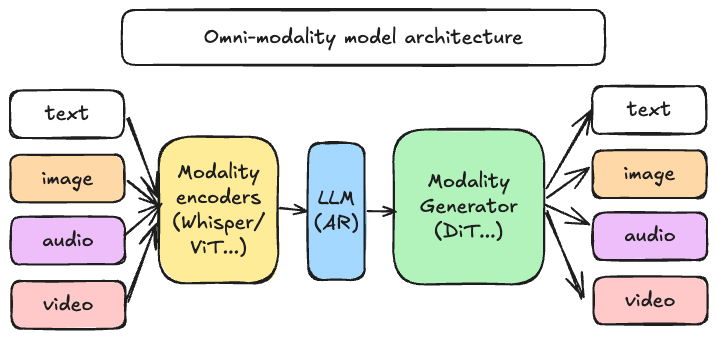
[vLLM](https://github.com/vllm-project/vllm) was originally designed to support large language models for text-based autoregressive generation tasks. vLLM-Omni is a framework that extends its support for omni-modality model inference and serving:
- **Omni-modality**: Text, image, video, and audio data processing
- **Non-autoregressive Architectures**: extend the AR support of vLLM to Diffusion Transformers (DiT) and other parallel generation models
- **Heterogeneous outputs**: from traditional text generation to multimodal outputs
vLLM-Omni is fast with:
- State-of-the-art AR support by leveraging efficient KV cache management from vLLM
- Pipelined stage execution overlapping for high throughput performance
- Fully disaggregation based on OmniConnector and dynamic resource allocation across stages
vLLM-Omni is flexible and easy to use with:
- Heterogeneous pipeline abstraction to manage complex model workflows
- Seamless integration with popular Hugging Face models
- Tensor, pipeline, data and expert parallelism support for distributed inference
- Streaming outputs
- OpenAI-compatible API server
vLLM-Omni seamlessly supports most popular open-source models on HuggingFace, including:
- Omni-modality models (e.g. Qwen-Omni)
- Multi-modality generation models (e.g. Qwen-Image)
## Getting Started
Visit our [documentation](https://vllm-omni.readthedocs.io/en/latest/) to learn more.
- [Installation](https://vllm-omni.readthedocs.io/en/latest/getting_started/installation/)
- [Quickstart](https://vllm-omni.readthedocs.io/en/latest/getting_started/quickstart/)
- [List of Supported Models](https://vllm-omni.readthedocs.io/en/latest/models/supported_models/)
## Contributing
We welcome and value any contributions and collaborations.
Please check out [Contributing to vLLM-Omni](https://vllm-omni.readthedocs.io/en/latest/contributing/) for how to get involved.
## Join the Community
Feel free to ask questions, provide feedbacks and discuss with fellow users of vLLM-Omni in `#sig-omni` slack channel at [slack.vllm.ai](https://slack.vllm.ai) or vLLM user forum at [discuss.vllm.ai](https://discuss.vllm.ai).
## License
Apache License 2.0, as found in the [LICENSE](./LICENSE) file.