# Gamestonk-Terminal
**Repository Path**: chacha_group/Gamestonk-Terminal
## Basic Information
- **Project Name**: Gamestonk-Terminal
- **Description**: Gamestonk Terminal 是一个股票和加密市场的投资研究终端,为投资研究提供了一个基于 Python 的现代集成环境,允许交易者使用最先进的数据科学和机器学习技术
- **Primary Language**: Python
- **License**: MIT
- **Default Branch**: main
- **Homepage**: https://www.oschina.net/p/gamestonk+terminal
- **GVP Project**: No
## Statistics
- **Stars**: 0
- **Forks**: 1
- **Created**: 2021-11-09
- **Last Updated**: 2021-11-09
## Categories & Tags
**Categories**: Uncategorized
**Tags**: None
## README
[![Stargazers][stars-shield]][stars-url]
[![Forks][forks-shield]][forks-url]
[![Contributors][contributors-shield]][contributors-url]
[![MIT License][license-shield]][license-url]
[![Issues][issues-shield]][issues-url]
[![Bugs Open][bugs-open-shield]][bugs-open-url]
[![Bugs Closed][bugs-closed-shield]][bugs-closed-url]
[](https://github.com/GamestonkTerminal/GamestonkTerminal/actions)
[](https://github.com/GamestonkTerminal/GamestonkTerminal/releases)
[](https://github.com/psf/black)
[](https://www.tickgit.com/browse?repo=github.com/GamestonkTerminal/GamestonkTerminal&branch=main)

[](https://twitter.com/gamestonkt)

Gamestonk Terminal 🚀
The next best thing after Bloomberg Terminal. #weliketheterminal
≪ ROADMAP
·
FEATURES »
Report Bug
·
Suggest Improvement
·
Request Feature
Table of Contents
- About The Project
-
Getting Started
- Contributing
- License
- Disclaimer
- Contacts
- Acknowledgments
## About The Project
**How it started:**
Gamestonk Terminal is an awesome stock and crypto market terminal that has been developed for fun, while I saw my GME
shares tanking. But hey, I like the stock 💎🙌.
**How it's going:**
Gamestonk Terminal provides a modern Python-based integrated environment for investment research, that allows
an average joe retail trader to leverage state-of-the-art Data Science and Machine Learning technologies.
As a modern Python-based environment, GamestonkTerminal opens access to numerous Python data libraries in Data Science
(Pandas, Numpy, Scipy, Jupyter), Machine Learning (Pytorch, Tensorflow, Sklearn, Flair), and Data Acquisition
(Beautiful Soup, and numerous third-party APIs).
## Getting Started
### Docker Installation - *new and improved*
1. First step is to make sure docker desktop is installed. Install links can be found [here](https://www.docker.com/products/docker-desktop).
To confirm that your docker desktop is downloaded and running, open a command prompt or terminal and enter
`docker info`. If you get the following you are not running the docker desktop:
```text
Server:
ERROR: Cannot connect to the Docker daemon at unix:///var/run/docker.sock.
Is the docker daemon running?
```
Open the docker desktop app in this case.
2. Download the latest docker image.
```bash
docker pull ghcr.io/gamestonkterminal/gst-poetry:latest
```
Upon running this the first time, you should see the various layers downloading (note the random series of letters
numbers will vary). The first time this is run, it will take a few minutes. Subsequent updates will be much faster,
as the changes will be in the MB instead of GB.
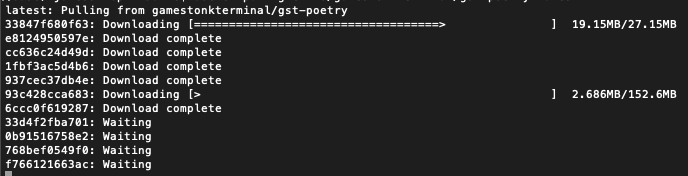
Once the download is complete, confirm that the image has been created by doing `docker images`. You should see
something similar to
```text
REPOSITORY TAG IMAGE ID CREATED SIZE
ghcr.io/gamestonkterminal/gst-poetry latest e2bbeebcc73c 42 hours ago 2.02GB
```
3. Run a container
You are now ready to run the terminal.
```docker run -it --rm ghcr.io/gamestonkterminal/gst-poetry:latest```
This will open up the terminal in your command prompt or terminal. Note that this has provided now environment file,
so you will not be able to view plots or use keys at this stage.
To read more on adding the environment keys and how to configure your X-server to show plots, hop over to the
[Advanced Docker Setup](/DOCKER_ADVANCED.md).
### Local Install - Anaconda and Python
If you'd like to see a video recording of the installation process, @JohnnyDankseed has made one available [here](https://www.youtube.com/watch?v=-DJJ-cfquDA).
This project supports Python 3.7, 3.8 and 3.9.
Our current recommendation is to use this project with Anaconda's Python distribution - either full
[__Anaconda3 Latest__](https://repo.anaconda.com/archive/) or [__Miniconda3 Latest__](https://repo.anaconda.com/archive/).
Several features in this project utilize Machine Learning. Machine Learning Python dependencies are optional.
If you decided to add Machine Learning features at a later point, you will likely have better user experience with
Anaconda's Python distribution.
0. Star the project
 1. [Install Anaconda](https://docs.anaconda.com/anaconda/install/index.html) (It's on the AUR as anaconda or miniconda3!)
- Confirm that you have it with: `conda -V`. The output should be something along the lines of: `conda 4.9.2`
- If on Windows, install/update Microsoft C++ Build Tools from here:
2. Install git
```bash
conda install -c anaconda git
````
3. Clone the Project
- Via HTTPS: `git clone https://github.com/GamestonkTerminal/GamestonkTerminal.git`
- via SSH: `git clone git@github.com:GamestonkTerminal/GamestonkTerminal.git`
4. Navigate into the project's folder
```bash
cd GamestonkTerminal/
```
5. Create Environment
You can name the environment whatever you want. Although you could use names such as: `welikethestock`, `thisistheway`
or `diamondhands`, we recommend something simple and intuitive like `gst`. This is because this name will be used
from now onwards.
```bash
conda env create -n gst --file build/conda/conda-3-8-env.yaml
````
6. Activate the virtual environment
```bash
conda activate gst
```
Note: At the end, you can deactivate it with: `conda deactivate`.
7. Install poetry dependencies
```bash
poetry install
```
If you are having trouble with Poetry (e.g. on a Windows system), simply install requirements.txt with pip
```bash
pip install -r requirements.txt
```
8. You're ready to Gamestonk it!
```bash
python terminal.py
```
9. (Windows - Optional) Speeding up opening process in the future
After you've installed Gamestonk Terminal, you'll find a file named "Gamestonk Terminal.bat". You can use this file
to open Gamestonk Terminal quicker. This file can be moved to your desktop if you'd like. If you run into issues
while trying to run the batch file. If you run into issues with the batch files, edit the file and check to see if
the directories match up. This file assumes you used the default directories when installing.
10. Jupyter Lab (Optional. Early alpha). User the Terminal from Jupyter Lab
You can install Jupyter Lab extensions that help you manage settings and launch the terminal in a JL bash console
using the commands in the [jupyterlab/README.md](jupyterlab/README.md)
**NOTE:** When you close the terminal and re-open it, the only command you need to re-call is `conda activate gst`
before you call `python terminal.py` again.
**TROUBLESHOOT:** If you are having troubles to install, check our *newest*
troubleshoot page
### Advanced User Install - Machine Learning
If you are an advanced user and use other Python distributions, we have several requirements.txt documents that you can
pick from to download project dependencies.
If you are using conda instead of build/conda/conda-3-8-env.yaml configuration file in Step 5, use build/conda/conda-3-8-env-full.
Note: The libraries specified in the [requirements.txt](/requirements.txt) file have been tested and work for
the purpose of this project, however, these may be older versions. Hence, it is recommended for the user to set up
a virtual python environment prior to installing these. This allows to keep dependencies required by different projects
in separate places.
*If you would like to use optional Machine Learning features:*
- Update your [feature_flags.py](/gamestonk_terminal/feature_flags.py) with:
```bash
ENABLE_PREDICT = os.getenv("GTFF_ENABLE_PREDICT") or True
```
- Install optional ML features dependencies:
```bash
poetry install -E prediction
```
### Update Terminal
The terminal is constantly being updated with new features and bug fixes, hence, for your terminal to be update,
you can run:
```bash
git pull
```
to get the latest changes.
If this fails due to the fact that you had modified some python files, and there's a conflict with the updates, you can use:
```bash
git stash
```
Then, re-run `poetry install` or `pip install -r requirements.txt` to get any new dependencies.
Once installation is finished, you're ready to gamestonk.
If you `stashed` your changes previously, you can un-stash them with:
```bash
git stash pop
```
### API Keys
The project is build around several different API calls, whether it is to access historical data or financials.
These are the ones where a key is necessary:
- Alpha Vantage:
- Binance: (US) / (Outside US)
- CoinMarketCap API:
- Degiro API :
- FRED:
- Financial Modeling Prep:
- Finhub API:
- News API:
- Oanda API:
- Polygon:
- Quandl:
- Reddit:
- SentimentInvestor:
- Tradier:
- Twitter:
- Coinbase Pro API:
- Whale Alert API:
- Ethplorer API:
When these are obtained, don't forget to update [config_terminal.py](/gamestonk_terminal/config_terminal.py).
Alternatively, you can also set them to the following environment variables:
| Website | Variables |
| :--- | :--- |
| [Alpha Vantage](https://www.alphavantage.co) | GT_API_KEY_ALPHAVANTAGE |
| [Binance](https://binance.com) | GT_API_BINANCE_KEY
1. [Install Anaconda](https://docs.anaconda.com/anaconda/install/index.html) (It's on the AUR as anaconda or miniconda3!)
- Confirm that you have it with: `conda -V`. The output should be something along the lines of: `conda 4.9.2`
- If on Windows, install/update Microsoft C++ Build Tools from here:
2. Install git
```bash
conda install -c anaconda git
````
3. Clone the Project
- Via HTTPS: `git clone https://github.com/GamestonkTerminal/GamestonkTerminal.git`
- via SSH: `git clone git@github.com:GamestonkTerminal/GamestonkTerminal.git`
4. Navigate into the project's folder
```bash
cd GamestonkTerminal/
```
5. Create Environment
You can name the environment whatever you want. Although you could use names such as: `welikethestock`, `thisistheway`
or `diamondhands`, we recommend something simple and intuitive like `gst`. This is because this name will be used
from now onwards.
```bash
conda env create -n gst --file build/conda/conda-3-8-env.yaml
````
6. Activate the virtual environment
```bash
conda activate gst
```
Note: At the end, you can deactivate it with: `conda deactivate`.
7. Install poetry dependencies
```bash
poetry install
```
If you are having trouble with Poetry (e.g. on a Windows system), simply install requirements.txt with pip
```bash
pip install -r requirements.txt
```
8. You're ready to Gamestonk it!
```bash
python terminal.py
```
9. (Windows - Optional) Speeding up opening process in the future
After you've installed Gamestonk Terminal, you'll find a file named "Gamestonk Terminal.bat". You can use this file
to open Gamestonk Terminal quicker. This file can be moved to your desktop if you'd like. If you run into issues
while trying to run the batch file. If you run into issues with the batch files, edit the file and check to see if
the directories match up. This file assumes you used the default directories when installing.
10. Jupyter Lab (Optional. Early alpha). User the Terminal from Jupyter Lab
You can install Jupyter Lab extensions that help you manage settings and launch the terminal in a JL bash console
using the commands in the [jupyterlab/README.md](jupyterlab/README.md)
**NOTE:** When you close the terminal and re-open it, the only command you need to re-call is `conda activate gst`
before you call `python terminal.py` again.
**TROUBLESHOOT:** If you are having troubles to install, check our *newest*
troubleshoot page
### Advanced User Install - Machine Learning
If you are an advanced user and use other Python distributions, we have several requirements.txt documents that you can
pick from to download project dependencies.
If you are using conda instead of build/conda/conda-3-8-env.yaml configuration file in Step 5, use build/conda/conda-3-8-env-full.
Note: The libraries specified in the [requirements.txt](/requirements.txt) file have been tested and work for
the purpose of this project, however, these may be older versions. Hence, it is recommended for the user to set up
a virtual python environment prior to installing these. This allows to keep dependencies required by different projects
in separate places.
*If you would like to use optional Machine Learning features:*
- Update your [feature_flags.py](/gamestonk_terminal/feature_flags.py) with:
```bash
ENABLE_PREDICT = os.getenv("GTFF_ENABLE_PREDICT") or True
```
- Install optional ML features dependencies:
```bash
poetry install -E prediction
```
### Update Terminal
The terminal is constantly being updated with new features and bug fixes, hence, for your terminal to be update,
you can run:
```bash
git pull
```
to get the latest changes.
If this fails due to the fact that you had modified some python files, and there's a conflict with the updates, you can use:
```bash
git stash
```
Then, re-run `poetry install` or `pip install -r requirements.txt` to get any new dependencies.
Once installation is finished, you're ready to gamestonk.
If you `stashed` your changes previously, you can un-stash them with:
```bash
git stash pop
```
### API Keys
The project is build around several different API calls, whether it is to access historical data or financials.
These are the ones where a key is necessary:
- Alpha Vantage:
- Binance: (US) / (Outside US)
- CoinMarketCap API:
- Degiro API :
- FRED:
- Financial Modeling Prep:
- Finhub API:
- News API:
- Oanda API:
- Polygon:
- Quandl:
- Reddit:
- SentimentInvestor:
- Tradier:
- Twitter:
- Coinbase Pro API:
- Whale Alert API:
- Ethplorer API:
When these are obtained, don't forget to update [config_terminal.py](/gamestonk_terminal/config_terminal.py).
Alternatively, you can also set them to the following environment variables:
| Website | Variables |
| :--- | :--- |
| [Alpha Vantage](https://www.alphavantage.co) | GT_API_KEY_ALPHAVANTAGE |
| [Binance](https://binance.com) | GT_API_BINANCE_KEY
GT_API_BINANCE_SECRET |
| [CoinMarketCap](https://coinmarketcap.com) | GT_CMC_API_KEY
GT_CMC_API_KEY |
| [DEGIRO](https://www.degiro.fr) | GT_DG_USERNAME
GT_DG_PASSWORD
GT_DG_TOTP_SECRET |
| [FRED](https://fred.stlouisfed.org) | GT_API_FRED_KEY |
| [Financial Modeling Prep](https://financialmodelingprep.com) | GT_API_KEY_FINANCIALMODELINGPREP |
| [Finhub](https://finnhub.io) | GT_API_FINNHUB_KEY |
| [News](https://newsapi.org) | GT_API_NEWS_TOKEN |
| [Oanda](https://developer.oanda.com) | GT_OANDA_TOKEN
GT_OANDA_ACCOUNT |
| [Polygon](https://polygon.io) | GT_API_POLYGON_KEY |
| [Quandl](https://www.quandl.com) | GT_API_KEY_QUANDL |
| [Reddit](https://www.reddit.com) | GT_API_REDDIT_CLIENT_ID
GT_API_REDDIT_CLIENT_SECRET
GT_API_REDDIT_USERNAME
GT_API_REDDIT_USER_AGENT
GT_API_REDDIT_PASSWORD|
| [SentimentInvestor](https://sentimentinvestor.com) | GT_API_SENTIMENTINVESTOR_TOKEN
GT_API_SENTIMENTINVESTOR_KEY |
| [Tradier](https://developer.tradier.com) | GT_TRADIER_TOKEN |
| [Twitter](https://developer.twitter.com) | GT_API_TWITTER_KEY
GT_API_TWITTER_SECRET_KEY
GT_API_TWITTER_BEARER_TOKEN |
| [Coinbase](https://docs.pro.coinbase.com/) | GT_API_COINBASE_KEY
GT_API_COINBASE_SECRET
GT_API_COINBASE_PASS_PHRASE |
| [Whale Alert](https://docs.whale-alert.io/) | GT_API_WHALE_ALERT_KEY |
| [Ethplorer](https://github.com/EverexIO/Ethplorer/wiki/Ethplorer-API) | GT_API_ETHPLORER_KEY |
Example:
```bash
export GT_API_REDDIT_USERNAME=SexyYear
```
Environment variables can also be set in a `.env` file at the top of the repo. This file is ignored by git so your API
keys will stay secret. The above example stored in `.env` would be:
```bash
GT_API_REDDIT_USERNAME=SexyYear
```
Note that the `GT_API_REDDIT_USER_AGENT` is the name of the script that you set when obtained the Reddit API key.
Note that it is not necessary to have a valid Alpha Vantage key to get daily OHLC values.
### Usage
Start by selecting a context that you would like to work with. If you want to research stocks, you would start with
```bash
stocks
```
Alternatively, you can set a default context to be loaded in the config_terminal file by setting
```bash
DEFAULT_CONTEXT = "stocks"
```
From this menu, you can load a ticker of interest (note the -t is optional):
```bash
load -t GME
```
At this point, all available menus will be in full color and available to use.
To look at the candle chart of your stock, run:
```bash
candle
```
Slice the historical data by loading ticker and setting a starting point, e.g.
```bash
load -t GME -s 2020-06-04
```
To perform technical analysis, first enter the menu
```bash
ta
```
and run a SMA with:
```bash
sma
```
However, imagine that you wanted to change the length of the window because you don't want to go long but do a swing,
and therefore a smaller window is necessary. Check what settings are available on the SMA command:
```bash
sma -h
```
Once that has been seen, set the parameters that you want after flagging them. In this case, to change length window
to 10, we would have to do:
```bash
sma -l 10
```
Example:
 To return to the stocks menu to perform more research in a different menu, just use the `q` command. From the stocks
menu, using `q` again will return you to the main menu where you can enter a different context (crypto for example).
## Contributing
There are 3 main ways of contributing to this project.
For a 1h coding session where the architecture of the repo is explained while a new feature is added, check .
**Become a Contributor 🦍**
Recommended if you bought the dip, and the share price keeps dipping. You may as well keep yourself busy while stonks
go up.
1. Fork the Project
2. Create your Feature Branch (`git checkout -b feature/AmazingFeature`)
3. Install the pre-commit hooks by running:
```pre-commit install```.
Any time you commit a change, linters will be run automatically. On changes, you will have to re-commit.
4. Commit your Changes (`git commit -m 'Add some AmazingFeature'`)
5. Push to your Branch (`git push origin feature/AmazingFeature`)
6. Open a Pull Request
**Become a Karen 🤷**
Recommended if you adopted a strategy of buying high and selling low.
We are interested in your view on what sort of [features](https://github.com/GamestonkTerminal/GamestonkTerminal/issues)
would make you buy even higher and selling even lower.
Also, if somehow you're sitting in several mils due to this terminal, don't forget to report a
[bug](https://github.com/GamestonkTerminal/GamestonkTerminal/issues) so that the team can fix, and keep the old ways.
**Join the 🙌 💎 Gang**
If red is your favorite color, and you never sell for a loss.
Welcome to the club, and feel free to support the developers behind this amazing open-source project.
## License
Distributed under the MIT License. See
[LICENSE](https://github.com/GamestonkTerminal/GamestonkTerminal/blob/main/LICENSE) for more information.
## Disclaimer
"A few things I am not. I am not a cat. I am not an institutional investor, nor am I a hedge fund. I do not have
clients and I do not provide personalized investment advice for fees or commissions." DFV
Trading in financial instruments involves high risks including the risk of losing some, or all, of your investment
amount, and may not be suitable for all investors. Before deciding to trade in financial instrument you should be fully
informed of the risks and costs associated with trading the financial markets, carefully consider your investment
objectives, level of experience, and risk appetite, and seek professional advice where needed. The data contained in GST
is not necessarily accurate. GST and any provider of the data contained in this website will not accept liability for
any loss or damage as a result of your trading, or your reliance on the information displayed.
## Contacts
[Didier Rodrigues Lopes](https://www.linkedin.com/in/didier-lopes/) - dro.lopes@campus.fct.unl.pt
[Artem Veremy](https://www.linkedin.com/in/veremey/) - artem@veremey.net
[James Maslek](https://www.linkedin.com/in/james-maslek-b6810186/) - jmaslek11@gmail.com
Feel free to share loss porn, memes or any questions at:
- Discord:
- Twitter: [@gamestonkt](https://twitter.com/gamestonkt)
### Contributors
- **pll_llq** and **Chavithra**: Working on JupyterLab integration. Also developed a GUI POOC.
- **jpp** : Responsible by developing `Crypto` menu.
- **northern-64bit** : Developing a discord bot for the terminal.
- **1lluz10n** and **crspy** : Working on our landing page .
- **Meghan Hone** : Managing Twitter account.
- **Chavithra** and **Deel18** : for Degiro's integration.
- **alokan** : Responsible by developing `Forex` menu.
- **Traceabl3** : By adding several preset screeners.
To return to the stocks menu to perform more research in a different menu, just use the `q` command. From the stocks
menu, using `q` again will return you to the main menu where you can enter a different context (crypto for example).
## Contributing
There are 3 main ways of contributing to this project.
For a 1h coding session where the architecture of the repo is explained while a new feature is added, check .
**Become a Contributor 🦍**
Recommended if you bought the dip, and the share price keeps dipping. You may as well keep yourself busy while stonks
go up.
1. Fork the Project
2. Create your Feature Branch (`git checkout -b feature/AmazingFeature`)
3. Install the pre-commit hooks by running:
```pre-commit install```.
Any time you commit a change, linters will be run automatically. On changes, you will have to re-commit.
4. Commit your Changes (`git commit -m 'Add some AmazingFeature'`)
5. Push to your Branch (`git push origin feature/AmazingFeature`)
6. Open a Pull Request
**Become a Karen 🤷**
Recommended if you adopted a strategy of buying high and selling low.
We are interested in your view on what sort of [features](https://github.com/GamestonkTerminal/GamestonkTerminal/issues)
would make you buy even higher and selling even lower.
Also, if somehow you're sitting in several mils due to this terminal, don't forget to report a
[bug](https://github.com/GamestonkTerminal/GamestonkTerminal/issues) so that the team can fix, and keep the old ways.
**Join the 🙌 💎 Gang**
If red is your favorite color, and you never sell for a loss.
Welcome to the club, and feel free to support the developers behind this amazing open-source project.
## License
Distributed under the MIT License. See
[LICENSE](https://github.com/GamestonkTerminal/GamestonkTerminal/blob/main/LICENSE) for more information.
## Disclaimer
"A few things I am not. I am not a cat. I am not an institutional investor, nor am I a hedge fund. I do not have
clients and I do not provide personalized investment advice for fees or commissions." DFV
Trading in financial instruments involves high risks including the risk of losing some, or all, of your investment
amount, and may not be suitable for all investors. Before deciding to trade in financial instrument you should be fully
informed of the risks and costs associated with trading the financial markets, carefully consider your investment
objectives, level of experience, and risk appetite, and seek professional advice where needed. The data contained in GST
is not necessarily accurate. GST and any provider of the data contained in this website will not accept liability for
any loss or damage as a result of your trading, or your reliance on the information displayed.
## Contacts
[Didier Rodrigues Lopes](https://www.linkedin.com/in/didier-lopes/) - dro.lopes@campus.fct.unl.pt
[Artem Veremy](https://www.linkedin.com/in/veremey/) - artem@veremey.net
[James Maslek](https://www.linkedin.com/in/james-maslek-b6810186/) - jmaslek11@gmail.com
Feel free to share loss porn, memes or any questions at:
- Discord:
- Twitter: [@gamestonkt](https://twitter.com/gamestonkt)
### Contributors
- **pll_llq** and **Chavithra**: Working on JupyterLab integration. Also developed a GUI POOC.
- **jpp** : Responsible by developing `Crypto` menu.
- **northern-64bit** : Developing a discord bot for the terminal.
- **1lluz10n** and **crspy** : Working on our landing page .
- **Meghan Hone** : Managing Twitter account.
- **Chavithra** and **Deel18** : for Degiro's integration.
- **alokan** : Responsible by developing `Forex` menu.
- **Traceabl3** : By adding several preset screeners.
 ## Acknowledgments
- [VICE article - Gamestonk Terminal Is a DIY, Meme Stock Version of Bloomberg Terminal](https://www.vice.com/en/article/qjp9vp/gamestonk-terminal-is-a-diy-meme-stock-version-of-bloomberg-terminal)
- [Daily Fintech article - Never underestimate Bloomberg, but here are 5 reasons why the Gamestonk Terminal is a contender](https://dailyfintech.com/2021/02/25/never-underestimate-bloomberg-but-here-are-5-reasons-why-the-gamestonk-terminal-is-a-contender/)
- [HackerNews - Show HN: Can’t afford Bloomberg Terminal? No prob, I built the next best thing](https://news.ycombinator.com/item?id=26258773)
- [Reddit r/algotrading - Gamestonk Terminal: The next best thing after Bloomberg Terminal.](https://www.reddit.com/r/algotrading/comments/m4uvza/gamestonk_terminal_the_next_best_thing_after/)
- [Reddit r/Python - Gamestonk Terminal: The equivalent to an open-source python Bloomberg Terminal.](https://www.reddit.com/r/Python/comments/m515yk/gamestonk_terminal_the_equivalent_to_an/)
- [Reddit r/Superstonk - Move over Bloomberg Terminal, here comes Gamestonk Terminal](https://www.reddit.com/r/Superstonk/comments/mx2cjh/move_over_bloomberg_terminal_here_comes_gamestonk/)
- [Spotlight: Didier Lopes. Creator of Gamestonk Terminal](https://deepsource.io/spotlight/didier-lopes/)
- [Reddit r/Superstonk - Gamestonk Terminal - We are very much alive](https://www.reddit.com/r/Superstonk/comments/o502i8/gamestonk_terminal_we_are_very_much_alive/)
- [Medium- Gamestonk Terminal. Can't Stop, Won't Stop](https://dro-lopes.medium.com/gamestonk-terminal-cant-stop-won-t-stop-e635662d6f2e)
[contributors-shield]: https://img.shields.io/github/contributors/GamestonkTerminal/GamestonkTerminal.svg?style=for-the-badge
[contributors-url]: https://github.com/GamestonkTerminal/GamestonkTerminal/graphs/contributors
[forks-shield]: https://img.shields.io/github/forks/GamestonkTerminal/GamestonkTerminal.svg?style=for-the-badge
[forks-url]: https://github.com/GamestonkTerminal/GamestonkTerminal/network/members
[stars-shield]: https://img.shields.io/github/stars/GamestonkTerminal/GamestonkTerminal.svg?style=for-the-badge
[stars-url]: https://github.com/GamestonkTerminal/GamestonkTerminal/stargazers
[issues-shield]: https://img.shields.io/github/issues/GamestonkTerminal/GamestonkTerminal.svg?style=for-the-badge&color=blue
[issues-url]: https://github.com/GamestonkTerminal/GamestonkTerminal/issues
[bugs-open-shield]: https://img.shields.io/github/issues/GamestonkTerminal/GamestonkTerminal/bug.svg?style=for-the-badge&color=yellow
[bugs-open-url]: https://github.com/GamestonkTerminal/GamestonkTerminal/issues?q=is%3Aissue+label%3Abug+is%3Aopen
[bugs-closed-shield]: https://img.shields.io/github/issues-closed/GamestonkTerminal/GamestonkTerminal/bug.svg?style=for-the-badge&color=success
[bugs-closed-url]: https://github.com/GamestonkTerminal/GamestonkTerminal/issues?q=is%3Aissue+label%3Abug+is%3Aclosed
[license-shield]: https://img.shields.io/github/license/GamestonkTerminal/GamestonkTerminal.svg?style=for-the-badge
[license-url]: https://github.com/GamestonkTerminal/GamestonkTerminal/blob/main/LICENSE.txt
[linkedin-shield]: https://img.shields.io/badge/-LinkedIn-black.svg?style=for-the-badge&logo=linkedin&colorB=555
[linkedin-url]: https://linkedin.com/in/DidierRLopes
## Acknowledgments
- [VICE article - Gamestonk Terminal Is a DIY, Meme Stock Version of Bloomberg Terminal](https://www.vice.com/en/article/qjp9vp/gamestonk-terminal-is-a-diy-meme-stock-version-of-bloomberg-terminal)
- [Daily Fintech article - Never underestimate Bloomberg, but here are 5 reasons why the Gamestonk Terminal is a contender](https://dailyfintech.com/2021/02/25/never-underestimate-bloomberg-but-here-are-5-reasons-why-the-gamestonk-terminal-is-a-contender/)
- [HackerNews - Show HN: Can’t afford Bloomberg Terminal? No prob, I built the next best thing](https://news.ycombinator.com/item?id=26258773)
- [Reddit r/algotrading - Gamestonk Terminal: The next best thing after Bloomberg Terminal.](https://www.reddit.com/r/algotrading/comments/m4uvza/gamestonk_terminal_the_next_best_thing_after/)
- [Reddit r/Python - Gamestonk Terminal: The equivalent to an open-source python Bloomberg Terminal.](https://www.reddit.com/r/Python/comments/m515yk/gamestonk_terminal_the_equivalent_to_an/)
- [Reddit r/Superstonk - Move over Bloomberg Terminal, here comes Gamestonk Terminal](https://www.reddit.com/r/Superstonk/comments/mx2cjh/move_over_bloomberg_terminal_here_comes_gamestonk/)
- [Spotlight: Didier Lopes. Creator of Gamestonk Terminal](https://deepsource.io/spotlight/didier-lopes/)
- [Reddit r/Superstonk - Gamestonk Terminal - We are very much alive](https://www.reddit.com/r/Superstonk/comments/o502i8/gamestonk_terminal_we_are_very_much_alive/)
- [Medium- Gamestonk Terminal. Can't Stop, Won't Stop](https://dro-lopes.medium.com/gamestonk-terminal-cant-stop-won-t-stop-e635662d6f2e)
[contributors-shield]: https://img.shields.io/github/contributors/GamestonkTerminal/GamestonkTerminal.svg?style=for-the-badge
[contributors-url]: https://github.com/GamestonkTerminal/GamestonkTerminal/graphs/contributors
[forks-shield]: https://img.shields.io/github/forks/GamestonkTerminal/GamestonkTerminal.svg?style=for-the-badge
[forks-url]: https://github.com/GamestonkTerminal/GamestonkTerminal/network/members
[stars-shield]: https://img.shields.io/github/stars/GamestonkTerminal/GamestonkTerminal.svg?style=for-the-badge
[stars-url]: https://github.com/GamestonkTerminal/GamestonkTerminal/stargazers
[issues-shield]: https://img.shields.io/github/issues/GamestonkTerminal/GamestonkTerminal.svg?style=for-the-badge&color=blue
[issues-url]: https://github.com/GamestonkTerminal/GamestonkTerminal/issues
[bugs-open-shield]: https://img.shields.io/github/issues/GamestonkTerminal/GamestonkTerminal/bug.svg?style=for-the-badge&color=yellow
[bugs-open-url]: https://github.com/GamestonkTerminal/GamestonkTerminal/issues?q=is%3Aissue+label%3Abug+is%3Aopen
[bugs-closed-shield]: https://img.shields.io/github/issues-closed/GamestonkTerminal/GamestonkTerminal/bug.svg?style=for-the-badge&color=success
[bugs-closed-url]: https://github.com/GamestonkTerminal/GamestonkTerminal/issues?q=is%3Aissue+label%3Abug+is%3Aclosed
[license-shield]: https://img.shields.io/github/license/GamestonkTerminal/GamestonkTerminal.svg?style=for-the-badge
[license-url]: https://github.com/GamestonkTerminal/GamestonkTerminal/blob/main/LICENSE.txt
[linkedin-shield]: https://img.shields.io/badge/-LinkedIn-black.svg?style=for-the-badge&logo=linkedin&colorB=555
[linkedin-url]: https://linkedin.com/in/DidierRLopes