# CarBode-Barcode-Scanner-For-SwiftUI
**Repository Path**: chaojianm/CarBode-Barcode-Scanner-For-SwiftUI
## Basic Information
- **Project Name**: CarBode-Barcode-Scanner-For-SwiftUI
- **Description**: No description available
- **Primary Language**: Unknown
- **License**: MIT
- **Default Branch**: master
- **Homepage**: None
- **GVP Project**: No
## Statistics
- **Stars**: 1
- **Forks**: 0
- **Created**: 2020-08-20
- **Last Updated**: 2021-05-05
## Categories & Tags
**Categories**: Uncategorized
**Tags**: None
## README
# CarBode
## Free and Opensource Barcode scanner & Barcode generator for swiftUI

## index
- [Installation](#installation)
- [Example project](#example-project)
- [How to use scanner view](#how-to-use-scanner-view)
- [Add camera usage description to `info.plist`](#add-camera-usage-description-to-your-infoplist)
- [torch light on/off](#how-to-turn-torch-light-onoff)
- [Test on iOS simulator](#test-on-ios-simulator)
- [Barcode types support](#barcode-types-support)
- [How to use barcode generator view](#how-to-use-barcode-generator-view)
- [Barcode type you can generate](#barcode-type-you-can-generate)
- [Rotate your barcode](#rotate-your-barcode)
- [How to contributing](#contributing)
- [Version Change logs](#changelog)
# Installation
The preferred way of installing SwiftUIX is via the [Swift Package Manager](https://swift.org/package-manager/).
>Xcode 11 integrates with libSwiftPM to provide support for iOS, watchOS, and tvOS platforms.
1. In Xcode, open your project and navigate to **File** → **Swift Packages** → **Add Package Dependency...**
2. Paste the repository URL (`https://github.com/heart/CarBode-Barcode-Scanner-For-SwiftUI`) and click **Next**.
3. For **Rules**, select **Branch** (with branch set to `1.4.3` ).
4. Click **Finish**.
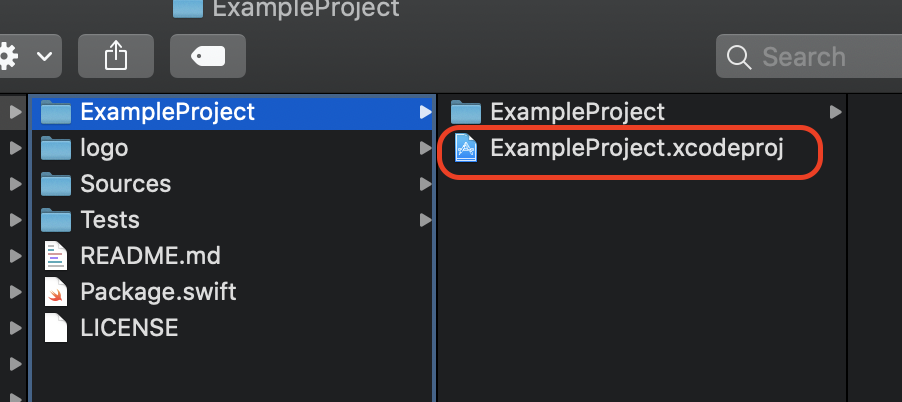
# Example project
CarBode-Barcode-Scanner-For-SwiftUI/ExampleProject/ExampleProject.xcodeproj
# How to use Scanner View
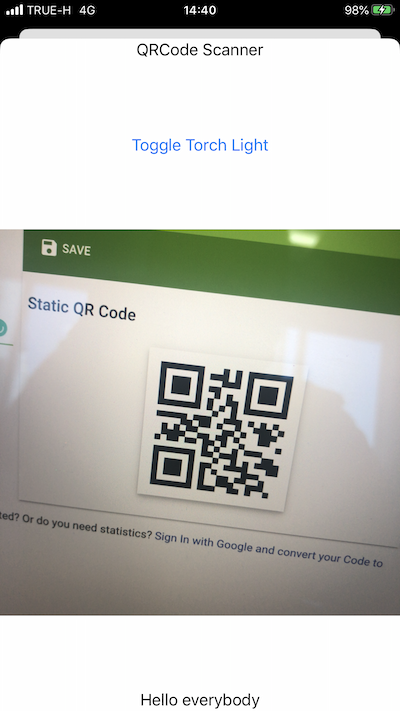
## Add camera usage description to your `info.plist`
``` XML
NSCameraUsageDescription
This app needs access to the camera, to be able to read barcodes.
```
```Swift
import SwiftUI
import CarBode
struct ContentView: View {
var body: some View {
VStack{
CBScanner(supportBarcode: [.qr, .code128]) //Set type of barcode you want to scan
.interval(delay: 5.0) //Event will trigger every 5 seconds
.found{
//Your..Code..Here
print($0)
}
}
}
}
```
# How to turn torch light on/off
```Swift
import SwiftUI
import CarBode
@State var torchIsOn = false
struct ContentView: View {
var body: some View {
VStack{
Button(action: {
self.torchIsOn.toggle()
}) {
Text("Toggle Torch Light")
}
Spacer()
CBScanner(supportBarcode: [.qr, .code128]) //Set type of barcode you want to scan
.torchLight(isOn: self.torchIsOn) // Turn torch light on/off
.interval(delay: 5.0) //Event will trigger every 5 seconds
.found{
//Your..Code..Here
print($0)
}
}
}
}
```
# Test on iOS simulator
The iOS simulator doesn't support the camera yet
but you can set a mock barcode for iOS simulator.
No need to remove the mock barcode from the production app it will only use for iOS simulator.
```Swift
CBScanner(supportBarcode: [.qr, .code128])
.interval(delay: 1.0)
.found{
print($0)
}
.simulator(mockBarCode: "MOCK BARCODE DATA 1234567890")
```
## Barcode Types Support
Read here [https://developer.apple.com/documentation/avfoundation/avmetadataobject/objecttype](https://developer.apple.com/documentation/avfoundation/avmetadataobject/objecttype)
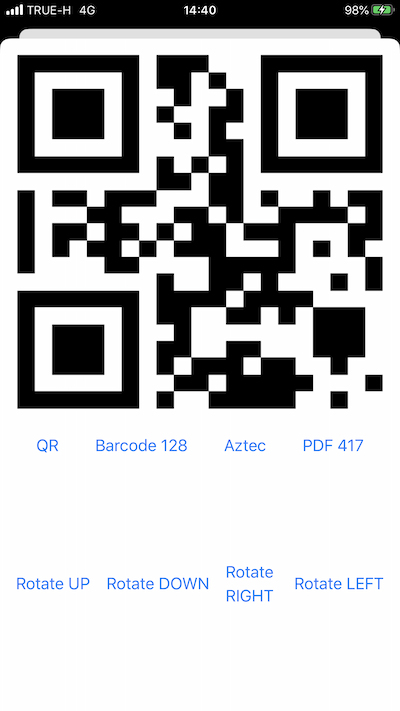
# How to use barcode generator view
## Excample code
```Swift
import SwiftUI
struct ModalBarcodeGenerator: View {
@State var dataString = "Hello Carbode"
@State var barcodeType = CBBarcodeView.BarcodeType.qrCode
@State var rotate = CBBarcodeView.Orientation.up
var body: some View {
var body: some View {
VStack {
CBBarcodeView(data: $dataString,
barcodeType: $barcodeType,
orientation: $rotate)
.frame(minWidth: 0, maxWidth: .infinity, minHeight: 400, maxHeight: 400, alignment: .topLeading)
}
}
}
```
# Barcode type you can generate
```Swift
//QR Code
// CBBarcodeView.BarcodeType.qrCode
//Code 128
// CBBarcodeView.BarcodeType.barcode128
//Aztec Code
// CBBarcodeView.BarcodeType.aztecCode
//PDF417
// CBBarcodeView.BarcodeType.PDF417
@State var barcodeType = CBBarcodeView.BarcodeType.qrCode
CBBarcodeView(data: ..... ,
barcodeType: $barcodeType ,
orientation: ... )
```
# Rotate your barcode
```Swift
/*Youcan rotate 4 directions
CBBarcodeView.Orientation.up
CBBarcodeView.Orientation.down
CBBarcodeView.Orientation.left
CBBarcodeView.Orientation.right*/
@State var rotate = CBBarcodeView.Orientation.left
CBBarcodeView(data: ..... ,
barcodeType: ..... ,
orientation: $rotate)
```
# Contributing
CarBode welcomes contributions in the form of GitHub issues and pull-requests.
## Changelog
- 1.0.1 Fixed bug camera delay 10 seconds when use on modal.
- 1.2.0 Add feature allows to turn torch light on or off.
- 1.3.0 You can set a mock barcode when running with an iOS simulator.
- 1.4.0 Rename component and add new barcode generator view component