# css-sweeper-扫雷
**Repository Path**: chen_shu_ming/css-sweeper-minesweeper
## Basic Information
- **Project Name**: css-sweeper-扫雷
- **Description**: 这是单纯用htm和css实现的扫雷游戏
- **Primary Language**: Unknown
- **License**: BSD-2-Clause
- **Default Branch**: master
- **Homepage**: None
- **GVP Project**: No
## Statistics
- **Stars**: 0
- **Forks**: 0
- **Created**: 2020-09-07
- **Last Updated**: 2020-12-19
## Categories & Tags
**Categories**: Uncategorized
**Tags**: None
## README

# css-sweeper from PropJockey
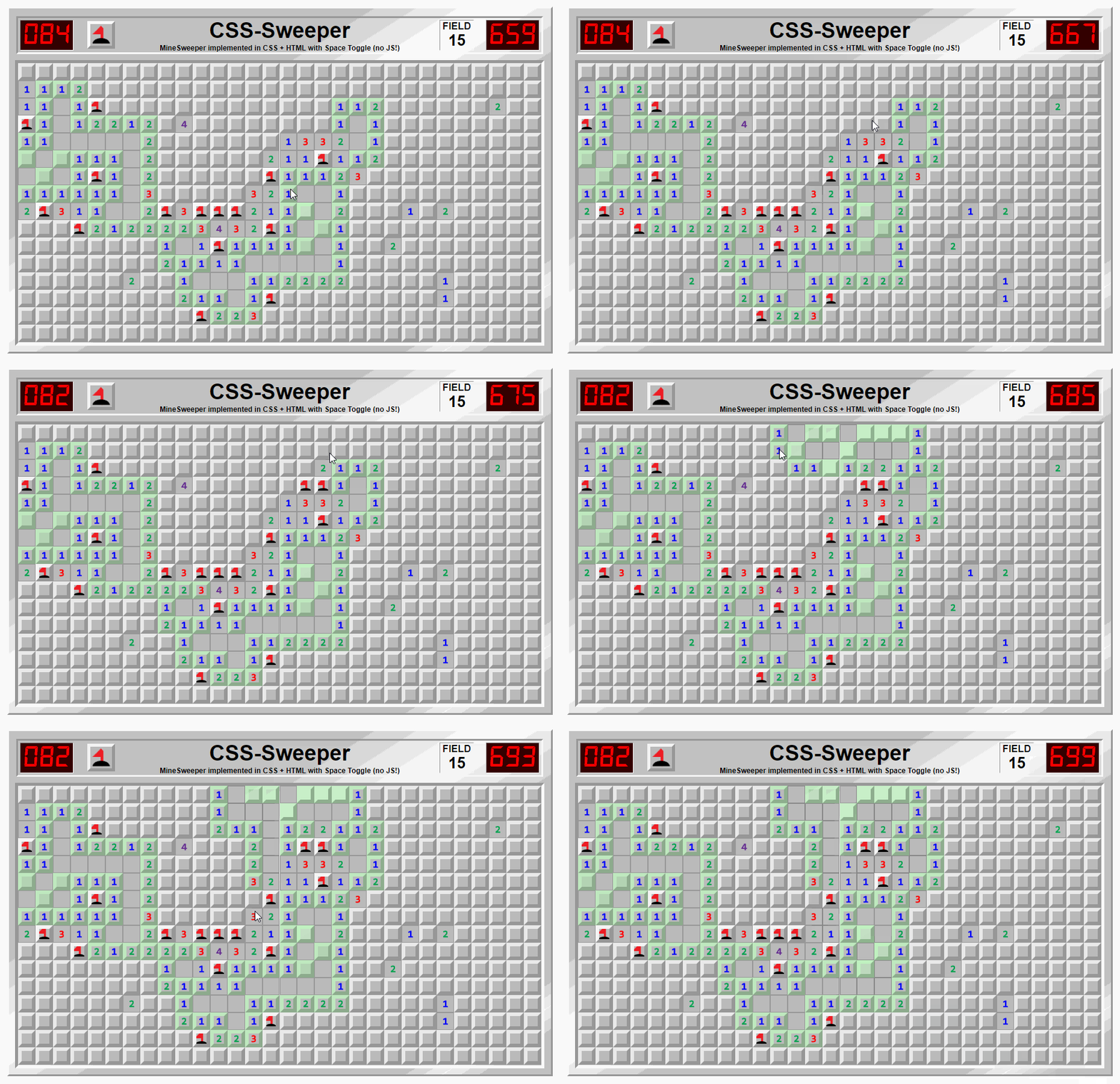
MineSweeper implemented in CSS + HTML using the Space Toggle trick (no JavaScript!)
PLAY IT HERE!
NOTE: this is another stress test, expect lag for the next several years of average computer advancement!
 ## Win Condition
Since it's not practical to clear all the spaces when you expose an empty area (without loops or causing cyclic references), the win condition has been reduced to:
1. Flag all the bombs
2. Do not flag non-bombs
3. ~~Clear all non-bomb spaces~~
This also allows you to win when it comes down to a forced-guess since you can flag without consequence. If you pick right and haven't flagged any non-bombs, you win.
## Mine Field Generation
The fields are only defined by where the bombs are (and that those spaces are not not-bombs).
The rest of the game, counter, numbers, etc flow from there, so the bombs can be placed anywhere, and in any number.
This is the (lazy/inefficient) script I ran before hand to generate the 16 included Fields:
```js
var levels = [{},{},{},{},{},{},{},{},{},{},{},{},{},{},{},{}]
var genlvl = (lvl) => {
var y = ~~(Math.random() * 16)
var x = ~~(Math.random() * 30)
var key = `bomb-${y}-${x}`
lvl[key] = `--${key}: ; --not-${key}: initial;`
}
levels.forEach(lvl => {
while (Object.keys(lvl).length < 99) { genlvl(lvl) }
})
var cssoutput = ""
levels.forEach((lvl, i) => {
var out = ` #level-${ i.toString(10).padStart(2, "0") }:checked ~ #ram {
--level: "${ (i + 1).toString(10).padStart(2, "0") }";
${Object.values(lvl).join("\n ")}
}
`
cssoutput += out
})
// cssoutput is the only css necessary to create new fields
```
## CSS is a programming language thanks to the Space Toggle trick
### Basics of Space Toggle:
* if your --css-var holds a space `--toggler: ;`, then it can be added to anything (any number of times) without changing the value
```css
--toggler: ;
--red-if-toggler: var(--toggler) red;
background: var(--red-if-toggler, green); /* will be red! */
```
* if your --css-var holds `initial` `--toggler: initial;` (or was never defined), then it can be added to anything to force-fallback when referenced
```css
--toggler: initial;
--red-if-toggler: var(--toggler) red;
background: var(--red-if-toggler, green); /* will be green! */
```
* Space Toggles can be combined for AND logic:
```css
--red-if-togglersalltrue: var(--tog1) var(--tog2) var(--tog3) red;
```
* Space Toggles can be combined for OR logic:
```css
--red-if-anytogglertrue: var(--tog1, var(--tog2, var(--tog3))) red;
```
* Checkboxes (and radio buttons) make a great source for space toggles (shout out to @RockStarwind for that idea)
```css
#common-css-var-area { /* default any "not" values to truthy */ --not-flagged: ; }
#mycheckbox:checked ~ #common-css-var-area { --flagged: ; --not-flagged: initial; }
#anotherbox:checked ~ #common-css-var-area { --open: ; }
#common-css-var-area {
--yellow-if-flagged-and-open: var(--open) var(--flagged) yellow;
--white-if-not-flagged-and-open: var(--open) var(--not-flagged) white;
--red-if-flagged: var(--flagged) red;
color: var(--yellow-if-flagged-and-open, var(--white-if-not-flagged-and-open, var(--red-if-flagged, black)))
}
/* color will be black if not flagged and not open */
```
### For reference, here's where Space Toggle has been discussed recently:
* https://twitter.com/James0x57/status/1282303255826046977 - introductory tweet (somewhat complex)
* https://twitter.com/James0x57/status/1283596399196680192 - Tweet with a relatively simple example.
* https://github.com/propjockey/css-media-vars - a library that provides space toggles to use anywhere based on @ media query state
* https://twitter.com/James0x57/status/1283906181031960576 - Tweet introducing css-media-vars, with discussion on how Space Toggle is per spec and not relying on bugs/hacks.
* https://propjockey.github.io/bcd7sdd/ - Uses Space Toggles to create a circuit board, using checkboxes to mantain state between inputs.
### Space Toggle has been independently discoverd a handful of times:
* @anatudor probably the first to discover it - about 3 years ago!
* @JamesOx57 in April 2020 which kickstarted development of augmented-ui v2 because it allows augs to be equipped without extra class names.
* @DavidKPiano in June 2020 and instead of just space, he includes an empty comment `--pnl: /**/;` and calls it `prop-and-lock`
## Socials
Follow me on Twitter for more web dev insanity!
(and feel free to ask questions!)
## Win Condition
Since it's not practical to clear all the spaces when you expose an empty area (without loops or causing cyclic references), the win condition has been reduced to:
1. Flag all the bombs
2. Do not flag non-bombs
3. ~~Clear all non-bomb spaces~~
This also allows you to win when it comes down to a forced-guess since you can flag without consequence. If you pick right and haven't flagged any non-bombs, you win.
## Mine Field Generation
The fields are only defined by where the bombs are (and that those spaces are not not-bombs).
The rest of the game, counter, numbers, etc flow from there, so the bombs can be placed anywhere, and in any number.
This is the (lazy/inefficient) script I ran before hand to generate the 16 included Fields:
```js
var levels = [{},{},{},{},{},{},{},{},{},{},{},{},{},{},{},{}]
var genlvl = (lvl) => {
var y = ~~(Math.random() * 16)
var x = ~~(Math.random() * 30)
var key = `bomb-${y}-${x}`
lvl[key] = `--${key}: ; --not-${key}: initial;`
}
levels.forEach(lvl => {
while (Object.keys(lvl).length < 99) { genlvl(lvl) }
})
var cssoutput = ""
levels.forEach((lvl, i) => {
var out = ` #level-${ i.toString(10).padStart(2, "0") }:checked ~ #ram {
--level: "${ (i + 1).toString(10).padStart(2, "0") }";
${Object.values(lvl).join("\n ")}
}
`
cssoutput += out
})
// cssoutput is the only css necessary to create new fields
```
## CSS is a programming language thanks to the Space Toggle trick
### Basics of Space Toggle:
* if your --css-var holds a space `--toggler: ;`, then it can be added to anything (any number of times) without changing the value
```css
--toggler: ;
--red-if-toggler: var(--toggler) red;
background: var(--red-if-toggler, green); /* will be red! */
```
* if your --css-var holds `initial` `--toggler: initial;` (or was never defined), then it can be added to anything to force-fallback when referenced
```css
--toggler: initial;
--red-if-toggler: var(--toggler) red;
background: var(--red-if-toggler, green); /* will be green! */
```
* Space Toggles can be combined for AND logic:
```css
--red-if-togglersalltrue: var(--tog1) var(--tog2) var(--tog3) red;
```
* Space Toggles can be combined for OR logic:
```css
--red-if-anytogglertrue: var(--tog1, var(--tog2, var(--tog3))) red;
```
* Checkboxes (and radio buttons) make a great source for space toggles (shout out to @RockStarwind for that idea)
```css
#common-css-var-area { /* default any "not" values to truthy */ --not-flagged: ; }
#mycheckbox:checked ~ #common-css-var-area { --flagged: ; --not-flagged: initial; }
#anotherbox:checked ~ #common-css-var-area { --open: ; }
#common-css-var-area {
--yellow-if-flagged-and-open: var(--open) var(--flagged) yellow;
--white-if-not-flagged-and-open: var(--open) var(--not-flagged) white;
--red-if-flagged: var(--flagged) red;
color: var(--yellow-if-flagged-and-open, var(--white-if-not-flagged-and-open, var(--red-if-flagged, black)))
}
/* color will be black if not flagged and not open */
```
### For reference, here's where Space Toggle has been discussed recently:
* https://twitter.com/James0x57/status/1282303255826046977 - introductory tweet (somewhat complex)
* https://twitter.com/James0x57/status/1283596399196680192 - Tweet with a relatively simple example.
* https://github.com/propjockey/css-media-vars - a library that provides space toggles to use anywhere based on @ media query state
* https://twitter.com/James0x57/status/1283906181031960576 - Tweet introducing css-media-vars, with discussion on how Space Toggle is per spec and not relying on bugs/hacks.
* https://propjockey.github.io/bcd7sdd/ - Uses Space Toggles to create a circuit board, using checkboxes to mantain state between inputs.
### Space Toggle has been independently discoverd a handful of times:
* @anatudor probably the first to discover it - about 3 years ago!
* @JamesOx57 in April 2020 which kickstarted development of augmented-ui v2 because it allows augs to be equipped without extra class names.
* @DavidKPiano in June 2020 and instead of just space, he includes an empty comment `--pnl: /**/;` and calls it `prop-and-lock`
## Socials
Follow me on Twitter for more web dev insanity!
(and feel free to ask questions!)