# EasyDialog
**Repository Path**: chenbabys/EasyDialog
## Basic Information
- **Project Name**: EasyDialog
- **Description**: No description available
- **Primary Language**: Unknown
- **License**: Not specified
- **Default Branch**: master
- **Homepage**: None
- **GVP Project**: No
## Statistics
- **Stars**: 0
- **Forks**: 0
- **Created**: 2025-05-13
- **Last Updated**: 2025-05-13
## Categories & Tags
**Categories**: Uncategorized
**Tags**: None
## README
# EasyDialog
[](https://jitpack.io/#tianzhijiexian/EasyDialog)
一个DialogFragment的封装库,提供了builder的方式进行调用,因为采用了alertDialog.Builder,所以代码中没有任何自定义,轻量稳定。
### 简介
原生的Dialog提供了很多Style来让开发者进行自定义,可以满足我们百分之九十的业务需求了。这其实是Android的设计思想,官方“一般”都会把属性值暴露出来,让显示和逻辑分开。因此,本项目并没有重新实现Dialog,而是通过封装了DialogFragment来让大家使用和定制Dialog更加的方便。
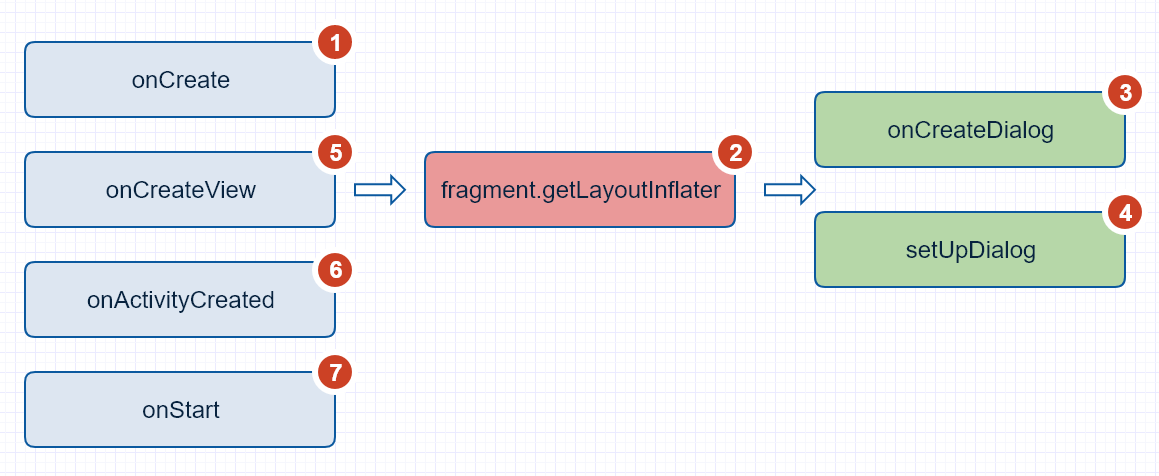
这里顺便贴一下dialogFragment的方法调用流程:
### 添加依赖
1.在项目外层的build.gradle中添加JitPack仓库
```
repositories {
maven {
url "https://jitpack.io"
}
}
```
2.在用到的项目中添加依赖
> compile 'com.github.tianzhijiexian:EasyDialog:[Latest release](https://github.com/tianzhijiexian/EasyDialog/releases)(<-click it)'
**举例:**
> compile 'com.github.tianzhijiexian:EasyDialog:1.1.2'
### 使用方式
EasyDialog充分利用了原生alertDialog.Builder的api,所以使用方式和alertDialog无异,它提供了如下五种基本的dialog。
**1. 基础对话框**

```JAVA
EasyDialog.Builder builder = EasyDialog.builder(this); // 建立builder对象
builder.setTitle("Title")
.setIcon(R.drawable.saber)
.setMessage(R.string.hello_world)
.setOnCancelListener(dialog -> Log.d(TAG, "onCancel"))
.setOnDismissListener(dialog -> Log.d(TAG, "onDismiss"))
// 设置下方的三个按钮
.setPositiveButton("ok", (dialog, which) -> {})
.setNegativeButton("cancel", (dialog, which) -> dialog.dismiss())
.setNeutralButton("ignore", null)
.setCancelable(true); // 点击空白处可以关闭
DialogFragment easyDialog = builder.build();
// 用showAllowingStateLoss()弹出
easyDialog.showAllowingStateLoss(getSupportFragmentManager());
```
**2. 单选对话框**

```JAVA
EasyDialog dialog = EasyDialog.builder(this)
.setTitle("Single Choice Dialog")
// 这里传入的“1”表示默认选择第二个选项
.setSingleChoiceItems(new String[]{"Android", "ios", "wp"}, 1,
(d, position) -> {d.dismiss();})
.setPositiveButton("ok", null)
.build();
dialog.show(getSupportFragmentManager(), TAG);
```
**3. 多选对话框**

```JAVA
EasyDialog.builder(this)
// 设置数据和默认选中的选项
.setMultiChoiceItems(
new String[]{"Android", "ios", "wp"}, new boolean[]{true, false, true},
(dialog, which, isChecked) -> showToast("onClick pos = " + which))
.build()
.show(getSupportFragmentManager());
```
**4. 简单列表对话框**

```xml
- 阿尔及利亚
- 安哥拉
- 贝宁
- 缅甸
```
```java
EasyDialog.builder(this)
// R.array.country为xml中定义的string数组
.setItems(R.array.country, (dialog, which) -> showToast("click " + which))
.setPositiveButton("yes", null)
.setNegativeButton("no", null)
.build()
.show(getSupportFragmentManager());
```
### 自定义对话框
自定义对话框需要继承自`BaseCustomDialog`。如果需要传入更多的参数,还需要继承自`EasyDialog.Builder`来建立自己的builder。
```JAVA
public class MyBuilderDialog extends BaseCustomDialog {
public static final String KEY_AGE = "KEY_AGE", KEY_NAME = "KEY_NAME";
/**
* 继承自{@link EasyDialog.Builder}以扩展builder
*/
public static class Builder extends BaseEasyDialog.Builder {
private Bundle bundle = new Bundle();
public Builder(@NonNull Context context) {
super(context);
}
public Builder setAge(int age) {
bundle.putInt(KEY_AGE, age);
return this;
}
public Builder setName(String name) {
bundle.putString(KEY_NAME, name);
return this;
}
@NonNull
@Override
protected EasyDialog createDialog() {
MyBuilderDialog dialog = new MyBuilderDialog();
dialog.setArguments(bundle); // 增加自己的bundle
return dialog;
}
}
@Override
protected int getLayoutResId() {
return 0;
}
@Override
protected void bindViews(View root) {
}
@Override
protected void modifyAlertDialogBuilder(AlertDialog.Builder builder) {
super.modifyAlertDialogBuilder(builder);
Bundle arguments = getArguments();
String name = arguments.getString(KEY_NAME);
int age = arguments.getInt(KEY_AGE);
String str = "name: " + name + ", age: " + age;
// 修改builder对象
builder.setMessage("修改后的message是:\n\n" + str);
}
@Override
protected void setViews() {
int age = getArguments().getInt(KEY_AGE);
Toast.makeText(getContext(), "age: " + age, Toast.LENGTH_SHORT).show();
}
}
```
### 自定义样式
**在主题中设置默认样式(如果你想用原生的样式,可以跳过这个步骤)**
```XML
```
```XML
```
### 开发者

Jack Tony:
### License
Copyright 2016-2019 Jack Tony
Licensed under the Apache License, Version 2.0 (the "License");
you may not use this file except in compliance with the License.
You may obtain a copy of the License at
http://www.apache.org/licenses/LICENSE-2.0
Unless required by applicable law or agreed to in writing, software
distributed under the License is distributed on an "AS IS" BASIS,
WITHOUT WARRANTIES OR CONDITIONS OF ANY KIND, either express or implied.
See the License for the specific language governing permissions and
limitations under the License.