# jquery.dataTable
**Repository Path**: chenhaoming/jquery.dataTable
## Basic Information
- **Project Name**: jquery.dataTable
- **Description**: jquery数据表格插件
- **Primary Language**: JavaScript
- **License**: Not specified
- **Default Branch**: master
- **Homepage**: None
- **GVP Project**: No
## Statistics
- **Stars**: 0
- **Forks**: 0
- **Created**: 2017-05-09
- **Last Updated**: 2020-12-19
## Categories & Tags
**Categories**: Uncategorized
**Tags**: None
## README
jquery.dataTable
-------------
jquery 数据表格
[配置项详情](https://poppinrubo.github.io/jquery.dataTable/ "查看配置项")
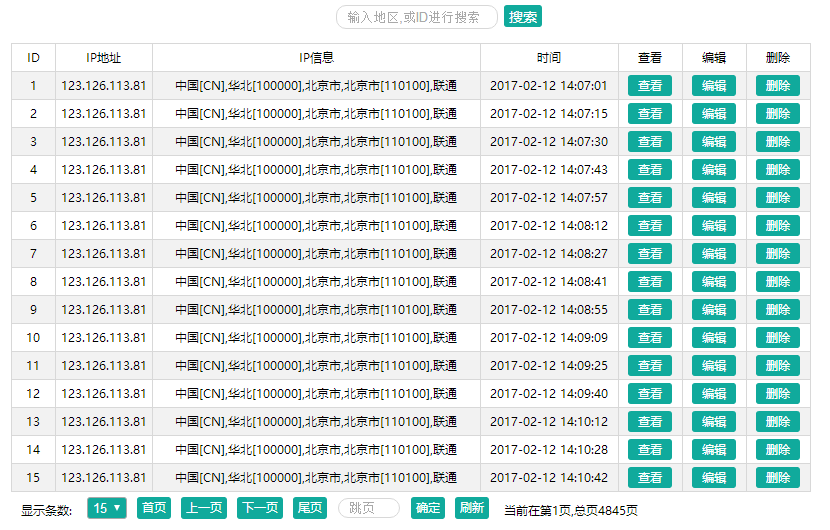
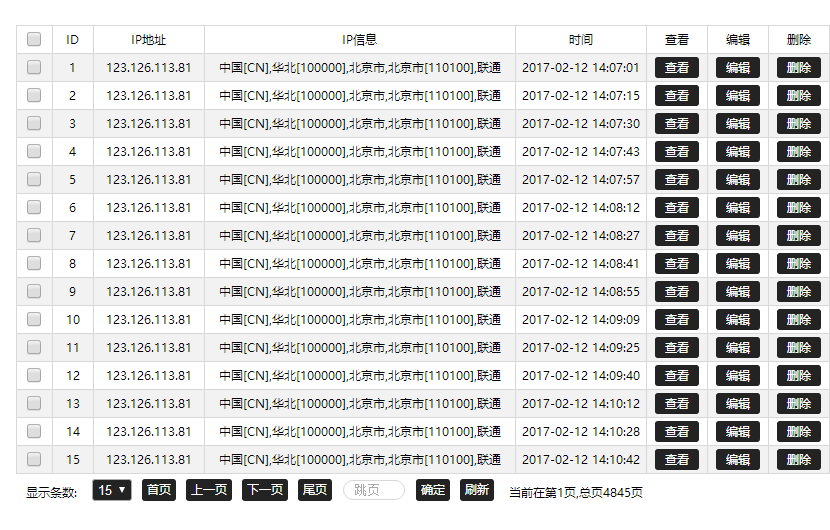
`使用方法`
1、引入JQ及dataTable插件
``` html
```
2、创建table
``` html
```
3、绑定设置
``` JavaScript
$("#Table").dataTable({
debug: true,
check: true,
pageCapacity:15,
loading:false,
oddEven:false,
url: "data.php",
style: {"font-size": "12px", "width": "800px"},
align:"center",
ButtonStyle:{fontColor:"#ffffff",backgroundColor:"#10AA9C"},
columns: [
{ColumnName: "id", title: "ID", width: 30},
{ColumnName: "img", img:true, title: "图片", width: 40},//设置img:true,后台数据反回url这一列就生成图片显示
{ColumnName: "name", title: "视频名", width: 500},
{title: "查看", button: "show", buttonName: "查看", width: 50},
{title: "编辑", button: "edit", buttonName: "编辑", width: 50},
{title: "删除", button: "del", buttonName: "删除", width: 50}
],
Click: function (row) {
alert("单击:"+row.id);
},
doubleClick: function (row) {
alert("双击:"+row.id);
}
,
editClick: function (row) {
alert("自定义编辑:"+row.id);
}
,
delClick: function (row) {
alert("自定义删除:"+row.id);
},
showClick: function (row) {
alert("自定义查看:"+row.name);
}
});
```
`关于后台数据`
后台需配合插件做分页设置,插件会用get方式发送为pager的json字符串对象,后台需要解析该字符串为对象,该对象为
page : 页码
pageCapacity : 页码容量(页显示条数)
参照PHP版本可解析到对象,并处理输出
``` php
page;
$Capacity = $pager->pageCapacity;
$List = $DB->order('id desc')->limit($page, $Capacity)->select('video');
$total = $DB->count('video');
$rows = array();
foreach ($List as $ListRow) {
$rows[] = array(
'id' => $ListRow['id'],
'name' => $ListRow['name'],
);
}
$data = array('total' => $total, 'rows' => $rows);
echo json_encode($data);
?>
```
Java版本(mysql)
``` java
public void doGet(HttpServletRequest request, HttpServletResponse response)
throws ServletException, IOException {
response.setContentType("text/html");
PrintWriter out = response.getWriter();
JdbcHelper db = new JdbcHelper();
//get获取json字符串对象
String pager= request.getParameter("pager");
//字符串转换为对象
JSONObject jsonObject = JSONObject.fromObject(pager);
//提取参数
int page=jsonObject.getInt("page");
int pageCapacity=jsonObject.getInt("pageCapacity");
//简单处理分页
int p=(page-1)*pageCapacity;
String sql="select * from video order by id desc limit "+p+","+pageCapacity+"";
JSONArray jsonArray = JSONArray.fromObject(db.query(sql,null, null));//list转换json字符串
String sqlcount="select * from video";
int total=db.queryCount(sqlcount,null, null);
String json="{"+"\"total\":"+total+",\"rows\":"+jsonArray+"}";//格式拼接
out.print(json);
out.flush();
out.close();
}
```
以上示例仅供参考,不建议直接使用在项目。对于分页可自行封装
返回的json格式(total:数据总条数,并非页数)
``` JavaScript
{
"total": 3744,
"rows": [
{
"id": 3832,
"name": "Haeni Kim- Falling For Someone New - Kuma"
},
{
"id": 3831,
"name": "Top Moments- A Friday Night vol. 100 (Korea)"
},
{
"id": 3830,
"name": "WAACKXXY Waacking 2017"
},
{
"id": 3829,
"name": "TRIX a.k.a. EYE X Krump 2017"
}
]
}
```
`获取返回数据的使用方法`
``` JavaScript
$('#Table').GetJSONArray();//获取Table通过URL获取到的数据,为数组类型的数据集
$('#Table').GetCheckArray();//获取当前复选框选中的值,为数组类型的数据集,未选择获取到null
```
`刷新表格数据`
``` JavaScript
$('#Table').TableRefresh();
//通过table绑定调用可以刷新当前表格数据,
//效果相当于点击了一下刷新按钮,
//要说明的是数据无变化并且没有开启loading,看着没变化并不是坏掉了
```
`通过url实现搜索功能`
``` JavaScript
//如果绑定的URL为url: "data.php",则可以通过以下方式来设置,然后后台对URL的get请求参数的处理进行表格的搜索查询
$("#Table").dataTable({
url: "data.php?name=查询"
})
//注意事项:需要考虑到IE浏览器的情况搜索中文需要使用encodeURI进行编码,避免传到后台乱码无法查询,则使用以下方式
$("#Table").dataTable({
url: "data.php?name="+encodeURI("查询")
})
```
搜索功能拉取数据PHP参考代码
``` php
page;
$Capacity = $pager->pageCapacity;
$Query = $_GET["search"];
$List = $DB->order('AmountID asc')->limit($page, $Capacity)->select('statistics');/*常规查询*/
$total = $DB->count('statistics');
if ($Query != null && $Query != "") {/*搜索内容不为空则采取模糊查询*/
$total = $DB->where("material like '%$Query%'")->count('statistics');
$List = $DB->order('AmountID desc')->where("material like '%$Query%'")->limit($page, $Capacity)->select('statistics');
if (is_numeric($Query)) {/*实现ID查询判断是否为数字*/
$total = $DB->where(array("AmountID" => $Query))->count('statistics');
$List = $DB->order('AmountID asc')->where(array("AmountID" => $Query))->limit($page, $Capacity)->select('statistics');
}
}
$rows = array();
foreach ($List as $ListRow) {
$rows[] = array(
'id' => $ListRow['AmountID'],
'ip' => $ListRow['ip'],
'material' => $ListRow['material']==null?"无":$ListRow['material'],
'time' => $ListRow['PlayData'],
);
}
returnData(array('total' => $total, 'rows' => $rows));
}
function returnData($data)
{/*返回数据*/
echo json_encode($data);
}
getList();
?>
```
### [查看demo](http://120.24.216.26/dataTable/ "查看demo")