# robin
**Repository Path**: cheni/robin
## Basic Information
- **Project Name**: robin
- **Description**: A ROS-CODESYS shared memory bridge to map CODESYS variables to ROS topics.
This bridge is the result of the ROBIN project, a Focused Technical Project (FTP) of the ROSIN European project.
- **Primary Language**: Unknown
- **License**: Apache-2.0
- **Default Branch**: noetic
- **Homepage**: None
- **GVP Project**: No
## Statistics
- **Stars**: 0
- **Forks**: 0
- **Created**: 2024-04-29
- **Last Updated**: 2024-04-29
## Categories & Tags
**Categories**: Uncategorized
**Tags**: None
## README
# ROBIN
[](https://rosin-project.eu/ftp/robin) [](https://github.com/ScalABLE40/robin/actions)
A ROS-CODESYS shared memory bridge to map CODESYS variables to ROS topics.
This bridge is the result of the [ROBIN](https://rosin-project.eu/ftp/robin) project, a Focused Technical Project (FTP) of the [ROSIN](https://rosin-project.eu/) European project.
## Getting started
The bridge is made up of two components:
* A ROS package that doesn't require any manual configuration other than the installation of its dependencies. The package contains a ROS node that reads/writes data from/to shared memory spaces and publishes/receives messages to/from ROS topics.
* A CODESYS library to be used in a CODESYS project created by the user. An example project is provided in [__robin_updater/src/robin_updater/cfg/codesys_project.xml__](https://github.com/ScalABLE40/robin/blob/master/robin_updater/cfg/codesys_project.xml). The library contains a _Robin_ function block that reads/writes data from/to shared memory spaces and writes/reads it to CODESYS user-defined variables.
The following IEC 61131-3 data types are currently supported:
* BOOL
* BYTE
* SINT, INT, DINT, LINT, USINT, UINT, UDINT, ULINT
* REAL, LREAL
* CHAR, STRING
As well as __arrays__ and __custom structs__. The following standard ROS message packages are already defined as CODESYS structs and available on the Robin CODESYS library:
* [std_msgs](http://wiki.ros.org/std_msgs)
* [geometry_msgs](http://wiki.ros.org/geometry_msgs)
These variables have to be defined on both the CODESYS project and the ROS package. For arrays or for structs with string or array members, because these data types are handled as non-POD (Plain Old Data) objects in C++, the mapping between the C++ variables and the ROS messages has to be explicitly defined. However, an updater application was developed to automate most of this process. The user simply needs to define its desired variables on the CODESYS project and run the updater.
### Prerequisites
* [Ubuntu 18.04](http://releases.ubuntu.com/18.04/)/[16.04](http://releases.ubuntu.com/16.04/) system (may work on other distros as well) with:
* SSH server
* [ROS Melodic](http://wiki.ros.org/melodic)/[Kinetic](http://wiki.ros.org/kinetic)
* CODESYS Control SoftPLC application:
* [Debian/Ubuntu](https://store.codesys.com/codesys-control-for-linux-sl.html?___store=en)
* [Raspberry Pi](https://store.codesys.com/codesys-control-for-raspberry-pi-sl.html?___store=en)
* [BeagleBone](https://store.codesys.com/codesys-control-for-beaglebone-sl.html?___store=en)
* Windows system with:
* [CODESYS Development System V3](https://store.codesys.com/codesys.html?___store=en) (developed and tested with version 3.5.15.0)
* [Windows OpenSSH](https://www.howtogeek.com/336775/how-to-enable-and-use-windows-10s-built-in-ssh-commands/)
### Installation
1. Install CODESYS library:
1. Open CODESYS Development System V3
2. Go to _Tools->Library Repository->Install_
3. Find and select [_robin_bridge/src/robin.library_](https://github.com/ScalABLE40/robin/blob/master/robin_bridge/src/robin.library)
4. Close the _Library Repository_ dialog
2. Create catkin workspace (if non-existent):
```sh
mkdir -p ~/catkin_ws/src
cd ~/catkin_ws
catkin_make # or 'catkin build'
source ~/catkin_ws/devel/setup.bash
```
3. Clone repository into catkin workspace (eg. __\~/catkin_ws__):
```sh
cd ~/catkin_ws/src
git clone https://github.com/ScalABLE40/robin
```
4. Install updater package dependencies:
```sh
rosdep install robin_updater
```
5. Compile bridge package:
```sh
cd ~/catkin_ws
catkin_make robin # or 'catkin build robin'
```
## Usage
1. Create CODESYS project. You can either:
* Create your own project and add the Robin library to it.
1. In the _Devices_ tree, double click _Library Manager_ and open the _Add Library_ dialog
2. Find and select the previously installed _Robin_ library and click _OK_
3. You can now use the _Robin_ function block as shown in the [Examples](#examples) section
* Create a new __empty__ project and import the example project from [__codesys_project.xml__](https://github.com/ScalABLE40/robin/blob/master/robin_updater/cfg/codesys_project.xml).
1. Go to _Project->Import PLCopenXML..._
2. Find and select the XML file
3. Select all items and click _OK_
Variable length arrays are only partially supported in CODESYS. To make the updater interpret a regular fixed length array as a ROS variable length array, preceed its declaration with the line: `{attribute 'robin_var_len'}`.
2. Make sure you can establish connection with the PLC. Go to the _Devices_ tree, double click the _Device_ and then:
* _Scan Network..._ for your PLC device.
* Or add it manually _Device->Options->Manage Favourite Devices..._
3. Go to _Windows Search Bar->Services_ and make sure **Windows OpenSSH Authentication Agent** service is running (Startup type: Automatic).
4. Run the updater application:
1. Go to _Tools->Scripting->Execute Script File..._
2. Open the script file [__robin_updater/src/robin_updater/src/robin_updater/start_update.py__](https://github.com/ScalABLE40/robin/blob/master/robin_updater/src/robin_updater/start_update.py)
* If you don't have access to it from CODESYS, first copy it to your Windows system
3. Input the requested information (target address and password) and follow the script's execution
* NOTE: Password will be asked again during the script
5. Launch the robin ROS node. Will restart codesyscontrol service and then launch the node:
To avoid having to manually restart codesyscontrol after each update run:
```sh
echo "$USER ALL=(ALL:ALL) NOPASSWD: /bin/systemctl * codesyscontrol" | sudo EDITOR="tee" visudo -f /etc/sudoers.d/allow_restart_codesyscontrol
```
This will allow the command `systemctl start/stop codesyscontrol` to be run with `sudo` without having to input a password. The user must be in the _sudo_ group.
If your system does not have systemctl:
```sh
echo "$USER ALL=(ALL:ALL) NOPASSWD: /usr/sbin/service codesyscontrol *" | sudo EDITOR="tee" visudo -f /etc/sudoers.d/allow_restart_codesyscontrol
```
This will allow the command `service codesyscontrol start/stop` to be run with `sudo` without having to input a password. The user must be in the _sudo_ group.
```sh
roslaunch robin_bridge_generated run.launch
```
If you prefer not to give those permissions run the node manually:
```sh
rosrun robin_bridge_generated robin_node_generated
```
### Examples
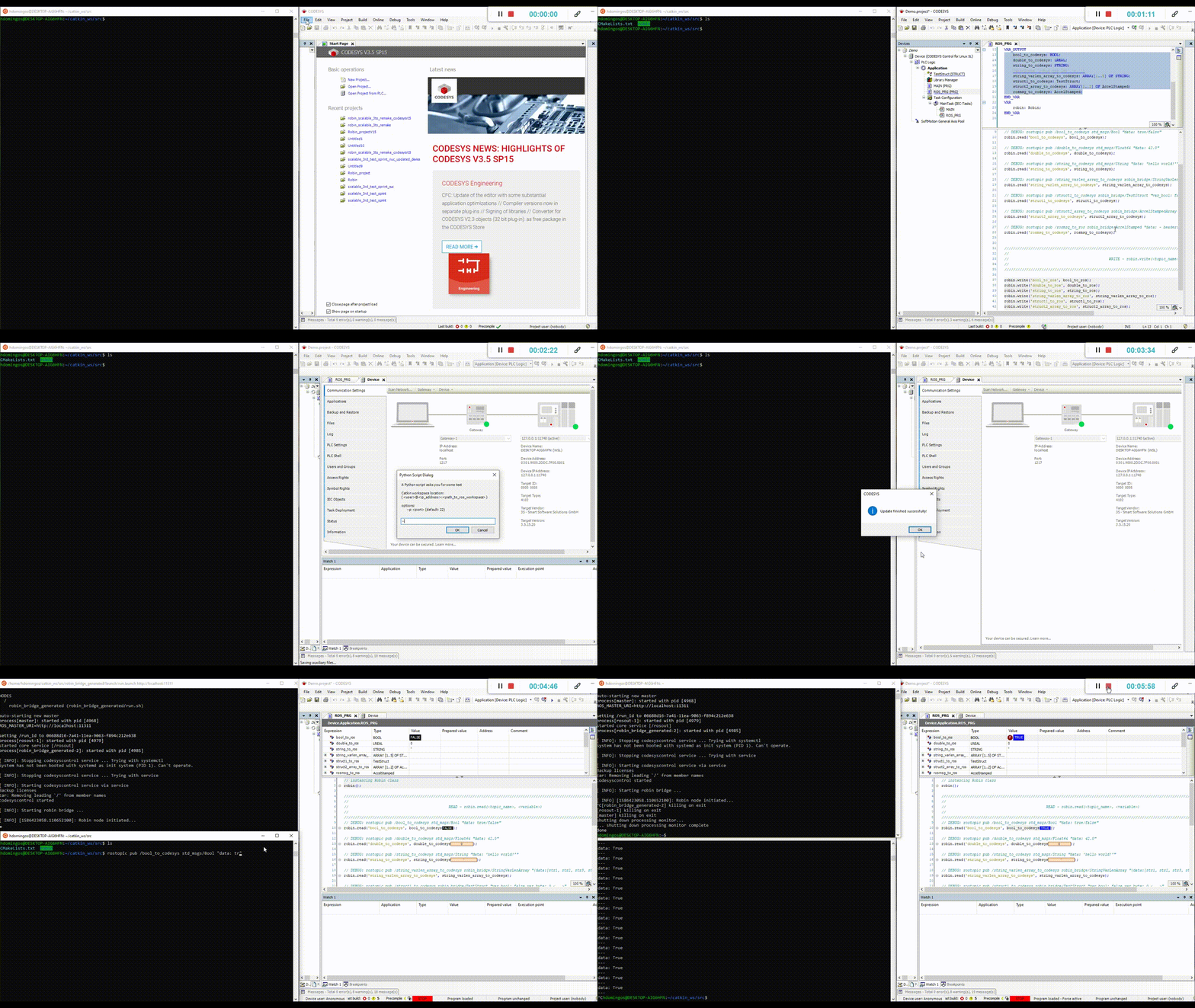
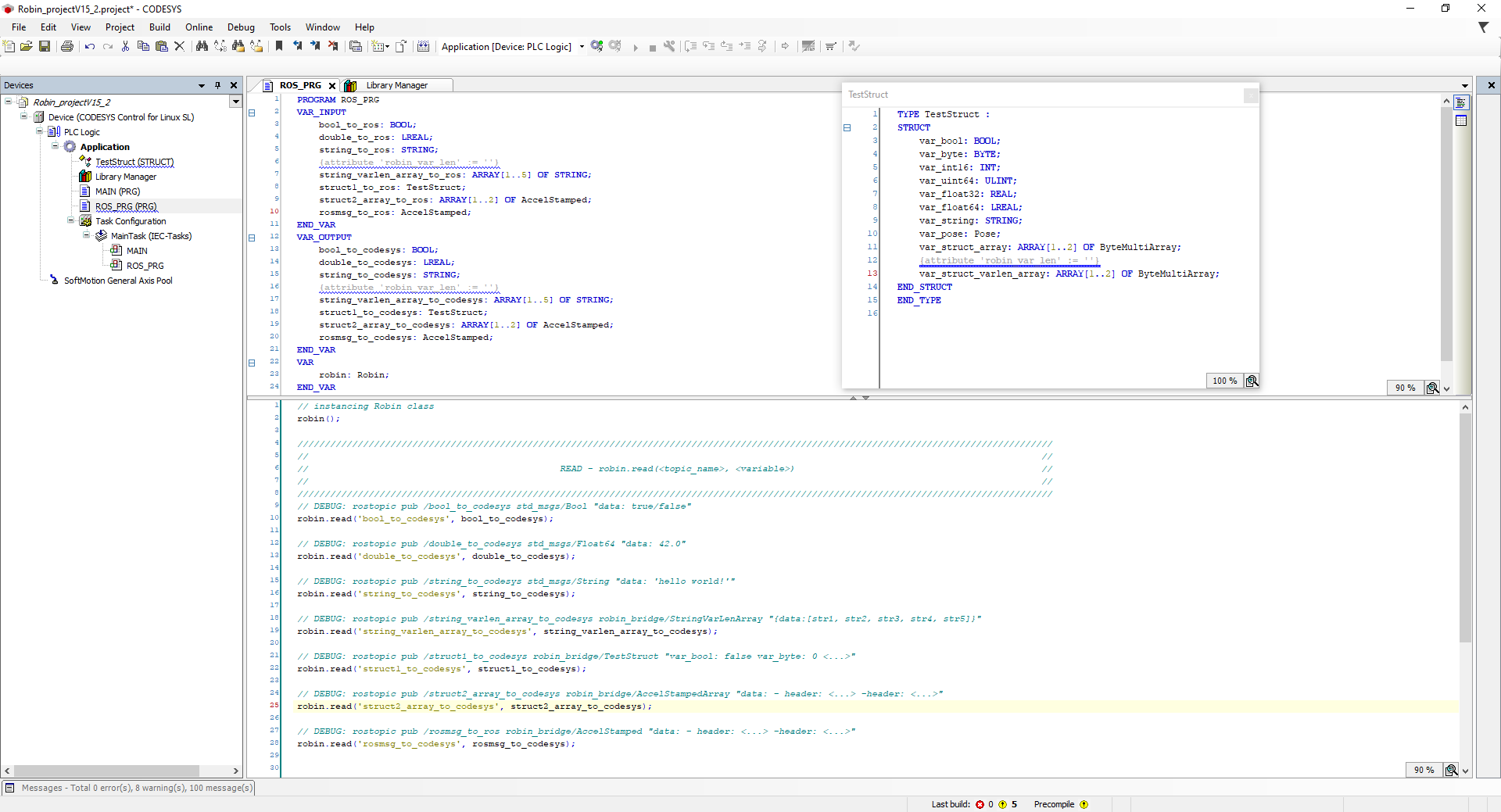
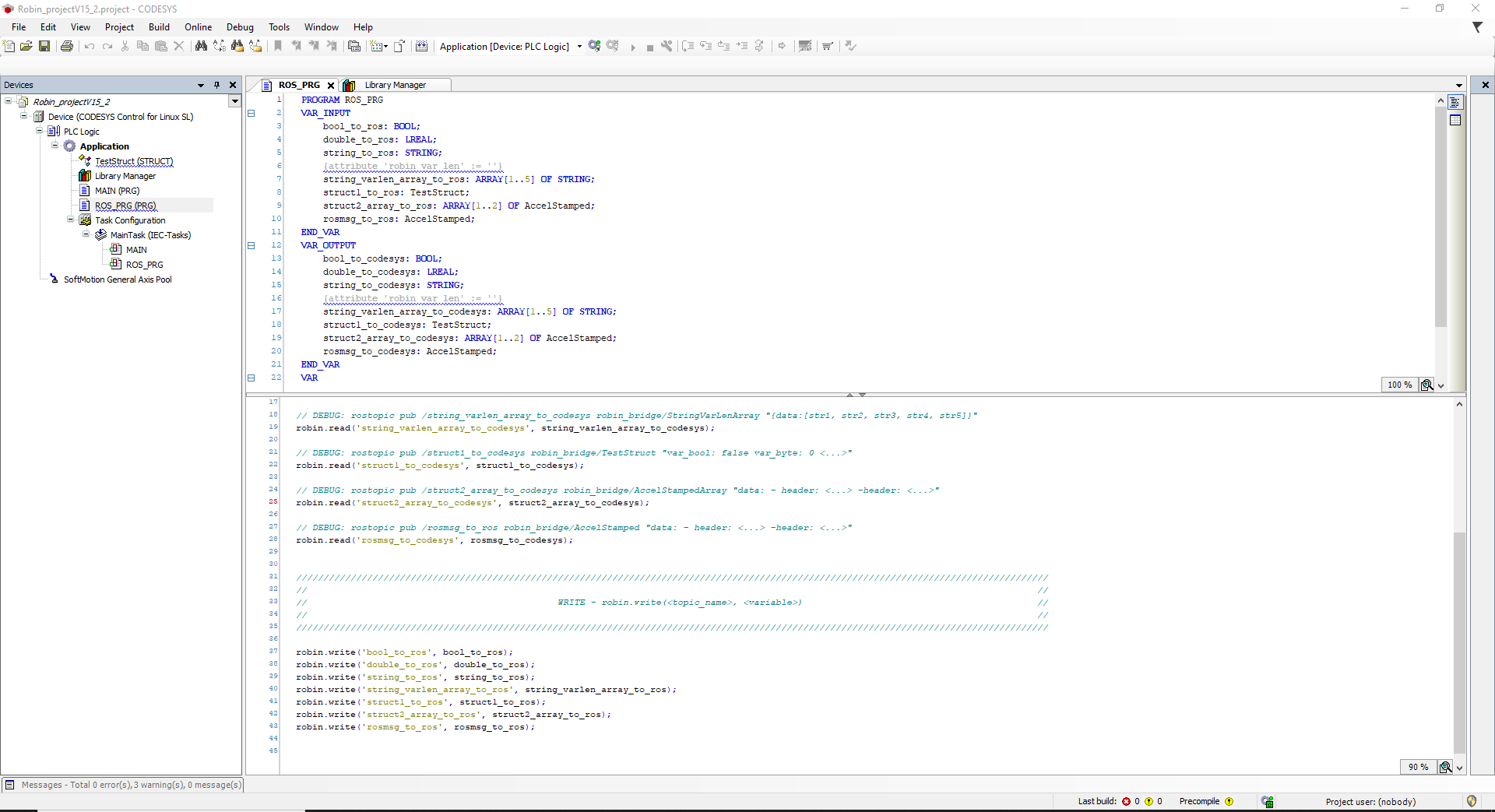
## License
[](https://opensource.org/licenses/Apache-2.0)
***
 Supported by ROSIN - ROS-Industrial Quality-Assured Robot Software Components.
More information: rosin-project.eu
Supported by ROSIN - ROS-Industrial Quality-Assured Robot Software Components.
More information: rosin-project.eu
 This project has received funding from the European Union’s Horizon 2020
research and innovation programme under grant agreement no. 732287.
This project has received funding from the European Union’s Horizon 2020
research and innovation programme under grant agreement no. 732287.