# Ximalaya-Downloader
**Repository Path**: chenqf1/Ximalaya-Downloader
## Basic Information
- **Project Name**: Ximalaya-Downloader
- **Description**: No description available
- **Primary Language**: Unknown
- **License**: AGPL-3.0
- **Default Branch**: develop
- **Homepage**: None
- **GVP Project**: No
## Statistics
- **Stars**: 0
- **Forks**: 0
- **Created**: 2025-07-27
- **Last Updated**: 2025-07-27
## Categories & Tags
**Categories**: Uncategorized
**Tags**: None
## README
喜马拉雅下载工具
Ximalaya-Downloader
[](https://github.com/Diaoxiaozhang/Ximalaya-Downloader/stargazers)
[](https://github.com/Diaoxiaozhang/Ximalaya-Downloader/forks)
[](https://github.com/Diaoxiaozhang/Ximalaya-Downloader/releases)
[](https://github.com/Diaoxiaozhang/Ximalaya-Downloader/releases)
### 说明
由于喜马拉雅官方没有下载声音的功能,即使开了vip也只能下载加密后的文件,且市面上很少有好的解密软件,所以我打算开发一款一键下载喜马拉雅专辑的软件。本软件计划使用纯Python语言开发,目前仍在编写中。由于本人的编程水平并不是十分理想,故如果大家在测试过程中发现bug,请一定在github中提交issue,也欢迎各位大佬提交pr。由于个人原因,可能无法及时回复或者解决问题,请大家见谅。
### 已实现功能
- [x] 单个声音下载
- [x] 专辑声音下载
- [x] 登录喜马拉雅账号并保存登录信息
- [x] 已购声音或vip免费声音下载
- [x] 自定义下载路径
- [x] 选择下载音频的音质
- [x] 自动重新下载下载失败的音频
### 计划实现功能
- [ ] GUI界面
### 存在的问题
- 由于喜马拉雅官方的限制,理论上付费音频的下载接口每日只能调用不到1000次。如果达到当日限制,建议使用喜马拉雅客户端下载加密的xm文件并使用[Ximalaya-XM-Decrypt](https://github.com/Diaoxiaozhang/Ximalaya-XM-Decrypt)解密。
### 手动获取cookie的方法
1. 在浏览器中打开喜马拉雅官网,并确保已登录账号。
2. 按F12打开开发者工具,选择Network(网络)选项卡。
3. 在页面中列出的一串请求列表中任意选择一个。
4. 在右侧的Headers(标头)选项卡中找到Cookie一项,复制其值。
5. 请确保复制的值中包含'1&_token'。
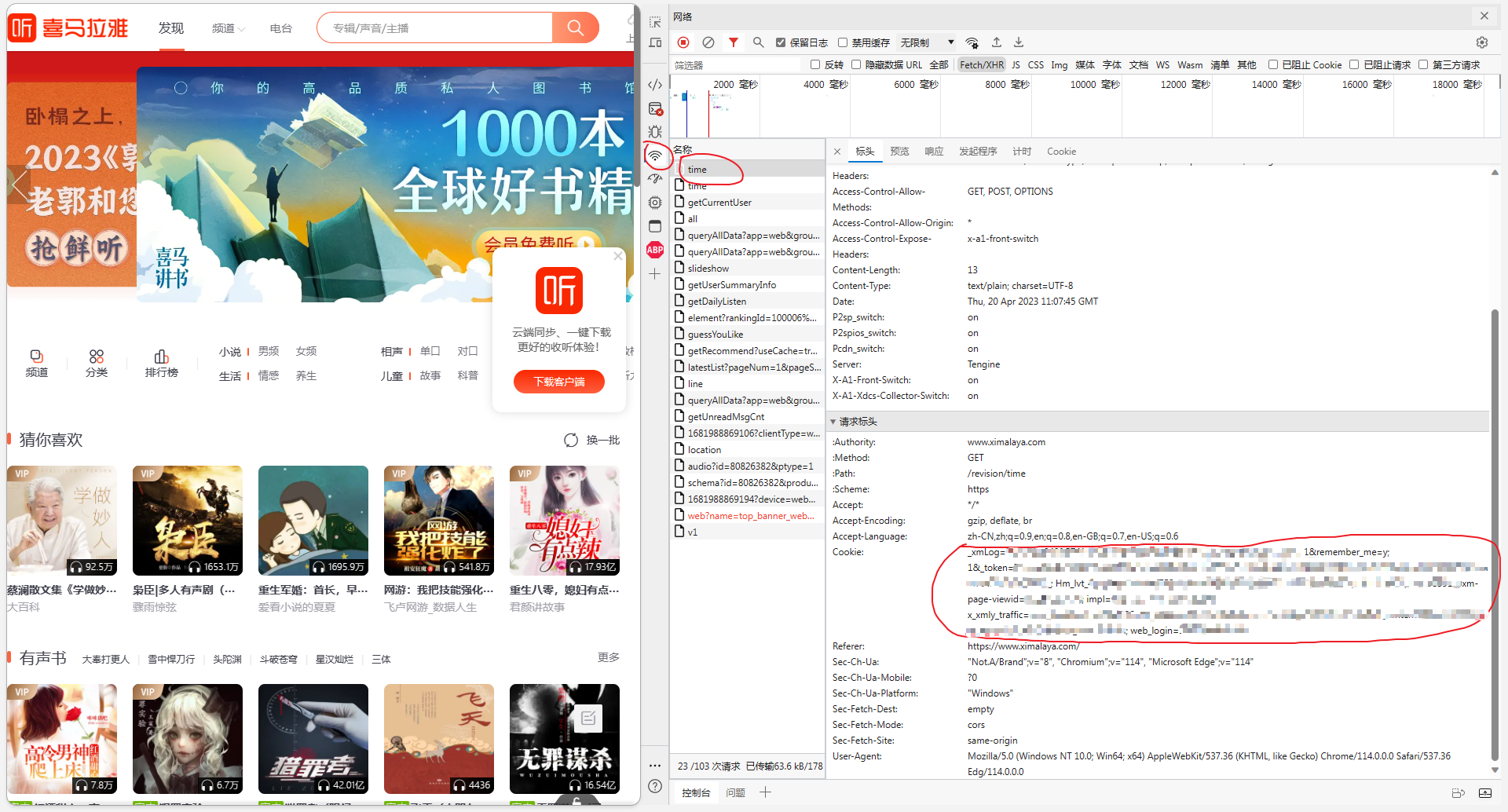
操作示例中使用的是最新版edge浏览器,如果使用的是其他浏览器,可以查找相对应浏览器的开发者工具使用教程。
### 手动设置下载路径的方法
1. 先启动一次本软件,自动生成config.json。
2. 打开config.json,找到"path": "",将右边的引号内改为你想要的下载路径
3. 请使用/或\\\\而不是\\作为路径分隔符,例如"path": "D:/Downloads"
4. 如果不设置下载路径,将默认下载到与软件同目录下的download文件夹