# Mysti
**Repository Path**: cherng/Mysti
## Basic Information
- **Project Name**: Mysti
- **Description**: No description available
- **Primary Language**: Unknown
- **License**: Apache-2.0
- **Default Branch**: main
- **Homepage**: None
- **GVP Project**: No
## Statistics
- **Stars**: 0
- **Forks**: 0
- **Created**: 2026-02-27
- **Last Updated**: 2026-02-27
## Categories & Tags
**Categories**: Uncategorized
**Tags**: None
## README
# Mysti - Your AI Coding Team Working Together






Your AI Coding team for VSCode
7 AI providers — Claude Code, Codex, Gemini, Copilot, Cline, Cursor & OpenClaw — working solo or in teams
Wisdom of the crowd where the collective intelligence of several agents outperforms a single one.

Providers •
Brainstorm •
Features •
Quick Start •
Config •
Docs
---
## What's New in v0.3.1
### 7 AI Providers
Mysti now supports **7 AI providers** — added **Cursor**, **OpenClaw**, and **Cline** alongside Claude Code, Codex, Gemini, and GitHub Copilot. Switch between providers with one click or use `@agent` mentions to route tasks to specific AIs.
### Autonomous Mode
Let the AI work independently with built-in safety controls. A three-level safety classifier (safe/caution/blocked) evaluates every operation, while a learning memory system adapts to your preferences over time. [Learn more](docs/AUTONOMOUS-MODE.md)
### @-Mention System
Type `@claude`, `@gemini`, or any agent name to route tasks directly. Chain agents for multi-perspective workflows: `@claude Write a sort function, then @codex optimize it`. Reference files with `@filename.ts` for instant context. [Learn more](docs/MENTIONS.md)
### 5 Brainstorm Collaboration Strategies
Brainstorm Mode now offers 5 strategies — **Quick**, **Debate**, **Red-Team**, **Perspectives**, and **Delphi** — each with role-based discussion and convergence detection. [Learn more](docs/BRAINSTORM.md)
### Context Compaction
Smart conversation compaction prevents context overflow. Native `/compact` support for Claude Code, with client-side summarization for other providers. [Learn more](docs/COMPACTION.md)
---
## Install in Seconds
**From VS Code:** Press `Ctrl+P` (`Cmd+P` on Mac), then paste:
```
ext install DeepMyst.mysti
```
**Or** [install from the VS Code Marketplace](https://marketplace.visualstudio.com/items?itemName=DeepMyst.mysti)
---
## Choose Your AI
Mysti works with the AI coding tools you already have. **No extra subscriptions needed.**

| Provider | Best For |
|----------|----------|
| **Claude Code** | Deep reasoning, complex refactoring, thorough analysis |
| **Codex** | Quick iterations, familiar OpenAI style |
| **Gemini** | Fast responses, Google ecosystem integration |
| **GitHub Copilot** | Multi-model access (Claude, GPT-5, Gemini) via GitHub subscription |
| **Cline** | Plan/Act mode, structured task completion |
| **Cursor** | Auto model selection, multi-model with Claude, GPT-5, Gemini |
| **OpenClaw** | Real-time WebSocket streaming, configurable thinking levels |
**Switch providers with one click. No lock-in.**
### Why Mysti?
| vs Copilot/Cursor | Mysti Advantage |
|-------------------|-----------------|
| Single AI | **Multi-agent brainstorming** — two AIs collaborate with 5 strategies |
| Locked to one provider | **7 providers** — Claude, Codex, Gemini, Copilot, Cline, Cursor, OpenClaw |
| Black box | **Full permission control** — read-only to full-access |
| Generic responses | **16 personas** — architect, debugger, security expert... |
| Manual workflow | **Autonomous mode** — AI works independently with safety controls |
| No cross-agent routing | **@-mentions** — route tasks to specific agents inline |
---
## See It In Action

Beautiful, modern chat interface with syntax highlighting, markdown support, and mermaid diagrams

Real-time task list rendering and progress tracking
---
## Brainstorm Mode
**Want a second opinion?** Enable Brainstorm Mode and let two AI agents tackle your problem together. **Choose any 2 of 7 agents** from the settings panel.

### 5 Collaboration Strategies
| Strategy | Roles | Best For |
|----------|-------|----------|
| **Quick** | Direct synthesis | Simple tasks, fast answers |
| **Debate** | Critic vs Defender | Architecture decisions, trade-offs |
| **Red-Team** | Proposer vs Challenger | Security reviews, edge case discovery |
| **Perspectives** | Risk Analyst vs Innovator | Greenfield design, technology selection |
| **Delphi** | Facilitator vs Refiner | Complex problems, reaching consensus |
### Why Two AIs Beat One
**Claude Code** (Anthropic), **Codex** (OpenAI), **Gemini** (Google), **GitHub Copilot**, **Cline**, **Cursor**, and **OpenClaw** have different training, different strengths, and different blind spots. When any two work together:
- Each AI catches edge cases the other might miss
- Different perspectives lead to more robust solutions
- **Together** they debate, challenge each other, and synthesize the best solution
It's like having a senior dev and a tech lead review your code—except they actually discuss it first.
### Convergence Detection
During discussions, Mysti tracks agent agreement and position stability. When **auto-convergence** is enabled, the discussion exits early once agents reach consensus — saving time without sacrificing quality.
### Choose Your Team
Configure which two agents collaborate in the **Settings Panel**:

| Combination | Best For |
|-------------|----------|
| Claude + Codex | Deep analysis meets rapid iteration |
| Claude + Gemini | Thorough reasoning with fast validation |
| Claude + Copilot | Compare native Claude vs Copilot's multi-model approach |
| Cursor + Gemini | Multi-model flexibility with Google integration |
| OpenClaw + Claude | WebSocket streaming with deep reasoning |
[Full Brainstorm documentation](docs/BRAINSTORM.md)
### Intelligent Plan Detection
When the AI presents multiple implementation approaches, Mysti automatically detects them and lets you choose your preferred path.

*Requires at least 2 CLI tools installed. See [Requirements](#requirements).*
---
## Key Features
### Autonomous Mode
Let the AI work independently with configurable safety controls:
- **Safety Classifier**: Three levels — safe (auto-approve), caution (mode-dependent), blocked (always deny)
- **Three Safety Modes**: Conservative, Balanced, Aggressive
- **Learning Memory**: Remembers your permission preferences and improves over time
- **Continuation Modes**: Goal-based or task-queue for extended autonomous sessions
- **Audit Trail**: Every autonomous decision is logged for review

[Full Autonomous Mode documentation](docs/AUTONOMOUS-MODE.md)
### @-Mention System
Route tasks to specific agents and reference files inline:

```
@claude Review this code for security issues
@src/auth.ts @gemini Suggest performance improvements for this file
@claude Write tests, then @codex optimize them
```
- **File mentions**: `@filename` adds transient context
- **Agent mentions**: `@agent` routes tasks to that provider
- **Chaining**: Later agents receive earlier agents' responses as context
[Full @-Mention documentation](docs/MENTIONS.md)
### Context Compaction
Smart conversation management that prevents context overflow:
- **Automatic**: Triggers when token usage approaches the threshold (default 75%)
- **Native support**: Claude Code uses built-in `/compact` command
- **Client-side**: Other providers use intelligent message summarization
- **Per-panel tracking**: Each chat panel tracks usage independently
[Full Compaction documentation](docs/COMPACTION.md)
### 16 Developer Personas
Shape how your AI thinks. Select from specialized personas that change the AI's approach to your problems.

| Persona | Focus |
|---------|-------|
| **Architect** | System design, scalability, clean structure |
| **Debugger** | Root cause analysis, bug fixing |
| **Security-Minded** | Vulnerabilities, threat modeling |
| **Performance Tuner** | Optimization, profiling, latency |
| **Prototyper** | Quick iteration, PoCs |
| **Refactorer** | Code quality, maintainability |
| + 10 more... | Full-Stack, DevOps, Mentor, Designer... |
[Full Personas & Skills documentation](docs/PERSONAS-AND-SKILLS.md)
---
### Quick Persona Selection
Select personas directly from the toolbar without opening panels.

---
### Smart Auto-Suggestions
Mysti automatically suggests relevant personas and actions based on your message.

---
### Conversation History
Never lose your work. All conversations are saved and easily accessible.

---
### Quick Actions on Welcome
Get started fast with one-click actions for common tasks.

---
### Extensive Settings
Fine-tune every aspect of Mysti including token budgets, access levels, and brainstorm mode.

---
## Requirements
**Already paying for Claude, ChatGPT, Gemini, or GitHub Copilot? You're ready to go.**
Mysti works with your existing subscriptions—no additional costs!
| CLI Tool | Subscription | Install |
|----------|--------------|---------|
| **Claude Code** (recommended) | Anthropic API or Claude Pro/Max | `npm install -g @anthropic-ai/claude-code` |
| **GitHub Copilot CLI** | GitHub Copilot Pro/Pro+/Business | `npm install -g @github/copilot-cli` |
| **Gemini CLI** | Google AI API or Gemini Advanced | `npm install -g @google/gemini-cli` |
| **Codex CLI** | OpenAI API | Follow OpenAI's installation guide |
| **Cline** | Depends on model provider | `npm install -g cline` |
| **Cursor** | Cursor subscription | `curl https://cursor.com/install -fsS \| bash` |
| **OpenClaw** | OpenClaw account | `npm install -g openclaw@latest && openclaw onboard --install-daemon` |
You only need **one** CLI to get started. Install **any two** to unlock Brainstorm Mode.
---
## Quick Start
### 1. Install Mysti
**Option A:** Press `Ctrl+P` (`Cmd+P` on Mac), paste and run:
```
ext install DeepMyst.mysti
```
**Option B:** [Install from VS Code Marketplace](https://marketplace.visualstudio.com/items?itemName=DeepMyst.mysti)
### 2. Install a CLI Tool
```bash
# Claude Code (recommended)
npm install -g @anthropic-ai/claude-code
claude auth login
# Or GitHub Copilot CLI (access Claude, GPT-5, Gemini via GitHub)
npm install -g @github/copilot-cli
copilot # then use /login command
# Or Gemini CLI
npm install -g @google/gemini-cli
gemini auth login
# Or Cursor
curl https://cursor.com/install -fsS | bash
agent login
# Or OpenClaw
npm install -g openclaw@latest && openclaw onboard --install-daemon
openclaw login
```
For Brainstorm Mode, install any two CLI tools.
### 3. Open Mysti
- Click the **Mysti icon** in the Activity Bar, or
- Press `Ctrl+Shift+M` (`Cmd+Shift+M` on Mac)
### 4. Start Coding
Type your request and let the AI assist you!
---
## Slash Commands
Access skills and actions quickly with the built-in slash command menu.

---
## 12 Toggleable Skills
Mix and match behavioral modifiers:
- **Concise** - Clear, brief communication
- **Test-Driven** - Tests alongside code
- **Auto-Commit** - Incremental commits
- **First Principles** - Fundamental reasoning
- **Scope Discipline** - Stay focused on the task
- And 7 more...
[Full Personas & Skills documentation](docs/PERSONAS-AND-SKILLS.md)
---
## Permission Controls
Stay in control of what the AI can do:
- **Read-only** - AI can only read, never modify
- **Ask-permission** - Approve each file change
- **Full-access** - Let the AI work autonomously

---
## Configuration
### Essential Settings
```json
{
"mysti.defaultProvider": "claude-code",
"mysti.brainstorm.agents": ["claude-code", "google-gemini"],
"mysti.brainstorm.strategy": "quick",
"mysti.accessLevel": "ask-permission"
}
```
### Provider Settings
| Setting | Default | Description |
|---------|---------|-------------|
| `mysti.defaultProvider` | `claude-code` | Primary AI provider |
| `mysti.claudePath` | `claude` | Path to Claude CLI |
| `mysti.codexPath` | `codex` | Path to Codex CLI |
| `mysti.geminiPath` | `gemini` | Path to Gemini CLI |
| `mysti.copilotPath` | `copilot` | Path to Copilot CLI |
| `mysti.clinePath` | `cline` | Path to Cline CLI |
| `mysti.cursorPath` | `agent` | Path to Cursor CLI |
| `mysti.openclawPath` | `openclaw` | Path to OpenClaw CLI |
### Brainstorm Settings
| Setting | Default | Description |
|---------|---------|-------------|
| `mysti.brainstorm.agents` | `["claude-code", "openai-codex"]` | Which 2 agents to use |
| `mysti.brainstorm.strategy` | `quick` | Strategy: `quick`, `debate`, `red-team`, `perspectives`, `delphi` |
| `mysti.brainstorm.autoConverge` | `true` | Auto-exit when agents converge |
| `mysti.brainstorm.maxDiscussionRounds` | `3` | Maximum discussion rounds |
### Autonomous Settings
| Setting | Default | Description |
|---------|---------|-------------|
| `mysti.autonomous.safetyMode` | `balanced` | `conservative`, `balanced`, `aggressive` |
| `mysti.autonomous.blockPatterns` | `[]` | Custom patterns to always block |
### Compaction Settings
| Setting | Default | Description |
|---------|---------|-------------|
| `mysti.compaction.enabled` | `true` | Enable context compaction |
| `mysti.compaction.threshold` | `75` | Compaction threshold (% of context window) |
### General Settings
| Setting | Default | Description |
|---------|---------|-------------|
| `mysti.accessLevel` | `ask-permission` | File access level |
| `mysti.agents.autoSuggest` | `true` | Auto-suggest personas |
| `mysti.agents.maxTokenBudget` | `0` | Max tokens for agent context (0 = unlimited) |
[Full Provider documentation](docs/PROVIDERS.md)
---
## Keyboard Shortcuts
| Action | Windows/Linux | Mac |
|--------|---------------|-----|
| Open Mysti | `Ctrl+Shift+M` | `Cmd+Shift+M` |
| Open in New Tab | `Ctrl+Shift+N` | `Cmd+Shift+N` |
---
## Commands
| Command | Description |
|---------|-------------|
| `Mysti: Open Chat` | Open the chat sidebar |
| `Mysti: New Conversation` | Start fresh |
| `Mysti: Add to Context` | Add file/selection to context |
| `Mysti: Clear Context` | Clear all context |
| `Mysti: Open in New Tab` | Open chat as editor tab |
---
## Documentation
| Guide | Description |
|-------|-------------|
| [Providers](docs/PROVIDERS.md) | All 7 providers — setup, models, features |
| [Brainstorm Mode](docs/BRAINSTORM.md) | 5 strategies, convergence, team selection |
| [Personas & Skills](docs/PERSONAS-AND-SKILLS.md) | 16 personas, 12 skills, custom agents |
| [Autonomous Mode](docs/AUTONOMOUS-MODE.md) | Safety system, memory, continuation modes |
| [@-Mentions](docs/MENTIONS.md) | Agent routing and file context |
| [Compaction](docs/COMPACTION.md) | Context management and summarization |
| [Architecture](docs/ARCHITECTURE.md) | Technical internals and extension points |
| [Features](docs/FEATURES.md) | Complete feature reference |
---
## Telemetry
Mysti collects **anonymous** usage data to improve the extension:
- Feature usage patterns
- Error rates
- Provider preferences
**No code, file paths, or personal data is ever collected.**
Respects VSCode's telemetry setting. Disable via:
Settings > Telemetry: Telemetry Level > off
---
## Contributors
Thanks to everyone who has helped make Mysti better!


 Want to join them? Check out the [Contributing](#contributing) section below.
---
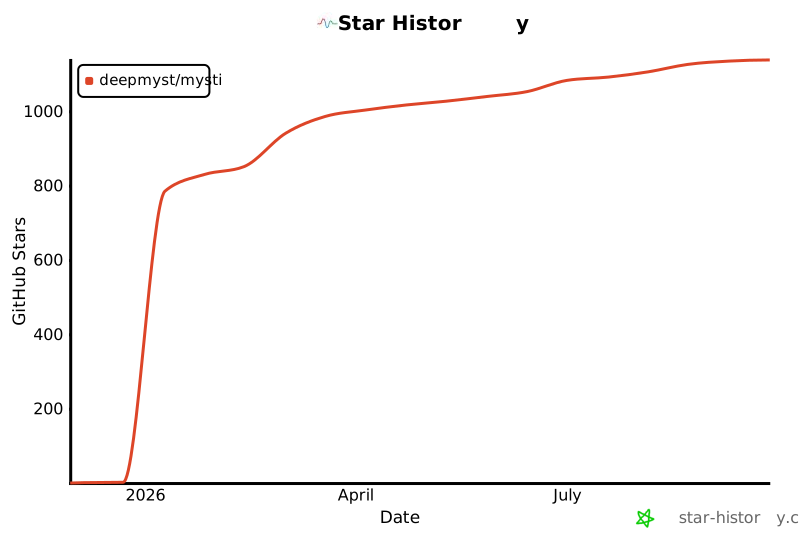
## Star History
If Mysti has been useful to you, consider giving it a star — it helps others discover the project and keeps us motivated!
Want to join them? Check out the [Contributing](#contributing) section below.
---
## Star History
If Mysti has been useful to you, consider giving it a star — it helps others discover the project and keeps us motivated!

---
## Contributing
We welcome contributions! Whether it's bug reports, feature requests, or code contributions.
- **Good First Issues**: Look for [`good first issue`](https://github.com/DeepMyst/Mysti/labels/good%20first%20issue) labels
- **Development**: Press `F5` in VS Code to launch Extension Development Host
- **Pull Requests**: Fork, create a feature branch, and submit a PR
See [CONTRIBUTING.md](CONTRIBUTING.md) for detailed guidelines.
---
## License
Apache License 2.0 — free to use, modify, and distribute, including for commercial purposes.
See the `LICENSE` file for full text.
---
Install •
Report Issue •
GitHub
Mysti — Built by DeepMyst Inc
Made with Mysti