# rustdesk
**Repository Path**: chinalxd/rustdesk
## Basic Information
- **Project Name**: rustdesk
- **Description**: 本仓库是 RustDesk 官方版本的定制增强分支。 在完整保留上游开源能力的基础上,针对企业内部 Windows 批量部署与运维场景做了增强。
- **Primary Language**: Unknown
- **License**: AGPL-3.0
- **Default Branch**: master
- **Homepage**: None
- **GVP Project**: No
## Statistics
- **Stars**: 0
- **Forks**: 0
- **Created**: 2026-07-10
- **Last Updated**: 2026-09-08
## Categories & Tags
**Categories**: Uncategorized
**Tags**: None
## README

Build •
Docker •
定制增强 •
Structure •
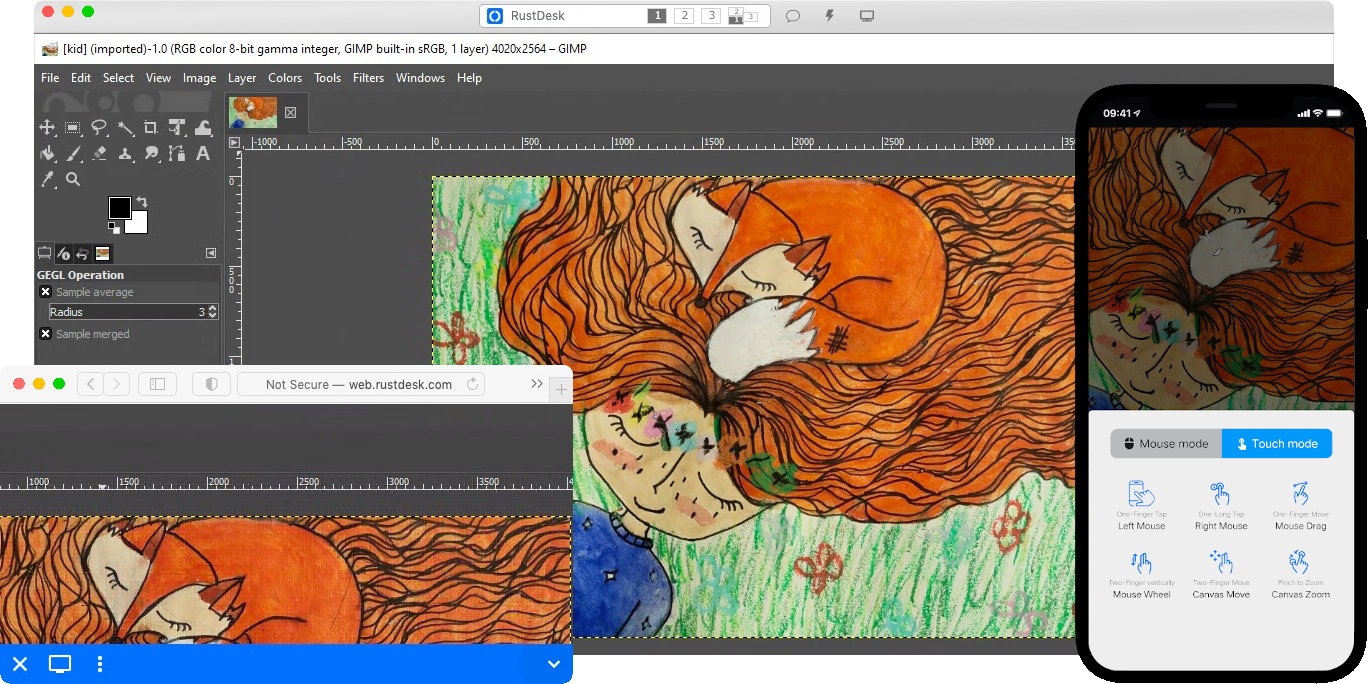
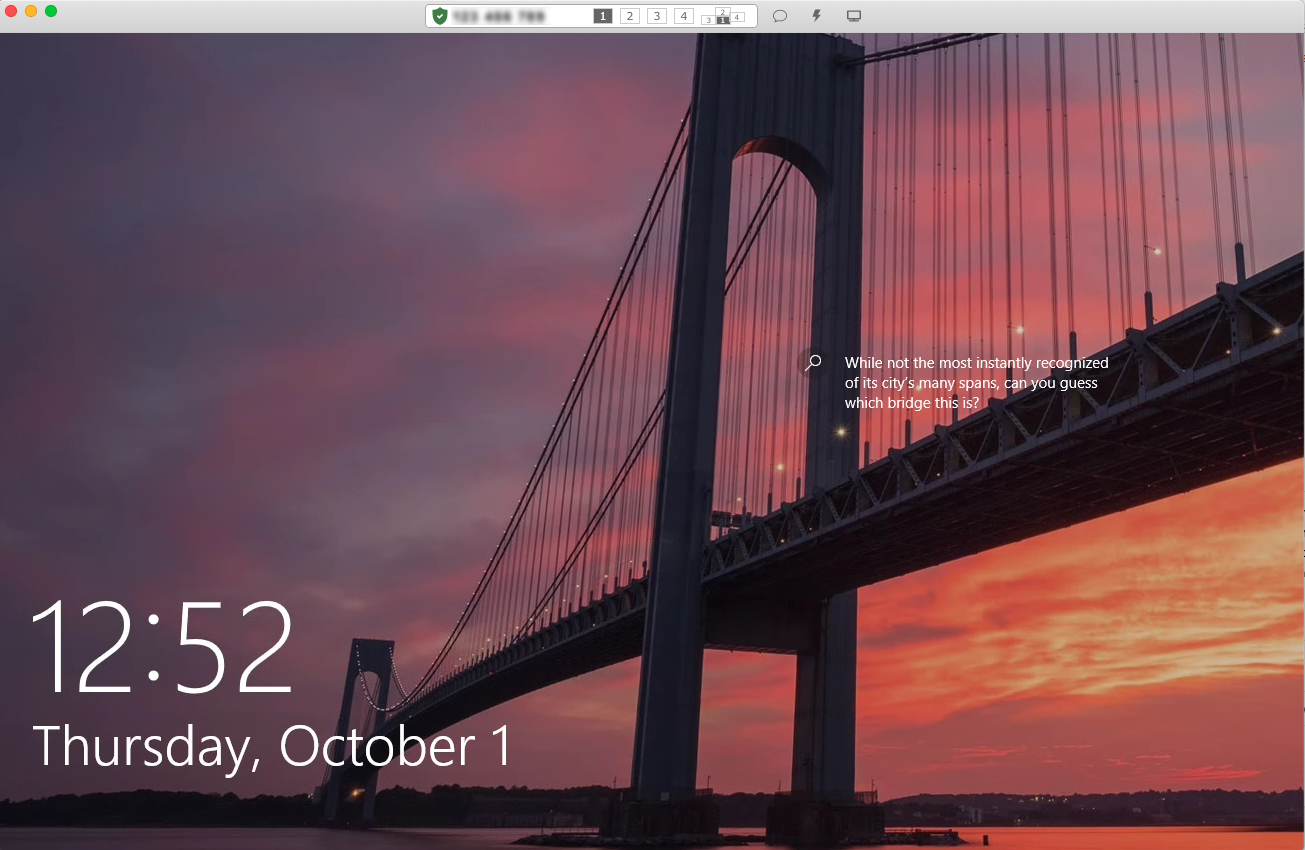
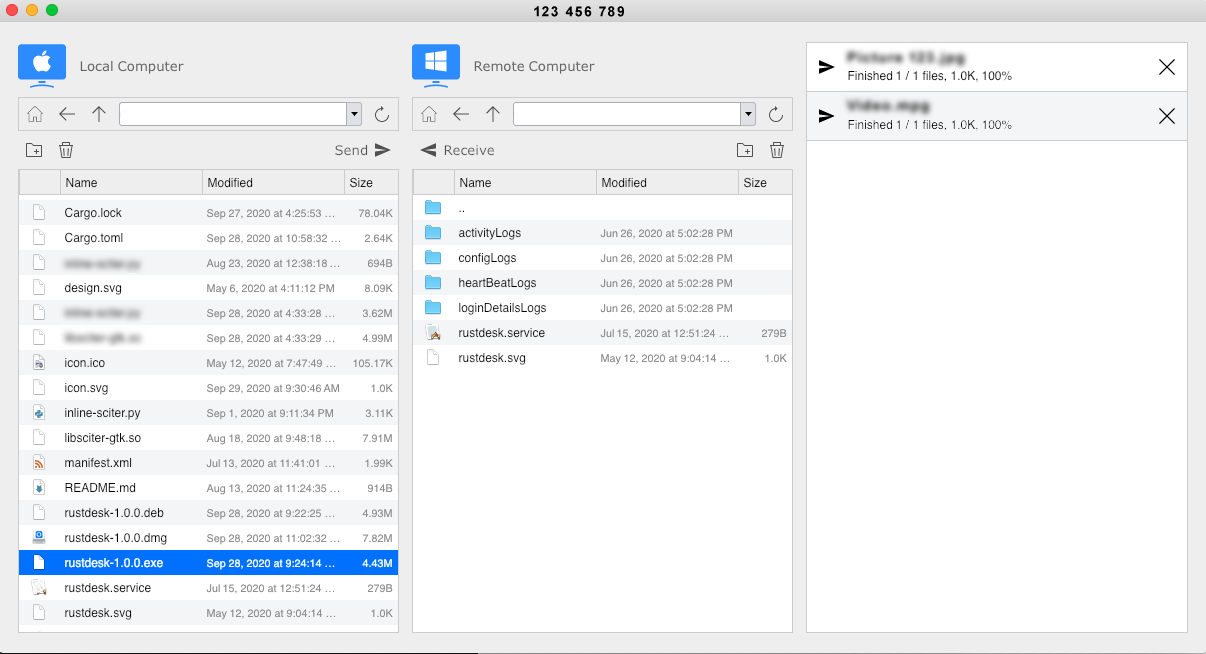
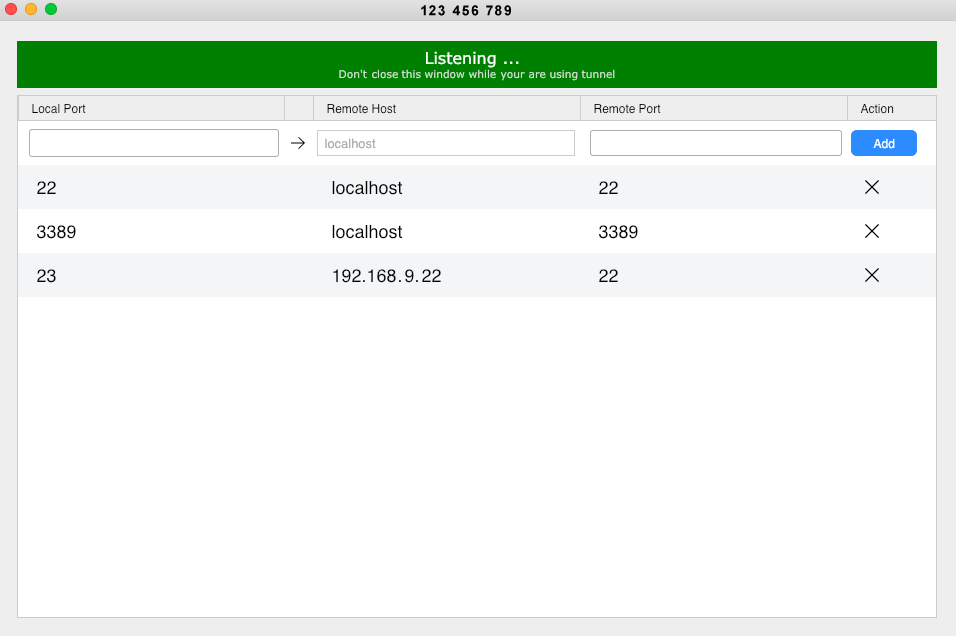
Snapshot
[Українська] | [česky] | [中文] | [Magyar] | [Español] | [فارسی] | [Français] | [Deutsch] | [Polski] | [Indonesian] | [Suomi] | [മലയാളം] | [日本語] | [Nederlands] | [Italiano] | [Русский] | [Português (Brasil)] | [Esperanto] | [한국어] | [العربي] | [Tiếng Việt] | [Dansk] | [Ελληνικά] | [Türkçe] | [Norsk] | [Română]
We need your help to translate this README, RustDesk UI and RustDesk Doc to your native language
---
## 🚀 定制增强功能 (Custom Enhancements)
> [!IMPORTANT]
> **本仓库是 RustDesk 官方版本的定制增强分支(v1.4.11)。**
> 在完整保留上游开源能力的基础上,针对企业内部 Windows 批量部署与运维场景做了以下增强。
> 下表为本分支**独有**功能,官方原版不具备。
>
> 🔹 跨会话复制文件 🔹 安装后自动启动服务并连接 🔹 卸载可彻底清除配置 🔹 CM 窗口完全隐藏
| # | 功能 | 说明 |
|---|------|------|
| 1 | **跨会话文件复制粘贴** | 控制端 A 会话中复制的文件,可在控制端 B 会话中直接粘贴(纯 Rust 层 cliprdr 消息中继,无需被控端参与),跨被控设备批量传文件更高效 |
| 2 | **远程文件复制粘贴** | 被控端 ↔ 控制端之间可直接复制/粘贴文件(sessionStart 事件流,剪贴板通道自动协商) |
| 3 | **剪贴板自动恢复** | 每次新建连接自动重建剪贴板上下文(`make_sure_enabled`),检测到 stopped 自动 reset/recreate,长时间会话不再丢剪贴板 |
| 4 | **安装后自动启动** | 安装/覆盖安装完成后自动弹出主窗口 + 托盘图标,服务自动创建并设为自启动(Automatic + RUNNING),已配置 ID/中继服务器时自动连接 |
| 5 | **卸载彻底清除配置** | 卸载时可选择一并删除用户及系统服务账户下的全部配置(ID、密码、连接记录、日志等),干净卸载不留残留(附带 `cleanup_rustdesk_config.ps1` 手动清理脚本) |
| 6 | **CM 窗口完全隐藏** | 连接管理窗口默认不弹出、不抢焦点,每 30 秒强制防弹窗加固,适合无人值守部署 |
| 7 | **静默提权安装** | 安装包 manifest `requireAdministrator`,支持 `--silent-install` 一键静默安装;安装器支持自选安装路径 |
| 8 | **安装失败可诊断** | 安装 bat 逐行执行日志写入 `%TEMP%\RustDesk_install.bat.log`(Stdio 物理重定向),失败弹窗直接提示日志路径,现场可追溯 |
| 9 | **服务操作竞态修复** | `sc stop/delete/create` 增加等待循环,消除 1073/1077 竞态导致的安装失败 |
---
### 以下为 RustDesk 官方开源说明
> [!Caution]
> **Misuse Disclaimer:**
> The developers of RustDesk do not condone or support any unethical or illegal use of this software. Misuse, such as unauthorized access, control or invasion of privacy, is strictly against our guidelines. The authors are not responsible for any misuse of the application.
[](https://rustdesk.com/pricing.html)
Yet another remote desktop solution, written in Rust. Works out of the box with no configuration required. You have full control of your data, with no concerns about security. You can use our rendezvous/relay server, [set up your own](https://rustdesk.com/server), or [write your own rendezvous/relay server](https://github.com/rustdesk/rustdesk-server-demo).
RustDesk welcomes contribution from everyone. See [CONTRIBUTING.md](docs/CONTRIBUTING.md) for help getting started.
[**FAQ**](https://github.com/rustdesk/rustdesk/wiki/FAQ)
[**BINARY DOWNLOAD**](https://github.com/rustdesk/rustdesk/releases)
[**NIGHTLY BUILD**](https://github.com/rustdesk/rustdesk/releases/tag/nightly)
[ ](https://f-droid.org/en/packages/com.carriez.flutter_hbb)
[
](https://f-droid.org/en/packages/com.carriez.flutter_hbb)
[ ](https://flathub.org/apps/com.rustdesk.RustDesk)
## Dependencies
Desktop versions use Flutter or Sciter (deprecated) for GUI, this tutorial is for Sciter only, since it is easier and more friendly to start. Check out our [CI](https://github.com/rustdesk/rustdesk/blob/master/.github/workflows/flutter-build.yml) for building Flutter version.
Please download Sciter dynamic library yourself.
[Windows](https://raw.githubusercontent.com/c-smile/sciter-sdk/master/bin.win/x64/sciter.dll) |
[Linux](https://raw.githubusercontent.com/c-smile/sciter-sdk/master/bin.lnx/x64/libsciter-gtk.so) |
[macOS](https://raw.githubusercontent.com/c-smile/sciter-sdk/master/bin.osx/libsciter.dylib)
## Raw Steps to build
- Prepare your Rust development env and C++ build env
- Install [vcpkg](https://github.com/microsoft/vcpkg), and set `VCPKG_ROOT` env variable correctly
- Windows: vcpkg install libvpx:x64-windows-static libyuv:x64-windows-static opus:x64-windows-static aom:x64-windows-static
- Linux/macOS: vcpkg install libvpx libyuv opus aom
- run `cargo run`
## [Build](https://rustdesk.com/docs/en/dev/build/)
## How to Build on Linux
### Ubuntu 18 (Debian 10)
```sh
sudo apt install -y zip g++ gcc git curl wget nasm yasm libgtk-3-dev clang libxcb-randr0-dev libxdo-dev \
libxfixes-dev libxcb-shape0-dev libxcb-xfixes0-dev libasound2-dev libpulse-dev cmake make \
libclang-dev ninja-build libgstreamer1.0-dev libgstreamer-plugins-base1.0-dev libpam0g-dev
```
### openSUSE Tumbleweed
```sh
sudo zypper install gcc-c++ git curl wget nasm yasm gcc gtk3-devel clang libxcb-devel libXfixes-devel cmake alsa-lib-devel gstreamer-devel gstreamer-plugins-base-devel xdotool-devel pam-devel
```
### Fedora 28 (CentOS 8)
```sh
sudo yum -y install gcc-c++ git curl wget nasm yasm gcc gtk3-devel clang libxcb-devel libxdo-devel libXfixes-devel pulseaudio-libs-devel cmake alsa-lib-devel gstreamer1-devel gstreamer1-plugins-base-devel pam-devel
```
### Arch (Manjaro)
```sh
sudo pacman -Syu --needed unzip git cmake gcc curl wget yasm nasm zip make pkg-config clang gtk3 xdotool libxcb libxfixes alsa-lib pipewire
```
### Install vcpkg
```sh
git clone https://github.com/microsoft/vcpkg
cd vcpkg
git checkout 2023.04.15
cd ..
vcpkg/bootstrap-vcpkg.sh
export VCPKG_ROOT=$HOME/vcpkg
vcpkg/vcpkg install libvpx libyuv opus aom
```
### Fix libvpx (For Fedora)
```sh
cd vcpkg/buildtrees/libvpx/src
cd *
./configure
sed -i 's/CFLAGS+=-I/CFLAGS+=-fPIC -I/g' Makefile
sed -i 's/CXXFLAGS+=-I/CXXFLAGS+=-fPIC -I/g' Makefile
make
cp libvpx.a $HOME/vcpkg/installed/x64-linux/lib/
cd
```
### Build
```sh
curl --proto '=https' --tlsv1.2 -sSf https://sh.rustup.rs | sh
source $HOME/.cargo/env
git clone --recurse-submodules https://github.com/rustdesk/rustdesk
cd rustdesk
mkdir -p target/debug
wget https://raw.githubusercontent.com/c-smile/sciter-sdk/master/bin.lnx/x64/libsciter-gtk.so
mv libsciter-gtk.so target/debug
VCPKG_ROOT=$HOME/vcpkg cargo run
```
## How to build with Docker
Begin by cloning the repository and building the Docker container:
```sh
git clone https://github.com/rustdesk/rustdesk
cd rustdesk
git submodule update --init --recursive
docker build -t "rustdesk-builder" .
```
Then, each time you need to build the application, run the following command:
```sh
docker run --rm -it -v $PWD:/home/user/rustdesk -v rustdesk-git-cache:/home/user/.cargo/git -v rustdesk-registry-cache:/home/user/.cargo/registry -e PUID="$(id -u)" -e PGID="$(id -g)" rustdesk-builder
```
Note that the first build may take longer before dependencies are cached, subsequent builds will be faster. Additionally, if you need to specify different arguments to the build command, you may do so at the end of the command in the `` position. For instance, if you wanted to build an optimized release version, you would run the command above followed by `--release`. The resulting executable will be available in the target folder on your system, and can be run with:
```sh
target/debug/rustdesk
```
Or, if you're running a release executable:
```sh
target/release/rustdesk
```
Please ensure that you run these commands from the root of the RustDesk repository, or the application may not find the required resources. Also note that other cargo subcommands such as `install` or `run` are not currently supported via this method as they would install or run the program inside the container instead of the host.
## File Structure
- **[libs/hbb_common](https://github.com/rustdesk/rustdesk/tree/master/libs/hbb_common)**: video codec, config, tcp/udp wrapper, protobuf, fs functions for file transfer, and some other utility functions
- **[libs/scrap](https://github.com/rustdesk/rustdesk/tree/master/libs/scrap)**: screen capture
- **[libs/enigo](https://github.com/rustdesk/rustdesk/tree/master/libs/enigo)**: platform specific keyboard/mouse control
- **[libs/clipboard](https://github.com/rustdesk/rustdesk/tree/master/libs/clipboard)**: file copy and paste implementation for Windows, Linux, macOS.
- **[src/ui](https://github.com/rustdesk/rustdesk/tree/master/src/ui)**: obsolete Sciter UI (deprecated)
- **[src/server](https://github.com/rustdesk/rustdesk/tree/master/src/server)**: audio/clipboard/input/video services, and network connections
- **[src/client.rs](https://github.com/rustdesk/rustdesk/tree/master/src/client.rs)**: start a peer connection
- **[src/rendezvous_mediator.rs](https://github.com/rustdesk/rustdesk/tree/master/src/rendezvous_mediator.rs)**: Communicate with [rustdesk-server](https://github.com/rustdesk/rustdesk-server), wait for remote direct (TCP hole punching) or relayed connection
- **[src/platform](https://github.com/rustdesk/rustdesk/tree/master/src/platform)**: platform specific code
- **[flutter](https://github.com/rustdesk/rustdesk/tree/master/flutter)**: Flutter code for desktop and mobile
- **[flutter/web/js](https://github.com/rustdesk/rustdesk/tree/master/flutter/web/v1/js)**: JavaScript for Flutter web client
## Screenshots

](https://flathub.org/apps/com.rustdesk.RustDesk)
## Dependencies
Desktop versions use Flutter or Sciter (deprecated) for GUI, this tutorial is for Sciter only, since it is easier and more friendly to start. Check out our [CI](https://github.com/rustdesk/rustdesk/blob/master/.github/workflows/flutter-build.yml) for building Flutter version.
Please download Sciter dynamic library yourself.
[Windows](https://raw.githubusercontent.com/c-smile/sciter-sdk/master/bin.win/x64/sciter.dll) |
[Linux](https://raw.githubusercontent.com/c-smile/sciter-sdk/master/bin.lnx/x64/libsciter-gtk.so) |
[macOS](https://raw.githubusercontent.com/c-smile/sciter-sdk/master/bin.osx/libsciter.dylib)
## Raw Steps to build
- Prepare your Rust development env and C++ build env
- Install [vcpkg](https://github.com/microsoft/vcpkg), and set `VCPKG_ROOT` env variable correctly
- Windows: vcpkg install libvpx:x64-windows-static libyuv:x64-windows-static opus:x64-windows-static aom:x64-windows-static
- Linux/macOS: vcpkg install libvpx libyuv opus aom
- run `cargo run`
## [Build](https://rustdesk.com/docs/en/dev/build/)
## How to Build on Linux
### Ubuntu 18 (Debian 10)
```sh
sudo apt install -y zip g++ gcc git curl wget nasm yasm libgtk-3-dev clang libxcb-randr0-dev libxdo-dev \
libxfixes-dev libxcb-shape0-dev libxcb-xfixes0-dev libasound2-dev libpulse-dev cmake make \
libclang-dev ninja-build libgstreamer1.0-dev libgstreamer-plugins-base1.0-dev libpam0g-dev
```
### openSUSE Tumbleweed
```sh
sudo zypper install gcc-c++ git curl wget nasm yasm gcc gtk3-devel clang libxcb-devel libXfixes-devel cmake alsa-lib-devel gstreamer-devel gstreamer-plugins-base-devel xdotool-devel pam-devel
```
### Fedora 28 (CentOS 8)
```sh
sudo yum -y install gcc-c++ git curl wget nasm yasm gcc gtk3-devel clang libxcb-devel libxdo-devel libXfixes-devel pulseaudio-libs-devel cmake alsa-lib-devel gstreamer1-devel gstreamer1-plugins-base-devel pam-devel
```
### Arch (Manjaro)
```sh
sudo pacman -Syu --needed unzip git cmake gcc curl wget yasm nasm zip make pkg-config clang gtk3 xdotool libxcb libxfixes alsa-lib pipewire
```
### Install vcpkg
```sh
git clone https://github.com/microsoft/vcpkg
cd vcpkg
git checkout 2023.04.15
cd ..
vcpkg/bootstrap-vcpkg.sh
export VCPKG_ROOT=$HOME/vcpkg
vcpkg/vcpkg install libvpx libyuv opus aom
```
### Fix libvpx (For Fedora)
```sh
cd vcpkg/buildtrees/libvpx/src
cd *
./configure
sed -i 's/CFLAGS+=-I/CFLAGS+=-fPIC -I/g' Makefile
sed -i 's/CXXFLAGS+=-I/CXXFLAGS+=-fPIC -I/g' Makefile
make
cp libvpx.a $HOME/vcpkg/installed/x64-linux/lib/
cd
```
### Build
```sh
curl --proto '=https' --tlsv1.2 -sSf https://sh.rustup.rs | sh
source $HOME/.cargo/env
git clone --recurse-submodules https://github.com/rustdesk/rustdesk
cd rustdesk
mkdir -p target/debug
wget https://raw.githubusercontent.com/c-smile/sciter-sdk/master/bin.lnx/x64/libsciter-gtk.so
mv libsciter-gtk.so target/debug
VCPKG_ROOT=$HOME/vcpkg cargo run
```
## How to build with Docker
Begin by cloning the repository and building the Docker container:
```sh
git clone https://github.com/rustdesk/rustdesk
cd rustdesk
git submodule update --init --recursive
docker build -t "rustdesk-builder" .
```
Then, each time you need to build the application, run the following command:
```sh
docker run --rm -it -v $PWD:/home/user/rustdesk -v rustdesk-git-cache:/home/user/.cargo/git -v rustdesk-registry-cache:/home/user/.cargo/registry -e PUID="$(id -u)" -e PGID="$(id -g)" rustdesk-builder
```
Note that the first build may take longer before dependencies are cached, subsequent builds will be faster. Additionally, if you need to specify different arguments to the build command, you may do so at the end of the command in the `` position. For instance, if you wanted to build an optimized release version, you would run the command above followed by `--release`. The resulting executable will be available in the target folder on your system, and can be run with:
```sh
target/debug/rustdesk
```
Or, if you're running a release executable:
```sh
target/release/rustdesk
```
Please ensure that you run these commands from the root of the RustDesk repository, or the application may not find the required resources. Also note that other cargo subcommands such as `install` or `run` are not currently supported via this method as they would install or run the program inside the container instead of the host.
## File Structure
- **[libs/hbb_common](https://github.com/rustdesk/rustdesk/tree/master/libs/hbb_common)**: video codec, config, tcp/udp wrapper, protobuf, fs functions for file transfer, and some other utility functions
- **[libs/scrap](https://github.com/rustdesk/rustdesk/tree/master/libs/scrap)**: screen capture
- **[libs/enigo](https://github.com/rustdesk/rustdesk/tree/master/libs/enigo)**: platform specific keyboard/mouse control
- **[libs/clipboard](https://github.com/rustdesk/rustdesk/tree/master/libs/clipboard)**: file copy and paste implementation for Windows, Linux, macOS.
- **[src/ui](https://github.com/rustdesk/rustdesk/tree/master/src/ui)**: obsolete Sciter UI (deprecated)
- **[src/server](https://github.com/rustdesk/rustdesk/tree/master/src/server)**: audio/clipboard/input/video services, and network connections
- **[src/client.rs](https://github.com/rustdesk/rustdesk/tree/master/src/client.rs)**: start a peer connection
- **[src/rendezvous_mediator.rs](https://github.com/rustdesk/rustdesk/tree/master/src/rendezvous_mediator.rs)**: Communicate with [rustdesk-server](https://github.com/rustdesk/rustdesk-server), wait for remote direct (TCP hole punching) or relayed connection
- **[src/platform](https://github.com/rustdesk/rustdesk/tree/master/src/platform)**: platform specific code
- **[flutter](https://github.com/rustdesk/rustdesk/tree/master/flutter)**: Flutter code for desktop and mobile
- **[flutter/web/js](https://github.com/rustdesk/rustdesk/tree/master/flutter/web/v1/js)**: JavaScript for Flutter web client
## Screenshots



