# Vue-Mall
**Repository Path**: coder-itl/Vue-Mall
## Basic Information
- **Project Name**: Vue-Mall
- **Description**: No description available
- **Primary Language**: JavaScript
- **License**: Not specified
- **Default Branch**: develop
- **Homepage**: None
- **GVP Project**: No
## Statistics
- **Stars**: 0
- **Forks**: 0
- **Created**: 2021-06-19
- **Last Updated**: 2021-08-31
## Categories & Tags
**Categories**: Uncategorized
**Tags**: Vue-Vuex-Router
## README
### Vue 项目文档
+ 效果总览
 - 项目部署查看
```javascript
# GitPages部署失败,Nginx部署成功
```
- `Vue`部署教程
```java
https://cli.vuejs.org/zh/guide/deployment.html#github-pages
```
- 项目拉取
```bash
git clone -b develop https://github.com/coder-itl/Vue-Mall.git
```
- 启动项目
```javascript
// 进入主目录
cd mgj-mall
// 安装项目依赖
npm install
// 启动服务
npm rum serve
// 打包
npm run dev
```
### MGJ-Mall Day-01
- 项目结构划分
- 项目部署查看
```javascript
# GitPages部署失败,Nginx部署成功
```
- `Vue`部署教程
```java
https://cli.vuejs.org/zh/guide/deployment.html#github-pages
```
- 项目拉取
```bash
git clone -b develop https://github.com/coder-itl/Vue-Mall.git
```
- 启动项目
```javascript
// 进入主目录
cd mgj-mall
// 安装项目依赖
npm install
// 启动服务
npm rum serve
// 打包
npm run dev
```
### MGJ-Mall Day-01
- 项目结构划分
 - `vue-cli 3`配置查看以及修改
```bash
查看原配置: node_modules/@vue/cli-serve/webpack.config.js
新增配置: 在项目根目录下创建文件 "vue.config.js"
```
- `VueRouter`使用
```javascript
/*
1. 安装模块 npm install --save vue-router
2. 在 src 目录下新建文件夹 router,再在该文件夹下新建 "index.js" 文件
3. 在 main.js 中引入 router,注册
4. 注意: routes 名称
*/
index.js(路由基础使用):
-----------------------------------------------------------
import Vue from "vue"
import VueRouter from "vue-router"
// 路由懒加载
const Home = () => import('../components/home/Home');
```
```javascript
// 安装插件
Vue.use(VueRouter)
// 映射
const routes = [
{ path: '/', redirect: '/home' },
// { path: '/home', component: Home } update: 2021-05-31 learn guild nav
{
path: '/home',
component: Home,
meta: {
title: '首页',
},
},
]
// 配置路由和组件之间的应用关系
const router = new VueRouter({
mode: 'history',
routes
})
// 全局导航首位 实现跳转时更换 title 功能
router.beforeEach((to, from, next) => {
document.title = to.matched[0].meta.title;
next();
});
// 将 router 对象传入到 Vue 实例中
export default router
```
- 箭头函数
```javascript
问题: 箭头函数中的 this 是如何查找的?
答案: 向外层作用域,一层层查找 this ,直到有 this 的定义
```
- 前端渲染后端渲染和前端路由后端路由
- 前端渲染
```javascript
定义:指的是后端返回 JSON 数据,前端利用预先写的 html 模板,循环读取JSON数据,拼接字符串(es6的模板字符串特性大大减少了拼接字符串的的成本),并插入页面。
优点: 网络传输数据量小。不占用服务端运算资源(解析模板),模板在前端(很有可能仅部分在前端),改结构变交互都前端自己来了,改完自己调就行。
缺点: 前端耗时较多,对前端工作人员水平要求相对较高。前端代码较多,因为部分以前在后台处理的交互逻辑交给了前端处理。占用少部分客户端运算资源用于解析模板。
```
- 后端渲染
```javascript
定义: 前端请求,后端用后台模板引擎直接生成html,前端接受到数据之后,直接插入页面。
优点: 前端耗时少,即减少了首屏时间,模板统一在后端。前端(相对)省事,不占用客户端运算资源(解析模板)
缺点: 占用服务器资源。
```
- 前端路由
```javascript
定义: 在单页面应用,大部分页面结构不变,只改变部分内容的使用
优点: 用户体验好,不需要每次都从服务器全部获取,快速展现给用户
缺点: 使用浏览器的前进后退会重新发送请求,没有合理地利用缓存单页面无法记住之前滚动地位置,无法在前进,后退地时候记住滚动的位置
```
- 后端路由
```javascript
通过用户请求的 url 导航到具体的 html 页面,每跳转到不同的 URL,都是重新访问服务端,然后服务端返回页面,页面可以是服务端获取数据m然后和模板组合,返回 HTML ,也可以是直接返回模板 HTML ,然后由前端 JS 再去请求数据,使用前端模板和数据进行组合,生成想要的 HTML
```
- `hash`模式修改
```javascript
const router = new VueRouter({
mode: 'history', // 添加该配置即可在路径显示中去除 "#"
})
```
- `router-link`的其他属性
```javascript
测试
// 携带 query
测试
// 获取对应的query 值
$route.query.key | $route.query[获取整个对象]
```
- `vue-router`打包解析
```javascript
...
```
- 路由懒加载
```javascript
// 路由懒加载最新写法
const Home = () => import('/home path')
const routes = [
{
path: '/home',
component: Home,
},
]
```
- 路由嵌套
```javascript
// 子路由
const Home = () => import('/home path')
const routes = [
{
path: '/home',
component: Home,
children: [
{
path: 'childrenRouter-path',
component: ChildrenRouter,
},
],
},
// 参数型
{
path:
'/home/:homeId [:homeId 动态参数,router-link 的 to 需要同时携带相应的参数]',
},
]
// 注意: 子路由的 位置,注意区分父路由的 router-view ,子路由也可以添加重定向
```
- 全局导航守卫
```javascript
1. 什么是导航守卫
vue-router提供的导航守卫主要用来通过跳转或取消的方式守卫导航。
```
```javascript
官网了解更多关于导航守卫: 'https://router.vuejs.org/zh/guide/advanced/navigation-guards.html'
```
### MGJ-Mall Day-02
- 路径别名配置
```javascript
vue.config.js:
------------------------------------------
// 新增自定义配置文件
module.exports = {
configureWebpack: {
resolve: {
alias: {
assets: '@/assets', // 静态资源路径别名
common: '@/common',
components: '@/components', // 组件别名
views: '@/views',
network: '@/network', // 网络封装
},
},
},
}
------------------------------------------
```
- 组件封装
```javascript
1. 封装组件 TabBar
2. 封装组件 TabBarItem
3. 封装组件 MainTabBar
```
- 动态封装组件路由点击颜色
```javascript
props: {
path: String,
// 动态封装组件路由点击颜色
activeColor: {
type: String,
default: "red",
},
},
computed:{
activeStyle() {
return this.isActive ? { color: this.activeColor } : {};
},
}
```
- `vue-cli 3`配置查看以及修改
```bash
查看原配置: node_modules/@vue/cli-serve/webpack.config.js
新增配置: 在项目根目录下创建文件 "vue.config.js"
```
- `VueRouter`使用
```javascript
/*
1. 安装模块 npm install --save vue-router
2. 在 src 目录下新建文件夹 router,再在该文件夹下新建 "index.js" 文件
3. 在 main.js 中引入 router,注册
4. 注意: routes 名称
*/
index.js(路由基础使用):
-----------------------------------------------------------
import Vue from "vue"
import VueRouter from "vue-router"
// 路由懒加载
const Home = () => import('../components/home/Home');
```
```javascript
// 安装插件
Vue.use(VueRouter)
// 映射
const routes = [
{ path: '/', redirect: '/home' },
// { path: '/home', component: Home } update: 2021-05-31 learn guild nav
{
path: '/home',
component: Home,
meta: {
title: '首页',
},
},
]
// 配置路由和组件之间的应用关系
const router = new VueRouter({
mode: 'history',
routes
})
// 全局导航首位 实现跳转时更换 title 功能
router.beforeEach((to, from, next) => {
document.title = to.matched[0].meta.title;
next();
});
// 将 router 对象传入到 Vue 实例中
export default router
```
- 箭头函数
```javascript
问题: 箭头函数中的 this 是如何查找的?
答案: 向外层作用域,一层层查找 this ,直到有 this 的定义
```
- 前端渲染后端渲染和前端路由后端路由
- 前端渲染
```javascript
定义:指的是后端返回 JSON 数据,前端利用预先写的 html 模板,循环读取JSON数据,拼接字符串(es6的模板字符串特性大大减少了拼接字符串的的成本),并插入页面。
优点: 网络传输数据量小。不占用服务端运算资源(解析模板),模板在前端(很有可能仅部分在前端),改结构变交互都前端自己来了,改完自己调就行。
缺点: 前端耗时较多,对前端工作人员水平要求相对较高。前端代码较多,因为部分以前在后台处理的交互逻辑交给了前端处理。占用少部分客户端运算资源用于解析模板。
```
- 后端渲染
```javascript
定义: 前端请求,后端用后台模板引擎直接生成html,前端接受到数据之后,直接插入页面。
优点: 前端耗时少,即减少了首屏时间,模板统一在后端。前端(相对)省事,不占用客户端运算资源(解析模板)
缺点: 占用服务器资源。
```
- 前端路由
```javascript
定义: 在单页面应用,大部分页面结构不变,只改变部分内容的使用
优点: 用户体验好,不需要每次都从服务器全部获取,快速展现给用户
缺点: 使用浏览器的前进后退会重新发送请求,没有合理地利用缓存单页面无法记住之前滚动地位置,无法在前进,后退地时候记住滚动的位置
```
- 后端路由
```javascript
通过用户请求的 url 导航到具体的 html 页面,每跳转到不同的 URL,都是重新访问服务端,然后服务端返回页面,页面可以是服务端获取数据m然后和模板组合,返回 HTML ,也可以是直接返回模板 HTML ,然后由前端 JS 再去请求数据,使用前端模板和数据进行组合,生成想要的 HTML
```
- `hash`模式修改
```javascript
const router = new VueRouter({
mode: 'history', // 添加该配置即可在路径显示中去除 "#"
})
```
- `router-link`的其他属性
```javascript
测试
// 携带 query
测试
// 获取对应的query 值
$route.query.key | $route.query[获取整个对象]
```
- `vue-router`打包解析
```javascript
...
```
- 路由懒加载
```javascript
// 路由懒加载最新写法
const Home = () => import('/home path')
const routes = [
{
path: '/home',
component: Home,
},
]
```
- 路由嵌套
```javascript
// 子路由
const Home = () => import('/home path')
const routes = [
{
path: '/home',
component: Home,
children: [
{
path: 'childrenRouter-path',
component: ChildrenRouter,
},
],
},
// 参数型
{
path:
'/home/:homeId [:homeId 动态参数,router-link 的 to 需要同时携带相应的参数]',
},
]
// 注意: 子路由的 位置,注意区分父路由的 router-view ,子路由也可以添加重定向
```
- 全局导航守卫
```javascript
1. 什么是导航守卫
vue-router提供的导航守卫主要用来通过跳转或取消的方式守卫导航。
```
```javascript
官网了解更多关于导航守卫: 'https://router.vuejs.org/zh/guide/advanced/navigation-guards.html'
```
### MGJ-Mall Day-02
- 路径别名配置
```javascript
vue.config.js:
------------------------------------------
// 新增自定义配置文件
module.exports = {
configureWebpack: {
resolve: {
alias: {
assets: '@/assets', // 静态资源路径别名
common: '@/common',
components: '@/components', // 组件别名
views: '@/views',
network: '@/network', // 网络封装
},
},
},
}
------------------------------------------
```
- 组件封装
```javascript
1. 封装组件 TabBar
2. 封装组件 TabBarItem
3. 封装组件 MainTabBar
```
- 动态封装组件路由点击颜色
```javascript
props: {
path: String,
// 动态封装组件路由点击颜色
activeColor: {
type: String,
default: "red",
},
},
computed:{
activeStyle() {
return this.isActive ? { color: this.activeColor } : {};
},
}
```
 - `axios`基础封装使用
```javascript
import axios from 'axios'
export function request(config) {
// 1.创建axios的实例
const instance = axios.create({
baseURL: 'http://123.207.32.32:8000',
timeout: 5000,
})
// 2.axios的拦截器
// 2.1.请求拦截的作用
instance.interceptors.request.use(
(config) => {
return config
},
(err) => {
// console.log(err);
},
)
// 2.2.响应拦截
instance.interceptors.response.use(
(res) => {
return res.data
},
(err) => {
console.log(err)
},
)
// 3.发送真正的网络请求
return instance(config)
}
```
- 封装`axios`前期出现`bug`,已经更正,成功请求首页轮播图数据
- `axios`基础封装使用
```javascript
import axios from 'axios'
export function request(config) {
// 1.创建axios的实例
const instance = axios.create({
baseURL: 'http://123.207.32.32:8000',
timeout: 5000,
})
// 2.axios的拦截器
// 2.1.请求拦截的作用
instance.interceptors.request.use(
(config) => {
return config
},
(err) => {
// console.log(err);
},
)
// 2.2.响应拦截
instance.interceptors.response.use(
(res) => {
return res.data
},
(err) => {
console.log(err)
},
)
// 3.发送真正的网络请求
return instance(config)
}
```
- 封装`axios`前期出现`bug`,已经更正,成功请求首页轮播图数据
 ### MGJ-Mall Day-03
- `TabControl`产生小`BUG`
### MGJ-Mall Day-03
- `TabControl`产生小`BUG`
 - 首先查看了书写过程,起初没检查出有效信息,进行了版本回退
```bash
# 查看提交日志
git log --pretty=oneline
# 进行版本回退
git reset --hard commit-id
# 发现回退错误,又进行未来版本回退
git reflog
```
- 最终解决方案
```javascript
在经过仔细阅读代码后,发现在 tabControl.vue 文件中多了一个空白的 script 标签,导致 props 的 titles属性无法被父组件获取
解决方案:
删除 script 标签
```
- 商品数据展示模型
```javascript
goods: {
'pop': { page: 0, list: [] },
'new': { page: 0, list: [] },
'sell': { page: 0, list: [] }
}
```
- 如何将一个数组存放到另一个数组?
- 循环
- `...数组名`
- 文字样式使用
```css
/* 文字属性 */
text-overflow: ellipsis; /* 这个关键字的意思是“用一个省略号 ('…', U+2026 HORIZONTAL ELLIPSIS)来表示被截断的文本”。 */
white-space: nowrap; /* 和 normal 一样,连续的空白符会被合并。但文本内的换行无效。 */
margin-bottom: 3px;
```
- `flex`布局
```css
父元素:
display: flex;
子元素:
flex: 1; /* 省略写法 */ 查阅资料: [ https://developer.mozilla.org/zh-CN/docs/Web/CSS/flex ]
flex-grow
flex-shrink
flex-basis
```
- 子组件的自定义事件
```javascript
TabControl.vue:
itemClick(index) {
this.currentIndex = index;
// 自定义事件: 子传父 this.$emit('自定义事件名称',参数)
this.$emit('tabClick', index)
}
```
```javascript
/*
* 获取自定义事件
*/
@tabClick="homeTabClick"
-------------------------------------------------
Home.vue:
homeTabClick(index) {
console.log('$emit事件获取监听');
console.log(index);
...
```
- `switch...case`
```javascript
...
switch (index) {
case 0:
this.currentType = 'pop';
break;
case 1:
this.currentType = 'new';
break;
case 2:
this.currentType = 'sell';
break;
}
}, // homeTabClick 结束代码块
```
- 演示效果
- 首先查看了书写过程,起初没检查出有效信息,进行了版本回退
```bash
# 查看提交日志
git log --pretty=oneline
# 进行版本回退
git reset --hard commit-id
# 发现回退错误,又进行未来版本回退
git reflog
```
- 最终解决方案
```javascript
在经过仔细阅读代码后,发现在 tabControl.vue 文件中多了一个空白的 script 标签,导致 props 的 titles属性无法被父组件获取
解决方案:
删除 script 标签
```
- 商品数据展示模型
```javascript
goods: {
'pop': { page: 0, list: [] },
'new': { page: 0, list: [] },
'sell': { page: 0, list: [] }
}
```
- 如何将一个数组存放到另一个数组?
- 循环
- `...数组名`
- 文字样式使用
```css
/* 文字属性 */
text-overflow: ellipsis; /* 这个关键字的意思是“用一个省略号 ('…', U+2026 HORIZONTAL ELLIPSIS)来表示被截断的文本”。 */
white-space: nowrap; /* 和 normal 一样,连续的空白符会被合并。但文本内的换行无效。 */
margin-bottom: 3px;
```
- `flex`布局
```css
父元素:
display: flex;
子元素:
flex: 1; /* 省略写法 */ 查阅资料: [ https://developer.mozilla.org/zh-CN/docs/Web/CSS/flex ]
flex-grow
flex-shrink
flex-basis
```
- 子组件的自定义事件
```javascript
TabControl.vue:
itemClick(index) {
this.currentIndex = index;
// 自定义事件: 子传父 this.$emit('自定义事件名称',参数)
this.$emit('tabClick', index)
}
```
```javascript
/*
* 获取自定义事件
*/
@tabClick="homeTabClick"
-------------------------------------------------
Home.vue:
homeTabClick(index) {
console.log('$emit事件获取监听');
console.log(index);
...
```
- `switch...case`
```javascript
...
switch (index) {
case 0:
this.currentType = 'pop';
break;
case 1:
this.currentType = 'new';
break;
case 2:
this.currentType = 'sell';
break;
}
}, // homeTabClick 结束代码块
```
- 演示效果
 * `better-scroll`库的使用
- 安装
```bash
npm install better-scroll --save
```
- 实现局部滚动的方法
1. 原生
```css
/* 内容盒子 */
.content {
height: 200px;
background-color: pink;
overflow-y: scroll; /* Y 轴区域滚动 */
}
```
2. 基础使用过程
```javascript
* `better-scroll`库的使用
- 安装
```bash
npm install better-scroll --save
```
- 实现局部滚动的方法
1. 原生
```css
/* 内容盒子 */
.content {
height: 200px;
background-color: pink;
overflow-y: scroll; /* Y 轴区域滚动 */
}
```
2. 基础使用过程
```javascript
分类
- Better-Scroll数据测试1
- Better-Scroll数据测试2
...
- Better-Scroll数据测试99
- Better-Scroll数据测试100
```
3. 封装`BScroll`
```javascript
```
- 组件所有的`原生`事件监听,需要使用`修饰符.native`
```javascript
// back-top 组件
```
- 实现返回顶部原理
```javascript
1. 组件注册点击事件
2. `封装 scrollTo(x,y,time)`
3. `this.$refs.scroll.scrollTo(0, 0, 500)`
```
- 第三方插件使用思想
```javascript
为避免过度依赖第三方插件使用,使用之前先对第三方插件进行`组件`封装,这样做的优势在于后期维护性
```
- `Back-Top`的显示与影藏
```javascript
Scroll.vue:
// 2. 监听滚动位置
this.scroll.on('scroll', (position) => {
// 文档地址
// console.log('Better-Scroll 文档地址: https://better-scroll.github.io/docs/zh-CN/guide/');
// console.log(position); 输出封装
this.$emit('scroll', position);
})
-----------------------------------------------------------------
Home.vue:
data(){
return {
isShowBackTop: false // 默认 false-> 隐藏,true-> 显示
}
}
// 自定义事件
contentScroll(position) {
console.log(position);
this.isShowBackTop = (-position.y) > 1000;
},
```
### MGJ-Mall Day-04
+ `Butter-Scroll`带来的`BUG`分析与解决
```javascript
Better-Scroll 在决定有多少区域可以滚动时,时根据 scrollHeight 属性决定
scrollHeight 属性是根据 Better-Scroll 的 content 中的子组件的高度,但是我们的首页中m刚开始在计算 scrollHeight 属性时,是没有将图片计算在内的,所以,计算出来的是一个错误数据,后来图片加载进来之后有了新的高度,但是 scrollHeight 属性并没有进行更新,所以出现了滚动的问题.
```
+ 解决方案
```javascript
监听每一张图片是否加载完成,只要有一张图片加载完成了,执行一次 refresh()
```
+ 如何监听图片加载完成了
+ 原生的`js`监听图片:`img.onload = function(){}`
+ `Vue`中监听:`@load='方法'`
+ 事件总线
```javascript
main.js:
Vue.protoType.$bus = new Vue()
```
```
```
+ 防抖
```javascript
mounted() {
const refresh = this.debounce(this.$refs.scroll.refresh,500);
// 监听 item 中图片加载完成
this.$bus.$on('itemImageLoad', () => {
// 防抖
refresh();
});
},
methods:{
// 防抖函数
debounce(func, delay) {
let timer = null;
return function (...args) {
if (timer) clearTimeout(timer)
timer = setTimeout(() => {
func.apply(this, args)
}, delay)
}
},
}
```
+ 防抖函数起作用的过程
```javascript
如果我们直接执行 refresh,那么 refresh函数会被执行 30 次m我们可以将 refresh 函数传入到 debounce【防抖】 函数中,生成一个新的函数,之后在调用非常频繁的时候m就是用新生成的函数,而新生成的函数并不会非常频繁的调用,如果下一次执行来的非常快,那么会将上一次取消掉
```
+ 吸顶效果实现
```javascript
// 对 tab-control 组件复用,
homeClick(){
// 对两个 tabcontrol 进行统一
this.$refs.tabControll.currentIndex = index;
this.$refs.tabControl.currentIndex = index;
}
```
+ 如何获取一个组件的元素
```javascript
TabControl.vue:
...
methods:{
getTabControlc(){
this.$refs.tabControl.$el
}
}
```
+ 保留状态
```javascript
1. keep-alive
2. 记录值
activated() {
// 0,y,time
this.$refs.scroll.scrollTo(0, this.saveY, 0);
this.$refs.scroll.refresh();
},
deactivated() {
this.saveY = this.$refs.scroll.getScollY();
},
```
### MGJ-Mall Day-05
+ 疑问点
```javascript
// axios 封装时如何使用 query
```
+ 如何让一个组件不进行缓存(`刷新执行 create(){}`),`未生效,详情页轮播图数据需要强制刷新?`
```javascript
exclude="不被包含的组件名称"
```
+ 如何将服务器杂乱的信息处理为合理数据
```javascript
// 面向一个类开发
export class Goods {
constructor(itemInfo, columns, service) {
this.desc = itemInfo.desc
this.price = itemInfo.price
this.oldPrice = itemInfo.oldPrice
this.discount = itemInfo.discount
this.columns = columns
this.service = service
}
}
```
 + `scroll`使用注意点
```css
包裹必须指定高度
```
+ `watch:{}`
```javascript
// 目的: 获取图片个数
watch:{
detailInfo() {
this.imageLength = this.detailInfo.detailImage[0].list.length; // 避免被调用多次
}
}
```
+ `scroll`使用注意点
```css
包裹必须指定高度
```
+ `watch:{}`
```javascript
// 目的: 获取图片个数
watch:{
detailInfo() {
this.imageLength = this.detailInfo.detailImage[0].list.length; // 避免被调用多次
}
}
```
 ### MGJ-MallDay-06
+ 实现参数数据请求展示
```javascript
1. 放弃类的构建,直接请求 itemParams 对象
2. 父组件初始化属性
3. 子组件 props 传递
```
+ 疑问点
```javascript
父子组件的参数名称问题[props]
```
+ 如何将`时间戳转换成时间格式化字符串`
```javascript
时间戳: unix时间戳是从1970年1月1日(UTC/GMT的午夜)开始所经过的`秒数`,不考虑闰秒
```
```javascript
注意: 时间戳(单位: 秒)
Eg: 123456(s)*1000 = 123456000 ms
Date对象是 JavaScript 原生的时间库。它以1970年1月1日00:00:00作为时间的零点,可以表示的时间范围是前后各1亿天(单位为`毫秒`)。
1. 将时间戳转换为 Date 对象
const date = new Date() // 单位: 'ms'
2. 将 date 进行格式化,转换成对应的字符串
+ date.getYear() 年 ···月(getMonth)
+ format(date,'格式化类型[Eg. yyyy-MM-dd hh:mm:ss 2021-06-11 07:03 ]')
date --> FormatString(常用)
y: year 年
M: Month 月
d: day 日
h: hours 小时(h-12小时,H-24小时)
m: minutes 分钟
s: seconds 秒钟
```
+ 组件复用时引起的`eror`
```javascript
computed: {
showImage() {
// 解决方案: 前面为原始获取 || 后面为新数据源获取
return this.goodsItem.image || this.goodsItem.show.img;
}
}
```
+ `mixin[混入]`
```javascript
// 使用原因 computed 代码冗余
Home.vue:
computed(){
...
}
Detail.vue:
computed(){
...
}
```
+ 为什么要取消全局事件监听
```bash
```
+ `iid`传入为什么没有变化
```javascript
主要原因误解 params 和 query
export function getDetail(iid) {
return request({
url: '/detail',
params: {
iid,
},
})
}
保存 iid: this.iid = this.$route.params.iid;
```
+ `toast`封装
```javascript
import Toast from './Toast'
const obj = {}
obj.install = function (Vue) {
// 1. 创建组件构造器
const toastConstructor = Vue.extend(Toast)
// 2.new的方式,根据组件构造器,创建一个组件对象
const toast = new toastConstructor()
// 3.将组件对象手动挂载到某一个DOM元素上
toast.$mount(document.createElement('div'))
// 4.toast.$el对应的就是div
document.body.appendChild(toast.$el)
Vue.prototype.$toast = toast
}
export default obj
main.js:
import toast from "file-path"
Vue.use(toast)
使用:
this.$toast.show(res, 2000)
show函数封装:
show(message, duration = 2000) {
this.message = message;
this.isShow = true;
// 可以用setTimeout实现,也可以用动画实现
setTimeout(() => {
this.isShow = false;
this.message = '';
}, duration);
}
```
+ `fastclick`解决`300ms`延迟
+ 安装
```bash
npm install fastclick --save
```
+ 使用
```javascript
main.js:
import FastClick from 'fastclick'
FastClick.attach(document.body)
```
### MGJ-MallDay-07
+ 详情页联动
```javascript
// NavBar 发射事件,Detail 接受事件,再根据 index 跳转到对应位置
titleClick(index) {
console.log('title index', index);
// 根据 index 跳转到对应位置
this.$refs.scroll.scrollTo(0, -this.themeTopYs[index], 500);
}
```
+ `$nextTick()`
```javascript
// 根据最新的数据 对应的 DOM 是已经被渲染出来
// 但是图片依然没有加载完
this.$nextTick(()=>{
this.themeTopYs.push(0), // 商品offsetTop
this.themeTopYs.push(this.$refs.params[自定义名称].$el.offsetTop), // 参数offsetTop
this.themeTopYs.push(this.$refs.comment.$el.offsetTop), // 评论的 offsetTop
this.themeTopYs.push(this.$refs.recommend.$el.offsetTop), // 推荐offsetTop
})
```
+ 顶部导航滚动发生联动变化
```javascript
contentScroll(position) {
let positionY = -position.y;
let length = this.themeTopYs.length;
//hack做法,
for (let i = 0; i < length; i++) {
if (this.currentIndex !== i && positionY >= this.themeTopYs[i] && positionY < this.themeTopYs[i + 1]) {
this.currentIndex = i;
this.$refs.nav.currIndex = this.currentIndex;
}
}
// 是否显示backTop图标
this.isShowBackTop = Math.abs(position.y) > 1000;
}
```
+ `bug position:fixed`
```css
position:fixed // 未生效
```
+ `VueX[购物车数据]`使用
+ 安装
```bash
npm install vuex --save
```
+ 在根目录新建`store`文件夹
```bash
mkdir store
touch ./store/index.js
```
+ `index.js`基本内容
```javascript
import Vue from 'vue'
import Vuex from 'vuex'
Vue.use(Vuex)
const store = new Vuex.Store({
// state: 状态管理
state: {
// 定义状态
},
// mutations: 修改 state 数据
mutations: {
...
},
actions: {
...
},
getters: {
...
},
modules: {
...
},
})
// 导出 store 独享
export default store
```
+ 挂载元素
```javascript
main.js:
import store from './store'
new Vue({
render: (h) => h(App),
router, // 挂载路由
store, // 挂载 store
}).$mount('#app')
```
+ `mutations`
```javascript
mutations 唯一的目的就是修改state中状态
mutations 中的每个方法尽可能完成的事比较单 一 一 点
Eg. actions -> mulations
```
>
### MGJ-MallDay-06
+ 实现参数数据请求展示
```javascript
1. 放弃类的构建,直接请求 itemParams 对象
2. 父组件初始化属性
3. 子组件 props 传递
```
+ 疑问点
```javascript
父子组件的参数名称问题[props]
```
+ 如何将`时间戳转换成时间格式化字符串`
```javascript
时间戳: unix时间戳是从1970年1月1日(UTC/GMT的午夜)开始所经过的`秒数`,不考虑闰秒
```
```javascript
注意: 时间戳(单位: 秒)
Eg: 123456(s)*1000 = 123456000 ms
Date对象是 JavaScript 原生的时间库。它以1970年1月1日00:00:00作为时间的零点,可以表示的时间范围是前后各1亿天(单位为`毫秒`)。
1. 将时间戳转换为 Date 对象
const date = new Date() // 单位: 'ms'
2. 将 date 进行格式化,转换成对应的字符串
+ date.getYear() 年 ···月(getMonth)
+ format(date,'格式化类型[Eg. yyyy-MM-dd hh:mm:ss 2021-06-11 07:03 ]')
date --> FormatString(常用)
y: year 年
M: Month 月
d: day 日
h: hours 小时(h-12小时,H-24小时)
m: minutes 分钟
s: seconds 秒钟
```
+ 组件复用时引起的`eror`
```javascript
computed: {
showImage() {
// 解决方案: 前面为原始获取 || 后面为新数据源获取
return this.goodsItem.image || this.goodsItem.show.img;
}
}
```
+ `mixin[混入]`
```javascript
// 使用原因 computed 代码冗余
Home.vue:
computed(){
...
}
Detail.vue:
computed(){
...
}
```
+ 为什么要取消全局事件监听
```bash
```
+ `iid`传入为什么没有变化
```javascript
主要原因误解 params 和 query
export function getDetail(iid) {
return request({
url: '/detail',
params: {
iid,
},
})
}
保存 iid: this.iid = this.$route.params.iid;
```
+ `toast`封装
```javascript
import Toast from './Toast'
const obj = {}
obj.install = function (Vue) {
// 1. 创建组件构造器
const toastConstructor = Vue.extend(Toast)
// 2.new的方式,根据组件构造器,创建一个组件对象
const toast = new toastConstructor()
// 3.将组件对象手动挂载到某一个DOM元素上
toast.$mount(document.createElement('div'))
// 4.toast.$el对应的就是div
document.body.appendChild(toast.$el)
Vue.prototype.$toast = toast
}
export default obj
main.js:
import toast from "file-path"
Vue.use(toast)
使用:
this.$toast.show(res, 2000)
show函数封装:
show(message, duration = 2000) {
this.message = message;
this.isShow = true;
// 可以用setTimeout实现,也可以用动画实现
setTimeout(() => {
this.isShow = false;
this.message = '';
}, duration);
}
```
+ `fastclick`解决`300ms`延迟
+ 安装
```bash
npm install fastclick --save
```
+ 使用
```javascript
main.js:
import FastClick from 'fastclick'
FastClick.attach(document.body)
```
### MGJ-MallDay-07
+ 详情页联动
```javascript
// NavBar 发射事件,Detail 接受事件,再根据 index 跳转到对应位置
titleClick(index) {
console.log('title index', index);
// 根据 index 跳转到对应位置
this.$refs.scroll.scrollTo(0, -this.themeTopYs[index], 500);
}
```
+ `$nextTick()`
```javascript
// 根据最新的数据 对应的 DOM 是已经被渲染出来
// 但是图片依然没有加载完
this.$nextTick(()=>{
this.themeTopYs.push(0), // 商品offsetTop
this.themeTopYs.push(this.$refs.params[自定义名称].$el.offsetTop), // 参数offsetTop
this.themeTopYs.push(this.$refs.comment.$el.offsetTop), // 评论的 offsetTop
this.themeTopYs.push(this.$refs.recommend.$el.offsetTop), // 推荐offsetTop
})
```
+ 顶部导航滚动发生联动变化
```javascript
contentScroll(position) {
let positionY = -position.y;
let length = this.themeTopYs.length;
//hack做法,
for (let i = 0; i < length; i++) {
if (this.currentIndex !== i && positionY >= this.themeTopYs[i] && positionY < this.themeTopYs[i + 1]) {
this.currentIndex = i;
this.$refs.nav.currIndex = this.currentIndex;
}
}
// 是否显示backTop图标
this.isShowBackTop = Math.abs(position.y) > 1000;
}
```
+ `bug position:fixed`
```css
position:fixed // 未生效
```
+ `VueX[购物车数据]`使用
+ 安装
```bash
npm install vuex --save
```
+ 在根目录新建`store`文件夹
```bash
mkdir store
touch ./store/index.js
```
+ `index.js`基本内容
```javascript
import Vue from 'vue'
import Vuex from 'vuex'
Vue.use(Vuex)
const store = new Vuex.Store({
// state: 状态管理
state: {
// 定义状态
},
// mutations: 修改 state 数据
mutations: {
...
},
actions: {
...
},
getters: {
...
},
modules: {
...
},
})
// 导出 store 独享
export default store
```
+ 挂载元素
```javascript
main.js:
import store from './store'
new Vue({
render: (h) => h(App),
router, // 挂载路由
store, // 挂载 store
}).$mount('#app')
```
+ `mutations`
```javascript
mutations 唯一的目的就是修改state中状态
mutations 中的每个方法尽可能完成的事比较单 一 一 点
Eg. actions -> mulations
```
> 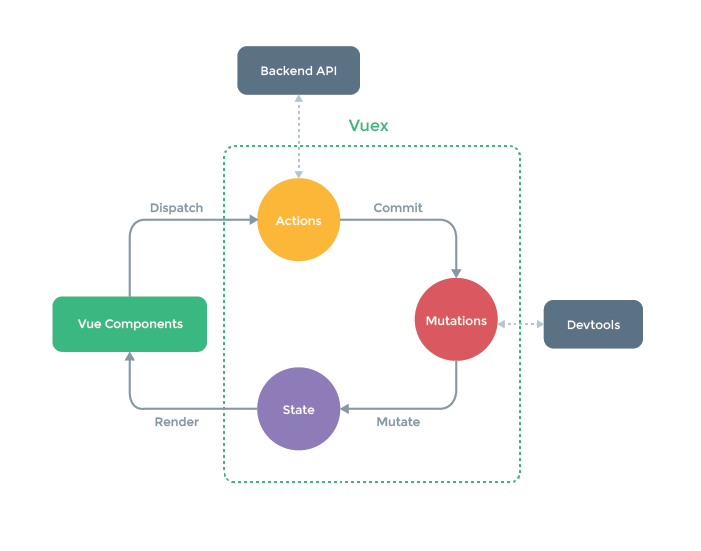 + `action`
```javascript
// 使用
this.$store.dispatch('addCart', product);
```
+ `getters`封装
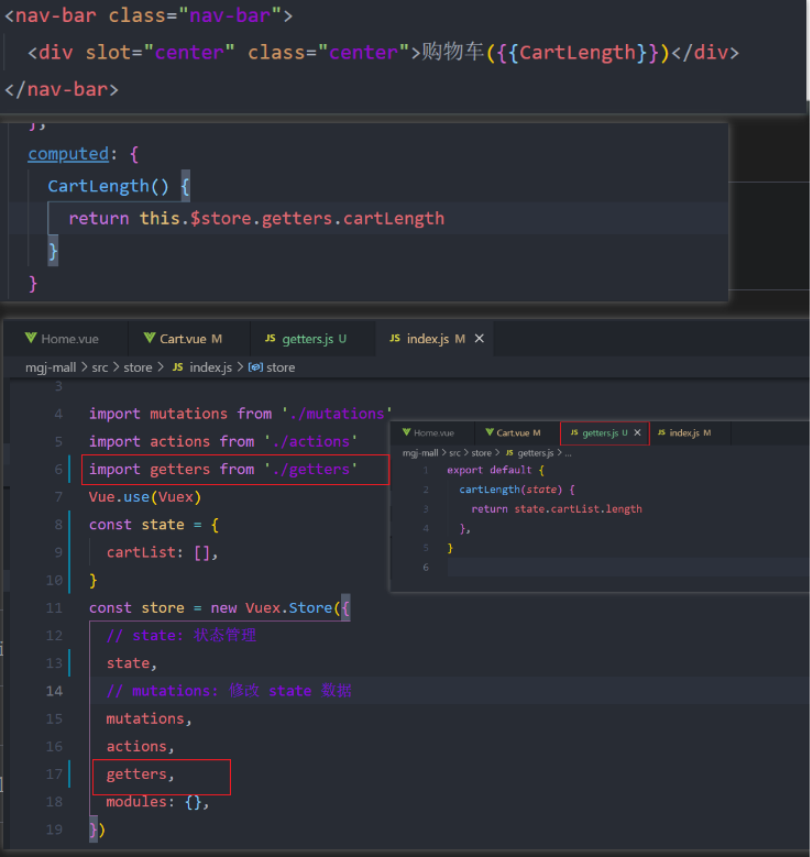
+ 如何将`getters`转换为计算属性使用
```javascript
import {mapGetters} from 'vuex'
// 使用对象展开运算符将 getter 混入 computed 对象中
// 语法一
...mapGetters([
'指定要转换的getters函数名'
// ...
])
// 语法二
...mapGetters({
length: '指定要转换的getters函数名', // length 类似于别名映射
...
})
```
### MGJ-Mall Day-08
+ `vue-lazyload`懒加载
+ 文档地址
```bash
https://github.com/hilongjw/vue-lazyload
```
+ 安装
```bash
npm install vue-lazyload --save
```
+ 基础使用
```javascript
// 1. 下载
// 2. 导入
import VueLazyLoad from "vue-lazyload"
// 3. 安装
Vue.use(VueLazyLoad,options)
options:{
loading: ''; // 1. 网络图片资源可以直接填写地址 2. 本地资源通过 require('file-path'); 图片懒加载占位图
}
// 4. 在使用图片的地方将 :src="" 替换
+ `action`
```javascript
// 使用
this.$store.dispatch('addCart', product);
```
+ `getters`封装

+ 如何将`getters`转换为计算属性使用
```javascript
import {mapGetters} from 'vuex'
// 使用对象展开运算符将 getter 混入 computed 对象中
// 语法一
...mapGetters([
'指定要转换的getters函数名'
// ...
])
// 语法二
...mapGetters({
length: '指定要转换的getters函数名', // length 类似于别名映射
...
})
```
### MGJ-Mall Day-08
+ `vue-lazyload`懒加载
+ 文档地址
```bash
https://github.com/hilongjw/vue-lazyload
```
+ 安装
```bash
npm install vue-lazyload --save
```
+ 基础使用
```javascript
// 1. 下载
// 2. 导入
import VueLazyLoad from "vue-lazyload"
// 3. 安装
Vue.use(VueLazyLoad,options)
options:{
loading: ''; // 1. 网络图片资源可以直接填写地址 2. 本地资源通过 require('file-path'); 图片懒加载占位图
}
// 4. 在使用图片的地方将 :src="" 替换
![]() ```
+ `px2ww-css`单位转换
```bash
npm install postcss-px-to-viewport --sve--dev
```
+ 根目录添加文件`postcss.config.js`
```javascript
module.exports = {
plugins: {
autoprefixer: {},
'postcss-px-to-viewport': {
viewportWidth: 375, // 视窗的宽度
viewportHeight: 667, //视窗的高度
viewportUnit: 'vw', // 指定需要转换成的视窗单位,建议使用 vw
unitPrecision: 5, //指定 ‘px’ 转换为视窗单位值的小委属(很多时候无法整除)
selectortBlackList: ['ignore', 'tab-bar', 'tab-bar0item'], // 指定不需要转换的类
minPixelValue: 1, //小于或等于 '1px' 不转换为视窗单位
mediaQuery: false, //允许在媒体查询中转换 'px'
},
},
}
```
+ 项目部署
+ `windows`部署
```javascript
# 命令行启动nginx产生如下错误:
nginx: [emerg] bind() to 0.0.0.0:80 failed (10013: An attempt was made to access a socket in a way forbidden by its access permissions)
# 解决方案
server {
listen 8070; # D:\Nginx\conf [修改 nginx.conf文件的端口号]
...
}
# 成功:
Welcome to nginx!
If you see this page, the nginx web server is successfully installed and working. Further configuration is required.
For online documentation and support please refer to nginx.org.
Commercial support is available at nginx.com.
Thank you for using nginx.
```
+ `Linux`部署
```javascript
# yum 安装
yum install nginx
# 开启 nginx 服务
systemctl start nginx.service
# 跟随系统启动
systemctl enable nginx.service
```
+ 面试题
```javascript
1. 如何理解 Vue 生命周期
2. 如何进行非父子组件通信
3. Vue响应式原理
```
+ `Vue响应式原理`
>
```
+ `px2ww-css`单位转换
```bash
npm install postcss-px-to-viewport --sve--dev
```
+ 根目录添加文件`postcss.config.js`
```javascript
module.exports = {
plugins: {
autoprefixer: {},
'postcss-px-to-viewport': {
viewportWidth: 375, // 视窗的宽度
viewportHeight: 667, //视窗的高度
viewportUnit: 'vw', // 指定需要转换成的视窗单位,建议使用 vw
unitPrecision: 5, //指定 ‘px’ 转换为视窗单位值的小委属(很多时候无法整除)
selectortBlackList: ['ignore', 'tab-bar', 'tab-bar0item'], // 指定不需要转换的类
minPixelValue: 1, //小于或等于 '1px' 不转换为视窗单位
mediaQuery: false, //允许在媒体查询中转换 'px'
},
},
}
```
+ 项目部署
+ `windows`部署
```javascript
# 命令行启动nginx产生如下错误:
nginx: [emerg] bind() to 0.0.0.0:80 failed (10013: An attempt was made to access a socket in a way forbidden by its access permissions)
# 解决方案
server {
listen 8070; # D:\Nginx\conf [修改 nginx.conf文件的端口号]
...
}
# 成功:
Welcome to nginx!
If you see this page, the nginx web server is successfully installed and working. Further configuration is required.
For online documentation and support please refer to nginx.org.
Commercial support is available at nginx.com.
Thank you for using nginx.
```
+ `Linux`部署
```javascript
# yum 安装
yum install nginx
# 开启 nginx 服务
systemctl start nginx.service
# 跟随系统启动
systemctl enable nginx.service
```
+ 面试题
```javascript
1. 如何理解 Vue 生命周期
2. 如何进行非父子组件通信
3. Vue响应式原理
```
+ `Vue响应式原理`
>