# logger
**Repository Path**: crwth/logger
## Basic Information
- **Project Name**: logger
- **Description**: 方便快速访问
- **Primary Language**: Unknown
- **License**: MIT
- **Default Branch**: main
- **Homepage**: None
- **GVP Project**: No
## Statistics
- **Stars**: 0
- **Forks**: 0
- **Created**: 2024-01-24
- **Last Updated**: 2024-01-24
## Categories & Tags
**Categories**: Uncategorized
**Tags**: None
## README
# Logger
[](https://pub.dartlang.org/packages/logger)
[](https://github.com/SourceHorizon/logger/actions)
[](https://github.com/SourceHorizon/logger/commits/main)
[](https://github.com/SourceHorizon/logger/pulls)
[](https://github.com/SourceHorizon/logger)
[](https://github.com/SourceHorizon/logger/blob/main/LICENSE)
Small, easy to use and extensible logger which prints beautiful logs.
Inspired by [logger](https://github.com/orhanobut/logger) for Android.
**Show some ❤️ and star the repo to support the project**
### Resources:
- [Documentation](https://pub.dev/documentation/logger/latest/logger/logger-library.html)
- [Pub Package](https://pub.dev/packages/logger)
- [GitHub Repository](https://github.com/SourceHorizon/logger)
## Getting Started
Just create an instance of `Logger` and start logging:
```dart
var logger = Logger();
logger.d("Logger is working!");
```
Instead of a string message, you can also pass other objects like `List`, `Map` or `Set`.
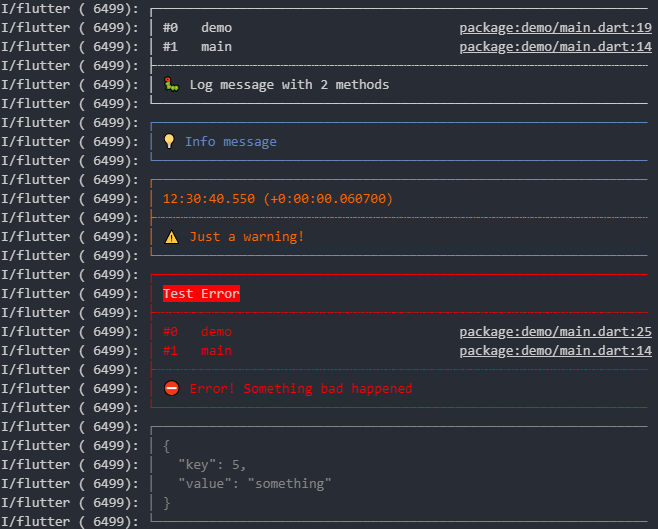
## Output
# Documentation
## Log level
You can log with different levels:
```dart
logger.t("Trace log");
logger.d("Debug log");
logger.i("Info log");
logger.w("Warning log");
logger.e("Error log", error: 'Test Error');
logger.f("What a fatal log", error: error, stackTrace: stackTrace);
```
To show only specific log levels, you can set:
```dart
Logger.level = Level.warning;
```
This hides all `trace`, `debug` and `info` log events.
## Options
When creating a logger, you can pass some options:
```dart
var logger = Logger(
filter: null, // Use the default LogFilter (-> only log in debug mode)
printer: PrettyPrinter(), // Use the PrettyPrinter to format and print log
output: null, // Use the default LogOutput (-> send everything to console)
);
```
If you use the `PrettyPrinter`, there are more options:
```dart
var logger = Logger(
printer: PrettyPrinter(
methodCount: 2, // Number of method calls to be displayed
errorMethodCount: 8, // Number of method calls if stacktrace is provided
lineLength: 120, // Width of the output
colors: true, // Colorful log messages
printEmojis: true, // Print an emoji for each log message
printTime: false // Should each log print contain a timestamp
),
);
```
### Auto detecting
With the `io` package you can auto detect the `lineLength` and `colors` arguments.
Assuming you have imported the `io` package with `import 'dart:io' as io;` you
can auto detect `colors` with `io.stdout.supportsAnsiEscapes` and `lineLength`
with `io.stdout.terminalColumns`.
You should probably do this unless there's a good reason you don't want to
import `io`, for example when using this library on the web.
## LogFilter
The `LogFilter` decides which log events should be shown and which don't.
The default implementation (`DevelopmentFilter`) shows all logs with `level >= Logger.level` while
in debug mode.
In release mode all logs are omitted.
You can create your own `LogFilter` like this:
```dart
class MyFilter extends LogFilter {
@override
bool shouldLog(LogEvent event) {
return true;
}
}
```
This will show all logs even in release mode. (**NOT** a good idea)
## LogPrinter
The `LogPrinter` creates and formats the output, which is then sent to the `LogOutput`.
You can implement your own `LogPrinter`. This gives you maximum flexibility.
A very basic printer could look like this:
```dart
class MyPrinter extends LogPrinter {
@override
List log(LogEvent event) {
return [event.message];
}
}
```
If you created a cool `LogPrinter` which might be helpful to others, feel free to open a pull
request.
:)
### Colors
Please note that in some cases ANSI escape sequences do not work under macOS.
These escape sequences are used to colorize the output.
This seems to be related to a Flutter bug that affects iOS builds:
https://github.com/flutter/flutter/issues/64491
However, if you are using a JetBrains IDE (Android Studio, IntelliJ, etc.)
you can make use of
the [Grep Console Plugin](https://plugins.jetbrains.com/plugin/7125-grep-console)
and the [`PrefixPrinter`](/lib/src/printers/prefix_printer.dart)
decorator to achieve colored logs for any logger:
```dart
var logger = Logger(
printer: PrefixPrinter(PrettyPrinter(colors: false))
);
```
## LogOutput
`LogOutput` sends the log lines to the desired destination.
The default implementation (`ConsoleOutput`) send every line to the system console.
```dart
class ConsoleOutput extends LogOutput {
@override
void output(OutputEvent event) {
for (var line in event.lines) {
print(line);
}
}
}
```
Possible future `LogOutput`s could send to a file, firebase or to Logcat. Feel free to open pull
requests.
# Acknowledgments
This package was originally created by [Simon Choi](https://github.com/simc).