# mirror-anygrasp_sdk
**Repository Path**: ctbots/mirror-anygrasp_sdk
## Basic Information
- **Project Name**: mirror-anygrasp_sdk
- **Description**: No description available
- **Primary Language**: Unknown
- **License**: Not specified
- **Default Branch**: main
- **Homepage**: None
- **GVP Project**: No
## Statistics
- **Stars**: 0
- **Forks**: 0
- **Created**: 2025-11-12
- **Last Updated**: 2025-11-12
## Categories & Tags
**Categories**: Uncategorized
**Tags**: None
## README
 # AnyGrasp SDK
AnyGrasp SDK for grasp detection & tracking.
[[arXiv](https://arxiv.org/abs/2212.08333)]
[[project](https://graspnet.net/anygrasp.html)]
[[dataset](https://graspnet.net/datasets.html)]
[[graspnetAPI](https://github.com/graspnet/graspnetAPI)]
## Update
* **August 1, 2024** Support Python 3.10.
* **May 7, 2024** Add new features and flags to AnyGrasp detector:
* Dense Predictions (default is False)
* Set ``dense_grasp=True`` to enable extremely dense output. It's helpful for some corner cases or prompt-based grasping.
* **Warning: this mode is designed for special scenarios, leading to higher GPU memory, lower inference speed and lower grasp quality. You can crop the point clouds with your own segmantation masks or 3D bounding boxes to improve the performance.**
* Filtering by Objectness Mask (default is True)
* Set ``apply_object_mask=False`` to disable default grasp filtering by objectness masks. This will lead to predictions on backgrounds.
* Collision Detection (default is True)
* Set ``collision_detection=False`` to disable default collision detection step.
* These flags are useful for more flexible development, but **we highly recommend to use the default setting in common scenarios**. See [grasp_detection/demo.py](grasp_detection/demo.py) for examples.
* **October 8, 2023** Fix a bug in grasp detection inference code, which may cause partial grasp widths exceeding the constrained range.
* **July 20, 2023** Fix a bug in grasp detection inference code, which may cause no prediction when there are only one or two objects.
## Video
[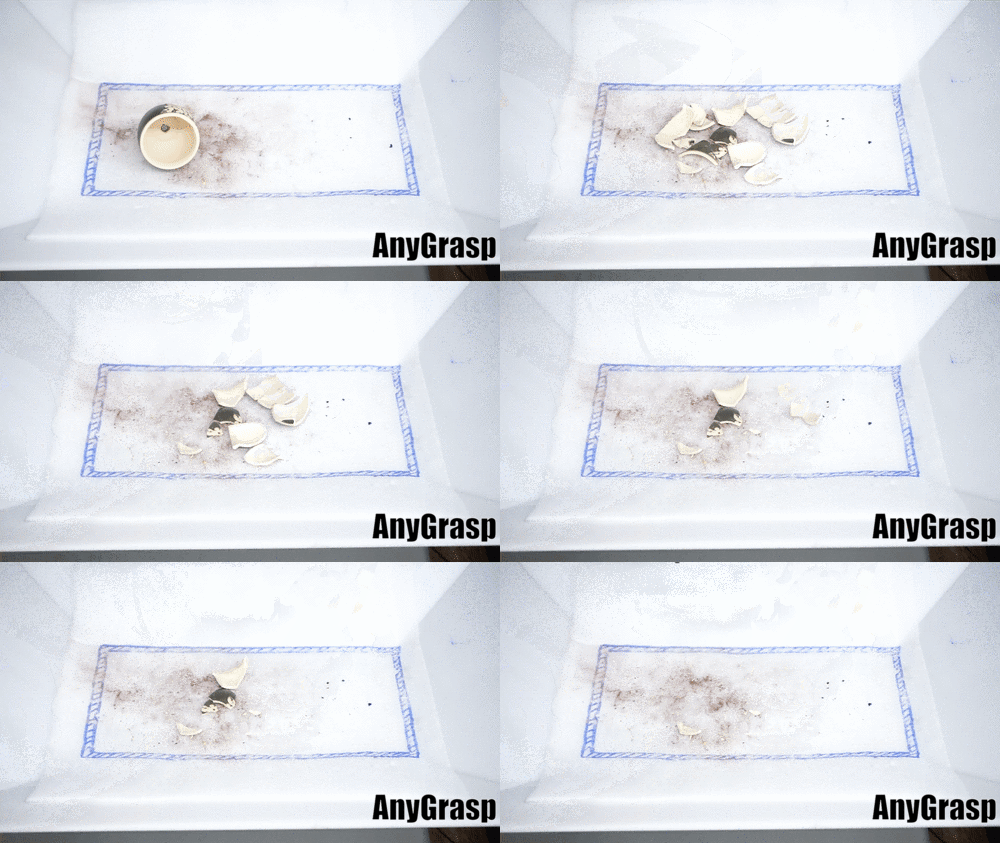](https://www.youtube.com/watch?v=s0SUw1vgtr8 "AnyGrasp Demo: Cleaning fragments of a broken pot")
# AnyGrasp SDK
AnyGrasp SDK for grasp detection & tracking.
[[arXiv](https://arxiv.org/abs/2212.08333)]
[[project](https://graspnet.net/anygrasp.html)]
[[dataset](https://graspnet.net/datasets.html)]
[[graspnetAPI](https://github.com/graspnet/graspnetAPI)]
## Update
* **August 1, 2024** Support Python 3.10.
* **May 7, 2024** Add new features and flags to AnyGrasp detector:
* Dense Predictions (default is False)
* Set ``dense_grasp=True`` to enable extremely dense output. It's helpful for some corner cases or prompt-based grasping.
* **Warning: this mode is designed for special scenarios, leading to higher GPU memory, lower inference speed and lower grasp quality. You can crop the point clouds with your own segmantation masks or 3D bounding boxes to improve the performance.**
* Filtering by Objectness Mask (default is True)
* Set ``apply_object_mask=False`` to disable default grasp filtering by objectness masks. This will lead to predictions on backgrounds.
* Collision Detection (default is True)
* Set ``collision_detection=False`` to disable default collision detection step.
* These flags are useful for more flexible development, but **we highly recommend to use the default setting in common scenarios**. See [grasp_detection/demo.py](grasp_detection/demo.py) for examples.
* **October 8, 2023** Fix a bug in grasp detection inference code, which may cause partial grasp widths exceeding the constrained range.
* **July 20, 2023** Fix a bug in grasp detection inference code, which may cause no prediction when there are only one or two objects.
## Video
[](https://www.youtube.com/watch?v=s0SUw1vgtr8 "AnyGrasp Demo: Cleaning fragments of a broken pot")
**AnyGrasp cleaning fragments of a broken pot**
[](https://www.youtube.com/watch?v=2KM3Lq5VaS4 "AnyGrasp Fish Catching Spotlight")
**AnyGrasp catching swimming robot fish**
## Requirements
- Python 3.6/3.7/3.8/3.9/3.10
- PyTorch 1.7.1+ with CUDA 11.x/12.1
- [MinkowskiEngine](https://github.com/NVIDIA/MinkowskiEngine) v0.5.4
## Installation
1. Follow MinkowskiEngine [instructions](https://github.com/NVIDIA/MinkowskiEngine#anaconda) to install [Anaconda](https://www.anaconda.com/), cudatoolkit, Pytorch and MinkowskiEngine. If you are using CUDA 12.1 and encounter compatibility issue when installing MinkowskiEngine, you could try [this branch](https://github.com/chenxi-wang/MinkowskiEngine/tree/cuda-12-1). **Note that you need ``export MAX_JOBS=2;`` before ``pip install`` if you are running on an laptop due to [this issue](https://github.com/NVIDIA/MinkowskiEngine/issues/228)**. If PyTorch reports a compatibility issue during program execution, you can re-install PyTorch via Pip instead of Anaconda.
2. Install other requirements from Pip.
```bash
pip install -r requirements.txt
```
3. Install ``pointnet2`` module.
```bash
cd pointnet2
python setup.py install
```
## License Registration
Due to the IP issue, currently we can only release the SDK library file of AnyGrasp in a licensed manner. Please get the feature id of your machine and fill in the [form](https://forms.gle/XVV3Eip8njTYJEBo6) to apply for the license. See [license_registration/README.md](license_registration/README.md) for details. **If you are interested in code implementation, you can refer to our [baseline version of network](https://github.com/graspnet/graspnet-baseline), or a third-party implementation of our [GSNet](https://github.com/graspnet/graspness_unofficial).**
We usually reply in 2 work days. If you do not receive the reply in 2 days, **please check the spam folder.**
## Demo Code
Now you can run your code that uses AnyGrasp SDK. See [grasp_detection](grasp_detection) and [grasp_tracking](grasp_tracking) for details.
## Citation
Please cite these papers in your publications if it helps your research:
@article{fang2023anygrasp,
title={AnyGrasp: Robust and Efficient Grasp Perception in Spatial and Temporal Domains},
author = {Fang, Hao-Shu and Wang, Chenxi and Fang, Hongjie and Gou, Minghao and Liu, Jirong and Yan, Hengxu and Liu, Wenhai and Xie, Yichen and Lu, Cewu},
journal={IEEE Transactions on Robotics (T-RO)},
year={2023}
}
@inproceedings{fang2020graspnet,
title={Graspnet-1billion: A large-scale benchmark for general object grasping},
author={Fang, Hao-Shu and Wang, Chenxi and Gou, Minghao and Lu, Cewu},
booktitle={Proceedings of the IEEE/CVF conference on computer vision and pattern recognition},
pages={11444--11453},
year={2020}
}
@inproceedings{wang2021graspness,
title={Graspness discovery in clutters for fast and accurate grasp detection},
author={Wang, Chenxi and Fang, Hao-Shu and Gou, Minghao and Fang, Hongjie and Gao, Jin and Lu, Cewu},
booktitle={Proceedings of the IEEE/CVF International Conference on Computer Vision},
pages={15964--15973},
year={2021}
}